Getting Started with Claude Code: How AI Coding Assistants Went from Chatting to Actually Getting Things Done

Claude Code goes beyond AI chat — it autonomously reads, writes, and executes code directly in your project.
Claude Code is a next-generation Agentic AI coding assistant that moves beyond suggestions to actually executing tasks in your codebase. It reads entire projects automatically, remembers your preferences, runs commands and tests, and connects to external tools via the MCP protocol — making it far more capable than traditional web-based AI chat tools like GPT or Cursor.
What Exactly Is Claude Code
Claude Code has been gaining rapid traction in developer circles lately. Simply put, it's an AI coding assistant — but one that's fundamentally different from the AI chat tools we're used to. It doesn't just talk; it actually gets things done directly on your machine.
Some useful background: the evolution from GitHub Copilot to Claude Code represents a leap from "code completion" to "autonomous execution." Early tools like Copilot were primarily built around context-aware line-by-line or function-level completions — essentially a smart autocomplete engine. Claude Code represents a new generation of "Agentic AI" — instead of passively waiting for instructions, AI can now proactively plan task steps, call tools, and iterate through execution until a goal is achieved. The underlying driver of this shift is the breakthrough in large language model (LLM) reasoning capabilities and context window sizes, enabling AI to understand complex engineering projects spanning tens of thousands of lines of code.
All you need to do is tell it what you want in plain, natural language. It understands your entire project and handles the corresponding operations automatically. Two key phrases here: first, "natural language" — the interaction remains conversational, keeping the barrier to entry extremely low; second, "gets things done" — it actually executes, rather than stopping at giving suggestions.
For developers, this marks an important shift: AI has gone from being a "remote consultant" to "an assistant sitting right next to you." Traditional AI chat tools operate in a "single-turn or multi-turn dialogue" mode, where each interaction ends with generated text and execution always stays in human hands. The Agentic model that Claude Code represents introduces a closed-loop "plan-execute-feedback" mechanism: AI breaks down a complex goal into subtasks, sequentially calls tools for file reading/writing, command execution, and test running, and dynamically adjusts subsequent plans based on each step's results — just like an engineer assistant with genuine autonomous agency.

Five Core Differences Between Claude Code and Ordinary AI Chat
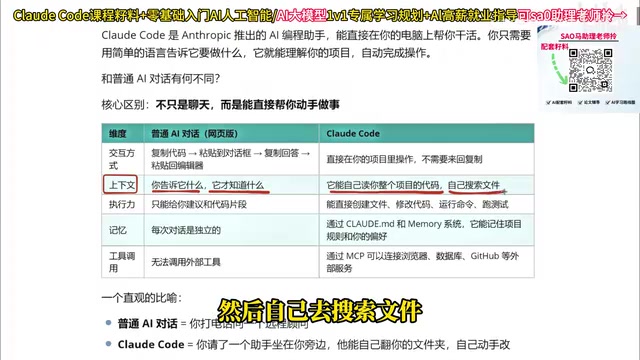
To give you a clearer picture of what makes Claude Code powerful, let's compare it across five dimensions against web-based AI chat tools like GPT, DeepSeekAd, and Doubao.
Interaction: Say Goodbye to Copy-Pasting Forever
Using a web-based AI involves a surprisingly tedious loop: copy code → paste into the chat box → copy the AI's response → paste it back into your editor. It's not complicated, but it's genuinely painful.
Claude Code operates directly inside your project, eliminating all copy-pasting and keeping your workflow seamless.
Context Understanding: Automatically Reads Your Entire Project
With ordinary AI chat, "it only knows what you tell it" — context is entirely dependent on manual input. Claude Code is different: it can automatically read your entire project's codebase and proactively search for relevant files. This dramatically reduces communication overhead and is the key to why it feels so "smart."
Execution Capability: Handles Complete Projects, Not Just Code Snippets
Ordinary AI can only offer suggestions or isolated code snippets — it can't deliver a complete, runnable project. Real projects consist of numerous files and complex logic that no single file can contain.
Claude Code can directly create files, modify code, run commands, and execute tests, giving it genuine engineering execution capability. The technical key here lies in its "reliability of tool calls" and "error recovery" — when a step fails, Claude Code can identify the cause and automatically retry or adjust its strategy rather than simply stopping. This allows it to handle the various uncertainties of real-world engineering environments.
Claude Code's Memory and Tool-Calling Capabilities
Memory: Remembers Project Rules and Coding Preferences
One major frustration with web-based AI is "amnesia" — close the window, open a new conversation, and everything from before vanishes. You're back to square one every time.
Through configuration files, Claude Code can remember your project rules and personal preferences, including coding style. This means the AI gradually "gets to know you" and produces results that increasingly match your habits.
MCP Tool Calls: Connecting to the Real Development Environment
Web-based AI tools struggle to call external services, and even platforms that offer plugin capabilities often make the process cumbersome or require extra payment. Claude Code uses MCP (Model Context Protocol) to directly connect to browsers, databases, GitHub, and other external services, extending AI capabilities into the real development environment.
MCP is an open standard protocol launched by Anthropic in 2024, designed to solve the integration challenges between AI models and external tools and data sources. Before MCP, every AI tool that wanted to connect to GitHub, a database, or a browser had to build a custom interface — extremely costly to develop and difficult to maintain. MCP defines a unified "context provider" interface specification, allowing any compliant external service to plug into an AI model out of the box — analogous to how the USB standard unified hardware connection interfaces. Architecturally, MCP servers encapsulate the capabilities of external tools, while Claude Code, acting as an MCP client, can dynamically discover and call these tools during a conversation, dramatically lowering the integration costs across the AI ecosystem.

What Claude Code Can Do for Developers
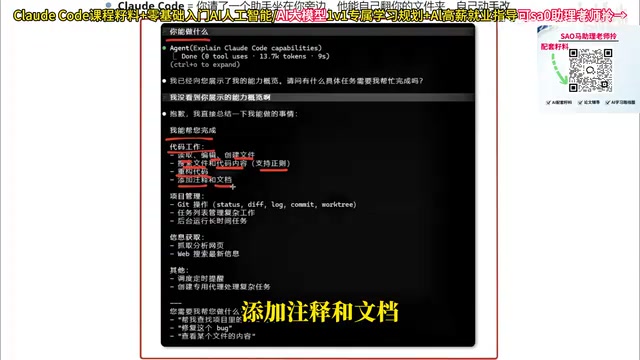
After installing Claude Code, the author's first question was simply "what can you do?" Its answer covered virtually every aspect of a developer's day-to-day work:
- Code work: Read, edit, and create files; search code; refactor logic; add comments and documentation
- Project management: Git operations, task list management, running long-duration tasks in the background
- Information gathering: Scrape and analyze web pages, search for the latest technical news
- Advanced capabilities: Schedule timed reminders, create specialized agents to handle complex tasks
From writing code to managing projects to researching information, Claude Code covers the full development pipeline. For developers, it's a genuine productivity multiplier.
Claude Code vs Cursor: Should You Switch?
Many developers accustomed to Cursor are wrestling with whether to switch to Claude Code. The author's advice is refreshingly pragmatic: use whichever tool you're most comfortable with.
That said, the author also shared his honest experience: lately he's been gravitating toward Claude Code, for two main reasons:
First, more efficient token usage. Everything Cursor can do, Claude Code can do too — but Claude Code is more economical in its token consumption. There's a technical reason for this: tokens are the basic unit LLMs use to process text, with roughly 750 English words equaling about 1,000 tokens, and cost scaling directly with usage. Cursor, built on a VS Code plugin architecture, tends to inject a large amount of editor context into every prompt; Claude Code, through its command-line interface, can more precisely control the context scope of each request, retrieving only the truly relevant file segments and reducing wasted tokens. For developers who use AI coding tools heavily, token efficiency often determines the order of magnitude of monthly costs.
Second, outputs that better match expectations. As a frontend developer, the author noticed that Claude Code produces code that more closely aligns with what he has in mind.
Of course, this comes down to personal preference — your specific choice should factor in your own work habits and project types.
Conclusion: A New Phase for AI Coding Assistants
Claude Code represents a significant evolution in AI coding assistants — from "able to chat" to "able to do." By directly manipulating project files, automatically reading context, remembering personal preferences, and calling external tools via the MCP protocol, it genuinely integrates AI into a developer's workflow.
The essence of this evolution is AI upgrading from a "content generation tool" to an "autonomous execution agent." When AI gains the full closed-loop capabilities of planning, executing, receiving feedback, and self-correcting, the collaborative relationship between AI and developers will gradually shift from "humans driving AI" to "humans and AI working in tandem."
For developers looking to boost their productivity, Claude Code is absolutely worth trying. The next step is simple: install it and experience this "AI coding assistant sitting right beside you" for yourself.
Key Takeaways
Related articles

Vibe Coding Full-Stack in Practice: AI Programming from Beginner to Enterprise Deployment
From Cursor to Claude Code, this Bilibili AI programming course uses four progressive projects to cover full-stack development, open-source secondary development, and team collaboration. The article analyzes the shock to frontend roles, the efficiency shift from 50 people to 5, and the methodology required for enterprise-grade projects.

David Blaine's Global Quest for Real Magic: From South Africa to Japan and India
David Blaine travels to South Africa, Japan, and India in his Do Not Attempt special, documenting Spinning drivers, black mamba rescuers, iaijutsu masters, and ascetics—exploring the boundary between magic and real human极限 challenges.

Is a Touchscreen MacBook Coming? Vergecast Reveals Apple Executive's Response
Vergecast podcast reveals a conversation between a reporter and Apple executive John Ternus about a touchscreen MacBook and Apple Pencil support. Ternus says iPad is the best device for a stylus, while the reporter bets MacBook will eventually support Apple Pencil.