Getting Started with Claude Code: Mastering CLAUDE.md and Plan Mode

How CLAUDE.md and Plan Mode turn Claude Code from a random generator into a reliable dev collaborator.
This article summarizes an official Claude Code workshop focused on two collaboration mechanisms. CLAUDE.md is a project context file injected into every request — auto-generated via `init` — that locks in tech stack and architecture conventions to reduce aimless model exploration. Plan Mode forces a "plan first, no code yet" step at the prompt level, helping developers catch directional errors before execution. The workshop also emphasized the need for verifiable artifacts (like design screenshots or test cases) to anchor vague intent. Together, these tools shift the developer's role from code writer to intent definer and output reviewer.
Claude Code, Anthropic's command-line coding assistant, is reshaping how developers collaborate with AI. In an official workshop, the instructor walked through two core capabilities: CLAUDE.md — a file for locking in project context — and Plan Mode, which encourages planning before writing any code. These features may seem simple, but they're the key to transforming Claude from a "random code generator" into a reliable collaborator.
CLAUDE.md: Write It Once, Stop Repeating Yourself
CLAUDE.md is the first thing injected into the user prompt. Generating it for an existing project is straightforward — just run the init command. Claude Code will explore your entire codebase in the background, understand your conventions and structure, and automatically generate a CLAUDE.md based on what it finds.
The instructor's rule of thumb was blunt: if you find yourself repeating something in your prompts multiple times, put it in CLAUDE.md. The generated file typically includes a project overview, tech stack, common commands, and architecture notes. In the demo project, for example, DND (a drag-and-drop library) was in use — exactly the kind of information that's invaluable to the model. Without it, the model might make extra tool calls just to figure out where the dashboard is or which components depend on it. That's the value of CLAUDE.md: give the model full context upfront and cut down on that kind of aimless exploration.
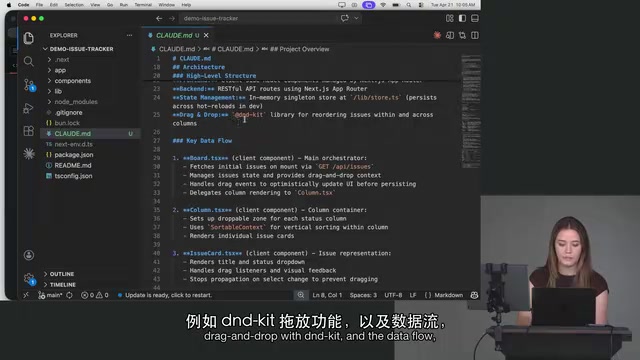
On the question of which model to use for init, an attendee asked whether Opus was worth it. The instructor's answer: the content generated during init already exists in the codebase — the model doesn't need to do deep critical thinking, the answers are right there. Sonnet is more than sufficient.
Bigger Isn't Better
One easily overlooked point: the entire CLAUDE.md gets concatenated into the assembled prompt, which means it consumes your context window. If the file is large and most of the content is irrelevant to the current task, it just burns through your token budget faster.
The instructor shared his own workflow: he sometimes strips CLAUDE.md down as far as possible, watches where the model starts to go wrong, then adds back only what's necessary. He also noted a broader trend — the importance of CLAUDE.md is actually inversely related to model capability. As models get better at understanding intent, the file becomes less critical. It was especially important with earlier models like Opus 4.5, but newer models understand intent more readily and rely on it less.
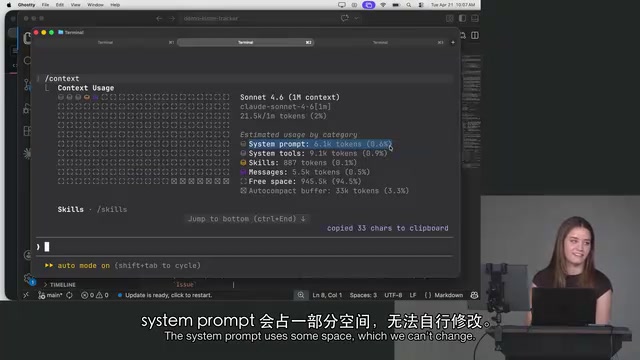
To check context usage at any time, use the context command. The demo showed roughly 21K / 1M tokens in use — the system prompt accounted for a portion (which you can't change, just accept), and message history was only 0.5%. Plugins and skills added later will also fill the context, so it's worth developing the habit of asking: "Am I adding unnecessary things to the context?"
From a technical standpoint, CLAUDE.md is essentially system-level context injection. When Claude Code assembles each request's prompt, it prepends the CLAUDE.md content before the user message — silently providing background context at the start of every conversation. The effect is similar to restating that background manually in each message, but the maintenance cost shifts from being scattered across individual messages to a single, centrally managed file. For multi-developer projects, committing CLAUDE.md to version control also ensures every team member starts with consistent context when using Claude Code, avoiding behavioral inconsistencies caused by varying prompt habits.
CLAUDE.md Hierarchy in Mono Repos
For mono repo setups, an attendee asked how to organize CLAUDE.md files. The instructor explained that a hierarchy mechanism exists: you can place a root-level CLAUDE.md in your home directory that applies to nearly all projects, then work your way down — individual repos and sub-repos can each have their own.
Which file gets used depends on which directory you launch Claude from — it searches upward from the current directory. The practical recommendation: put shared project settings in the project-level CLAUDE.md, and keep anything you want to stay local and private in the root-level file (e.g., the user-level file under ~/.claude).
Plan Mode: Plan First, Code Later
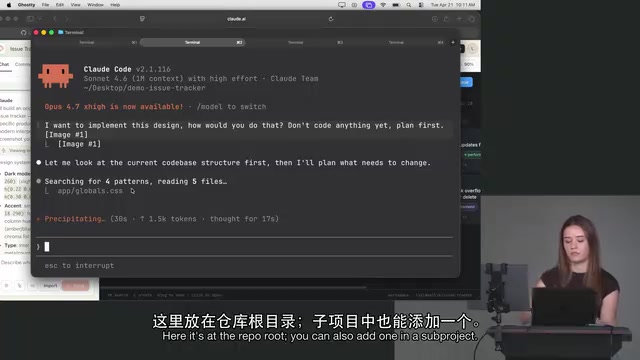
The instructor compared Claude to any colleague: before diving into implementation, you'd always ask them, "How do you think we should approach this?" In this mode, the developer's role shifts closer to that of a product manager (PM).
There are a few ways to activate Plan Mode — press Shift+Tab in the CLI, use the dropdown in the desktop app, or simply tell Claude directly. Because Plan Mode is fundamentally just one extra sentence added to the prompt: "This is plan mode — don't write any code yet." So even in a regular conversation, prompting it this way achieves the same effect.
Verification Must Be Part of the Loop
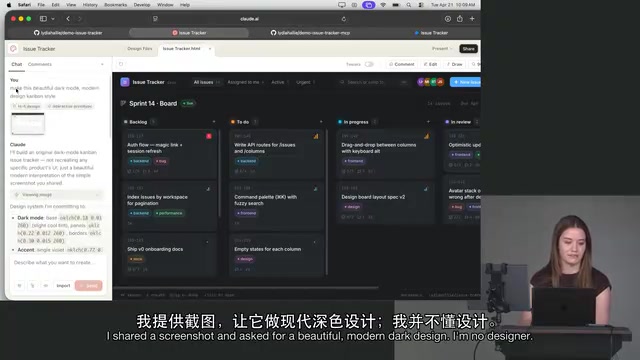
A key concept from the demo: Claude Code's workflow must include something "verifiable." The instructor prepared an intentionally ugly to-do list demo and wanted to make it look good. The challenge: how do you make Claude understand what you mean by "beautiful" and "design"?
His approach was to leverage Claude's design capabilities: take a screenshot, use a casual prompt like "make this beautiful dark mode, modern design," and have Claude generate a new design mockup. With that image in hand, there's now a concrete reference the model can verify against — this could be an image, or it could be test cases.
He then opened a new session, dragged the design screenshot into the CLI, and prompted: "I want to implement this design — don't write code yet, make a plan first." Even though the CLI doesn't render images, Claude can still read and understand the image content.
The concept of a "verifiable artifact" is especially important in AI-assisted development because natural language descriptions are inherently ambiguous. Words like "beautiful," "modern," and "clean" can map to wildly different visual outcomes in different people's minds. Converting vague intent into something concrete — whether a design screenshot, test cases, data samples, or an existing page — gives the model a clear "convergence target." In software engineering practice, this parallels test-driven development (TDD): define "what counts as passing" first, then let the implementation satisfy that standard. For Claude Code, that standard can be an image, runnable assertions, or written acceptance criteria — the key is that the model and developer agree on what "done" looks like.
The Developer Becomes a Reviewer
Once an implementation plan is generated, the software engineer's role shifts from "writing code" to "reviewer and PM" — the core task becomes judging whether the plan matches your expectations.
In the demo, Claude noticed details the instructor hadn't even thought about: new fields needed issue numbers, labels, and priorities; the store would need updates to make the design work; new API routes and components would be required. If the plan is off, you can keep going back and forth to refine it — "Is this in line with what you had in mind?" "Actually, not quite" — just treat it like a colleague.
The instructor also acknowledged that the "uncertainty" in this kind of demo is precisely what makes it authentic: previous workshops always had clear right-or-wrong answers, but everyone's Claude Code might produce different results. The best way to learn is to try it yourself.
Plan Mode reflects a core tension in AI-assisted development: large language models have a natural tendency to "generate immediately" — once given a task description, they'll output code directly rather than confirming direction first. This tendency is harmless for simple tasks, but when facing complex changes spanning multiple files, modules, or APIs, it often leads to significant rework. Plan Mode addresses this by forcing a "pause-and-plan" step at the prompt level, using the model's reasoning capabilities to produce a structured implementation path before any execution cost is incurred — allowing developers to catch directional errors early. This is similar to embedding a "design review" phase into the rhythm of a single AI conversation.
Takeaways
CLAUDE.md and Plan Mode represent two fundamental skills for collaborating with an AI coding assistant. The former solves context consistency, helping the model avoid unnecessary detours. The latter solves directional correctness, surfacing disagreements before any code gets written. Together, they point toward the same shift: developers are moving from being "writers of code" to "definers of intent and reviewers of output." As model capabilities continue to improve, the specifics of how these tools are used will keep evolving — but the principles of "provide sufficient context, plan before executing, and maintain a verification loop" will likely hold for a long time to come.
Related articles

Felix Rieseberg Personal Homepage
Felix Rieseberg's personal homepage sparks attention on Hacker News. This article covers the Slack engineer's technical background, the rise and fall of nativefier, and the value of a developer homepage as a tech calling card.

@ai-sdk/vue 3.0.306 Patch Release Syncs with [email protected] Update
@ai-sdk/vue 3.0.306 released, synced with [email protected]. A routine patch release for the Vercel AI SDK ecosystem with no public API changes; the Vue adapter layer stays version-aligned with the core package.

Gemini 4 Argon API Launches: The Era of Million-Token Output Begins
Google launches Gemini 4 Argon with sparse MoE architecture, up to 1M output tokens, and a 68.90% Vals Index score, available across API, AI Studio, and the Gemini app.