Getting Started with Claude Code Projects: A Practical Guide to Multi-Threaded Parallel Development

Claude Code Projects uses cloud-based parallel Threads to automatically break down and advance large cross-session, cross-repo development tasks.
Claude Code Projects is a new working mode Anthropic has rolled out for Claude Code. Users simply describe a big goal, and Claude automatically breaks it into subtasks and assigns independent Threads to push them forward in parallel. Each Thread is a Claude Code session running on its own branch in the cloud, continuing to work even after you close your laptop, with progress viewable from your phone. Threads automatically open PRs and keep an eye on CI status and review comments, automating the full flow from coding to merge. Projects also introduces a shared artifact library and cross-Thread memory, and supports connecting to monitoring services for daily automated regression checks. The official recommendation is to keep the Coordinator at a low effort level and default Threads to a smaller model to control plan quota consumption. The feature is currently in Beta, gradually rolling out to Pro and Max users.
What Is Claude Code Projects?
Claude Code Projects is a brand-new working mode that Anthropic has rolled out for Claude Code. The core idea is simple: you hand over a big goal, and Claude automatically breaks it down into multiple subtasks, then assigns each one to a separate Thread that pushes forward in parallel.
According to a demo video from a tech creator on Bilibili, using Claude Code in the past meant you had to figure out subagents yourself, manage multiple sessions or work trees. Projects takes over that entire layer of complexity — you just describe the goal, and Claude handles the orchestration.
Each Thread is essentially an independent Claude Code session running on its own branch in the cloud. That means even if you close your laptop, the work keeps going, and you can check progress from your phone anytime.
Subagents and session management: Before Claude Code Projects existed, Claude Code already supported two concepts: "subagents" and "work trees." A Subagent is an auxiliary agent spawned within a main session that has its own context window — ideal for isolating high-frequency but low-stakes operations like exploration and search so they don't pollute the main conversation's context. A work tree is Git's multi-working-directory mechanism, allowing the same repository to check out multiple branches into different directories at once, so multiple tasks don't interfere with each other at the file level. In the past, developers had to manually create subagents, switch session directories, and coordinate the merge order of each branch — a significant cognitive burden. What Projects does is productize this scheduling and isolation mechanism, replacing manual orchestration with the abstraction of "goal → subtasks → cloud Threads," so the scale of parallel work is no longer limited by the local environment.
When Should You Use Projects?
Projects is best suited for tasks that exceed what a single session can handle. The video lists several typical scenarios:
- Large-scale migrations: For example, migrating an app away from a deprecated package
- Cross-repo updates: Updating an endpoint in sync across API, web, and mobile repositories
- Ongoing investigation: Like the example in the video — investigating and fixing a series of performance issues on a website, while setting up daily checks to prevent future regressions
The criterion is simple: if your goal spans multiple sessions, or even multiple repos, Projects was designed for that scenario.
From Scratch: Creating and Configuring
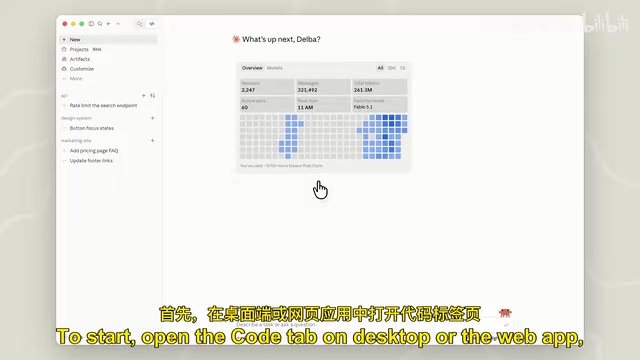
Open the Code tab in the desktop or web app and click to create a new project. You'll need to fill in three key pieces of information: the project name, the goal Claude needs to work toward, and the relevant repository or folder.
Once created, you'll land in the main conversation interface. This is the hub for communicating and coordinating with Claude. You can pick from the suggestions it offers, ask a quick question, or just hand it a list of tasks.
In the demo video, the creator shares metrics data and user feedback with Claude, asking it to explore the codebase and propose performance optimizations. Claude returns its findings after exploring the repo. Once both sides confirm the work to be done, Claude spins up a Thread for each task.
Most of the time you can let Threads run on their own, but you can also click a card to follow what Claude is doing, converse within a Thread to steer the task, or stop it outright.
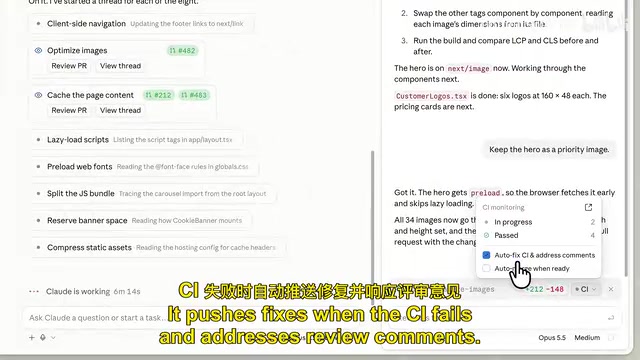
Managing Threads, PRs, and Artifacts
When a Thread produces a concrete change (say, a bug fix), it automatically opens a Pull Request — or you can request one at any time. The Thread then keeps an eye on that PR: pushing fixes when CI fails, responding point by point when there are review comments.
You can see the next moves on a PR in the main conversation. To view all PRs and their statuses, go to the Pull Requests tab in Overview. When you're ready to merge, just tell Claude.
Projects also introduces shared Artifacts. You can have Claude generate a report comparing performance metrics before and after optimization, for sharing with your team. These artifacts live in the Library tab — think of it as the project's shared folder. Any Thread can access its contents, including wireframes or design specs you add manually. That means the next time you do performance-related work, Claude can directly update that report.
CI and Pull Request workflows: A PR (Pull Request) is the standard way to submit code changes on platforms like GitHub — a developer commits changes on a separate branch, requests a merge into the main branch via a PR, and can attach descriptions, discussion, and review. CI (Continuous Integration) is the build-and-test pipeline automatically triggered every time code is pushed; when it fails, it flags the PR red and provides logs. When the article says "the Thread keeps an eye on the PR," it means Claude reads CI status and reviewer comments, proactively pushing fix commits or replying to comments one by one, until the PR is ready to merge. This mechanism matters because it hands the entire "code—commit—verify—revise" loop to the Thread, leaving developers to just confirm at key checkpoints instead of staring at the pipeline and debugging over and over.
Advanced Usage: Monitoring Integrations and Automation
In a shell environment, you can connect Claude to monitoring services so it can check real user metrics on its own. Then ask Claude to set up a daily routine to detect performance regressions. Once it spots a problem, it automatically opens a Thread to investigate — and by the time you next check the project, the investigation work is already waiting for you.
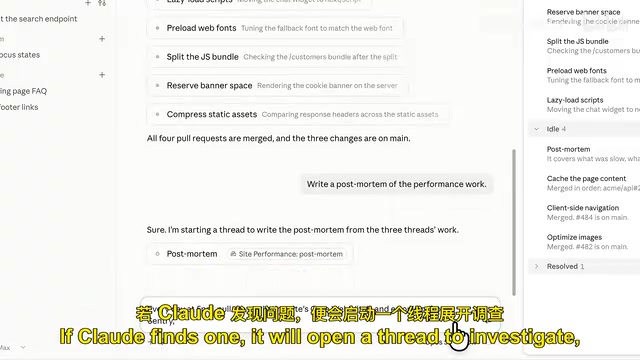
Three Practical Tips from the Claude Code Team
At the end of the video, some optimization tips from the Claude Code team are shared:
1. Watch your usage management. Each Thread is a full Claude Code session, and a single project can run several at once, so it burns through your plan quota far faster than a single session. They recommend keeping the Coordinator at a low effort level — it mainly handles routing and dispatch, and raising the level won't bring noticeably better results. Threads carry the bulk of the workload, but since each task has a clearly defined scope, you can consider defaulting to a smaller model and only switching within a Thread when you hit larger, more complex tasks.
2. Actively define how it works. You can tell Claude how you want it to operate — how many Threads to run simultaneously, how often to report progress, or to show a plan before starting work.
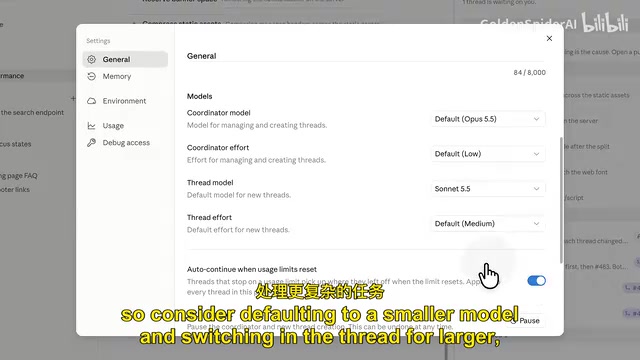
3. Leverage shared memory. Threads share memory with each other. You can have Claude remember a preference and apply it to all future Threads, or edit those memories in project settings.
The trade-off between low effort levels and model tiering: The "low effort" level mentioned here, along with "defaulting to a smaller model," corresponds to the common cost-quality trade-off in large model inference. The higher the reasoning effort level, the more thinking steps the model takes before generating, and the more context it consumes — usually improving the quality of complex reasoning, but significantly increasing latency and token costs. The Coordinator's job is mainly to parse goals, split tasks, and route them to each Thread — fundamentally scheduling rather than heavy lifting — so a low effort level suffices, and raising it won't yield proportional quality gains. Threads, by contrast, do the real work, but each task has clear boundaries and limited scope, so a small model is enough; only when facing hard problems like architecture design or complex debugging should you temporarily switch to a larger model. Allocating models and effort levels by role is the most direct way to control plan quota consumption in multi-Thread parallel scenarios.
Current Status
Claude Code Projects is currently in Beta, gradually rolling out to Pro and Max plan users. For developers who regularly face large cross-session, cross-repo tasks, this workflow — which integrates scheduling, isolation, and continuity — is worth trying the moment you get access.
Its core value isn't a breakthrough in any single feature, but rather taking the cognitively demanding job of "managing multiple parallel tasks" off developers' hands.
One-line Summary
Claude Code Projects uses cloud-based parallel Threads to automatically break down and push forward large cross-session, cross-repo development tasks.
Paragraph Summary
Claude Code Projects is a new working mode Anthropic has rolled out for Claude Code. Users simply describe a big goal, and Claude automatically breaks it into subtasks and assigns independent Threads to push them forward in parallel. Each Thread is a Claude Code session running on its own branch in the cloud, continuing to work even after you close your laptop, with progress viewable from your phone. When a Thread produces a change, it automatically opens a PR and keeps an eye on CI status and review comments, automating the full flow from coding to merge. Projects also introduces a shared artifact library and cross-Thread memory, and supports connecting to monitoring services for daily automated regression checks. The official recommendation is to keep the Coordinator at a low effort level and default Threads to a smaller model to control plan quota consumption. The feature is currently in Beta, gradually rolling out to Pro and Max users.
Related articles

OpenCode 2.0: A Major Upgrade for the Terminal AI Coding Assistant
OpenCode 2.0 is released: this open-source terminal AI coding assistant gets a major upgrade, emphasizing open-source, self-hostable, model-agnostic design, sparking developer discussion on Hacker News.

Jev 1.14.0 Released: Experimental Features for Dreamers Arrive
Open-source project Jev releases version 1.14.0 with experimental features for dreamers. The news, released via RSS, sparked discussion on Hacker News—here's what the update means.

Two U.S. Cities Move to Ban Foie Gras: The Animal Cruelty Debate Resurfaces
Washington, D.C. and Denver may ban foie gras sales, reigniting animal cruelty debates. This article examines force-feeding, key disagreements, and whether bans reduce suffering.