Getting Started with Claude Code Skill Creator: A Practical Guide to the Skill Engineering Era

Master Claude Code's Skill Creator to build evaluatable, reusable packaged prompts that replace repetitive manual prompting.
This article explores the core philosophy and practical methods behind "Skill Engineering" in Claude Code. Skills are Markdown-based packaged prompts; the Skill Creator tool auto-generates precise descriptions and runs differential evals to ensure each Skill genuinely improves workflows. The `description` field targets users while `when to use` guides the model, together solving the real-world problem of the model not knowing when to invoke a Skill. Advanced features include per-Skill permission control via `allowed tools` and Context Fork for running subtasks in isolated contexts to prevent main conversation pollution.
From Prompt Engineering to Skill Engineering
A clear trend is emerging in advanced Claude Code usage: developers are shifting from traditional "Prompt Engineering" to "Skill Engineering." As the official presenter puts it, rather than repeatedly typing the same prompts and reminding the model of the same things over and over, it makes far more sense to package these repetitive workflows into reusable Skills.
The presenter is blunt about it: "If you want to stay competitive in this industry right now, go create Skills that are useful for a lot of people and share them through plugins." Behind this statement is a clear-eyed understanding of what a Skill actually is — not some mysterious black-box technology, but "essentially a packaged prompt" written in Markdown, and nothing more.
Yet precisely because a Skill is just a "packaged prompt," it becomes extremely shareable and reusable. There's even a joke circulating online that "a lot of SaaS companies could have just been a Skill" — the presenter admits it sounds a bit harsh, but "isn't entirely untrue." When you configure a Skill correctly and give it access to what it needs, its power in handling repetitive workflows is remarkable.
Skill Creator: More Than Generation — It Evaluates Too
When it comes to creating Skills, the presenter's answer is clear: "I almost always use Skill Creator." Compared to writing one manually, one of Skill Creator's greatest advantages is that it automatically writes an extremely precise description for you — which is precisely what determines whether the model will invoke the Skill correctly.
Skill Creator also has a capability that often gets overlooked: automatically running evals. When you run it, it tests "how your codebase performs with and without this Skill," verifying whether your newly added Skill actually improves the workflow. This matters enormously — if a Skill doesn't deliver real improvement, it only wastes extra tokens. The evaluation runs against the existing Skills in your repository and generates a small HTML report that visually shows the Skill's impact.
If you want to dive straight in, the official recommendation is to clone the Skills repository and copy-paste the contents to start using them. The evaluation scripts bundled in the repository run alongside your Skill and help you judge whether it's working.
Evals are a testing framework used in machine learning engineering to measure the quality of model or system outputs. In traditional AI development, evals typically require engineers to manually design test cases and write scoring logic — a high barrier to entry. Skill Creator internalizes this mechanism: it automatically generates comparative tests for the current codebase, runs the same tasks under both "with Skill" and "without Skill" conditions, and presents the differences in an HTML report. The key value of this "differential evaluation" approach is preventing Skill bloat — since every additionally loaded Skill consumes tokens in the context window, a Skill that brings no meaningful improvement will actually dilute model attention, slow responses, and increase API costs. Evaluation isn't a nice-to-have; it's the quality gate that keeps the Skill ecosystem healthy.
Description and when-to-use: Getting the Model to Invoke the Right Skill
A practical question arises: can Claude automatically determine which Skill to invoke? The answer is "you can't fully rely on automation." The presenter admits this depends heavily on the specific model — some are excellent at invoking Skills, while others need an explicit nudge. He's personally encountered situations with Opus where "I configured a bunch of Skills, but the model just wouldn't use them."
The solution lies in the Skill's front matter fields. Beyond description, there's a critical field called when to use. The distinction between the two is:
- description: User-facing — visible when you load the Skill in the CLI;
- when to use: More model-facing — provides additional context to help the model more precisely understand "what kinds of tasks this Skill should be used for," without cluttering the user interface.
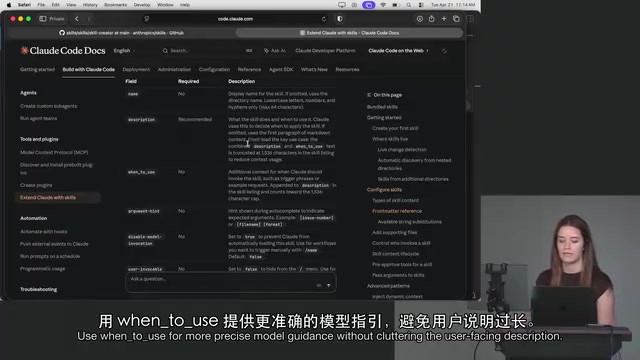
Beyond these, the front matter supports a wide range of customization options: argument hint (a CLI-facing prompt that tells users to input values like staging or production), disable model invocation, user invocable (determines whether it's a command or a capability the model can invoke automatically), and even newer options like effort levels.
Permissions, Hooks, and Context Fork: Advanced Skill Configuration
The power of Skills goes beyond wrapping prompts — they enable fine-grained runtime control.
On the permissions side, you can set allowed tools for individual Skills, functioning as "per-Skill permission control." For instance, if you only want a Skill to run commands like bash npm run, add that to allowed tools and it won't be permitted to do anything else.
Similarly, if you already understand and use Hooks, you can define a dedicated hooks array within a Skill so those hooks only apply to that Skill. The presenter notes this is an advanced feature, recommended only for users already comfortable with the Hooks concept.
Another concept worth attention is Context Fork. By default, a Skill runs in the main context, and all back-and-forth interactions get added to your user conversation history. But if you don't want a "side quest" to pollute the main context, you can have the Skill run inside a subagent via Context Fork.
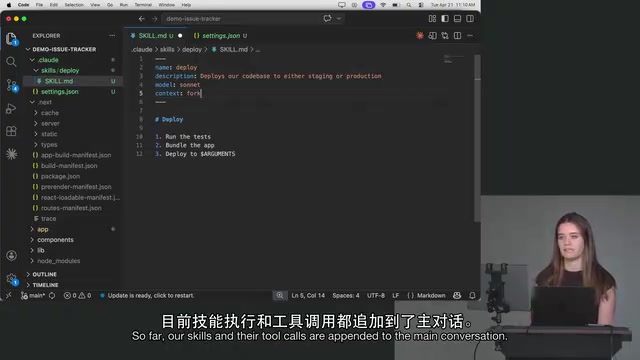
The subagent runs in a completely fresh, isolated context in parallel. The main conversation only gets back the result — all the intermediate tool calls and process steps never get stuffed into the main conversation. This effectively improves model output quality, since the main context isn't cluttered with content unrelated to the original task.
Context Fork draws conceptually from the process fork idea in operating systems: a parent process spawns a child process to execute a task independently, returning only the result to the parent when done. In the context of large language models, the "context" is everything the model can see in the current conversation — including message history, tool call records, and intermediate outputs. As a conversation grows longer, the context window fills up with procedural information, causing the model to lose focus on the original task and produce lower-quality outputs. This phenomenon is commonly called "context pollution" in the industry. Context Fork addresses this by having subagents run in isolated contexts, so the main conversation only receives the final conclusion, keeping the main context lean and focused. This mechanism is especially useful for multi-step investigative subtasks like code review or document retrieval.
Skills Are Not Tool Calls: Clarifying the Core Concepts
Many people confuse Skills with tool calls, but the two are fundamentally different.
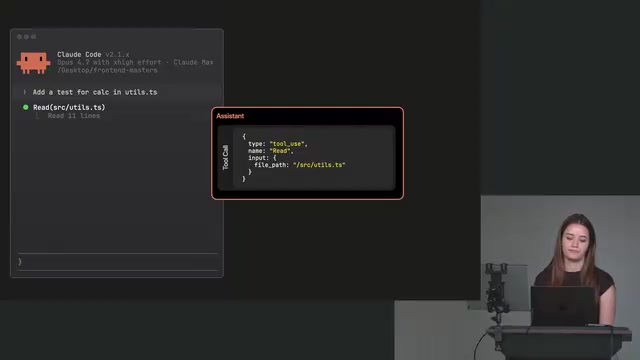
The presenter explains: tool calls are the essential mechanism by which a model takes action — "I need to read a file" or "I need to make an edit" are classic tool calls. Without tool calls, an Agent ceases to exist and degrades into a chatbot that only responds in plain text.
Skills, on the other hand, are more of a user experience layer: they save you from typing the same prompts repeatedly and reminding the model of the same things constantly. The only substantive difference between a Skill and a regular prompt is that within a Skill you can declare configurations like "this task should run in a subagent" — and Skills can be shared with your team or the world via plugins.
Tool Calls (Function Calling) are the foundational mechanism of modern LLM Agent architectures. The principle works like this: when generating a response, the model can output a structured "invocation request" (typically in JSON format). The host application captures this request, executes the corresponding external function (such as reading a file, calling an API, or running a shell command), and then injects the execution result back into the model as new context, allowing the model to continue generating the next step of output. This "perceive–act–observe" loop is the core of Agent paradigms like ReAct (Reasoning + Acting). Without tool calls, models can only rely on static knowledge from training data — they cannot perceive or modify the state of the external world, and therefore cannot complete any real programming task. Understanding this clarifies the division of labor between Skills and tool calls: tool calls are the Agent's "hands and feet," while Skills are the preset instruction sets that govern "how the Agent thinks and acts."
Beyond Skills: A Few Useful Commands
The presentation also touched on several beginner-friendly Claude Code commands:
- insights: Generates an HTML report showing how you've been performing with Claude Code. The presenter colorfully describes it as "the Claude Code equivalent of an MBTI personality test" — you can see what you're good at and where there's room to improve.
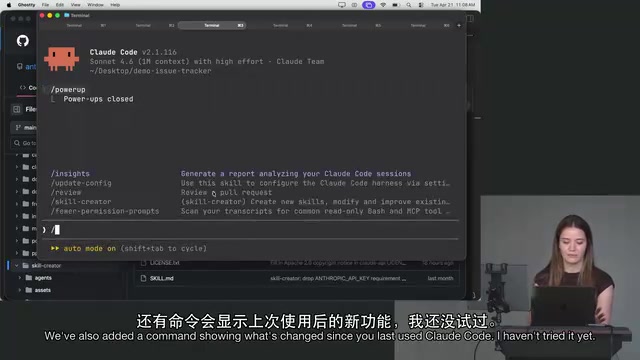
- power up: Helps new users get up to speed quickly and lets you "talk to your codebase." One handy tip: mention a file anywhere in your prompt using
@to automatically attach that file to the prompt. This directly saves the model a file-reading tool call, improving efficiency. - what's new: A newer command that tells you what's changed in Claude Code since you last used it.
Additionally, the official team has launched a Claude Devs Twitter account and added a weekly "What's New" page to the documentation, making it easier for developers to track new capabilities each week.
Summary
Skill Creator represents a shift in how Claude Code is used: moving from crafting one-off prompts with care to building evaluatable, reusable, shareable capability modules. Its built-in automatic evaluation mechanism ensures every Skill you add is "worth its weight," while configurations like when to use, allowed tools, and Context Fork give Skills a flexibility that far exceeds ordinary prompts. For anyone looking to stay competitive in AI development, mastering "Skill Engineering" may well be the next critical step. Readers are encouraged to explore the official Skills documentation further — there's plenty of valuable content on path configuration, cross-project reuse, and more.
Related articles

Should U.S. College Fraternities Be Banned? A Researcher's Incisive Observations
Why not just ban U.S. college fraternities? A researcher finds the key resistance comes from decision-makers' own fraternity identities and schools' "willful ignorance."

Microsoft Discovery: Accelerating Scientific Discovery with AI Agents
Microsoft's Discovery platform runs specialized AI agents to help researchers screen and prioritize the most promising compounds and experimental paths, reducing experiments and accelerating scientific discovery.

Cambridge Heavy Industries Secretly Develops Desktop-Scale Nuclear Fusion Device
Cambridge Heavy Industries is secretly developing a desktop-scale laser-driven nuclear fusion device, targeting the equipment supply market for fusion power plants. This article analyzes its miniaturization technology path, commercialization logic, and unique positioning in the fusion startup wave.