Getting Started with Claude Code Skills: Automate Repetitive Workflows in One Click
Claude Code Skills encapsulate reusable workflows in Markdown with support for parameters, model selection, and dynamic context injection.
Skills is Claude Code's mechanism for encapsulating repetitive multi-step workflows into Markdown files, addressing the limitation that CLAUDE.md and permissions can only passively define rules. Each Skill lives in a `skills` folder with a name, description, and optional front matter config. By default, only the name and description are sent to the model — full content is only revealed on invocation, keeping token usage in check. Skills now unify with Commands, supporting per-skill model selection, invocation control, runtime arguments, and enterprise-wide managed settings. Dynamic context injection further allows shell commands to run before a Skill is sent, embedding live environment data into the prompt — a powerful but security-sensitive feature that can be disabled.
Why You Need Skills
In Claude Code, you can use CLAUDE.md to shape model behavior and permissions to constrain its operational boundaries. But both of these are fundamentally passive — they define rules without actively helping you complete tasks.
Real-world development workflows are full of multi-step processes that need to be repeated over and over: deployments, integrations, Q&A loops, and more. Re-typing the same prompts and re-explaining the same processes every single time is incredibly inefficient. That's exactly the problem Skills are designed to solve.
Simply put, a Skill is a Markdown file containing a specific workflow. It codifies the multi-step operations you'd otherwise have to explain to Claude repeatedly, and it can be customized at the project level. Whether it's a deployment script, a third-party integration, or a code review loop — anything you need to run multiple times can be packaged into a Skill.
Quickly Create Skills with Skill Creator
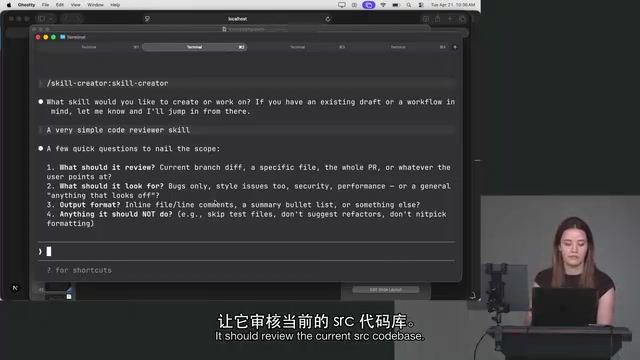
In her demo, Lydia recommended a built-in utility called Skill Creator. It lets you describe what you need in natural language, and Claude automatically generates the Skill file for you — no manual writing required.
This hints at a more important mindset shift: when you encounter a repetitive problem, your first instinct shouldn't be "let me go implement this manually in the codebase." Instead, ask yourself first — "Can Claude Code already handle this automatically?" The key to getting the most out of tools like this is learning to "Claude-ify" your everyday work wherever possible.
That said, auto-generation can sometimes overreach. In the demo, Skill Creator asked too many questions and tried to do too much, so Lydia simply copied the output and created the file herself. This is a good reminder: tools are aids, and the final workflow design still needs a human to sign off on it.
Skill File Structure and Loading Mechanism
The rules for creating a Skill are straightforward: create a skills folder (note the plural), and place your skill.md files inside it. This is the directory structure Claude Code expects.
A Skill file typically contains two key fields: a name and a description. For example, a skill named review might have a description like "review the current project's SRC codebase and report bugs."
Here's a detail that's easy to overlook but matters a lot for cost: by default, only the Skill's name and description are sent to the model — not the full Markdown content. This means even if you've written out a detailed multi-step process in your Skill file, that content doesn't count toward your token usage during normal operation. The full content is only revealed to the model when the Skill is actually invoked.
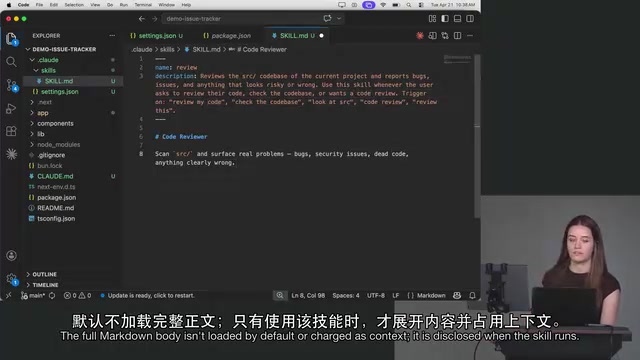
When a Skill gets triggered depends on its description. If you say "review this codebase" in a prompt and the model isn't sure how to proceed, it may notice there's a Skill called review and automatically invoke it. Of course, you can also invoke it explicitly as a user.
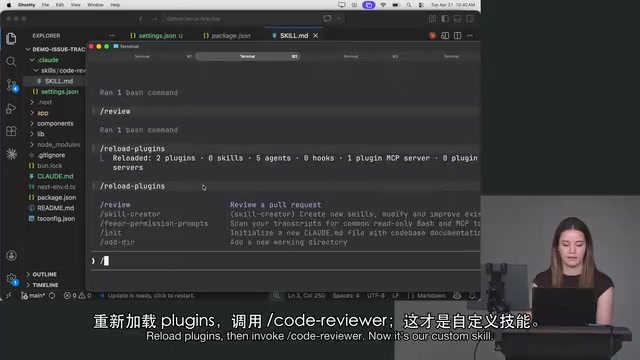
One notable change: Skills and Commands used to be two separate mechanisms, but they've now been unified — Skills are also Commands. After adding a new Skill, you'll need to run reload plugins before Claude Code can recognize the new content.
CLAUDE.md is the core project-level configuration file for Claude Code, typically placed in the project root directory. It provides the model with persistent context such as project architecture notes, coding standards, and common commands. It loads automatically at the start of each session — essentially acting as a supplement to the model's "system prompt." The division of labor between Skills and CLAUDE.md is clear: CLAUDE.md handles "what the model should know," while Skills handle "how the model should execute certain tasks." Together, they form a complete AI work companion with both background knowledge and action procedures. Front matter is a YAML-formatted metadata block at the top of a Markdown file, wrapped in
---delimiters. It's commonly used in static site generators (like Jekyll or Hugo) to describe document properties. Claude Code borrows this convention so that Skill files can carry structured configuration information alongside their regular Markdown content, without needing a separate configuration file format.
Fine-Grained Behavioral Control with Front Matter
The real power of Skills lies in the rich configuration options available through front matter, which let you precisely control how each skill behaves.
Specifying a Model
You can specify a model on a per-Skill basis. For instance, if you're using Opus across the board but a particular code review Skill doesn't need that level of capability, you can configure it to always use Sonnet or even Haiku — saving on costs every time it's invoked.
Controlling Invocation
disable model invocation: true: The model can never invoke this Skill autonomously. It can only be triggered manually by the user via a slash command. In this mode, the content stays local and is never sent to the model.user invocable: false: The inverse — only the model can invoke the Skill; users can no longer trigger it with a slash command.
Lydia acknowledged that these two negatively-phrased config options feel a bit awkward — logically, a single toggle would make more sense. But for now, that's what we have to work with.
Enterprise-Level Controls
For enterprise users, settings like effort level can be managed centrally through Managed Settings. For example, if you don't want team members using max effort, you can set an upper limit. Enterprise admins have significant control over what their teams can and cannot do within Claude Code.
Passing Arguments and Dynamic Context Injection
Skills also support passing arguments using standard arguments syntax.
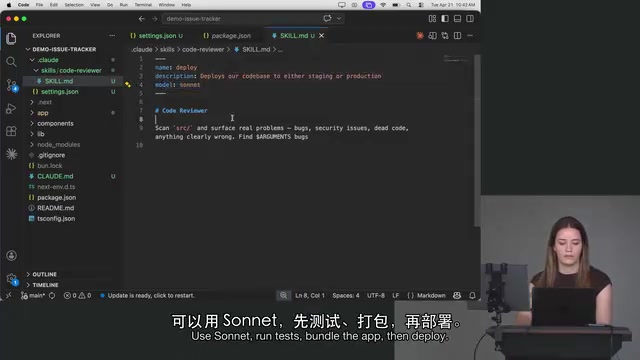
Take a deployment scenario as an example: a deploy skill can accept an environment argument. At runtime, typing deploy staging will deploy code to the staging environment; deploy production does the same for production. Internally, the workflow can be orchestrated to run tests first, then build, then deploy to the specified environment. This parameterization makes a single Skill reusable across multiple scenarios — extremely practical.
Another advanced capability not shown in the slides, but specifically demoed by Lydia, is dynamic context injection. Using a specific syntax, a Skill can execute a shell command before sending its content to Claude, and inject the output at the top of the Skill content. For example, if you have the GitHub CLI installed, relevant information can be injected into the Skill before it's sent. This capability is incredibly powerful for Skills that need to be shared across a team.
However, this also introduces security risks: installing someone else's Skill means running code they wrote on your machine. To address this, Claude Code has added a setting to disable this behavior, so users can opt out of executing these shell commands.
Dynamic context injection is essentially a "pre-processing hook" pattern: before the Skill content is handed to the language model, a side effect is triggered (executing a shell command) that injects real-time environment information into the prompt. This is different from information statically written into the Skill file at authoring time — injected content can vary with each execution, such as the current Git branch, environment variables, or remote repository state. This pattern is especially valuable in CI/CD and multi-environment deployment scenarios, where the state of the target environment is inherently dynamic. From a security standpoint, the risk is similar to software supply chain attacks: a malicious Skill embedding dangerous shell commands could cause serious harm if an unsuspecting recipient installs and triggers it. When using shared Skills from unknown sources, it's advisable to inspect their shell command contents first, or disable the capability entirely through Claude Code's settings.
Summary
Skills push Claude Code from "passive responder" to "active executor." A simple Markdown file is all it takes to encapsulate complex workflows that would otherwise require repeated explanation — and when combined with model specification, invocation control, argument passing, and dynamic context injection, it forms a remarkably complete workflow automation system.
For individual developers, Skills significantly reduce repetitive work. For teams and enterprises, they enable sharing of standardized processes while keeping safety and cost guardrails in place through managed settings. The core shift is a mental one: when you encounter repetitive work, ask yourself first whether you can "Claude-ify" it.
Related articles

How Big Can Stars Really Get? The Physical Limits of the Largest Stars
Red supergiants are the largest stars by volume, with radii up to 2,000 times the Sun, engulfing the inner solar system. But there is no precise upper limit on stellar size—models predict up to 15,000 solar radii. The most massive blue stars are far smaller than red supergiants—biggest and heaviest are two different things.

Apple HomeView Smart Display Full Feature Breakdown: Wall-Mount or Desktop, $299
Apple launches HomeView, a $299 smart display with wall-mount and desktop options, 12MP camera for facial recognition, smart home control, music playback, and recipe step-by-step cooking. Full breakdown of watch faces, apps, privacy, and cooking integration.

Where Did the Promised New Studio Go? Craft Computing Answers After Five Years
Craft Computing's host responds to viewer questions: the new studio promised five years ago was shelved as construction costs soared from $30,000 to $75,000, and was replaced by a 168-square-foot garage conversion.