Getting Started with Cursor AI Coding Agents: How Agents Complete Coding Tasks Autonomously

AI Coding Agents autonomously loop through tools to complete goals — treat them like fast junior devs who need oversight.
This article introduces the core concepts and practical limits of AI Coding Agents. An Agent runs tools in a loop, letting you set a goal while it autonomously plans and executes every step. A confetti demo illustrates the full workflow — from prompt to tool calls, task management, and code validation. Agents excel at well-defined tasks like writing tests or docs, but struggle with complex debugging and pixel-perfect design. The right mental model: a blazing-fast junior developer who needs clear direction and ongoing supervision.
From Tool Calls to Autonomous Agents
AI models using tools to extend their capabilities is nothing new. But when we allow a model to call multiple tools in sequence, decide autonomously which tools to use, and learn from the results of each action, an entirely new concept emerges — the AI Coding Agent.
Cursor's official tutorial offers a remarkably concise definition of what an Agent fundamentally is: an Agent is essentially a tool runner operating in a loop. In other words, instead of guiding the AI step by step, you give it a goal and let it figure out every step needed to achieve that goal on its own.
Think of it like two ways of giving someone directions: you could tell them turn-by-turn at every intersection, or you could just give them the destination and let them use GPS to plan the route themselves. An Agent is the latter — you set the intent, and it fills in everything between that intent and the final working code.
From a technical standpoint, this "loop" is commonly referred to as the ReAct loop (Reasoning + Acting). The basic structure goes: receive goal → reason about next action → call a tool → observe result → reason again… until the task is complete or a stopping condition is met. With each iteration, the model can dynamically adjust its plan based on the actual output of the previous step, rather than mechanically executing a hardcoded sequence. This is the fundamental difference between an Agent and traditional scripted automation: every step in a script is hardcoded by a human at write time, whereas an Agent's execution path is generated at runtime based on environmental feedback. It's precisely this dynamic planning capability that allows Agents to autonomously find viable paths even when given ambiguous goals.
A Real-World Demo: Popping Confetti
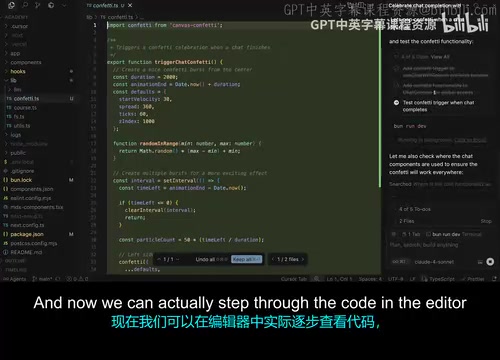
The tutorial uses a vivid example to demonstrate how an Agent works in practice. The author typed a fairly broad instruction into Cursor: "When the chat finishes, let it pop confetti."

Notice the phrasing — the author didn't say "go look at this file, read this text, then add this new dependency." Instead, they gave a somewhat vague but concrete goal and left everything else to the Agent's judgment.
In the Agent's execution log, you can clearly see how the various concepts introduced earlier in the tutorial layer on top of each other and work in concert:
- Receiving the prompt: The model takes in the user's goal;
- Tool calls: The Agent autonomously performs searches, reads files, and more;
- Task list management: The Agent maintains a to-do list, steadily working through and checking off completed items;
- Running commands: Such as adding a new dependency to the application;
- Generating and validating code: After writing the code, it proactively checks for linting errors and, once everything looks clean, starts the dev server in the background.
Interestingly, the Agent independently chose a third-party library called canvas-confetti to implement the confetti effect — the author admitted they hadn't even known the package existed. After the whole process ran, opening localhost:3000 confirmed it: confetti popped at the end of the chat, just as requested.
canvas-confetti is a lightweight frontend JavaScript library purpose-built for rendering colorful particle animations (confetti) on a webpage. It's roughly 7KB minified with zero external dependencies. The Agent's choice to use this library rather than hand-writing Canvas animation reflects a classic engineering trade-off: reach for a mature, purpose-built tool rather than reinventing the wheel. This detail is worth noting because it shows that Agents possess a degree of "engineering common sense" — they know to look for existing tools rather than building from scratch. That said, it also means Agents may sometimes introduce third-party dependencies you're unfamiliar with or simply don't need. In production projects, this creates additional maintenance overhead and security review requirements, and developers should scrutinize every new dependency an Agent introduces.
What Agents Are Good At — and Where They Fall Short
The demo is impressive, but the tutorial doesn't shy away from discussing the limits of Agent capabilities — which is arguably its most valuable section.
Scenarios where Agents excel are those with clear goals and established patterns, such as:
- Adding test coverage to an existing codebase;
- Writing documentation in parallel with new feature development.
These tasks have well-defined "correct answers" and existing patterns to reference, allowing Agents to work efficiently.
Scenarios where Agents still struggle fall mainly into two categories. The first is complex debugging that requires deep understanding of how a codebase works — these problems rarely follow established patterns and depend on holistic insight into the system.

The second is pixel-perfect design implementation. If you hand an Agent a design mockup and demand it be reproduced with zero deviation, it's probably not the right tool for the job.
Think of the Agent as a "Junior Dev Running at 10x Speed"
The tutorial offers a highly fitting mental model: treat the Agent like a junior developer who works extremely fast but needs clear direction and supervision.
What problems do junior developers run into? They can get stuck in loops — repeatedly trying to solve the same problem the same way, without realizing that stepping back and trying a completely different approach is the right move. Agents do the same thing.
This means that as a developer — as the Agent's "manager" — you remain responsible for the correctness of the code and, more critically, for ensuring it meets your quality standards. The AI handles execution, but the responsibility for judgment and oversight doesn't transfer.

This "getting stuck in a loop" problem has a specific term in AI research: the repetitive failure loop, and it's one of the primary reliability bottlenecks for current Coding Agents. The root cause is that models lack genuine metacognition — they can't spontaneously realize "I've failed with this same approach three times; I should switch strategies." Some Agent frameworks try to mitigate this by introducing an explicit reflection step, which forces a high-level reasoning pass after a certain number of failures to re-evaluate the overall approach. But this remains an open problem with no universal solution. This is precisely why the design of human intervention checkpoints is so critical in high-stakes or complex tasks — you need to recognize the signals that an Agent is looping and step in proactively before it spirals.
Building Confidence with Agents Over Time
The key to using Agents effectively is learning what to delegate and when. The tutorial's recommended path to getting started is pragmatic:
- Start with small, well-defined tasks and build confidence as you learn to manage Agent behavior;
- Gradually increase the scope of delegation as your proficiency grows and you're comfortable handing off larger chunks of work;
- Validate and check throughout, regardless of task size — always review the Agent's output as you go.
The tutorial emphasizes a key principle: the goal of bringing in an Agent is not to remove human involvement, but to augment the developer's capabilities — enabling people to thoughtfully distribute different parts of the software creation process and ultimately get more done.
Turning Knowledge into Hands-On Practice
This content is framed as an introduction to how Agents work under the hood, and the author closes with the most practical advice of all: the only way to truly internalize these concepts is to actually build something.
Whether you're starting a brand new project from scratch or adding a feature to an existing app, the critical thing is to get your hands on the keyboard. Understanding that an Agent is a tool runner in a loop, understanding its capability limits, understanding how to divide labor in a human-AI collaboration — all of that knowledge only becomes genuine skill through real building.
For developers just getting started with AI-assisted programming, this conceptual framework may be more valuable than any demo: an Agent isn't a black box that replaces you — it's a high-velocity collaborator that you need to learn how to manage.
Related articles

Chain of Thought Isn't Just for AI: How Humans Can Use CoT to Improve Thinking Quality
Chain of Thought isn't just a prompt trick for large models. Starting from a Hacker News discussion, this article analyzes why CoT works for human thinking too, breaks down actionable ways to transfer it, and highlights the key differences between human CoT and machine CoT.
Cloudflare Teams Up with OpenAI: Closi…
Cloudflare Teams Up with OpenAI: Closing the Loop from Vulnerability Discovery to Defense with AI
Cloudflare uses OpenAI Daybreak to investigate security vulnerabilities and generate reviewable remediation plans, while developers use Codex to boost coding efficiency and quality.

Orca Multi-Agent Orchestration in Practice: A Guide to Parallel Collaboration with Claude and Codex
Orca is Stable AI's free open-source agent workbench supporting 34 agents like Claude Code and Codex in parallel. Learn its Git worktree isolation, multi-model orchestration, and mobile management.