Getting Started with Dify: A Complete Guide from Local Deployment to Building Enterprise-Grade AI Applications

A hands-on guide to Dify: from local deployment to building enterprise-grade AI applications.
This guide explains what Dify is—an open-source LLM app platform combining BaaS and LLMOps—and walks through a beginner-friendly local deployment using VMware, Ubuntu 22.04, aaPanel, and Docker. It covers model integration, RAG, agents, workflow orchestration, and common troubleshooting.
What is Dify?
Dify is an open-source large language model (LLM) application development platform that combines the concepts of Backend as a Service (BaaS) and LLMOps, helping developers build production-grade generative AI applications more quickly.
Background: LLMOps and BaaS LLMOps (Large Language Model Operations) is an extension of the MLOps philosophy into the era of large language models, covering the full lifecycle of operational practices including model deployment, monitoring, iterative optimization, and prompt version management. MLOps itself grew out of the DevOps culture, introducing the continuous integration/continuous delivery (CI/CD) principles from software engineering into machine learning—while LLMOps builds on this foundation to further focus on LLM-specific operational challenges such as prompt engineering, context window management, and model evaluation benchmarks. BaaS (Backend as a Service) is a cloud computing service model where developers don't need to build their own backend infrastructure and can directly call platform-provided APIs to handle data storage, authentication, push notifications, and more. By integrating both, Dify not only hosts the backend logic for LLM invocation but also provides operational capabilities like model management, log tracing, and A/B testing, enabling teams to continuously iterate on AI applications just as they would operate internet products.
It's worth noting that Dify isn't just for technical people—even product managers or operations staff without a programming background can participate in defining AI applications and managing data operations.
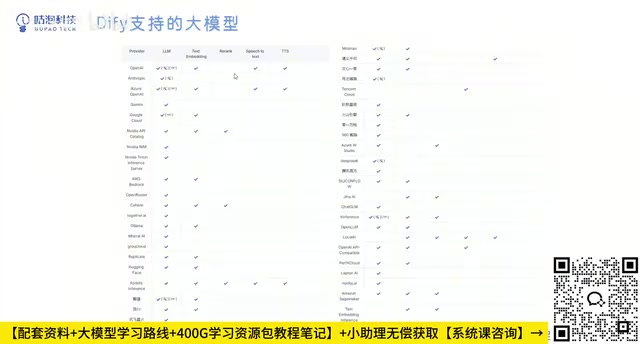
Dify comes with a complete built-in technology stack for building LLM applications, supporting integration with hundreds of models. This includes domestic models such as ERNIE Bot, Doubao, Zhipu, Baichuan, iFlytek Spark, Tongyi Qianwen, and DeepSeekAd, as well as mainstream international models like OpenAI (ChatGPT) and Google Gemini. The platform also provides an intuitive prompt orchestration interface and a high-quality RAG (Retrieval-Augmented Generation) engine, sparing developers from reinventing the wheel so they can focus on business innovation itself.
Background: RAG (Retrieval-Augmented Generation) RAG (Retrieval-Augmented Generation) is the core technical paradigm for enterprises deploying AI knowledge Q&A today. Its workflow consists of two stages: in the retrieval stage, the user's question is converted into a vector (Embedding), and the semantically most similar document fragments are recalled from a pre-built vector database; in the generation stage, the retrieved content is injected into the prompt as context, guiding the LLM to answer based on real knowledge, thereby greatly reducing the model's "hallucination" problem. Worth exploring in depth: the essence of vectorization (Embedding) is mapping text into numerical vectors in a high-dimensional space, where semantically similar texts are closer together in that space, and the system rapidly performs retrieval using cosine similarity or approximate nearest neighbor (ANN) algorithms. In addition, modern RAG systems have introduced re-ranking mechanisms to refine the retrieved results, as well as hybrid retrieval strategies that combine vector retrieval with traditional keyword retrieval (BM25) to further improve accuracy. The core advantage of RAG is that it requires no retraining of the model—simply maintaining the knowledge base allows the AI to grasp the latest private information, making it the standard solution for scenarios like enterprise knowledge management and customer service bots.
Regarding vector database selection, Dify has built-in support for multiple backends, including Weaviate (featuring graph-structured storage), Qdrant (written in Rust with excellent performance), Milvus (for distributed scenarios with billions of vectors), and pgvector (a PostgreSQL extension, ideal for teams with existing PG infrastructure). Different vector databases emphasize different aspects in indexing algorithms (HNSW, IVF, etc.), persistence strategies, and horizontal scaling capabilities: HNSW (Hierarchical Navigable Small World graph) strikes an excellent balance between query latency and recall rate, making it the top choice for most small-to-medium-scale scenarios; while IVF (Inverted File Index) has lower memory usage for ultra-large-scale datasets. Understanding these differences helps you make reasonable choices in production environments based on data scale, query frequency, and operational complexity, rather than simply sticking with the default configuration.
How Does Dify Differ from LangChain?
Many people compare Dify with LangChain. Simply put, LangChain is more like a "toolbox" (Library) full of tools, while Dify is a fully engineered and tested "scaffold"—it not only provides tools but can also directly support production deployment.
Background: LangChain's Design Philosophy and Limitations LangChain rose rapidly in late 2022 alongside the ChatGPT wave, famous for its rich chain invocation (Chain), memory management (Memory), and tool integration abstraction layers. Its greatest strength is flexibility—developers can freely combine various components to build highly customized LLM applications. However, this flexibility comes at a cost: the complex abstraction layers make debugging difficult, frequent version iterations lead to occasional compatibility issues, and it lacks out-of-the-box visual interfaces and production-grade monitoring capabilities. In contrast, Dify sacrifices some low-level flexibility in exchange for a more complete productized experience—from visual prompt orchestration and one-click API publishing to user session log tracing and model cost statistics, Dify covers the complete loop from development to operations. For projects requiring rapid delivery, team collaboration, or participation by non-technical members, Dify's level of engineering offers a significant advantage; whereas for research-oriented projects that require deep customization of underlying logic, LangChain or LlamaIndex remain more suitable choices. It's worth mentioning that LlamaIndex (formerly GPT Index) focuses on data indexing and retrieval scenarios, offering more fine-grained control over the RAG pipeline than LangChain, making it a powerful complement for building complex knowledge retrieval systems; each of the three has its own emphasis, and hybrid architectures using all three together are common in real projects.
More importantly, Dify is fully open source. Open source means free to use, and it also means you can freely extend and customize on top of it—this is a core advantage that makes it one of the preferred platforms for enterprise-grade AI application development.
What Can Dify Do?
Dify's application scenarios are wide-ranging, primarily manifesting in the following directions:
- Rapidly bringing AI ideas to life: Directly transform AI application concepts into usable products, greatly compressing development cycles.
- Enhancing existing business systems: Seamlessly integrate large language models into existing businesses through Dify's standard APIs.
- Building enterprise-grade LLM infrastructure: Accelerate the promotion and adoption of AI technology within an organization.
- Exploring the boundaries of model capabilities: Independent developers or tech enthusiasts can also easily create their own AI applications with the help of prompt engineering and Agent technology.
In the model list, there are two icons worth understanding: the hammer icon indicates support for tool use, and the glasses icon indicates support for vision capabilities.
Background: Tool Use and AI Agents Tool Use (also called Function Calling) refers to an LLM's ability to proactively decide during reasoning to call external APIs, database queries, code execution, and other tools, and to integrate the tool's returned results into the final answer. This mechanism is the cornerstone of building Agents. The core design idea of Agents comes from the ReAct (Reasoning + Acting) framework: the model alternates through a "think → act → observe" loop until the target task is completed. Only models that support tool use can build truly autonomous AI agents in Dify, completing complex tasks like searching for information, manipulating files, and calling third-party services. This is precisely the core capability difference represented by the hammer icon.
Going further, the Function Calling mechanism was first scaled up by OpenAI in 2023. Its technical implementation involves adding specialized tool-call format learning during the model training phase, enabling the model to output structured JSON call instructions instead of plain text. The industry has also seen the emergence of more evolved Multi-Agent architectures, where multiple specialized Agents handle different roles such as planning, execution, and validation, collaborating through message passing to complete complex tasks—Dify's workflow orchestration feature is an embodiment of this direction of evolution. In terms of vision capabilities, models supporting the glasses icon can accept images as input, understand chart content, recognize document screenshots, or analyze product images. This capability has broad practical value in fields like document intelligence, e-commerce scenarios, and automated quality inspection. When combined with tool-use capabilities, it can build composite AI agents that can "operate based on what they see."
For example, OpenAI has both tool-use and vision capabilities; if you want to build an Agent using a domestic model, you should prioritize models marked with the hammer icon, such as Moonshot (Kimi) and DeepSeek.
Deploying Dify Locally: Environment Preparation
Dify supports multiple deployment methods, including source code startup and Docker deployment. Considering overall ease of use, this article recommends local deployment via aaPanel + Docker, which is the most beginner-friendly.
The complete deployment chain is: VMware virtual machine → Ubuntu 22.04 → aaPanel → Docker → Dify.
Background: Why Choose Docker Deployment? Docker is currently the most mainstream containerization platform. Its core idea is to package an application and all its dependencies (runtime, libraries, configuration files) into a lightweight, portable "container image." Container technology relies on the Linux kernel's cgroups (resource isolation) and namespace (process isolation) mechanisms to achieve lightweight virtualization. Compared to traditional virtual machines, it doesn't need to simulate a complete hardware layer, compressing startup time from minutes to seconds and reducing resource usage several-fold. For applications like Dify that consist of multiple microservices (API service, vector database, Nginx reverse proxy, message queue, etc.), Docker Compose can use a single
docker-compose.ymlconfiguration file to uniformly orchestrate the startup order, network connectivity (internal DNS resolution), and data persistence (Volume mounting) of all services, freeing developers from manually configuring the dependencies of each service one by one.Specifically for Dify's
docker-compose.yml, it typically includes the following key service declarations: theapicontainer handles HTTP requests and business logic; theworkercontainer, based on the Celery asynchronous task framework, handles time-consuming operations like document vectorization and batch imports; thedbcontainer runs PostgreSQL to store structured data; therediscontainer provides caching and task queues; and thenginxcontainer serves as a reverse proxy to uniformly expose ports to the outside. Services declare startup dependency order through thedepends_onfield (for example, api must not start until db is ready), and achieve direct domain-based connectivity between containers through a custom Docker network (e.g., the api container can directly access the database container using the hostnamedb). Understanding this structure means that when a service fails to start, you can quickly pinpoint which container has the problem viadocker compose logs [service name], without blindly scouring a screen full of logs. Additionally, the immutability of Docker images guarantees consistency from "it runs on my machine" to "it runs on any machine," which is the fundamental reason why Docker is the officially recommended deployment method for Dify.
Before starting, prepare the following two pieces of software:
- VMware Workstation 17 (or VMware Player)—for running the virtual machine.
- Ubuntu 22.04 system image—the operating system for the runtime environment.
Installing the Virtual Machine and Operating System
After downloading the VMware installation package, double-click to install. Be sure to avoid the C drive for the installation path, as the large number of cache files generated during operation can easily fill up the system drive.
After installation, open VMware and select "Create a New Virtual Machine" → "I will install the operating system later" → choose Linux (Ubuntu 64-bit). Name the virtual machine and set the storage path (again, it's recommended to avoid the C drive). For disk capacity, if you're only using it to deploy Dify, allocating 20GB is sufficient, and choose "Store virtual disk as multiple files."
Background: Why Choose Ubuntu 22.04 LTS? Ubuntu 22.04 is a Long-Term Support (LTS) version released by Canonical in April 2022. The company officially commits to 5 years of mainline security update support (until 2027) and 10 years of Extended Security Maintenance (ESM). Compared to rolling-release versions, LTS versions have more conservative and stable kernel and core library versions, rarely experiencing compatibility issues caused by underlying dependency updates, making them the standard choice for server deployment. Additionally, Ubuntu 22.04 has the most complete official support for Docker Engine—the latest stable version of Docker can be obtained directly from the apt repository, eliminating complex manual configuration steps. Choosing 22.04 over the newer 24.04 is also a matter of ecosystem maturity—a large number of third-party tools and tutorials have been thoroughly validated against 22.04, making community solutions easier to find when problems arise.
From a resource configuration perspective, when allocating resources to the Ubuntu virtual machine in VMware, it's recommended to allocate at least 4GB of memory and 2 CPU cores: Dify's multi-container architecture initializes multiple processes simultaneously during startup—the database, vector engine, API service, etc.—and insufficient memory will cause containers to be frequently killed by the system's OOM Killer. If the host machine has ample memory, allocating 8GB yields a smoother experience. Disk I/O performance significantly impacts the vector database's retrieval latency, so if possible, place the virtual machine's disk file on a solid-state drive (SSD) partition rather than a mechanical hard drive.
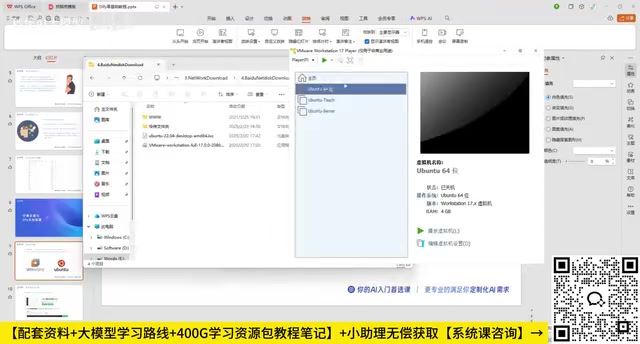
The newly created virtual machine is an empty shell that cannot start directly; you first need to mount the system image. Go to "Edit virtual machine settings" → find the CD/DVD option → select "Use ISO image file" and point it to the downloaded Ubuntu image path—this is equivalent to inserting a system installation disc into the virtual machine.
Installing Ubuntu 22.04
After starting the virtual machine, select "Try or Install" to enter the installation wizard. Choose "Simplified Chinese" for the language and keep the default keyboard layout.
There's a small trick when choosing the installation type: if you're only using it for aaPanel deployment of Dify, choose Minimal installation; if you also need to do other Linux development, choose the normal installation. When partitioning the disk, since it's a brand-new 20GB space, simply select "Erase disk and install now."
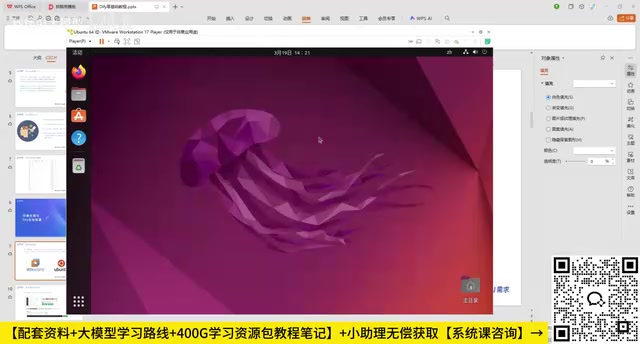
After setting the username and password (a simple password is fine for internal use), wait for the installation to complete and restart. During the restart, press Enter to remove the installation media, and the Ubuntu system deployment is complete.
Installing aaPanel and Docker
Once the system is ready, go to the aaPanel official website and select the Linux panel (be careful to avoid ad placements on the page), and copy the one-click installation command for your system version.
Background: The Technical Positioning of aaPanel aaPanel (BT Panel) is a widely used server operations management tool in China. It is essentially a web console developed based on the Python Flask framework, which underneath achieves graphical management of services like Nginx, Apache, MySQL, and PHP by wrapping Linux shell commands. For operations engineers familiar with the command line, aaPanel is less flexible than directly operating the shell; but for developers new to Linux servers, it visualizes operations such as firewall rule configuration, file permission management, and scheduled task setup, greatly reducing the mental burden of server management. In this article's deployment scenario, aaPanel primarily serves two roles: first, simplifying the installation and image management of Docker, and second, conveniently viewing logs and editing configuration files through its built-in file manager—making it an ideal intermediate-layer tool for beginners.
It's worth knowing that after aaPanel is installed, it registers a resident background process in the system (managed through the
systemdservice) and by default occupies port 8888 to provide the web management interface. The panel itself consumes about 200-400MB of memory, which needs to be factored into the overall memory planning in resource-limited virtual machine environments. Additionally, aaPanel's Security Entry mechanism is a noteworthy security design: the default access path appends a random string (e.g.,/xxxxxxxxxxxx), and requests to unknown paths are redirected to a 404 page, effectively preventing the panel login page from being probed by automated scanning tools. After first deployment, it's recommended to immediately change the default port and security entry, enable IP whitelist restrictions for panel login, and form a defense-in-depth strategy.
Inside the virtual machine, press Ctrl + Alt + T to open the terminal, paste the command, and enter your password to execute (it's normal for no characters to appear while typing the password). After installation, the terminal will output the panel's access information, including the intranet address, username, and initial password. For local deployment, simply use the intranet address to access it.
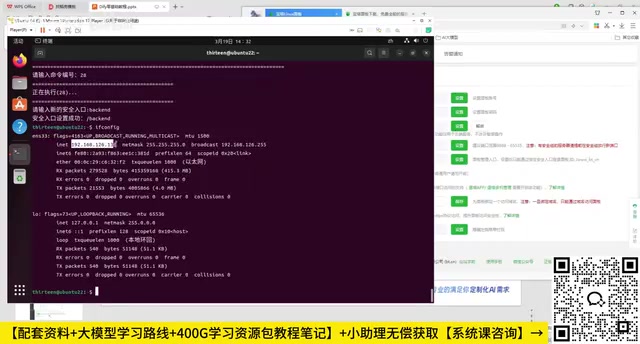
On first login, you need to read the agreement and bind your account. After entering the panel, it's recommended to immediately change the default password, port number, and security entry in "Panel Settings" (the default long path string is hard to remember, so you can change it to a short string). You can also invoke the aaPanel management menu using the bt command to perform the same operations.
Installing Docker and Deploying Dify
Find the "Docker" module on the left side of the aaPanel and click install (keep the default configuration and wait patiently). After installation, refresh the panel to see the Docker management interface.
Enter the Docker app store, search for Dify, and click install.
Common Deployment Issues and Solutions
In practice, image pull failure is the most common error, and the root cause is usually restricted network access.
Background: Why Do Image Pulls Fail? Docker images are pulled by default from Docker Hub (hub.docker.com), a server located overseas, which in a domestic network environment is extremely slow or even completely inaccessible. A Mirror Registry deploys cache nodes domestically, synchronizing commonly used images to domestic servers, thereby bypassing the network bottleneck. Major domestic cloud vendors (Alibaba Cloud, Tencent Cloud, Huawei Cloud) all provide their own mirror acceleration services, among which Alibaba Cloud provides a dedicated acceleration address for each registered user, offering relatively high stability. Changing the DNS configuration to 8.8.8.8 (Google Public DNS) is to solve domain name resolution failures—some systems' default DNS servers are unstable in resolving overseas domains, while Google's public DNS is usually more reliable in resolution accuracy and response speed; another alternative is to use 1.1.1.1 (Cloudflare DNS), which has an advantage in privacy protection. Using both together can cover most image pull failure scenarios.
From a more fundamental networking perspective, image pull failures typically manifest in two forms: one is DNS resolution timeout (
dial tcp: lookup registry-1.docker.io: no such host), which can be resolved by modifying the nameserver in/etc/resolv.conf; the other is TCP connection timeout (dial tcp x.x.x.x:443: i/o timeout), which means DNS resolution succeeded but the packets were dropped at the routing layer, in which case you need to configure a mirror registry to route requests to domestic nodes. When diagnosing, you can first runping registry-1.docker.ioandcurl -v https://registry-1.docker.io/v2/to determine which situation applies, then treat it accordingly. If none of the above solutions work, you can also consider exporting the image archive directly in an environment with network access via thedocker savecommand, then transferring it to the target machine to import offline viadocker load.
You can troubleshoot step by step as follows:
- Switch the Dify version: If the default version keeps producing errors, try reinstalling with version 1.0.0.
- Modify the DNS configuration: In the virtual machine terminal, run
nano /etc/resolv.conf, changenameserverto8.8.8.8, and add8.8.4.4on a new line. After saving, runsudo btto restart the panel. - Configure Docker mirror acceleration: Change the mirror acceleration URL in the Docker settings (the aaPanel help documentation provides several usable acceleration links; test them one by one until success), then restart and reinstall Dify.
After completing the above configuration, Dify can pull images normally and enter the "Running" state. At this point, copy the access address, change the protocol to http, change the port to 8088, and append /install to the end of the path to enter the Dify initialization interface. After setting the administrator email and username, the local deployment is officially complete.
Subsequent Learning Path and Application Scenarios
Completing the local deployment is just the beginning. Based on Dify, you can gradually delve deeper following the path below:
- Intelligent chatbots: Quickly build conversational applications with contextual memory
- AI Agents: Combine tool-use capabilities to build AI agents that make autonomous decisions
- Workflow orchestration: Combine complex multi-step AI processes through visual nodes
- External knowledge base (RAG): Integrate private documents to achieve precise enterprise knowledge Q&A
- External publishing: Embed into existing business systems through public web sites or APIs
Background: The Technical Essence of Dify's Workflow Orchestration Dify's Workflow feature is designed based on a Directed Acyclic Graph (DAG)—each node represents an independent processing unit, which can be an LLM call, code execution (Python/JavaScript sandbox), HTTP request, conditional branch, or variable assignment, with data flowing between nodes through variable binding. This design philosophy is highly homologous in architecture to Apache Airflow (a workflow scheduling tool in the data engineering field), with the difference being that Dify treats LLM calls as a first-class primitive and provides a no-code visual canvas for non-technical users to operate.
In terms of the DAG's execution mechanism, Dify supports parallel execution of nodes—when there are no data dependencies between multiple nodes, the system automatically schedules them concurrently, significantly reducing the overall end-to-end latency of the process. For example, a market analysis workflow can simultaneously call two nodes in parallel—a "competitor data scraping API" and an "internal sales data query"—and once both return results, a summary node merges the data and passes it to the LLM for analysis; compared to serial execution, the total time can be reduced by nearly half. In more advanced applications, Dify workflows can be combined with Webhooks to enable event-driven triggering (such as automatically triggering an intelligent customer service reply process when a new order enters the system), or connect to enterprise systems like CRM and ERP through API nodes, thereby deeply embedding AI capabilities into business processes rather than staying merely at the conversational level. Understanding this architecture helps you design more robust and maintainable AI applications in real projects.
Combined with domestic models like DeepSeek that support tool use, Dify is an ideal platform for quickly getting started with enterprise-grade AI application development. Whether used for a graduation project, an interview portfolio, or actual project deployment, it offers considerable practical value.
Key Takeaways
Related articles

Salesforce Acquires Rune for $375M: AI Logistics Tech Bolsters Defense Business
Salesforce reportedly acquires defense tech startup Rune for $375M. Rune's AI logistics tech will strengthen Salesforce's Missionforce defense platform, continuing its M&A spree.

Why Fair Use Benefits Everyone in the AI Era
Starting from a Hacker News discussion, this article analyzes the legal logic and controversies of the fair use principle in AI training and content creation, and its dual impact on creators and the tech ecosystem.

Mistral Large 4 Open-Sources a Trillion Parameters, Microsoft Offers Voluntary Severance to 60,000 Employees
Mistral Large 4 open-sources a trillion-parameter multimodal model with a coding agent score of 48; SanDisk earnings show AI inference reshaping NAND demand; Google Gemini adds in-app file editing, OpenAI raises Codex quotas, and Microsoft offers voluntary severance to 60,000 employees.