Getting Started with Dify: A Complete Guide to Building AI Application Workflows from Scratch
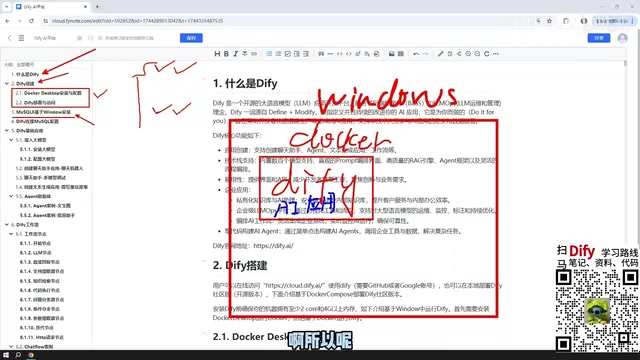
A complete beginner's guide to building AI application workflows with the Dify low-code platform.
This guide walks you through getting started with Dify, an open-source low-code platform for building AI applications. It covers deploying Dify via Docker on Windows, setting up MySQL, integrating paid LLM APIs like DeepSeek, and mastering Dify's five core app types: Chat Assistant, Text Generation, Agent, ChatFlow, and Workflow. The tutorial also explains workflow node orchestration and multiple methods for publishing your AI apps to the web.
What Is Dify: A Low-Code Development Platform Connecting LLMs to Business
Dify is an open-source platform tool that helps developers and businesses rapidly build AI applications. Its core value lies in the ability to quickly assemble both complex enterprise-level scenarios and simple personal use cases through visual orchestration, dramatically lowering the barrier to developing LLM-powered applications.
In the past, packaging LLM capabilities into a usable application required writing extensive code and handling complex API integrations. Dify abstracts all of this into modular components, allowing you to build applications through a drag-and-drop interface. This is a prime example of the low-code AI development trend.
Low-Code development has become a significant trend in software engineering in recent years. Its core philosophy is to enable developers — and even non-technical users — to build applications with minimal hand-written code through visual interfaces and pre-built modules. Gartner predicts that by 2025, 70% of new applications will be developed using low-code or no-code technologies. This trend is particularly pronounced in the AI space — traditional LLM application development requires handling prompt engineering, API call chains, context management, vector database integration, and numerous other technical details. Low-code platforms encapsulate this complexity into draggable modules, dramatically lowering the development barrier. Dify, Coze (ByteDance), Langflow, and similar tools are all representative products of this trend.
For beginners, the first step to understanding Dify is to clarify its positioning — it is not a large language model itself, but rather a "middle-layer platform" that connects LLMs, data, and tools. You can use it to orchestrate business logic, integrate external models, chain together workflows, and ultimately produce an AI application ready for public release.
Environment Setup: Deploying Dify with Docker on Windows
This tutorial uses Docker on Windows to deploy Dify. In addition, Dify supports two other deployment methods:
- Source code deployment: Suitable for developers who need deep customization;
- Official online platform: No self-hosting required — use Dify's officially hosted version directly, with an interface essentially identical to the local deployment.
First, let's understand the basic concept of Docker. Docker is a containerization technology that packages an application and all its dependencies into a standardized "container" for execution. Unlike traditional virtual machines, Docker containers share the host operating system's kernel, resulting in faster startup times and lower resource consumption. For a composite application like Dify that includes multiple service components (web frontend, API backend, PostgreSQL database, Redis cache, Weaviate vector database, etc.), Docker Compose can define and launch all services with a single configuration file, eliminating the tedious process of manually installing and configuring each one. This is why Dify officially recommends Docker as the simplest deployment method.
There's a key distinction to note here: if you use the official online platform and your AI application needs to access a local database or local environment, you must use a reverse proxy tunneling tool to expose your local IP to the public internet for the online platform to call. NAT Traversal / Reverse Proxy Tunneling is a technique for exposing services within a local area network to the public internet. In home or corporate networks, devices typically sit behind a router's NAT (Network Address Translation), making them inaccessible from external networks. Tunneling tools (such as frp, ngrok, and similar services) establish a relay tunnel on a public server that forwards external requests to the internal device, enabling public internet access to local services. In the Dify context, if you're using the official online platform but need to access a local MySQL database, you'll need tunneling to allow the cloud-based Dify service to reach your local database.
Local Docker deployment, on the other hand, can natively access local resources, making self-hosting on your own machine or company server the recommended approach for production environments — it's more convenient and more secure.
Why You Need to Install MySQL 8
The tutorial includes specific steps for installing MySQL 8 on Windows (feel free to skip if you're already familiar). The reason is that AI applications built in Dify often need to read data from a database to complete AI interaction tasks, so a working database environment is necessary.
MySQL's deployment location is very flexible: you can install it directly on Windows, deploy it via Docker, or even run it in a VMware virtual machine. Once Docker is installed, Dify's network can communicate with MySQL on the Windows host as well as databases in virtual machines. In other words, MySQL can be placed anywhere — the key requirement is that Dify can access it. After installation, you'll also need to configure the connection parameters for Dify to connect to MySQL, enabling your AI applications to successfully read database data.
It's important to note that the MySQL mentioned here serves as a business database for AI applications to read from. This is separate from Dify's built-in PostgreSQL database (which stores Dify platform configuration, application definitions, and other metadata) — don't confuse the two.
Dify's Five Core Application Types Explained
When you open Dify to create an application, you'll see five application types. These form the backbone of the entire Dify learning framework.
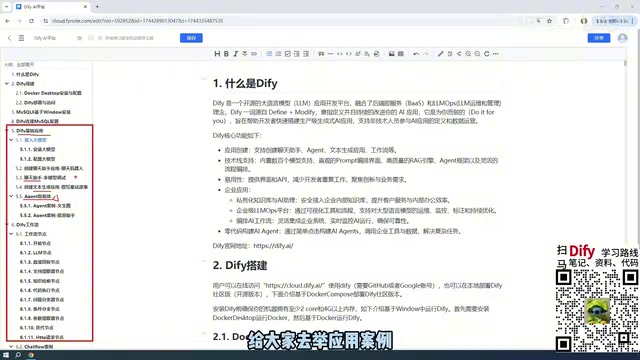
Basic Applications: Chat Assistant and Text Generation
Chat Assistant is the simplest application type — essentially a conversational interaction with an AI model. Text Generation is designed for one-time content creation, such as writing articles, generating documents, or crafting fiction. Both types have straightforward logic and are the quickest to get started with, making them ideal as your first stop when learning Dify.
From a technical perspective, Chat Assistant and Text Generation differ in their underlying API calls: Chat Assistant uses the model's Chat Completion interface, maintaining a message history list to enable multi-turn conversation context memory; Text Generation is more similar to a single Completion interface call, where you input a prompt and directly receive the complete output without retaining conversation history. Understanding this distinction helps you choose the appropriate type for real-world applications.
Advanced Application: Agent
Agent is the most capable type among the basic applications. The key difference between Agents and Chat Assistants or Text Generation is that Agents can invoke external tools, systematically combining multiple tools to fulfill complex user instructions.
Agent is one of the most cutting-edge concepts in current AI application development, with its theoretical foundation traceable to the ReAct (Reasoning + Acting) framework. Traditional LLM conversations can only generate text based on existing knowledge, but Agents introduce a "tool calling" mechanism — during the reasoning process, the LLM can determine when to invoke external tools (such as search engines, code executors, database queries, API calls, etc.), obtain real-time information, and then continue reasoning. This mechanism was popularized by OpenAI's Function Calling feature. The core loop of an Agent is: Observe → Think → Act → Observe, which enables it to handle tasks far beyond the capabilities of pure text generation.
For example, you can have an Agent first scrape web content, then analyze and summarize the retrieved data — the entire process is autonomously orchestrated by the agent. This ability to combine "tool invocation + autonomous decision-making" is the core advantage that distinguishes Agents from regular conversational applications. In Dify, you can equip Agents with various built-in and custom tools. The agent autonomously decides which tools to call, in what order to execute them, and ultimately integrates the results before returning them to the user.
Workflows: ChatFlow and Workflow
The most central application types in Dify are Workflows. There are two variants:
- ChatFlow: Supports multi-turn conversational interaction with the workflow;
- Workflow: Designed for one-off tasks — input goes in, results come out.
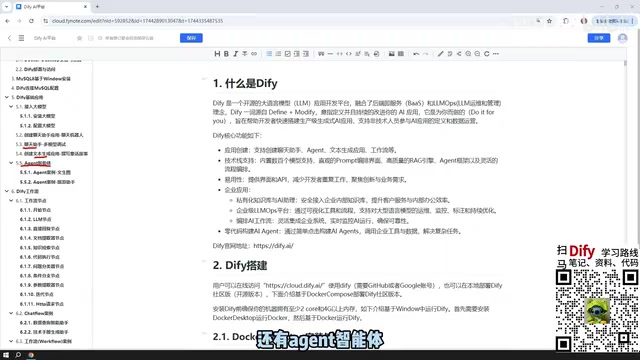
The core difference lies in the interaction mode — ChatFlow is continuous and conversational, while Workflow is single-execution. Although the current version still labels workflows as beta, they're already quite stable in practice.
The key to building workflows is understanding the concept of Nodes. A node is an individual functional module that makes up the workflow. Node-based Orchestration is a design pattern that decomposes complex processes into independent functional units connected through a directed graph. Each node handles a specific function (such as LLM invocation, conditional logic, data transformation, HTTP requests, knowledge base retrieval, etc.), and nodes pass data between each other through input/output parameters. This pattern has a long history in software engineering, from Unix pipes and Apache Airflow's DAGs (Directed Acyclic Graphs) to the visual programming tool Node-RED — all employ similar concepts. In AI application scenarios, node-based orchestration gives developers precise control over how data flows through each processing step. For example, you might first perform intent recognition, then branch into different processing logic based on the results, and finally consolidate the output — this kind of fine-grained control is difficult to achieve with purely conversational AI.
When creating a ChatFlow or Workflow, you connect different nodes together to form a complete processing pipeline. The tutorial covers over a dozen of the most commonly used nodes in detail, covering nearly all node types available on the official site, with hands-on examples for each.
Integrating LLMs: Paid APIs Recommended
All Dify AI applications need to interact with large language models, making model integration an essential step. The recommendation here is very practical: prioritize paid external model APIs, such as DeepSeekAd, ChatGPT, or Alibaba's Qwen and Baidu's ERNIE Bot (the latter two typically offer millions of free tokens).
Here it's important to understand the concept of Tokens and their billing mechanism. A token is the basic unit by which large language models process text, and it doesn't simply equate to one character or one word. For English, one token corresponds to roughly 4 characters or 0.75 words; for Chinese, one character is typically encoded as 1-2 tokens. LLM API pricing is based on separate rates for input tokens and output tokens. Taking DeepSeek-V3 as an example, its API pricing is approximately 0.5 RMB per million input tokens and 2 RMB per million output tokens (even lower with cache hits), meaning a single conversation of several hundred characters might cost less than 0.01 RMB.
Don't be put off by the word "paid" — with DeepSeek, for example, a 10 RMB top-up can last a very long time. In practice, after topping up 10 RMB and using it extensively, less than 1 RMB was consumed. The cost is extremely low.
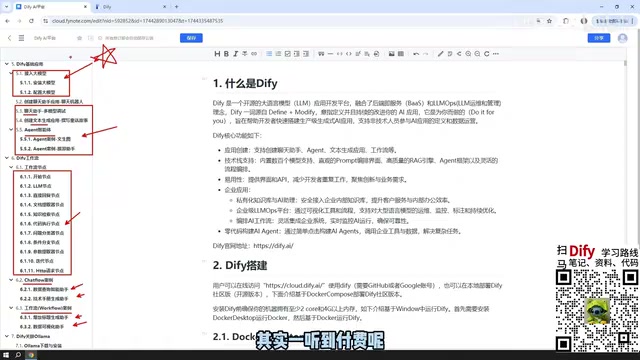
So why not use local models? Dify does support integrating Ollama local models (e.g., managing locally deployed open-source models through Ollama), but for typical personal computers, the models that can run locally usually have relatively small parameter counts, and the actual generation quality tends to be underwhelming.
Ollama is an open-source local LLM management tool that simplifies the process of downloading, running, and managing open-source large language models on personal computers. With Ollama, users can deploy models like Llama, Qwen, and Mistral with a single command. However, an LLM's reasoning capability is closely tied to its parameter count — larger models are generally "smarter," but demand more VRAM and computing power. A consumer-grade GPU with 8GB of VRAM can typically only run 7B (7 billion parameter) models smoothly, while models with noticeably better performance often require 70B parameters or more. This creates a practical dilemma: models that can run on personal computers have limited effectiveness, while effective models can't run on personal computers.
Of course, if you have access to enterprise-grade GPU clusters capable of deploying large-parameter models like DeepSeek's open-source offerings (the largest version can exceed 400GB after download), then local LLMs can deliver equally excellent results and are perfectly suitable for building enterprise-grade AI applications. For enterprises, the advantages of local LLM deployment include data sovereignty, lower latency, and controllable long-term costs, but the upfront hardware investment is significant and should be evaluated based on actual business volume and security compliance requirements.
Application Publishing: From Local Development to Public Deployment
Applications built in Dify aren't limited to use within the local Dify interface. Dify provides multiple publishing methods to give your applications real external-facing capabilities:
- Publish as a public website: Generate a link accessible to anyone (local deployments require a tunneling tool);
- Embed in an existing website: Integrate the AI application as a component (via iframe or JavaScript SDK) into your own website, allowing users to interact with the AI directly on your site with a seamless native experience;
- Call via API: Dify generates RESTful API endpoints for each application, allowing external programs to directly invoke your AI application's capabilities. This means you can integrate Dify applications into mobile apps, WeChat mini-programs, enterprise internal systems, or any environment that supports HTTP requests.
This step completes the full cycle from "development" to "deployment," enabling AI applications built with Dify to generate real business value. It's worth mentioning that Dify also provides application monitoring and logging features — you can view detailed information about each user interaction in the backend, including token consumption, response time, user satisfaction metrics, and more, providing data-driven support for ongoing application optimization.
Dify Learning Path Summary
Overall, the complete learning path for getting started with Dify can be summarized in six stages:
- Understanding Dify — Grasp the platform's positioning and core features;
- Environment Setup — Deploy Dify via Docker on Windows, install and configure the MySQL database;
- Integrating LLMs — Use low-cost paid APIs (such as DeepSeek, Qwen) as recommended;
- Mastering the Five Application Types — Chat Assistant, Text Generation, Agent, ChatFlow, and Workflow, each with hands-on examples;
- Deep Dive into Workflow Nodes — Over a dozen node examples covering core usage patterns;
- Application Publishing — Deploy your completed AI applications for external access.
For developers looking to get started with LLM application development, Dify is an entry point with an extremely low barrier. Compared to writing code that directly calls APIs, Dify's visual orchestration approach lets you focus your energy on business logic itself, making it an ideal starter tool for AI application development. After mastering Dify's fundamentals, you can further explore advanced topics such as RAG (Retrieval-Augmented Generation) knowledge base construction, multi-Agent collaboration, and complex workflow orchestration, progressively building more powerful AI applications.
Related articles

Salesforce Acquires Rune for $375M: AI Logistics Tech Bolsters Defense Business
Salesforce reportedly acquires defense tech startup Rune for $375M. Rune's AI logistics tech will strengthen Salesforce's Missionforce defense platform, continuing its M&A spree.

Why Fair Use Benefits Everyone in the AI Era
Starting from a Hacker News discussion, this article analyzes the legal logic and controversies of the fair use principle in AI training and content creation, and its dual impact on creators and the tech ecosystem.

Mistral Large 4 Open-Sources a Trillion Parameters, Microsoft Offers Voluntary Severance to 60,000 Employees
Mistral Large 4 open-sources a trillion-parameter multimodal model with a coding agent score of 48; SanDisk earnings show AI inference reshaping NAND demand; Google Gemini adds in-app file editing, OpenAI raises Codex quotas, and Microsoft offers voluntary severance to 60,000 employees.