Getting Started with Gemini CLI: Installation and Your First AI Command

Gemini CLI brings free AI to your terminal with just a Google account — no API key needed.
Google's Gemini CLI embeds a large language model into the developer terminal with minimal friction: just Node.js 20+ and a Google account, no credit card or API key required, for 1,000 free requests per day. Core capabilities span three areas: rapidly understanding unfamiliar codebases in minutes instead of hours, auto-generating complete unit test suites without manual boilerplate, and using natural language to replace throwaway bash scripts for file operations — with a permission prompt before any changes are made. Slash commands like `/stats model` and `/help` provide clear usage visibility and easy navigation.
Google's Gemini CLI brings large language models directly into the terminal. No paid subscription, no credit card, no API key required — just a Google account. With it, you can have AI read through an entire codebase, auto-generate unit tests, and handle all kinds of file operations. This guide is based on Episode 1 of the "Gemini CLI Masterclass" on YouTube, covering everything from zero to running your first command.
Prerequisites and One-Command Installation
The barrier to installing Gemini CLI is remarkably low. The only hard requirement is Node.js 20 or higher — run node -v to confirm your environment before getting started.
Once that's in place, a single npm command is all it takes to install Gemini CLI globally. After installation, it's callable from any terminal in any directory, regardless of your current project. This "install once, use everywhere" design makes it feel more like a system-level tool than a project-scoped dependency.
There are no complex config files to set up and no tedious environment variable management — a clear advantage over many AI tools that require manually handling API keys.
Node.js 20 was released in April 2023 and is the current LTS (Long-Term Support) version. Its bundled
npm(Node Package Manager) is the foundation for installing Gemini CLI. A global install (npm install -g) writes the executable to your system path — unlike a local install, which scopes the package to a project'snode_modulesdirectory and requiresnpxor a project script to invoke. If you manage multiple Node.js versions on the same machine, tools likenvm(Node Version Manager) orfnmlet you switch between them flexibly while ensuring Gemini CLI runs in a compatible environment.
Zero-Cost Authentication: One Google Account Is All You Need
After installation, run gemini and select the first option. A browser window will open automatically with an authorization page. Click your Google account, and authentication is done.

What's worth highlighting here is how frictionless the entire auth flow is: no credit card, no API key, no paywall. Once authenticated, you get 1,000 free requests per day — a quota that resets every 24 hours and is more than sufficient for most individual developers and everyday workflows.
This pricing strategy is clearly Google's move to rapidly expand its developer user base — lower the barrier to entry with a free tier, and get more people building AI tools into their daily terminal habits.
Understanding a Codebase: Minutes Instead of Hours
One of Gemini CLI's most immediate value propositions is code comprehension. Navigate into any project directory, launch Gemini, and describe what you want to understand in plain language.
With your permission, it reads through the project files and explains the structure and logic it finds. For anyone taking over an unfamiliar codebase, this compresses what used to take hours of manual review down to a few minutes of high-level understanding.
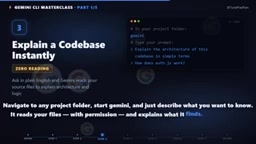
This capability is especially useful for engineers joining a new team or developers maintaining legacy projects. It doesn't write code for you — it helps you read the code first, which is often the most time-consuming prerequisite.
Slash Commands: Your Cockpit
Gemini CLI uses slash commands as its primary interaction layer. Two of the most essential ones are:
/stats model— Check how many of today's 1,000 requests you have left, so you can track usage and avoid hitting the ceiling unexpectedly./help— Pull up a list of all available commands at any time, great for exploring while you're still getting familiar with the tool.
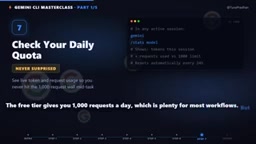
The existence of /stats model makes your free quota usage transparent — you always know where you stand, rather than getting rate-limited without warning. This kind of usage visibility is a thoughtful design detail for a responsible tool.
Auto-Generating Unit Tests
Having Gemini write tests for any given file is one of the core capabilities demonstrated in this episode. You simply point it at a target file, it reads the source code, understands the business logic, and generates a complete test suite.
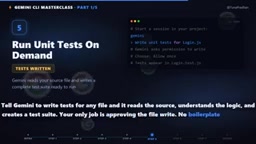
All the developer needs to do is review and approve the generated files. No more copying boilerplate by hand, no more filling in test stubs one by one. The most mechanical and tedious parts of writing tests are automated, freeing you to focus on verifying that the test logic is actually correct.
Unit tests verify the behavior of the smallest functional units in software — typically individual functions or class methods — and sit alongside integration and end-to-end tests in the classic testing pyramid. Writing them traditionally requires developers to manually reason through input/output boundaries, edge cases, and error paths for each function, then construct assertions accordingly. "Boilerplate" refers to the fixed scaffolding every test file needs — framework imports, nested
describe/itblocks, and so on. "Test stubs" are placeholder implementations that stand in for real dependencies to isolate the unit under test. Both are high-repetition, low-creativity work — exactly where AI-assisted automation delivers the most value. Gemini CLI compresses this mechanical process to seconds by reading source code to understand the business logic, then mapping it to the appropriate test structure.
Natural Language Instead of One-Off Scripts
Beyond code tasks, Gemini CLI can handle all kinds of file operations, standing in for those throwaway bash scripts you'd otherwise write from scratch. Whether it's "batch rename these images" or "merge these CSV files," you can describe the task in plain English.
The key safety mechanism: Gemini asks for permission before actually modifying any files. This keeps automated operations under control — you won't lose data because of an ambiguous instruction. Compared to writing a new script every time, giving instructions in natural language is simply faster.
A "one-off script" is a shell script written for a temporary task — typically in Bash or Python — used once and discarded. The problem with these scripts is that they require remembering specific command syntax (like
find,xargs,awk), take time to debug, and rarely get reused, accumulating into what you might call "script debt." Gemini CLI uses natural language as the abstraction layer, so users don't need to worry about implementation details — the tool translates intent into a concrete sequence of file operations. Its "ask before acting" mechanism is technically a Human-in-the-Loop design pattern: AI plans the operation steps, humans retain final approval authority. This balances automation efficiency with operational safety, preventing irreversible data loss from ambiguous batch instructions.
Wrap-Up and What's Next
At this point, Gemini CLI is installed, authenticated, and genuinely doing useful work in the terminal: reading codebases, generating tests, and handling file tasks — all at zero cost with minimal setup.
Episode 2 of the series will go deeper into file workflows, multi-file editing, and coding tasks that used to take hours. If you're looking for a free, capable AI assistant that lives in your terminal, Gemini CLI is well worth trying.
Related articles

Felix Rieseberg Personal Homepage
Felix Rieseberg's personal homepage sparks attention on Hacker News. This article covers the Slack engineer's technical background, the rise and fall of nativefier, and the value of a developer homepage as a tech calling card.

@ai-sdk/vue 3.0.306 Patch Release Syncs with [email protected] Update
@ai-sdk/vue 3.0.306 released, synced with [email protected]. A routine patch release for the Vercel AI SDK ecosystem with no public API changes; the Vue adapter layer stays version-aligned with the core package.

Gemini 4 Argon API Launches: The Era of Million-Token Output Begins
Google launches Gemini 4 Argon with sparse MoE architecture, up to 1M output tokens, and a 68.90% Vals Index score, available across API, AI Studio, and the Gemini app.