Getting Started with Microsoft Foundry: The Testing Ground Before Releasing Your Agent

Microsoft Foundry emphasizes validating models, instructions, and tools in the playground before release.
The article introduces the recommended workflow for building Agents in Microsoft Foundry, with the core idea that the playground—not code—deserves the most time before release. Foundry offers three entry points: build from scratch, deploy a model, or start with code. After creating an Agent, the platform initializes automatically and drops you into the playground, which revolves around model selection, instructions, tools, and live chat—exactly the areas where Agents most often fail. The author recommends confirming the pipeline with a hello world prompt, then adding instructions and tools one at a time with re-testing after each step. Since Agent behavior is probabilistic, configuration combinations must be tested in a controlled environment rather than left for production to expose.
Microsoft's Microsoft Foundry provides a centralized Agent development environment. Before officially releasing, the place developers should spend the most time isn't writing code—it's that unassuming playground, which serves as the first line of defense for validating model behavior, instruction following, and tool invocation.
Three Starting Points, All Roads Lead to the Same Place
After entering Foundry, the platform offers three entry points: build an Agent from scratch, deploy a model directly, or start with code. For those who want to see results quickly, starting from "Build Agent" has the lowest friction. Give the Agent a name, click create, and the platform completes initialization in the background, then drops you straight into the playground.
The design intent is clear: shorten the distance from "wanting to do it" to "being able to try it." There's no need to first sort out environment configuration or scaffolding—the creation action itself completes resource preparation.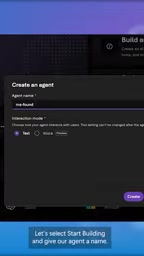
The Difference Between Model Deployment and Agent Building
The "Deploy Model" entry point targets scenarios that only need model inference capability; after deployment you get a directly callable endpoint, without instruction orchestration or tool scheduling logic. "Build Agent" layers system instructions, tool sets, and conversation state management on top of this—essentially wrapping a layer of behavior control around the model. The two aren't mutually exclusive: the same deployed model can be referenced by multiple Agents. For scenarios requiring multi-turn conversations, external tool calls, or specific role settings, the Agent-building path is more suitable; if you're just doing single-pass text generation or classification, deploying a model directly is lighter weight. Which entry point to choose depends on whether you need "behavior" and not just "capability."
Playground: The Single Source of Truth Before Release
Once you land in the playground, the interface revolves around four things: select a model, write instructions, configure tools, and chat directly. These four items happen to correspond to the areas where Agents most often go wrong after launch—wrong model selected, vague instructions, tools not connected properly, and actual conversations going off track.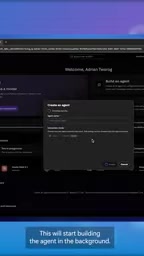
The demo uses the simplest hello world prompt to confirm the pipeline is working. This action seems mundane, but it's a necessary baseline check: first confirm you can get a response, then tune complex logic. If even basic Q&A isn't stable, the instructions and tools layered on later will only amplify the problem.
What's truly worth paying attention to is the combined effect of these four configurations. Model capability determines the ceiling, instructions determine behavioral boundaries, tools determine the executable scope, and the conversation interface exposes all of these at once.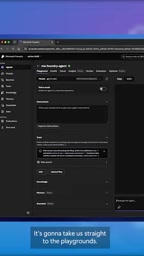
The Relationship Between Playground and the Real API
The Playground is not an independent simulation environment—it calls the same model endpoints and tool connectors as production deployments. That is, the response latency, tool call success rate, and instruction-following degree observed in the playground can largely be extrapolated to post-release performance. Differences mainly appear in quotas, concurrency, and authentication—the playground typically uses development-level quotas, while production environments have independent throughput limits. Therefore, the playground is suitable for validating behavioral correctness, but not for stress testing or cost accounting. Understanding this helps avoid two misjudgments: first, treating the playground's stable performance as a production guarantee; second, rejecting the overall approach because of occasional playground timeouts.
Why "Test Before Release" Deserves Special Emphasis
The difference between Agents and traditional applications is that their behavior is probabilistic. With the same prompt, changing the model, tweaking a sentence of instructions, or adding one more tool can produce completely different output. The value of the playground is letting these variables be repeatedly tested in a controlled environment, rather than waiting for users to discover problems for you in production.
From a product flow perspective, Foundry places testing between creation and release, rather than as after-the-fact remediation. This ordering consideration says more about the platform's understanding of the Agent lifecycle than any single feature: release is not a click action, but a natural result after testing passes.
One-Sentence Advice
If you're building an Agent in Foundry, don't rush to find the release button. First get hello world running in the playground, then add instructions and tools one by one, testing again after each addition. This clumsy approach can save you a lot of online rework.
One-line Summary
Microsoft Foundry emphasizes validating the combination of model, instructions, and tools in the playground before release.
Related articles
Fable 5.2's Self-Improvement Loop Accelerates as Gemini 4 Carbon Closes In
Anthropic Fable 5.2 and Google Gemini 4 Carbon launch together, Remote Labor Index doubles, self-improvement loop accelerates, but benchmark flaws and evaluation awareness persist.
Meta FAIR Releases e-means: A New k-means Alternative That Converges 10x Faster
Meta FAIR releases e-means in FAISS 1.16.0, replacing mini-batch k-means with ~10x fewer epochs, 10-45x GPU speedup, and no new hyperparameters.
AI Is Great at Writing Code, So Why Are Codebases Becoming More Fragile?
AI coding tools boost efficiency but may make codebases fragile. Based on a developer blog and Hacker News discussion, this article analyzes the hidden costs of AI-generated code, community divisions, and practical suggestions for reducing risks.