Getting Started with n8n: A Deep Dive into the Self-Hostable Workflow Automation Tool

n8n is an open-source, self-hostable workflow automation platform with code support and AI Agent capabilities — a flexible Zapier alternative.
n8n is an open-source workflow automation tool launched in 2019 that lets users connect hundreds of popular services through visual nodes, or write JavaScript and Python directly inside nodes for complex logic. Its biggest differentiator from SaaS tools like Zapier is full self-hosting support — deployable with a single Docker command, keeping data and costs under your control. n8n has gained rapid traction in AI development circles thanks to its built-in AI Agent node, which integrates a language model, memory, and callable tools into a unified interface, upgrading workflows from mechanical data-shuffling to intelligent, reasoning-capable agents. Every run is saved as an execution record for precise fault tracing, reducing maintenance overhead. Whether automating daily operations or prototyping AI workflows, n8n delivers a solution that balances ease of use with flexibility.
What Is n8n
n8n is a workflow automation tool that lets you connect apps like snapping LEGO bricks together — and when the built-in pieces aren't enough, you can always drop into real code. The name is pronounced "n-eight-n" and is short for Nodemation. The project was started by Jan Oberhauser in Berlin in 2019.
If you've used Zapier before, think of n8n as its open-source alternative — with one key difference: n8n supports self-hosting, and its source code is available under a Fair-code license. You can run it entirely on your own server, freeing yourself from per-task billing. For teams with high automation volume, strong data privacy requirements, or a desire to control costs, this is a genuinely compelling option.
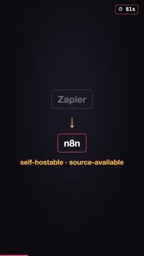
Fair-code isn't a standard open-source license — it's an authorization model proposed by the n8n team that sits between open source and commercial software. It allows anyone to view, modify, and self-host the source code, but restricts using the software as a hosted service sold commercially (i.e., you can't take someone else's code and resell it as a cloud service). The key difference from traditional open-source licenses like MIT or Apache is that those typically place no restrictions on commercial use, whereas Fair-code keeps the code open while preserving certain commercial protections for the original authors. For regular users and internal enterprise use, this restriction is almost never a barrier — you can self-host for free, fork it, and use it in production. You only need to negotiate a commercial license with the team if you plan to wrap n8n itself into a SaaS product and sell it to others.
Core Mechanics: Triggers and Nodes
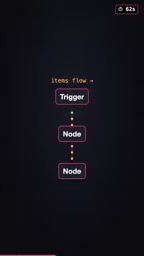
Every n8n workflow starts with a trigger. A trigger can be a webhook, a scheduled time, a new email, or a new row added to a spreadsheet. Once the trigger condition is met, data begins flowing through nodes.
The logic of each node is straightforward: receive input items, do one specific thing, then pass the result to the next node. This "single input, single output, single responsibility" design means complex processes can be broken down into clear, readable steps.
n8n comes with hundreds of built-in integrations covering popular services like Slack, Gmail, Google Sheets, Postgres, Notion, and Stripe. There's also a universal HTTP node for connecting to any API that doesn't have a dedicated node. In other words, there's almost no service it can't reach.
When Built-in Nodes Aren't Enough: The Code Node
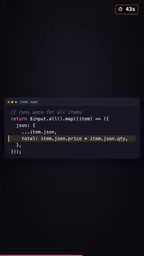
Visual nodes are convenient, but they have their limits. n8n addresses this with the Code Node, which lets you write JavaScript or Python directly inside your workflow. This means low-code convenience and full programming power can coexist seamlessly — use drag-and-drop for simple logic, write code for complex processing, without ever having to switch between two separate systems.
Why n8n Has Become a Favorite for AI Use Cases
n8n has gained significant popularity in the AI application space in recent years, primarily because of its AI Agent node. This node connects a language model, memory, and tools together, enabling workflows to "think" before they act.
This capability elevates n8n from a simple "trigger-and-execute" automation tool to a platform capable of hosting intelligent agent logic. You can build an automation that reads context, calls external tools, and makes decisions — rather than just mechanically shuffling data. For developers looking to rapidly prototype AI workflows, this significantly lowers the barrier to entry.
An AI Agent is an AI system capable of autonomously planning and executing multi-step tasks — fundamentally different from the traditional "input question → output answer" single-turn conversation model. Its core architecture typically includes three components: a language model responsible for understanding intent and generating decisions; memory for retaining context across multiple interactions (such as conversation history or user preferences); and tools, which are external capabilities the model can actively invoke, such as searching the web, querying a database, or sending an email. n8n's AI Agent node encapsulates all three into a unified interface, allowing developers to attach tools and configure memory strategies in a visual editor — without manually writing glue code for frameworks like LangChain or LlamaIndex. This dramatically lowers the technical barrier to building "AI that can use tools."
Deployment and Operations
Self-hosting n8n is straightforward: a single Docker command gets it running, and then you open localhost:5678 in your browser and you're ready to go. If you'd rather not manage your own server, you can use the official n8n Cloud service instead.
One particularly thoughtful operational design: every run is saved as an execution record. When something goes wrong, you can see exactly which node failed and what data it received at the time. This traceability is critical for debugging complex workflows and eliminates a lot of time spent on blind troubleshooting.
Typical Use Cases
n8n's value is easiest to see in real-world scenarios. A few common examples:
- Automatically send a Slack notification whenever a new order is placed;
- Use AI to summarize your inbox every morning;
- Back up a database automatically at midnight.
What these tasks have in common: none of them require you to write a backend service yourself. n8n handles the triggering, data flow, and integrations — developers can focus purely on the business logic.
Summary
With its three defining characteristics — open source, self-hostable, and code-extensible — n8n occupies a unique position in the workflow automation space. It preserves the ease of use of visual tools while leaving plenty of room for advanced users to code, and its native support for AI Agents makes it a popular choice for building automated and intelligent workflows today. Whether you're an individual developer or a technical team, it's well worth taking the time to explore.
Related articles

Chain of Thought Isn't Just for AI: How Humans Can Use CoT to Improve Thinking Quality
Chain of Thought isn't just a prompt trick for large models. Starting from a Hacker News discussion, this article analyzes why CoT works for human thinking too, breaks down actionable ways to transfer it, and highlights the key differences between human CoT and machine CoT.
Cloudflare Teams Up with OpenAI: Closi…
Cloudflare Teams Up with OpenAI: Closing the Loop from Vulnerability Discovery to Defense with AI
Cloudflare uses OpenAI Daybreak to investigate security vulnerabilities and generate reviewable remediation plans, while developers use Codex to boost coding efficiency and quality.

Orca Multi-Agent Orchestration in Practice: A Guide to Parallel Collaboration with Claude and Codex
Orca is Stable AI's free open-source agent workbench supporting 34 agents like Claude Code and Codex in parallel. Learn its Git worktree isolation, multi-model orchestration, and mobile management.