Getting Started with n8n: Build Your First AI Workflow from Scratch

Build a Chat Trigger + AI Agent + Gemini auto-reply workflow with n8n in one hour.
This article recaps a beginner-focused AI Automation Bootcamp built around the open-source tool n8n. It covers the difference between basic rule-based automation and intelligent AI automation, explains n8n's three core concepts (nodes, triggers, and workflows), and walks through a hands-on session where students debug a workflow step by step — adding a Chat Trigger, AI Agent, and Google Gemini model — until it can hold a real conversation. The session also touches on memory components and System Prompts as next-level configurations, with Telegram integration as the next goal.
Getting Started with n8n: Build Your First AI Workflow from Scratch
Automation is quickly becoming one of the most underrated — yet most in-demand — skills in the modern workplace. An online AI Automation Bootcamp for beginners packed everything from "what is automation" to "building your first AI-powered auto-reply workflow with n8n" into a single hour. This article distills the core lessons from that session to help you understand n8n's fundamental logic and build your own entry-level AI Agent.
What Is Automation, and Why Should You Learn It?
The course offered a clear, concise definition: automation means "making a task happen automatically without doing every step manually."
The instructor used one of the most relatable examples — a receptionist — to illustrate the concept. The traditional workflow goes: customer sends a message → someone reads it → understands the request → writes a reply → sends it back. Repeat that loop all day, and one person can only handle a limited number of customers. With automation, a system can read, understand, and respond to messages 24/7 with virtually no human intervention.
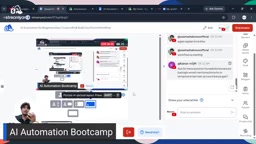
The instructor also did a live search on job platforms, pulling up listings for "automation jobs in Karachi" and "go high level jobs" on Indeed and Google — finding plenty of roles with salaries ranging from $70K to $150K. The takeaway was blunt: automation's value is rising every day, and failing to develop these skills puts you at risk of being left behind.
Two Types of Automation: Basic vs. AI
The course drew a distinction between two categories of automation — an important split for beginners trying to make sense of the broader landscape.
Basic Automation
This is rule-based automation with no intelligent decision-making. A classic example is Google Sheets combined with Apps Script: automatically saving emails and attachments to a spreadsheet, or sending scheduled emails. The instructor noted that on freelance platforms like Fiverr, competition for "Google Apps Script" gigs is relatively low — some services show 40 to 240 orders, but overall demand still outpaces the competition compared to more mainstream tools.
AI Automation
This category is about using AI "to understand information, make decisions and perform intelligent tasks." The instructor shared a real project: building a website and automation system for a dental clinic. Previously, if a patient messaged at midnight to book an appointment, the front desk couldn't respond in real time. After deploying AI automation, the system could understand the patient's intent (e.g., "my tooth hurts, I need an appointment"), check available time slots, complete the booking, and notify both the doctor and the patient — all without any human involvement.
Meet n8n: Open Source, Free, and Template-Rich
The bootcamp's tool of choice was n8n. The instructor described it as an "automation framework" — a platform that comes pre-loaded with a huge library of tools and modules, so your job is simply to understand the process and wire up your own workflows.
The reasons for choosing n8n were clear:
- Rich template library: 2,500+ ready-made automation templates built in, easy to adapt and reuse
- Free and open source: Use it online via the official site, or download and self-host it
- Beginner-friendly: Low barrier to entry with an intuitive visual interface
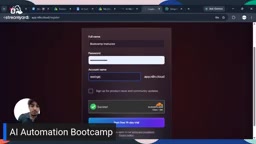
The instructor personally recommended the cloud version, while noting that those who want full control can self-host following the official documentation. During signup, he demonstrated a handy trick — using a temporary email (temp mail) to claim the 14-day free trial without burning a Gmail address.
n8n (pronounced "n-eight-n") gets its name from "nodemation" — node-based automation. It was released in 2019 by German developer Jan Oberhauser under a "Fair Code" license: the core functionality is fully open source, but commercial hosted services require payment. Compared to similar tools like Zapier and Make (formerly Integromat), n8n's biggest differentiator is self-hosting: you can deploy the entire system on your own server, keeping data out of third-party hands and giving you full control over privacy and costs. SaaS tools like Zapier charge per task execution, so costs escalate quickly at scale. A self-hosted n8n instance, once deployed, incurs virtually no additional cost per execution — a major economic advantage for high-frequency business automation. n8n currently includes built-in integrations for over 400 third-party apps, covering popular tools like Gmail, Slack, Notion, Airtable, and Stripe.
Core Concepts: Nodes, Workflows, and Triggers
Understanding n8n comes down to three key concepts.
Nodes
Nodes are n8n's basic building blocks. The instructor used a helpful analogy: if a workflow is a machine, each node is one of its components — some receive information, some send it, some process data, and some connect to external apps. String multiple nodes together and you get a complete workflow.
Triggers
Every workflow needs a starting point. The instructor compared it to needing electricity before a fan can spin — without a trigger condition, automation simply won't run. Trigger types vary widely: a Telegram trigger (fires when a message is received), a WhatsApp trigger, and so on. For testing purposes in the course, a Chat Trigger node was used — it starts the workflow whenever a chat message comes in.
Workflows
Nodes connect to each other to form a workflow, and the entire process is built and executed on the workflow canvas.
Hands-On: From "Only Receives" to "Intelligently Replies"
This was the most instructive part of the session. The instructor started with just a single Chat Trigger node, typed "Hi," and the workflow turned green — technically a successful execution. But the response was a string of unintelligible random content, with no actual reply.
What went wrong? The instructor walked students through the reasoning: nothing downstream was there to receive and process the message. The Chat Trigger only handles receiving — it passed the message along, but found nothing on the other end. This "error" became the best teaching moment of the session. As the instructor kept emphasizing: you only truly understand the logic when you've hit the wall yourself.
The fix involved adding two key components:
- AI Agent node: Think of it as hiring an employee or intern whose job is to understand incoming messages, make decisions, and send replies. With an Agent in place, you don't need to configure a separate model for every trigger — one Agent handles everything.
- Chat Model: Connecting a "brain" to the Agent. The course used Google Gemini.
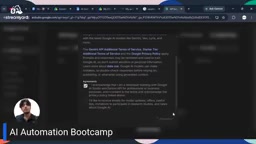
Configuring Gemini requires an API Key. The instructor took a moment to explain the concept — API stands for Application Programming Interface, and at its core it means "using something someone else already built, rather than building it yourself from scratch." Since we're not about to build our own chat model, we use an API Key to plug directly into Gemini or ChatGPT. To get one, search "Gemini API" on Google, go to the API Key page, create a new key, copy it, and paste it into n8n's New Credential dialog.
The instructor also flagged an important nuance: different models have different capabilities — some respond fast but with lower quality, others are better but slower and more expensive. During the demo, Gemini 3.5 Flash threw a "Service Unavailable" error, and the instructor had to switch to 3.6 Flash to get things running again — a live reminder that model availability can directly affect your workflow.
With the Agent and model connected, typing "Hi" now returned a perfectly normal: "Hello, how are you doing today? How can I help you?" At that point, a basic AI reply workflow was fully up and running.

Going Further: Memory and System Prompts
Once the workflow was running, the instructor tested one critical capability: memory. When he asked "Can you see my previous messages?" the AI flatly said no — because by default, the Agent has no memory and cannot retain context across turns. Enabling conversation memory requires adding a dedicated memory component to the Agent.
Another advanced configuration is the System Message. The instructor compared it to briefing a new intern on their role: by adding a System Message in the Agent's Options, you can tell the AI "You are a dental clinic manager responsible for handling X, Y, and Z," making it behave according to a specific role and set of rules. There are also two connection modes: "Connected Chat Trigger" automatically uses the linked node, while "Define Below" lets you manually specify which node to connect (such as a Telegram node).
The reason AI Agents have no memory by default comes down to the stateless nature of large language models: every API call is an independent request, and the model doesn't automatically retain anything from the previous turn. In n8n, there are two common approaches to adding memory: Window Buffer Memory, which stores the last N messages in memory and includes them with each request (lightweight, suitable for short conversations); and connecting an external database like Redis or PostgreSQL to persist full conversation history (better for long-term memory needs like customer service or booking systems). Keep in mind that more stored messages mean more tokens sent per request, which increases both cost and latency — in production, you'll need to balance "memory length" against "cost and speed." The System Prompt, sent at the very top of every request with the highest priority, is the most direct and effective way to define the AI's role, tone, and behavioral boundaries.
Wrapping Up and What's Next
In just one hour, this introductory session covered a complete loop from concept to working prototype: understanding the value of automation → getting to know n8n → mastering the three core concepts of nodes, triggers, and workflows → building a functional "Chat Trigger + AI Agent + Gemini" workflow that can actually reply.
The instructor's homework for students: practice the workflow built today until it's second nature, in preparation for the next step — wiring the whole setup into Telegram for real-world use cases like automated message replies and appointment scheduling.
For beginners, the real value of this learning path isn't memorizing where the buttons are. It's about developing the mental model of trigger → process → respond. Tools will come and go, but that underlying logic is universal.
Related articles

Receipt Forgery Detection Near Random? Real-World Struggles and Solutions in Document Image Forensics
A receipt forgery detection project with ROC-AUC near random reveals the pitfalls of small-sample document forensics. Explores anomaly detection, self-supervised pre-training, and numerical consistency as viable alternatives.

From Workflows to Eval-Driven Development: A Paradigm Shift in How We Solve Problems with AI
AI problem-solving is shifting from deterministic workflows to "define evals + hillclimb." This piece explores how eval-driven development reshapes tasks, data vendors, human roles, and Agent UX.

Tesla Powerwall + Electric Vehicle: A Dual Backup Power Solution for Outages
Tesla Powerwall combined with EV bidirectional charging can provide multi-layer home backup power during outages. We break down runtime, V2H realities, and Supercharger loop feasibility.