Getting Started with Sparrow Studio: A Complete Guide to the All-in-One Ecological Data AI Analysis Platform

Sparrow Studio unifies ecological data upload, AI analysis, annotation, and export in a single platform with 53 built-in models.
Sparrow Studio is a data processing and management platform built for ecological researchers, integrating field monitoring data upload, AI-automated analysis, manual correction, and export into a single end-to-end pipeline. With 53 built-in models (22 detectors, 27 classifiers, 2 aerial models) and support for 4G cameras, Sparrow Edge devices, drones, and GPS sensors, it organizes work into projects that can be configured for archived data, real-time streams, or edge device pipelines. AI results can be manually re-annotated to fix errors, and data can be exported as PDF or CSV for reporting and further scientific analysis.
What Is Sparrow Studio?
Sparrow Studio is a data processing and management platform designed for ecological researchers. Its core goal is to integrate ecological data upload, analysis, and export into a single unified workflow. For researchers who routinely deal with massive volumes of field monitoring data, juggling multiple separate tools is time-consuming and inefficient — Sparrow Studio aims to reduce that complexity through a unified platform.
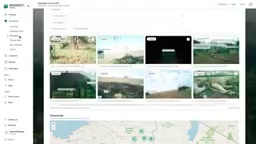
According to the official tutorial, the platform supports multiple data sources: you can upload historical archived data or connect near-real-time images, audio, and video. This data can come from 4G-connected cameras, the official Sparrow Edge devices, or third-party drones. The platform also supports integration with third-party sensors such as GPS tracking tags, adding a location dimension to wildlife behavior and distribution research.
Model Zoo: 53 Pre-Built AI Models
One of Sparrow Studio's core capabilities is that once data is uploaded, analysis is automatically handled by the platform's built-in Model Zoo. This means researchers can obtain structured recognition results without having to build or train models themselves.
According to figures disclosed in the tutorial, the platform currently offers 53 models, including 22 detectors, 27 classifiers, and 2 aerial models. Detectors locate targets within images or video, classifiers determine the species or category of each target, and the aerial models are specifically optimized for high-altitude, top-down imagery captured by drones.
This combination of detection + classification + aerial analysis covers the most common task types in ecological monitoring. For users, the key value lies in not having to invest heavy engineering resources in model selection and deployment — instead, they can focus their energy back on the science itself.
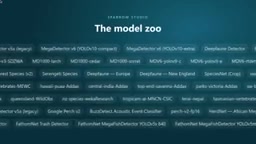
The division of labor between detectors and classifiers is well-defined in computer vision pipelines. Detectors (typically based on architectures like YOLO or Faster R-CNN) output bounding boxes and confidence scores for targets in an image — answering the question "where is the target?" Classifiers then build on the regions identified by detectors to answer "what is the target?" — for example, assigning a specific species to a detected animal silhouette. This two-stage design is more practical than single-stage end-to-end classification in ecological settings, since field images often contain multiple individuals, complex backgrounds, and occlusion. Detecting first and then identifying effectively improves accuracy and reduces missed detections. Aerial-specific models face additional challenges such as scale distortion and extremely small target sizes from high-altitude perspectives, and typically require targeted adjustments to both training data and model architecture.
Project Structure and Data Processing Workflow
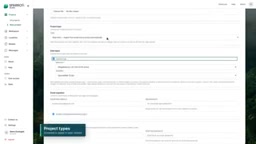
The starting point for using Sparrow Studio is creating a project, then assigning one or more models to that project to analyze the uploaded data. The platform offers several project types, including those mentioned in the tutorial:
- Archived data processing: Batch analysis of historical data collected previously;
- Real-time data processing: On-the-fly recognition for near-real-time data streams;
- Data processing pipelines: Pipeline-style processing for compatible devices or Sparrow Edge devices.
This project-based design — where models are attached on demand — allows different research scenarios to use different analysis configurations. Whether revisiting monitoring footage from years ago or processing live images just transmitted from a camera, everything can be organized under the same logical framework within a single platform.
Edge computing here refers to the Sparrow Edge device performing some computation locally at the point of data capture, rather than transmitting all raw data to the cloud for processing. This architecture offers clear advantages for field monitoring: remote locations often have limited network bandwidth, so offloading initial detection or filtering tasks to an edge device can significantly reduce upstream data volume, lower transmission costs, and shorten the latency between capture and result. Edge devices typically run lightweight models (such as quantized or pruned versions), while more complex classification tasks are handled by the cloud platform — creating a workflow of "edge pre-filtering + cloud fine-classification."
Result Management, Re-Annotation, and Data Export
Another key emphasis of Sparrow Studio is making AI model predictions easy to manage. Since AI recognition inevitably produces occasional errors, the platform provides a re-annotate feature — when a data item is misclassified, users can manually correct it to ensure the accuracy of the final dataset. This is especially important in research contexts, where data quality directly determines the credibility of scientific conclusions.
For data export, the platform supports two primary formats: PDF is suitable for generating reports and presenting findings, while CSV makes it easy to import data into other scientific tools or data processing platforms for further analysis. This open export capability signals that Sparrow Studio is not intended to be a closed data silo — it is designed to fit into researchers' existing workflows.
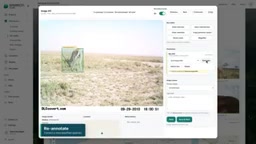
Re-annotation plays a role in ecological AI workflows that goes beyond error correction — it also serves as a data source for continuous model improvement. Manually corrected annotation data can be fed back into fine-tuning pipelines, helping models gradually adapt to the specific species composition, lighting conditions, and camera angles of a particular research site. This human-in-the-loop mechanism is especially critical in ecological monitoring, where images from different habitats, seasons, and device models can vary significantly in distribution. Relying solely on general pre-trained models often introduces systematic biases, and ongoing manual correction with data feedback is the primary means of closing that domain gap. CSV export also makes it straightforward to import corrected annotations into other annotation tools or training frameworks.
Significance for Ecological Research Workflows
By linking upload, AI-automated analysis, manual correction, and multi-format export into a single chain, Sparrow Studio is fundamentally providing an end-to-end processing pipeline for ecological data. Unified ingestion from multiple sources — cameras, edge devices, drones, and sensors — combined with an out-of-the-box model library, lowers the technical barrier to entry. Re-annotation and standardized export, meanwhile, address the scientific community's requirements for data accuracy and reusability.
As the first episode in a tutorial series, this video is primarily conceptual in nature. According to official guidance, subsequent episodes will cover how to create an initial project, the differences between project types, and how to assign different models to a project. For research teams interested in combining field monitoring with AI, this platform is worth following closely as its specific features continue to mature.
Related articles

JobRunner MCP Server: AI Agents Can Now Fix Failed Java Jobs
JobRunner launches an open-source MCP server enabling AI agents to view cluster status, diagnose failures, and recover Java jobs—incident response from any cloud coding environment or existing agent.

MLAI Digital Launches 9 Security Agents: MCP Server Safeguards the Full Lifecycle of Agentic AI
MLAI Digital launches Security MCP Server with nine built-in specialized security agents covering vulnerability discovery, attack simulation, prompt injection detection, API and infrastructure assessment, and accelerated remediation—embedding security validation across the full Agentic AI lifecycle from development to production.

Running Isaac Lab on H100 GPUs: Exploring Better Approaches
Exploring optimization methods for running Isaac Lab on NVIDIA H100 GPUs, including MIG configuration, mixed precision, TensorRT acceleration, and community experience to improve robotics simulation and reinforcement learning efficiency.