Getting Started with Tencent WorkBuddy: A Desktop AI Agent That Actually Gets Things Done

WorkBuddy is a desktop AI agent for Chinese professionals that executes tasks directly — not just gives advice.
Tencent WorkBuddy is a desktop AI agent that directly operates your local computer and integrates with WeChat, Feishu, DingTalk, and Tencent Docs to complete real office tasks like file organization, data summarization, and automated reporting. Compared to the more powerful but technically demanding Codex, WorkBuddy requires zero configuration, offers free daily credits, and is far more accessible for non-technical users. The article's core argument: AI's value lies in execution, not advice — and users should shift their mindset from asking AI questions to managing AI like an employee.
From AI Questioner to AI Manager
You've learned all those prompting techniques — but did your paycheck go up? Behind that uncomfortable question lies a truth most people overlook: prompts are just suggestions, and suggestions aren't worth much. Execution is what counts.
Most people use AI by opening a chat window, asking questions, copying the output, and then manually carrying out the work themselves. It looks like we're using AI, but it's really more like we're working for AI — the AI hands out advice, while the real dirty work still falls on us and our mouse and keyboard. WorkBuddyAd, released by Tencent, is designed to close exactly that gap. It's a desktop AI agent that can directly operate your local computer and complete real office tasks — not just another Q&A tool.
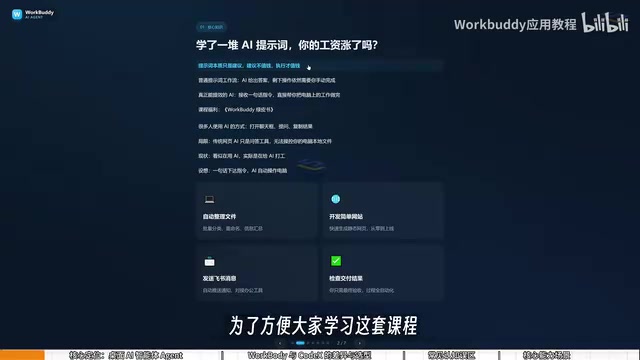
This shift in positioning calls for a corresponding shift in how you think about using it: move from "asking AI questions" to "managing AI to do work." Here's a useful analogy — you're the manager, WorkBuddy is your employee, and your computer is the company. You give instructions in plain language; it handles the research, execution, and delivery. You just review the results.
What WorkBuddy Actually Does
WorkBuddy's core value lies in its deep integration with China's office software ecosystem. It connects with WeChat, WeCom (企业微信), Feishu, DingTalk, Baidu Netdisk, Tencent Docs, and other mainstream domestic platforms — making its practical use cases highly relevant to the everyday workflow of Chinese professionals.
Based on the original tutorial, it covers several high-frequency office needs:
- File management: Batch sorting, batch renaming, and multi-document summarization of local files. For example, if you recorded a course and named files 01, 02, 03, then had to merge a session mid-way and the numbering got scrambled, manually renaming everything is a nightmare — just tell WorkBuddy in one sentence and it'll handle the reorganization.
- Data and document processing: Automatically extracting key data from a 50-page PDF to generate a PPT outline, consolidating files from a WeChat group into an Excel spreadsheet, or pulling Baidu Netdisk materials to write a Feishu weekly report.
- Collaboration and automation: Monitoring spreadsheet updates and automatically pushing daily reports via WeCom, sending a voice message on mobile WeChat to remotely trigger software on your desktop and export data, or generating periodic work summaries.
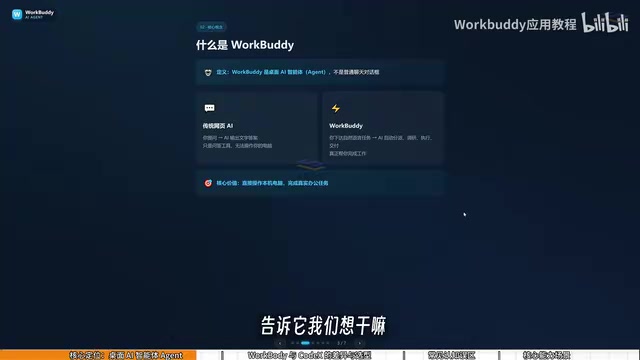
What all these capabilities share is that they no longer "tell you how to do something" — they do it for you. As long as the instruction is reasonable, WorkBuddy can take the task all the way to an actual deliverable.
The fundamental difference between an AI agent and a standard AI chat tool lies in tool-calling capability. Standard large language models can only output text. Agents, by contrast, are granted permission to invoke external tools — including reading and writing the local file system, controlling GUI interfaces (simulating mouse clicks and keyboard input), and calling third-party software APIs. WorkBuddy is built on exactly this architecture: it receives a natural language instruction, automatically breaks it down into subtasks, invokes the corresponding tool modules in sequence, and returns real files, data, or action results — not just recommendations. That's why it can "do it for you" rather than "tell you how."
WorkBuddy vs. Codex: Why Learn This One First
Many people first hear about Codex when they start exploring desktop AI agents. If Codex is more powerful, why bother learning WorkBuddy?
Here's a fitting analogy: if Codex is a special forces operative, WorkBuddy is a college graduate hire. Special forces are formidable, but they need a commanding officer to lay out a detailed operational plan — you have to specify the exact file, the exact directory, the parameters for execution. That requires real technical skill and experience, often involving environment setup, command-line work, and a VPN. WorkBuddy, on the other hand, is an eager, capable graduate — install it and go, zero configuration, just scan a QR code to get started. It can't handle highly complex tasks, but for everyday work like organizing files and sending documents, it's more than capable.
The differences come down to three areas:
Ease of Getting Started
WorkBuddy is ready to use right out of the box — no environment setup or command line required. Codex has a steeper learning curve and is better suited for users with a programming background.
Ecosystem Fit
WorkBuddy is deeply integrated with domestic office tools like Feishu, DingTalk, WeCom, and Tencent Docs. Codex is more oriented toward international platforms and has limited support for Chinese software.
Cost
WorkBuddy gives out free daily credits — check in every day for a month and you can accumulate around 3,000 credits, with bonus credits available during promotional events. Codex runs on a subscription model, meaning you're paying real money even while you're still learning.
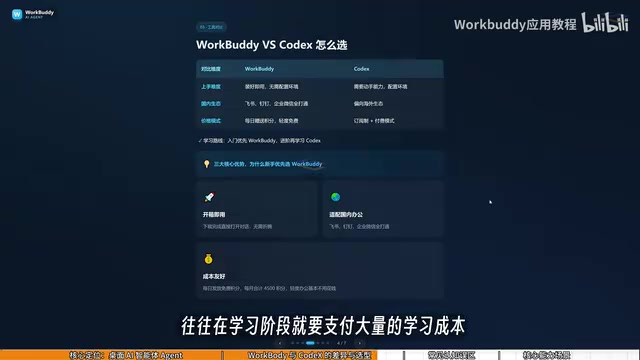
For the average professional, a practical learning path looks like this: start with WorkBuddy to get real work done — it covers the vast majority of use cases. Only once you hit a genuine ceiling should you move on to Codex and the additional investment that requires. A manager might not be ready to command special forces just yet, but directing a capable new hire? Absolutely.
Codex was originally launched by OpenAI as a code generation model, and has since evolved into an agent product that can autonomously write and run code within a sandbox environment. Its power lies in handling highly complex logical tasks — automated web scraping, data cleaning scripts, bulk API calls, and the like. But that power comes with the expectation that users can precisely define task boundaries and verify whether the code output matches their intent. For professionals who have never touched a command line or thought in programming logic, that cognitive barrier is real.
Three Common Misconceptions
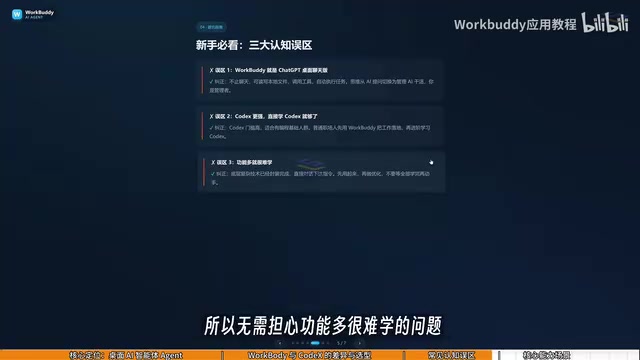
New users often approach tools like this with a few mistaken assumptions. Clearing them up early saves a lot of wasted effort.
Misconception #1: WorkBuddy is just a desktop chat version of ChatGPT. Not quite. It's not limited to conversation. Beyond giving advice like GPT does, it can read local files, call external tools, and autonomously execute tasks. The key is shifting your mindset from "asking AI questions" to "managing AI to do work."
Misconception #2: Codex is more powerful, so I should just learn Codex directly. Codex has a higher barrier to entry and is better suited for people with a programming background. For most professionals, the right move is to get real work done with WorkBuddy first, and only consider upgrading once you've actually outgrown it.
Misconception #3: It has so many features, it must be hard to learn. WorkBuddy's interface is very similar to tools like Doubao, Tongyi, and GPT. Learning it isn't about mastering a new UI — it's about changing how you frame your input, shifting from asking questions to issuing directives. You can absolutely follow along with tutorials and learn as you go.
Takeaway
WorkBuddy's real significance isn't in its feature count — it's in the shift it represents, moving AI from "Q&A tool" to "action-oriented employee." When AI can directly operate a computer and deliver real outputs, users need to evolve their role from AI questioner to AI manager.
For professionals in China, WorkBuddy's zero-configuration setup, native ecosystem integration, and low cost make it an extremely accessible entry point. Get fluent with WorkBuddy first, internalize how desktop AI agents work, and then level up to more specialized tools like Codex. That's a practical, realistic learning curve.
Related articles

Chain of Thought Isn't Just for AI: How Humans Can Use CoT to Improve Thinking Quality
Chain of Thought isn't just a prompt trick for large models. Starting from a Hacker News discussion, this article analyzes why CoT works for human thinking too, breaks down actionable ways to transfer it, and highlights the key differences between human CoT and machine CoT.
Cloudflare Teams Up with OpenAI: Closi…
Cloudflare Teams Up with OpenAI: Closing the Loop from Vulnerability Discovery to Defense with AI
Cloudflare uses OpenAI Daybreak to investigate security vulnerabilities and generate reviewable remediation plans, while developers use Codex to boost coding efficiency and quality.

Orca Multi-Agent Orchestration in Practice: A Guide to Parallel Collaboration with Claude and Codex
Orca is Stable AI's free open-source agent workbench supporting 34 agents like Claude Code and Codex in parallel. Learn its Git worktree isolation, multi-model orchestration, and mobile management.