Getting Started with Tencent WorkBuddy: From AI User to AI Manager

Tencent WorkBuddy is a low-barrier desktop AI agent that executes real office tasks on your local computer.
WorkBuddy is Tencent's desktop AI Agent that converts natural language instructions into real computer actions, rather than just outputting text advice. It integrates deeply with Feishu, DingTalk, WeCom, Tencent Docs, and Baidu Netdisk, covering high-frequency tasks like batch file processing, weekly report generation, Excel consolidation, and cross-platform messaging. Compared to the more capable but steeper Codex, WorkBuddy requires no environment setup or coding knowledge and offers a daily check-in credit system to reduce costs — making it the most accessible entry point for ordinary office workers who want AI to genuinely handle real work.
What Is WorkBuddy: A Desktop AI Agent That Actually Gets Things Done
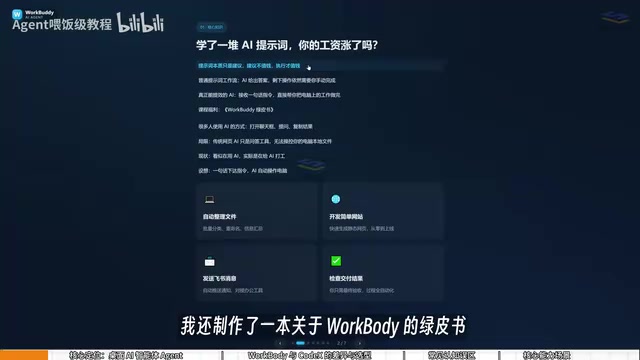
Most people still use AI the same way: open a chat window, ask a question, copy the answer. This approach might feel productive, but it's fundamentally just using AI as a Q&A tool — it has no access to your local files, and every real-world action still requires you to move the mouse and type on the keyboard yourself. In other words, you're not putting AI to work for you; you're working for the AI.
Tencent's WorkBuddyAd aims to change that. It's not just a chat interface — it's a desktop-level AI Agent. You assign tasks in natural language, just like delegating work to a real colleague, and it can automatically handle task breakdown, research, execution, and delivery. Its core value lies in directly operating your local computer to complete real office tasks, not just handing you suggestions or step-by-step instructions.
As the original video creator put it: "Prompts are just suggestions. Suggestions aren't worth much — execution is." WorkBuddy is the tool that turns suggestions into execution.
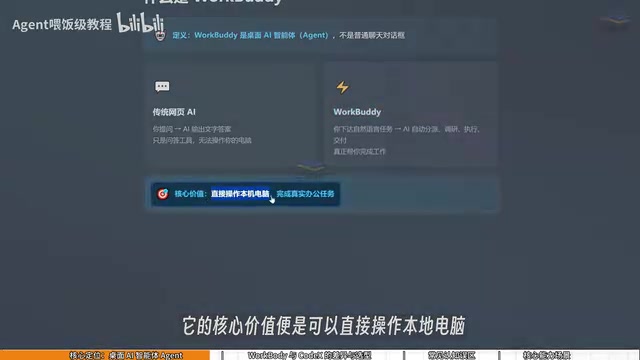
The fundamental difference between an AI Agent and a standard AI chat tool is the ability to act. Conventional large language models (like ChatGPT or Wenxin Yiyan) stop at generating text — they run on remote servers and have no awareness of your local file system, nor can they simulate mouse clicks or keyboard input. AI Agents go further by adding tool-calling and environment-interaction capabilities: they can read and write files, call APIs, control browsers, execute system commands, and dynamically adjust their next action based on results. This "perceive → plan → act → feedback" loop is what sets Agents apart from ordinary chatbots. WorkBuddy packages these capabilities into a user-friendly desktop interface, so you can drive AI to perform real computer tasks without any programming background.
What WorkBuddy Can Do: From File Management to Collaborative Office Work
WorkBuddy integrates deeply with WeChat, WeCom (企业微信), Feishu, DingTalk, Baidu Netdisk, Tencent Docs, and other mainstream Chinese office tools — making its practical use cases highly relevant to everyday workflows in Chinese workplaces.
File management is the most intuitive application. Bulk categorization, batch renaming, and multi-document information consolidation can all be handled in one go. A concrete example from the original video: when recording tutorial videos, files get named 01, 02, 03 — but if one episode is too short and gets merged into the previous one, the numbering breaks (becoming 1, 3, 4, for instance). Renaming them manually one by one is tedious, but WorkBuddy can handle it automatically.
Document and data processing is another strong suit, including generating weekly reports, processing Excel spreadsheets, and even building simple websites.
For collaborative office work, it can automatically send messages in Feishu and DingTalk and generate periodic work summaries. High-frequency scenarios highlighted in the original video include: automatically extracting files from WeChat group chats and consolidating them into Excel; pulling resources from Baidu Netdisk to auto-write a Feishu weekly report; scanning dozens of pages of PDFs to extract key data and generate a PPT outline; and monitoring spreadsheet updates to push daily reports to the team via WeCom.
WorkBuddy vs. Codex: College Intern vs. Special Forces Operative
Many people hear about the more powerful Codex before they encounter WorkBuddy. If Codex exists, why bother with WorkBuddy?
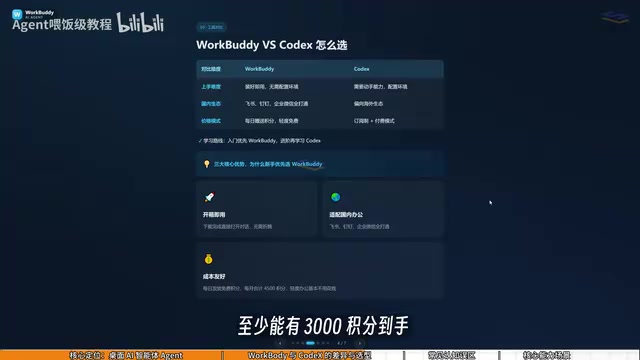
The original video creator used a fitting analogy: if Codex is a "special forces operative," WorkBuddy is a "college student intern." Special forces soldiers are formidable, but they need a commanding officer to draw up a detailed battle plan — you have to specify the exact file, the directory, the parameters to use on execution. That requires a fairly specialized skill set. WorkBuddy, on the other hand, is like an obedient intern: it may not handle highly complex tasks, but simple jobs like "send this file to someone" or "organize this folder" are well within its capabilities.
For most office workers, commanding Codex may feel overwhelming — but directing a "college intern" is perfectly manageable. The key differences can be summarized as:
- Deployment barrier: WorkBuddy is ready to use right after installation — no environment setup, no command line, no VPN required. Codex involves tedious configuration and demands more technical ability.
- Ecosystem fit: WorkBuddy integrates deeply with Feishu, DingTalk, WeCom, Tencent Docs, and other Chinese-market software. Codex is more oriented toward the international ecosystem and has limited support for domestic Chinese office tools.
- Cost: WorkBuddy gives away daily credits, with extra credits available during promotions. Signing in every day for a month can accumulate roughly 3,000 credits. Codex uses a subscription model, meaning you're paying real money even just to learn it.
A practical tip on credits: after logging in, click your avatar in the bottom-left corner, find the "Buddy加油站" (Buddy Fuel Station) option, and tap to check in daily for credits. Credits carry over, so anything unused today is still available tomorrow — building this daily habit is key to keeping costs down.
Codex is OpenAI's code generation and execution model (now integrated into the GPT-4 series). Its core strength lies in understanding and producing high-quality code, running programs in a sandbox environment, debugging errors, and manipulating file systems. Because it fundamentally "accomplishes tasks by writing code," users generally need some programming intuition — at minimum, the ability to clearly describe file paths, data structures, and logical boundaries, and to judge whether the generated code is reasonable. This stands in sharp contrast to WorkBuddy's approach of "describing intent in natural language and letting the Agent figure out the execution steps." For professionals without a technical background, Codex's power often comes with a steep learning curve, while WorkBuddy hides complex execution details behind a conversational interface, significantly reducing cognitive overhead.
Three Common Misconceptions for New Users
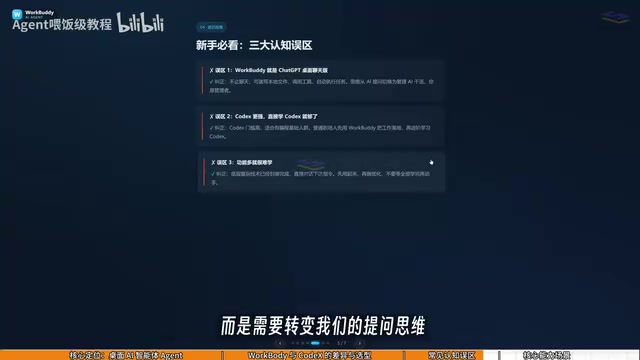
Before you dive in, correcting a few common misconceptions can save you a lot of time.
Misconception #1: WorkBuddy is just a desktop chat version of ChatGPT. Not quite. WorkBuddy goes beyond conversation — in addition to providing guidance and suggestions like GPT, it can read local files, call tools, and automatically execute tasks. The mindset shift here is from "asking AI questions" to "managing AI to do the work" — you're the manager, WorkBuddy is your employee, and your computer is your company.
Misconception #2: Codex is more powerful, so I should just learn Codex directly. Codex has a higher barrier to entry and is better suited for people with a programming background. For ordinary office workers, the right move is to use WorkBuddy to get things done first. For most workplace scenarios, WorkBuddy alone is more than sufficient — upgrade to Codex only when you genuinely hit its limits. This learning path minimizes the overall cost of getting up to speed.
Misconception #3: It has so many features, it must be hard to learn. In practice, WorkBuddy's interface is very similar to familiar AI tools like Doubao, Tongyi Qianwen, and GPT. Learning it isn't about memorizing where every button is — it's about shifting how you communicate: from "asking questions" to "issuing commands," and letting it operate the computer on your behalf.
Evolving from AI User to AI Manager
The core takeaway from this introductory guide is understanding the fundamental difference between "ordinary AI chat" and a "desktop AI Agent." Standard large language models can only chat with you and output text — and even at their most advanced, they generate images, music, or video, but still have no access to your local files. WorkBuddy converts natural language tasks into real, executed actions.
The real transformation happens at the mindset level: evolving from a passive "AI user" into an active "AI manager." You stop obsessing over crafting the perfect prompt and instead learn how to give a clear task to an "AI employee" and verify the results. For users in China who want AI to genuinely integrate into their daily office workflows without wrestling with complex environment setups, WorkBuddy offers an accessible, low-barrier entry point.
Related articles

ChatGPT Space Launches: Team Collaboration and New Pages Features Explained
ChatGPT Space is OpenAI's new team collaboration feature with Pages, real-time collaboration, and Slack/Google Drive sync. We break down its privacy design, multi-platform integration, and the full workflow from conversation to document.

Migrating Apache Spark UDFs to GPU Acceleration with AI Agents
NVIDIA developer blog explains how AI Agents rewrite Apache Spark UDFs for GPU acceleration, covering migration criteria, agent rewriting and verification workflows, plus pitfalls like result consistency and CPU-GPU transfer overhead.

Zed Editor v0.40.4-rc2 Released: Usage Credits Now Available Without Upgrading
Zed editor releases v0.40.4-rc2, allowing users to use usage credits for AI features without upgrading to a paid plan, lowering the trial barrier.