Getting Started with WorkBuddy: From AI Questioner to AI Manager
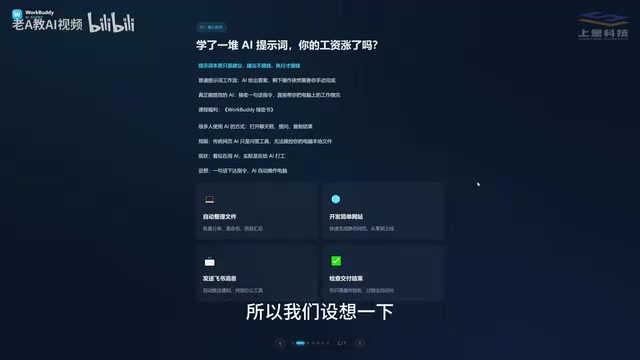
WorkBuddy is a desktop AI agent that shifts you from asking AI questions to managing AI to get real work done.
Most people use AI inefficiently because they're stuck in a Q&A loop rather than an execution mode. WorkBuddy, a desktop AI Agent, directly operates local files, calls tools, and integrates with platforms like Feishu and DingTalk to complete real office tasks — not just offer advice. Compared to CodeX, which is more powerful but requires technical expertise, WorkBuddy is the practical starting point for everyday professionals. The recommended path: automate daily work with WorkBuddy first, shift your mindset from questioner to manager, then advance to CodeX if needed.
From "AI Questioner" to "AI Manager": A Mindset Shift
If you've been using AI for a while — learning prompt techniques, experimenting with different approaches — yet haven't seen a meaningful boost in your productivity, the problem probably isn't your prompts. The real issue is this: prompts are essentially suggestions, and suggestions don't get things done. Execution does.
Most people are still stuck in the same loop: open a chat window → ask a question → copy the answer. Traditional web-based AI tools are, at their core, just Q&A engines. They have no access to your local files. It might seem like you're using AI, but in reality, you're working for the AI — because every real-world action still requires you to sit there clicking and typing.
That's exactly the "last mile" problem WorkBuddyAd is designed to solve. WorkBuddy is a desktop AI Agent, not just a chat interface. You describe what you need in plain language, and it automatically breaks down the task, does the research, executes the steps, and delivers results. The core value of WorkBuddy is that it can directly operate your local computer to complete real office tasks — not just hand you advice or instructions.

What WorkBuddy Is: Your "AI Employee"
Understanding WorkBuddy requires a fundamental shift in how you think about AI: stop seeing yourself as someone who asks AI questions, and start seeing yourself as someone who manages AI to get work done.
Here's a useful analogy: You're a manager, WorkBuddy is your employee, and your computer is your company. You don't need to micromanage every step. Just clearly describe the outcome you want, and WorkBuddy handles the execution in between. Your job is simply to review the final deliverable.
New users often fall into three common misconceptions when they first try WorkBuddy:
- Misconception #1: WorkBuddy is just a desktop chat version of ChatGPT. Not quite. While it can hold conversations and offer advice like GPT, WorkBuddy can also read local files, call tools, and autonomously execute tasks.
- Misconception #2: CodeX is more powerful, so I should just learn that instead. CodeX has a steeper learning curve and is better suited for people with a programming background. For everyday office workers, WorkBuddy is the practical starting point for getting real work done.
- Misconception #3: Too many features — must be hard to learn. In practice, WorkBuddy's interface feels very familiar if you've used Qianwen, Doubao, or GPT. The learning curve isn't about the interface — it's about shifting how you frame your requests.

WorkBuddy vs. CodeX: Special Forces vs. a Talented Graduate
Many people hear about CodeX before they discover WorkBuddy. So why bother learning WorkBuddy at all?
Here's a memorable analogy: If CodeX is a special forces soldier, WorkBuddy is a highly capable recent graduate.
A special forces soldier is extraordinarily skilled, but requires a commanding officer who can write detailed mission briefs — you need to specify the exact file, the exact directory, the exact parameters. That takes real technical expertise and experience. WorkBuddy, the "eager and capable graduate," may not handle the most complex missions, but for everyday tasks like "send this file to someone" or "organize these documents by category," it gets the job done perfectly.
For most office workers who aren't yet ready to command CodeX, learning to direct the "graduate" is clearly the more practical place to start.

Three Key Differences Between WorkBuddy and CodeX
| Dimension | WorkBuddy | CodeX |
|---|---|---|
| Ease of use | Install and go — no environment setup, no command line needed | Requires stronger technical ability and programming knowledge |
| Ecosystem fit | Deep integration with Feishu, DingTalk, WeCom, and Tencent Docs | Oriented toward international tools; limited support for Chinese office software |
| Cost | Daily free credits that accumulate; bonus credits during promotions | Subscription-based; costs money even while you're still learning |
The credit system is worth highlighting: after logging in, click your avatar in the bottom-left corner, find the "加油站" (Fuel Station) option, and check in daily to collect credits. Credits accumulate — if you check in consistently, you can earn at least 3,000 credits in a month, dramatically lowering the barrier to learning and daily use.
What WorkBuddy Can Do: From File Management to Team Collaboration
WorkBuddy covers a wide range of repetitive office tasks:
File management is the most immediate use case — bulk sorting, batch renaming, and consolidating information across multiple documents. Here's a real-world example: when recording a course, files were named 01, 02, 03, 04, but one lesson was too short and needed to be merged with the previous one, leaving a sequence of 1, 3, 4. Renaming them manually one by one would be tedious. With a single instruction, WorkBuddy handles the renaming automatically.

Beyond file management, WorkBuddy can also handle:
- Document and data processing: generating weekly reports, working with Excel spreadsheets
- Web development: building simple websites
- Team collaboration: sending messages and coordinating tasks in Feishu and DingTalk
- Recurring tasks: automatically generating work summaries and reports
These aren't just theoretical capabilities — given a clear instruction, WorkBuddy can execute directly, freeing you from repetitive manual work.
A Recommended Learning Path for WorkBuddy
For professionals who genuinely want AI to improve their productivity, here's a practical, step-by-step learning path:
- Start with WorkBuddy and automate your day-to-day work first. For most roles, WorkBuddy alone is more than sufficient.
- Complete the mindset upgrade: shift from "AI questioner" to "AI manager" — learn to give instructions, not just ask questions.
- Level up to CodeX only when needed: once you find WorkBuddy can't meet the demands of more complex tasks, that's the right time to invest in learning a more powerful tool.
This path minimizes your learning costs and transforms AI from a novelty into a genuine productivity tool. The guiding principle remains simple: starting today, switch your mindset from "asking AI" to "managing AI to work for you."
Related articles
AI Buzz Weekly: GPT-6.5 Leak, New Claude Model, and MiniMax's Cost-Effectiveness
This week's AI buzz roundup: suspected GPT-6.5 leak, Microsoft configs showing GPT-6.1 Tera, Anthropic's new model that can identify entire classes of bugs, disappointing early Gemini 4 Carbon results, and MiniMax M3.1 Flash beating Claude Opus 5 and GPT-5.6 Sol in benchmarks at extremely low cost.

AI Briefing: Gemini 4 Carbon Released, Ant Open-Sources Ling-3.1
AI Briefing: Google releases Gemini 4 Carbon qubit model, claiming to surpass Opus 5.5 with half-price tokens; Ant open-sources Ling-3.1-1019 for real-task Personal Agents; domestic AI drug discovery succeeds in 18 of 19 projects, hitting all 6 GPCR targets; zero-revenue company valued at $20B raises another $1B; Sichuan convenience store robot sales fail.
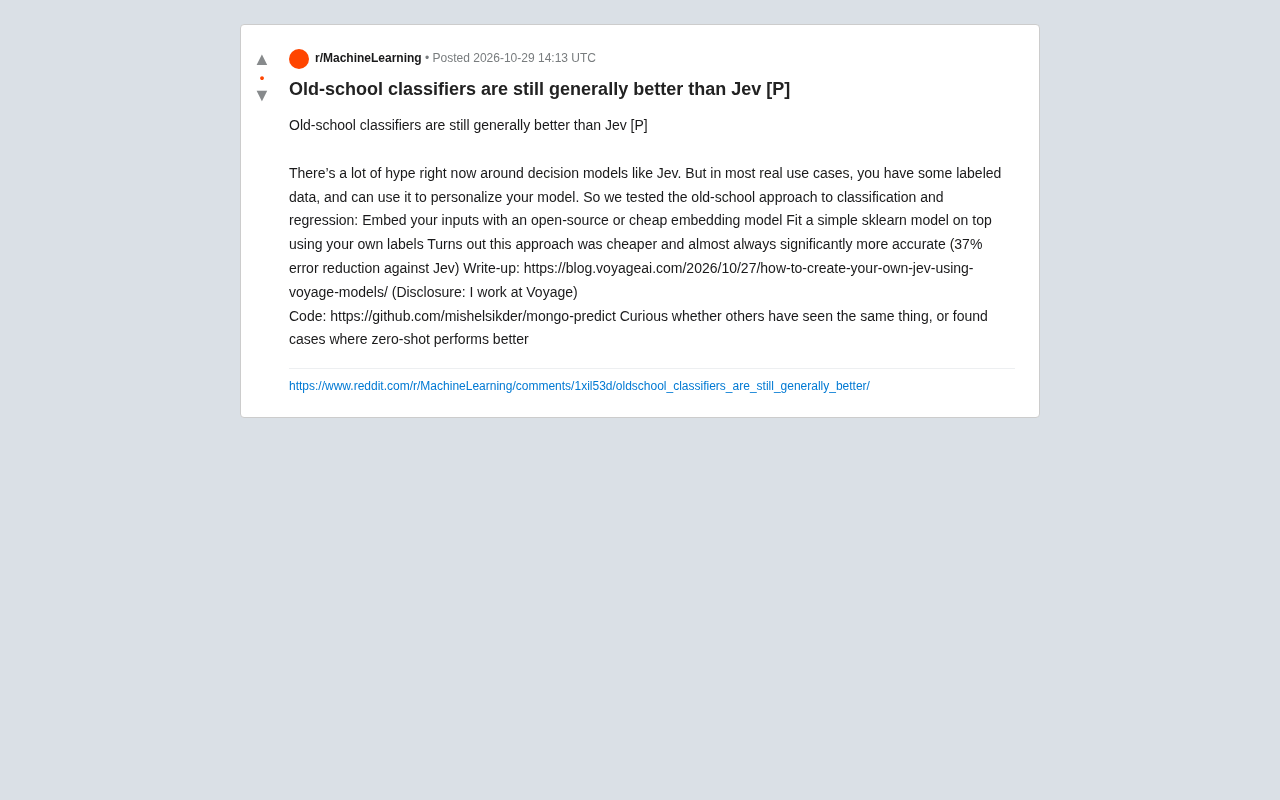
Old-School Classifiers Still Beat Jev: Embeddings + sklearn Cuts Error by 37%
Voyage AI engineers found that an old-school approach using open-source embedding models plus sklearn classifiers is cheaper and cuts error by 37% versus the popular decision model Jev. Discussing whether traditional methods are undervalued when labeled data exists, and the boundaries between zero-shot and supervised learning.