Getting Started with WorkBuddy: How AI Agents Become Your Digital Employees

WorkBuddy is an AI agent that executes tasks on your computer — not just answers questions.
This article is based on a Bilibili tutorial by creator Shangxi, drawing a clear line between two types of AI tools: conversational AI like DeepSeek and Doubao that answer questions, versus AI agents like WorkBuddy that take action — operating browsers, reading and writing local files, calling APIs, and sending messages. WorkBuddy functions as a locally deployed AI operation gateway, connecting to external platforms via MCP and skill mechanisms. It suits knowledge management, coding, and creative workflows, but not pure conversation. Costs are measured in Tokens, and sustained autonomous operation can add up quickly — budgeting ahead is essential.
What Is WorkBuddy? A New Kind of AI That Acts, Not Just Talks
In his latest course on Bilibili, content creator Shangxi introduced a new category of office automation tool — one he playfully nicknamed "crayfish" (referring to AI agents like WorkBuddyAd, Tencent ima, and OpenClawAd). The metaphor captures a fundamental distinction between two types of AI capability.
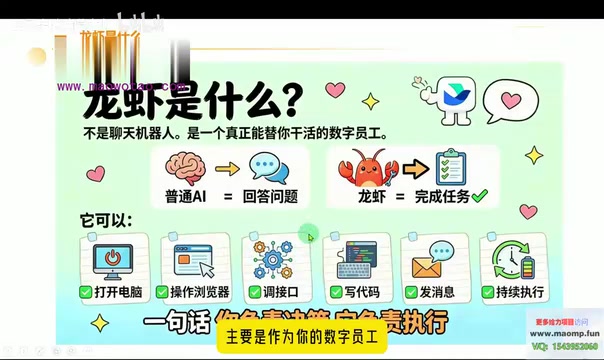
Familiar AI tools like DeepSeek, Doubao, and Tongyi Qianwen are essentially question-answerers — you ask, they respond, they tell you what to do. WorkBuddy and similar agents, by contrast, are task-completers — they don't just talk, they roll up their sleeves and get the work done.
As the course puts it: ordinary AI equals "answering questions"; WorkBuddy equals "completing and logging tasks." One is a consultant; the other is an executor. This distinction seems simple, but it determines entirely different use cases and value propositions for the two types of tools.
What Can WorkBuddy Actually Do?
According to the course, WorkBuddy has a real set of operational capabilities: opening applications, controlling a browser, calling APIs, writing code, sending messages, and sustaining task execution over time. Its role is that of a "digital employee" — available around the clock, carrying out the instructions you hand down.
A typical workflow might look like this: you ask it to create a document with a specific name, draft the content based on your knowledge base or a local file, save it to a designated folder, and even send it off for you. The whole process is essentially the agent simulating your mouse and keyboard, completing a chain of actions on your behalf.
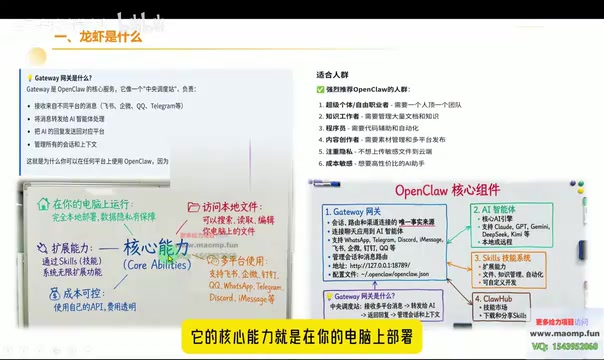
Shangxi describes the technical core of WorkBuddy as a Gateway — its fundamental capability is running locally on your machine, accessing, reading, and editing local files, and acting on your instructions.
Local Deployment and Cross-Platform Integration
Two key technical advantages of WorkBuddy stand out.
First, local deployment protects privacy. It runs directly on your computer, accessing local files and system resources without uploading data to the cloud — an important consideration for users who prioritize data security.
Second, cross-platform integration. By connecting to various platforms via their APIs, and leveraging tools like MCP (referred to in the course as "NCP," but correctly the Model Context Protocol), WorkBuddy can open up platform data for large language models to use. The course gives a concrete example: once Qichacha's (a Chinese business registry database) data is connected via an MCP interface, WorkBuddy can access business registration information for companies across China, dramatically expanding its capabilities.
Through this "skill (tool)" mechanism, WorkBuddy can theoretically become capable of almost anything and operate autonomously around the clock.
What is MCP?
MCP (Model Context Protocol) is an open standard introduced by Anthropic in late 2024 to solve the connectivity problem between large language models and external data sources or tools. Before MCP, every AI application that wanted to integrate with an external service — a database, a SaaS platform, a local file system — had to build a custom connector from scratch, which was labor-intensive and hard to reuse. MCP standardizes this: an external service provider (like Qichacha) builds an MCP Server once, and any MCP-compatible AI client (like WorkBuddy) can call it directly without further adaptation. Think of it like the USB standard — once the interface is unified, the cost of connecting devices drops dramatically. For end users, MCP means an agent's capabilities are no longer limited to built-in features; they expand continuously as more platforms join the MCP ecosystem.
Use Cases: Who Should Use It, and Who Shouldn't
The course is explicit about WorkBuddy's scope, which is especially important for newcomers.
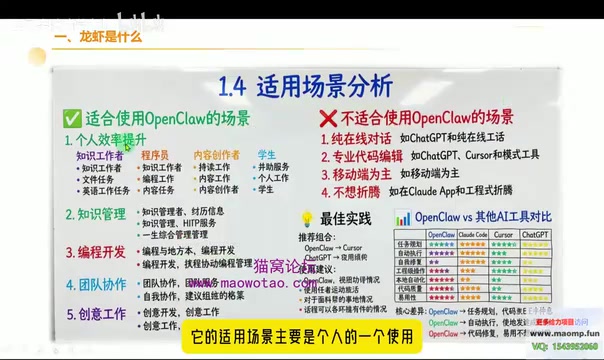
Good fits include: personal use, knowledge management, programming and development, learning to code, and creative work. What these share in common is a need for hands-on execution rather than simple Q&A.
Poor fits are scenarios that are purely conversational. If you just want to chat or ask a few questions, tools like Doubao or DeepSeek are more than sufficient — there's no need to deploy a heavy-duty agent for that.
In other words, WorkBuddy's value lies in liberating productivity — handing off repetitive computer tasks for automated execution — not in replacing everyday conversational AI. At its core, it's an "AI operation gateway." One-sentence summary: it gives a large language model access to your computer.
Cost: Token Is the New Electricity
On the topic of cost, the course delivers a pointed warning. Some users working with agents like OpenClaw have accidentally burned through tens of thousands — or even over a hundred thousand yuan — without realizing it.
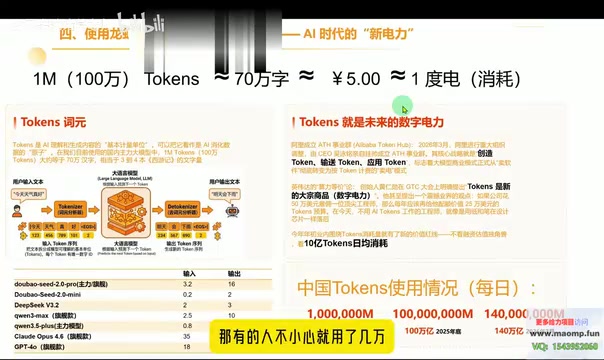
WorkBuddy's costs come primarily from compute consumption, measured in Tokens. Shangxi uses a fitting analogy: Token is like electricity — running AI consumes Tokens the way a machine consumes power.
The course offers a rough conversion as a mental model: approximately 1 million (1M) Tokens is roughly equivalent to consuming one kilowatt-hour of electricity, which costs around 5 RMB at industrial rates. While this isn't a precise billing formula, it conveys a critical point — continuous automated operation by an agent has real, measurable costs, and you need to budget for Token consumption before you start.
This also speaks to a broader reality: electrical power is becoming a foundational resource for AI infrastructure.
What is a Token?
A Token is the basic unit of measurement for how large language models process text — roughly a "word fragment." In English, one word typically corresponds to 1–2 Tokens; in Chinese, one character is approximately 1–2 Tokens. Every time a model generates a response, it consumes Tokens proportional to the combined length of the input and output. For AI agents, Token consumption deserves extra attention: when executing complex tasks, agents typically run through multiple "think → act → observe" cycles, each consuming Tokens — and the intermediate reasoning (Chain-of-Thought) itself generates substantial Token usage. This is why handing a task to an agent costs significantly more than a simple Q&A exchange. Most models are billed per million Tokens, with prices varying widely across providers. Checking the official pricing page for the specific model you're using is an essential step in managing costs.
Summary: Understanding the Core Logic of AI Agents
The value of this introductory course is in helping newcomers clarify one key concept: the fundamental difference between an AI agent and a regular conversational AI is whether it can take action and execute tasks.
As an AI operation gateway, WorkBuddy protects privacy through local deployment, extends its capabilities via MCP and skill mechanisms, and measures cost in Tokens — forming a coherent logic for what a digital employee looks like in practice. According to the course roadmap, the next lesson will cover the domestic AI agent ecosystem and step-by-step installation and deployment instructions, which is worth following for anyone looking to get hands-on.
One final note: this article is based on a single creator's introductory walkthrough. Some technical terms (such as MCP) and cost analogies are simplified for accessibility. For actual usage, always refer to official documentation and real billing information.
Related articles

Chain of Thought Isn't Just for AI: How Humans Can Use CoT to Improve Thinking Quality
Chain of Thought isn't just a prompt trick for large models. Starting from a Hacker News discussion, this article analyzes why CoT works for human thinking too, breaks down actionable ways to transfer it, and highlights the key differences between human CoT and machine CoT.
Cloudflare Teams Up with OpenAI: Closi…
Cloudflare Teams Up with OpenAI: Closing the Loop from Vulnerability Discovery to Defense with AI
Cloudflare uses OpenAI Daybreak to investigate security vulnerabilities and generate reviewable remediation plans, while developers use Codex to boost coding efficiency and quality.

Orca Multi-Agent Orchestration in Practice: A Guide to Parallel Collaboration with Claude and Codex
Orca is Stable AI's free open-source agent workbench supporting 34 agents like Claude Code and Codex in parallel. Learn its Git worktree isolation, multi-model orchestration, and mobile management.