GH-300 Certification Study Guide: A Detailed Breakdown of the Five Domains in the GitHub Copilot Exam

A comprehensive guide to the five exam domains of the GitHub Copilot GH-300 certification with scenario-based study strategies.
This guide breaks down the GitHub Copilot GH-300 certification exam into its five core domains: Responsible AI, Copilot Features & Usage, How Copilot Works, Prompt Engineering, and Security & Governance. It explains key concepts like MCP, Copilot Spaces, Content Exclusions, and Public Code Matching, while providing a scenario-based study framework for identifying the correct Copilot capability based on contextual clues.
Why GH-300 Is More Than Just Memorizing Concepts
As AI-assisted programming becomes increasingly mainstream, GitHub Copilot has become a key component in the developer toolchain. GitHub Copilot was launched in 2021 through a collaboration between GitHub (a Microsoft subsidiary) and OpenAI. Built on OpenAI's Codex model (later upgraded to the GPT-4 series), it was trained on billions of lines of public code and provides real-time suggestions as developers write code. As of 2024, Copilot has over 1.8 million paid users and more than 50,000 enterprise customers. Its core technology relies on large language models' ability to understand code context, generating suggestions by analyzing the current file, open tabs, code before and after the cursor, and comments. Microsoft's GH-300 certification is the official standard for measuring whether developers, administrators, and engineering team leads truly understand Copilot's capabilities.
The full name of GH-300 is the "GitHub Copilot" certification, classified as a Specialty certification within Microsoft's certification ecosystem. Unlike traditional programming language certifications, GH-300 tests a developer's systematic understanding of AI-assisted tools, including technical capabilities, governance strategies, and responsible use. The certification targets three roles: developers using Copilot, administrators managing Copilot deployments, and engineering leaders responsible for establishing AI usage policies.
Here's an important detail: the core logic of this exam is not about "remembering definitions." According to the study course's design philosophy, true certification success comes from a transferable mental model: Identify the scenario → Find key clues → Map to the correct Copilot capability or governance principle → Eliminate options that solve the wrong problem.
The course is built around 75 scenario-based learning challenges. You'll encounter real-world decision-making dilemmas faced by developers, administrators, security teams, engineering leads, and organizations. Each scenario doesn't teach you "the answer to a specific question" but trains you to build a reusable judgment framework—for example, "team with repetitive questions + needs shared documentation and repository context" should point to Copilot Spaces, and even if the next question swaps "software company" for "banking platform," you can still identify the same principle.
Breaking Down the Five GH-300 Exam Domains
The scope of GH-300 goes far beyond "can you generate code." Microsoft expects candidates to understand responsible AI, prompt engineering, Copilot features, privacy protection mechanisms, GitHub fundamentals, and practical software development skills.
Domain One: Responsible AI
This is the foundational domain of the exam. Microsoft focuses on the risks and limitations of generative AI, ethical use, potential harms and mitigation strategies, and why AI-generated output must be verified.
Microsoft's Responsible AI framework is built on six core principles: Fairness, Reliability & Safety, Privacy & Security, Inclusiveness, Transparency, and Accountability. In the context of Copilot, these principles manifest specifically as: AI-generated code may contain security vulnerabilities learned from training data (such as SQL injection patterns); models may produce "hallucinations"—generating APIs or libraries that seem plausible but don't actually exist; outputs may reflect biases present in training data. Microsoft particularly emphasizes the "Human-in-the-loop" philosophy, meaning AI assistance should not replace human judgment and verification.
In scenario questions, watch for these signals: generated code containing vulnerabilities, biased behavior, hallucinated information, outdated APIs, or a developer's mindset of "it's AI so it must be correct by default." These all test your understanding of responsible operations.
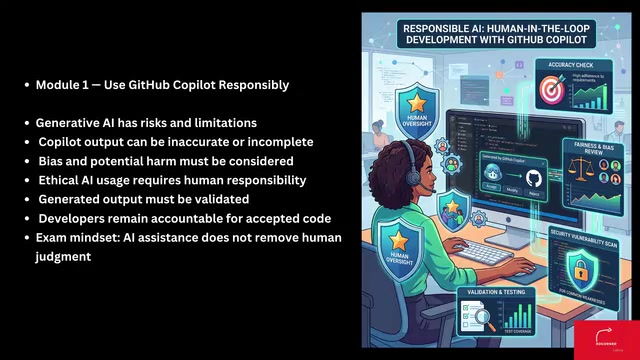
The core principle throughout is: Copilot is a tool that assists human developers—it does not absolve developers of their responsibility to review, test, validate, and understand code. The ultimate responsibility for any code that reaches production lies with humans.
Domain Two: Copilot Features and Usage (Largest Exam Proportion)
This is the domain with the highest official weight, accounting for approximately 25%–30%. It covers an extremely broad range: enabling and using Copilot in IDEs, inline suggestions, Chat, CLI, Agent mode, Content Exclusions, Copilot Edits, MCP, code review, Spaces, Spark, PR summaries, instruction and prompt files, organization policies, audit events, and managing subscriptions via REST API.
MCP (Model Context Protocol) is an open-source standard protocol released by Anthropic in late 2024, designed to establish a unified communication standard between AI models and external data sources/tools. Integrating MCP in GitHub Copilot means that Copilot Agent can connect to databases, APIs, internal documentation systems, and other external tools through standardized interfaces without writing separate adapters for each integration. MCP uses a client-server architecture where the AI assistant initiates requests as the client and external tools respond as servers, greatly expanding Copilot's capability boundaries.
Copilot Spaces is a collaborative feature launched by GitHub in 2025 that allows teams to create a shared knowledge space, combining specific repositories, files, documents, and custom instructions to provide Copilot with curated context. The core problem it solves is: in large organizations, different teams may need different contextual backgrounds for the same problem, while the default Copilot can only see what's in the current editor.
This domain is extremely well-suited for scenario-based questions because multiple Copilot capabilities may initially seem "plausible," and the exam truly tests whether you know which tool corresponds to which task:
- Quick typing assistance → inline completion
- In-depth conversation → Chat
- Shared curated knowledge → Spaces
- External tool integration → MCP
- Organization-level governance → centralized Copilot policies
For another example, when a large Pull Request makes it difficult for reviewers to understand the changes, the correct answer should point to the Pull Request Summary feature.
Domain Three: How Copilot Works
This domain examines "what happens behind the interface." Official objectives include data usage and flow, input processing, prompt construction, proxy filtering, post-processing, the code suggestion lifecycle, and the limitations of both large language models and Copilot itself.
Rather than memorizing architectural terms in isolation, remember this "journey": Collect developer context → Build prompt → Model inference → Output processing → Return results to the development experience. Specifically, when a developer types code in the editor, Copilot's IDE plugin collects contextual information such as the current file content, cursor position, open related tabs, and project structure; this information is processed and assembled into a structured prompt, typically containing system instructions, relevant code snippets, and user intent; the prompt is sent to a cloud-based large language model for inference; the model's output undergoes post-processing filters (including security checks, public code matching, and sensitive information detection) before finally being presented to the developer.
When a scenario describes "responses appearing incrementally," "relevant information being assembled into the prompt," "large files exceeding effective context," "suggestions reflecting surrounding code," or "output being filtered before reaching the developer," you can map these to the corresponding stages. It's worth noting that large language models have context window limitations, meaning overly large files or too much contextual information cannot all be included in a single inference pass—Copilot needs to intelligently select the most relevant code snippets.
Prompt Engineering: Communicating Intent Rather Than Finding Magic Words
The essence of prompt engineering is not finding some "magic spell" but effectively communicating the developer's intent. Microsoft expects candidates to understand prompt structure, how context is determined, zero-shot versus few-shot prompting, prompt writing best practices, and how chat history participates in the overall process.
Zero-shot prompting means directly presenting a task requirement to the model without providing any examples, relying on the model's general capabilities gained from pre-training to complete the task. Few-shot prompting provides one or more input-output examples within the instructions, helping the model understand the expected format and logical patterns. In practical Copilot usage, zero-shot prompting works well for simple, clear tasks (e.g., "convert this function to TypeScript"), while few-shot prompting is more effective when specific output formats or project coding standards need to be followed. For example, by showing a function's naming pattern and return format in comments, Copilot can follow the same pattern in subsequent suggestions. This distinction stems from the Transformer architecture's "In-Context Learning" capability—the model can "temporarily learn" patterns from examples in the prompt without updating its weights.
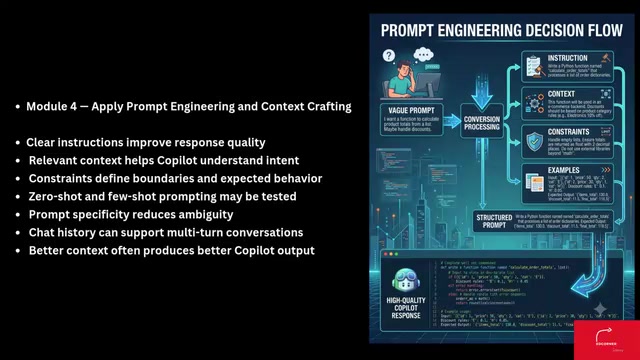
The course presents multiple typical scenarios: Copilot giving generic responses because the prompt contains almost no detail, comments improving inline suggestions, introducing relevant files to strengthen context, and follow-up questions working because earlier messages remain in the conversation.
Remember this fundamental relationship: Better instructions + better context + useful constraints = higher probability of getting relevant responses.
How Copilot Improves the Software Development Lifecycle
The fourth domain focuses on Copilot's value in the real software development lifecycle. Official objectives cover: code generation, refactoring, documentation writing, accelerating learning, reducing context switching, sample data generation, legacy system modernization, unit and integration testing, edge case identification, assertions, security improvements, and performance optimization.
The key is matching development problems to the appropriate form of AI assistance: unfamiliar legacy functions need explanation, repetitive logic needs refactoring, incomplete backends need mock data, slow searches benefit from algorithm optimization, and complex functions need edge case testing. In real enterprise environments, GitHub's research data shows Copilot can help developers increase coding speed by approximately 55%, but the more important benefit is reducing cognitive load—developers no longer need to frequently switch to a browser to look up API documentation or Stack Overflow, as Copilot Chat can provide explanations and examples directly within the editor. For the common challenge of legacy system modernization, Copilot can help developers understand undocumented old code, generate equivalent modern implementations, and create regression tests to ensure refactoring doesn't introduce breaking changes.
Security and Governance: Distinguishing Controls That "Sound Similar"
The final major domain focuses on protecting organizations and developers when using Copilot. Microsoft requires understanding of content exclusions, editor settings, ownership and limitations of generated output, Public Code Matching controls, and related troubleshooting.
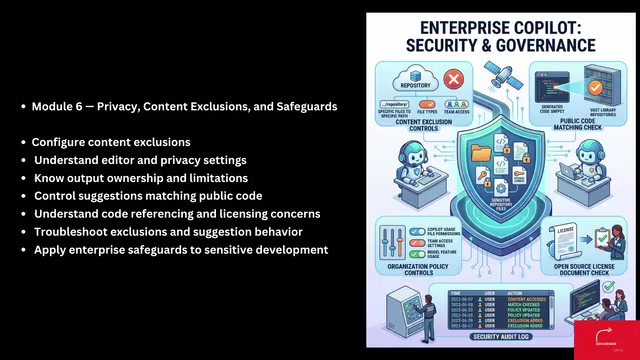
These questions often test whether you can distinguish between controls that "sound similar"—this is also where points are most easily lost:
- Content Exclusion: Protects selected context, preventing sensitive files (such as credential files) from entering Copilot's context. Its technical implementation involves filtering at both the client side (IDE plugin level) and server side: when a developer edits an excluded file, Copilot won't generate suggestions for it; when other files reference an excluded file, the excluded file's content won't be included in the prompt construction process. Typical use cases include excluding .env files containing API keys, test files containing customer data, and encryption code subject to export controls. This is fundamentally different from .gitignore—.gitignore controls version management, while Content Exclusions control AI context boundaries.
- Public Code Matching: Handles generated suggestions that match publicly available code. When this feature is enabled, Copilot compares generated suggestions against public code repositories on GitHub. If a suggestion matches a piece of public code beyond a threshold of approximately 150 characters, the system can choose to block the suggestion or display the matching code source and its license information. This mechanism helps organizations manage intellectual property risk—for example, if a generated code snippet comes from a GPL-licensed project while the organization uses a commercial license, direct use could constitute a license violation.
- Organization Policies: Centralized governance of allowed capability scope, where enterprise administrators can uniformly configure the enablement status and behavioral policies of various features at the organization level.
This can be further distilled into recognition patterns: sensitive files shouldn't enter context = Content Exclusion; quick in-editor assistance = inline/Chat; large PRs need an overview = PR Summary; automated seat allocation = Management API.
GH-300 Study Strategy and Key Exam Information
According to the official certification page, the exam duration is 100 minutes, and Microsoft provides both a practice assessment and an exam sandbox for preparation. The study guide states that a score of 700 or above is passing. Note that Microsoft certification exams use scaled scoring with a maximum of 1000 points and a minimum of 100 points—the 700 passing threshold does not mean answering 70% of questions correctly, as the actual pass rate depends on statistical calibration of question difficulty.
But the real advantage comes from concept recognition ability. When reading a question, first identify four elements: role, problem, constraints, expected outcome, then ask yourself "which Copilot concept most directly satisfies these clues."
The course repeatedly trains this ability through 75 different scenarios. By the time you complete the last scenario, GitHub Copilot should no longer be a collection of isolated features but a complete system where you clearly understand "when to use each capability, why it exists, how it works, what its limitations are, and how to apply it responsibly." This is the core mindset for both passing the GH-300 certification and truly using Copilot effectively.
Key Takeaways
Related articles

ChatGPT Space Launches: Team Collaboration and New Pages Features Explained
ChatGPT Space is OpenAI's new team collaboration feature with Pages, real-time collaboration, and Slack/Google Drive sync. We break down its privacy design, multi-platform integration, and the full workflow from conversation to document.

Migrating Apache Spark UDFs to GPU Acceleration with AI Agents
NVIDIA developer blog explains how AI Agents rewrite Apache Spark UDFs for GPU acceleration, covering migration criteria, agent rewriting and verification workflows, plus pitfalls like result consistency and CPU-GPU transfer overhead.

Zed Editor v0.40.4-rc2 Released: Usage Credits Now Available Without Upgrading
Zed editor releases v0.40.4-rc2, allowing users to use usage credits for AI features without upgrading to a paid plan, lowering the trial barrier.