GitHub Copilot Canvas Explained: Five Practical Use Cases Showcasing Visual AI Collaboration

GitHub Copilot Canvas transforms AI interaction from linear chat into a visual, interactive collaboration workspace.
GitHub Copilot Canvas upgrades traditional conversational AI into a visual collaboration workspace. Through five practical use cases—card-based issue triage, interactive codebase architecture diagrams, session worktree management, prompt coaching, and cross-platform knowledge finding—Canvas demonstrates how developers can work with AI more intuitively and efficiently, moving beyond text-based Q&A to true co-creation.
From Linear Conversations to a Visual Canvas
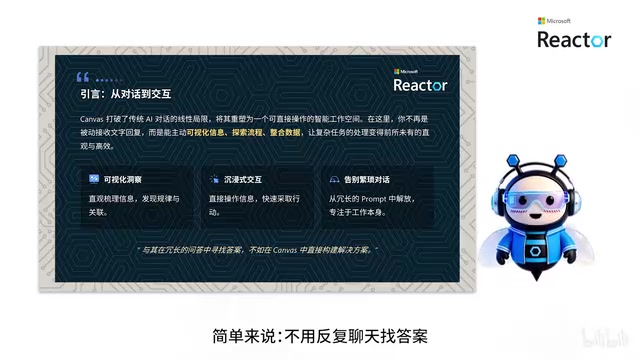
When we talk about AI-assisted development, the most common interaction pattern is still the "question-and-answer" dialog box. You type a prompt, the AI returns text, and the cycle repeats. This linear communication works fine for simple tasks, but once you're dealing with complex work—sorting through large amounts of data, understanding codebase structure, managing multiple sessions—the efficiency of pure-text communication drops off sharply.
The traditional conversational AI interaction model originated from the early chatbot design paradigm, which is essentially serialized information exchange. In this model, the context window is limited, and users must constantly repeat or supplement information across multiple conversation turns. The more fundamental problem is that plain-text output lacks a spatial dimension—when dealing with hierarchically structured data (like code dependency trees or project architecture), linear text cannot effectively express the topological relationships between nodes. Users are forced to mentally reconstruct spatial models, resulting in extremely high cognitive load.
The Canvas feature in the GitHub Copilot App was built precisely to address this pain point. It's no longer a passive chat window that simply responds to queries—it's an "interactive intelligent canvas" where humans and AI can collaborate within the same visual space. The Canvas interaction paradigm wasn't invented by GitHub; its design philosophy can be traced back to collaborative whiteboard tools like Miro and FigJam, as well as recent products like Notion Canvas and OpenAI's ChatGPT Canvas. The core idea is to use two-dimensional space as the foundation for organizing information, leveraging the human visual system's natural aptitude for spatial cognition to reduce information processing costs. What makes the Canvas paradigm unique in the AI domain is the introduction of the "AI as collaborator" concept—AI doesn't just generate content; it can also interactively modify and iterate on content with the user in real time within the same space.
According to a demonstration by Bilibili creator "小二课堂" (Xiao Er Classroom), Canvas has three core advantages over traditional conversational AI:
- Visual data presentation: Makes it easy to organize information and discover patterns, rather than scrolling back and forth through long text streams;
- Immersive click-and-drag interaction: Local operations take effect instantly, delivering a more direct interaction experience;
- Reduced prompt burden: No need to write lengthy, complex prompts—you can focus your energy on the actual work.
In a single sentence: "Instead of chatting back and forth to find answers, you build complete solutions directly on the canvas."
What Is Canvas, and How to Create One
Canvas is a real-time collaborative interface built into the GitHub Copilot App, fully powered by GitHub Copilot's underlying capabilities. It upgrades pure text conversations into a workspace where "humans and AI co-create together."
The GitHub Copilot App is a standalone AI development assistant application released by GitHub, distinct from the Copilot plugin embedded in IDEs. Under the hood, it relies on large language models (LLMs) for code comprehension and generation, while achieving deep integration with GitHub-native features—repositories, Issues, Pull Requests, and more—through GitHub's API ecosystem (including REST API and GraphQL API). The Canvas feature is built on top of this infrastructure, capable of accessing GitHub platform data sources and leveraging Copilot's reasoning capabilities to transform data into visual, interactive interface components.
Three Core Features
Real-time collaboration: You and Copilot can edit the same canvas simultaneously, with both parties' operations visible to each other.
Bidirectional interaction: Local operations take effect in real time, while complex computation and processing tasks are handled by AI in the background—each doing what it does best.
Continuous iteration: A canvas is not a one-time artifact. You can issue commands at any time to have AI continue optimizing and adjusting it.
Creating a Canvas in One Step
The creation process is straightforward: type the slash command /Create Canvas in the chat box, describe your requirements, and a dedicated canvas is generated with a single action. This low-barrier entry point allows Canvas capabilities to be quickly deployed across a wide range of practical scenarios.
Five Practical Use Cases: Exploring Canvas's Capabilities
Concepts alone aren't enough to be convincing. The video presented five "production-ready" use cases that demonstrate Canvas's application potential across different workflows.
Case 1: Card-Based Issue Triage
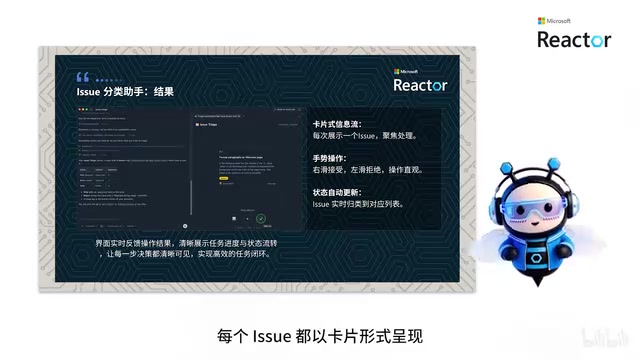
The goal is to quickly organize GitHub issues. With a simple prompt, Canvas creates a card-based interface: it displays one issue at a time, and you can swipe through them like cards—swipe right to accept, swipe left to reject. Canvas automatically processes the action and updates the status. Compared to clicking through items one by one in a long list, this interaction method is significantly more efficient.
This swipe-left/swipe-right interaction borrows from the card-based UI pattern popularized by apps like Tinder. The design follows the cognitive psychology principle of "Progressive Disclosure": presenting only one piece of information at a time forces users to make a clear binary decision (accept/reject), thereby avoiding the "Decision Fatigue" that arises from scanning long lists. In the issue triage scenario, the traditional approach requires opening, reading, and labeling issues one by one on the GitHub Issues page, whereas the card-based interface compresses this workflow into intuitive gesture operations, dramatically reducing cognitive cost.
Case 2: Interactive Codebase Architecture Diagram
Understanding the structure and component relationships of complex projects is often a headache. Canvas can generate a colorful, interactive architecture diagram that visually presents how different parts of the code work together. The diagram is not only richly colored but also supports zooming, node dragging, and filtering specific sections, enabling developers to deeply explore every detail of the code and significantly lowering the barrier to understanding unfamiliar codebases.
Generating an interactive code architecture diagram involves multiple technical steps: first, static code analysis parses the AST (Abstract Syntax Tree) to extract inter-module dependency relationships, inheritance hierarchies, and call chains; second, graph layout algorithms—such as force-directed layout or hierarchical layout—map abstract dependency relationships into intuitive spatial topologies; finally, the frontend interaction layer, typically built on visualization libraries like D3.js, Mermaid, or similar tools, implements zoom, drag, and filter functionality. Copilot handles the conversion from code to structured data, while Canvas is responsible for rendering the data into an interactive graphical interface.
Case 3: Sessions Worktree View
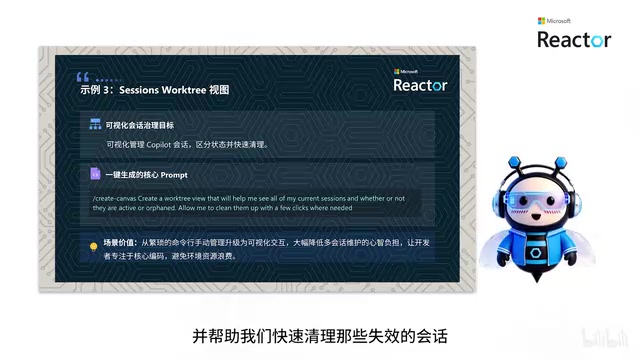
Frequent Copilot users tend to accumulate a large number of sessions, which can become chaotic to manage. This Canvas aims to visualize all sessions, clearly indicating which ones are active and which have become orphaned and ineffective. Sessions that are no longer needed can be cleaned up with a single button click, significantly improving workspace tidiness.
Session proliferation is a common pain point when continuously using AI coding assistants. Each session carries its own independent context state, including conversation history, referenced files, and generated code snippets. When the number of sessions reaches dozens or even hundreds, it becomes difficult for developers to remember each session's purpose and status. The "Worktree View" naming borrows from the Git Worktree concept—Git Worktree allows multiple working directories to be checked out simultaneously within the same repository, and Sessions Worktree similarly visualizes multiple AI sessions in a tree structure, helping users identify branching relationships and activity levels among sessions.
Case 4: Agent Prompt Coach
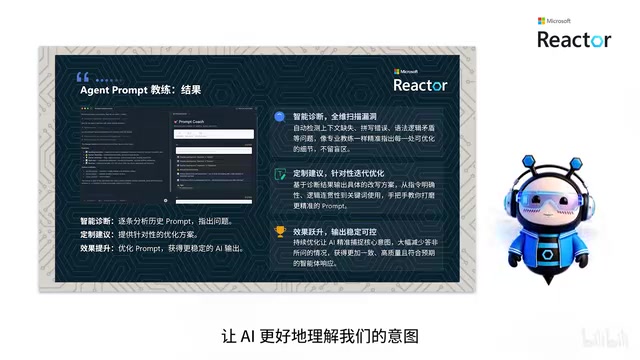
Writing more effective prompts is something every AI user strives for. This Canvas analyzes your conversation history, identifies areas for improvement such as grammatical errors and missing context, and provides specific suggestions. It acts like a personal prompt coach, helping you continuously refine your AI interaction techniques so the AI can more accurately understand your intent.
Prompt Engineering has evolved into an independent practice discipline, with its core challenge being how to use precise natural language descriptions to guide LLMs toward producing high-quality results. Common optimization strategies include Chain-of-Thought prompting, Few-shot Learning examples, and Role Prompting, among others. The "Agent Prompt Coach" in Case 4 is essentially a meta-learning application—it analyzes the user's prompt patterns, identifies common issues (such as vague instructions, missing constraints, and context breaks), and provides improvement suggestions based on best practices, forming a continuous optimization feedback loop.
Case 5: Knowledge Finder
In large teams, finding the person who knows the most about a particular file or topic is often difficult. Knowledge Finder performs cross-platform searches, integrating information from multiple channels such as Slack, Teams, and email, and clearly lists the most relevant people along with their associated information. This greatly simplifies the process of knowledge discovery and team communication.
The technical implementation of Knowledge Finder involves building an Enterprise Knowledge Graph. In large organizations, knowledge is scattered across data silos including Slack messages, Teams channels, email threads, Confluence documents, and GitHub commit history. Cross-platform search requires first collecting data through each platform's API, then using NLP techniques (such as Named Entity Recognition and Relation Extraction) to build an association network between people, topics, and files. When presenting results, the system ranks relevant individuals based on dimensions such as contribution frequency, recent activity time, and expertise match, solving the common organizational problem of "where is the person who knows the answer"—a classic tacit knowledge discovery challenge.
The Significance of Canvas and Future Outlook
Looking across these five cases, it becomes clear that Canvas's capabilities extend far beyond code itself, reaching into broader engineering practice scenarios such as issue management, session governance, prompt optimization, and team knowledge collaboration.
The core value of Canvas lies in transforming AI from a passive conversational tool into an active, visual collaboration partner. This role shift means developers can process information and complete tasks in a more intuitive and efficient way, rather than being trapped in a pure-text Q&A loop.
Interestingly, what has been demonstrated so far is only a starting point. As the visual collaboration paradigm matures, tools like Canvas may redefine how we collaborate with AI—evolving from "asking AI questions" to "building with AI." For developers who are interested, you can try out this feature right now in the GitHub Copilot App.
Key Takeaways
Related articles

DeepCell: One-Click AI Generation of Documents, Spreadsheets, and Slides
DeepCell tops Product Hunt with one-click generation of documents, spreadsheets, and slides, using the .deepcell format for linked updates, designed for System 2 tasks like modeling and sales reviews.

Doneas: 15-Minute Daily Accountability Calls That Keep Indie Developers From Procrastinating
Doneas is a daily accountability tool for indie developers: plan tasks on Monday, join a 15-minute call with five builders each day, and log deliveries on a public progress page. This article analyzes its core mechanics, effectiveness, and potential issues around retention and matching.

Fastlane 2.0: Fully Automated AI Ad Campaigns, From Creative to Optimization
Fastlane 2.0 is an AI ad automation tool: enter your website and it learns your brand, generates video and image ads, and runs and optimizes them on Meta, TikTok, Instagram, and YouTube.