GitHub Copilot CLI Remote Control Feature Now in Public Preview: Manage Dev Sessions from Your Phone Anytime

GitHub Copilot CLI now lets you remotely control dev sessions from any device via public preview.
GitHub Copilot CLI's new remote control feature is now in public preview, allowing developers to manage CLI sessions from phones, tablets, or remote computers. Key capabilities include real-time cloud sync, QR code access, bidirectional millisecond-level interaction, and creator-only security. It deeply integrates with Copilot's AI agent for remote instruction, plan review, and flexible mode switching.
GitHub Copilot recently launched a major new feature in public preview — Web and mobile remote control of CLI sessions. This feature breaks the limitation of command-line tools being confined to local devices, allowing developers to connect to and manage running CLI sessions anytime, anywhere via phone, tablet, or remote computer. It's a significant upgrade to the development workflow.
Why Do We Need Remote Control for CLI?
CLI (Command Line Interface) is one of the most fundamental tools for developers to interact with operating systems, with a history dating back to teletype terminals in the 1960s. Despite the continuous evolution of graphical IDEs, CLI remains a core tool for professional developers due to its efficiency, scriptability, and low resource consumption. GitHub Copilot CLI is a command-line AI assistant launched by GitHub in 2023 that embeds large language model capabilities directly into the terminal environment, allowing developers to describe requirements in natural language and have AI generate shell commands, code snippets, or execute complex automation tasks.
However, Copilot CLI has long been limited to running on local devices — session state is stored in local process memory, and once you close the terminal or leave the device, the session context is lost. The moment you step away from your workstation, ongoing scripts, code optimizations, and project debugging become impossible to follow up on, severely constraining developers' work rhythm. Imagine this scenario: you kick off a time-consuming code generation task at the office, and after leaving work you want to check progress or adjust parameters on your phone — previously, that was simply impossible.
The newly launched Copilot Remote feature transforms the command line from a "standalone island" into an intelligent hub connected to the cloud, enabling full cross-device control of development sessions.
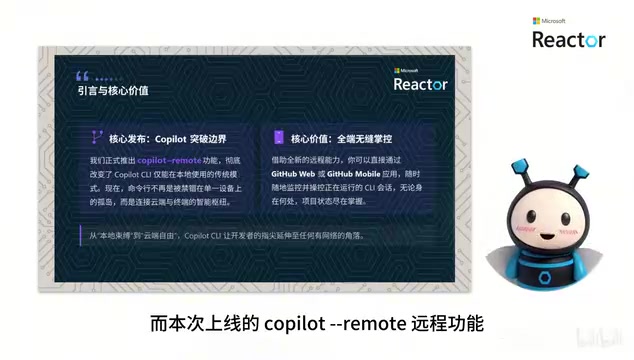
Four Core Capabilities of Copilot CLI Remote Control
1. Real-Time Sync: Operation Logs Automatically Synced to the Cloud
Once a remote session is started, all operation logs and session processes are automatically synced to the GitHub cloud in real time. No matter which device you connect from, you'll see the complete context without any information gaps.
This capability relies on WebSocket persistent connections and cloud-based session state management. WebSocket is a protocol for full-duplex communication over a single TCP connection. Unlike the traditional HTTP request-response model, it allows the server to proactively push data to clients with latency as low as milliseconds. GitHub's cloud infrastructure persistently stores the complete session state — including command history, environment variable snapshots, AI conversation context, and task execution progress. This architecture is similar to Google Docs' real-time collaboration model, where operations from any endpoint are broadcast via event streams to all connected clients, ensuring state consistency across multiple devices.
2. Easy Access: Scan to Connect
After a session starts, a dedicated access link and QR code are automatically generated. Phones, tablets, and remote computers can quickly join the session by scanning the code or opening the link — no complex configuration required.
3. Bidirectional Real-Time Interaction: Millisecond-Level Response
Bidirectional millisecond-level real-time interaction is achieved between web/mobile and local CLI — commands issued remotely execute locally in real time; local running status syncs back to the web interface with zero-latency collaboration.
4. Security: Creator-Only Access
Each remote session is accessible only to its creator, employing strict security mechanisms to safeguard code and operational data at the foundational level. This is especially important for enterprise users.
Specifically, the remote session security mechanism involves multi-layered protection. First, at the authentication layer, each remote session is tightly bound to the creator's GitHub account, requiring OAuth 2.0 token verification upon access to ensure only the session creator can connect. Second, at the transport layer, all remote communications are encrypted via TLS 1.3 to prevent man-in-the-middle attacks and data eavesdropping. Additionally, session links and QR codes have time limits and one-time binding properties, automatically expiring after their validity period. For enterprise users, this security architecture also integrates with organization-level SSO (Single Sign-On), SAML authentication, and audit log systems to ensure compliance with standards like SOC 2. All commands executed during remote sessions are recorded in audit logs, which is particularly critical for development teams in regulated industries such as finance and healthcare.
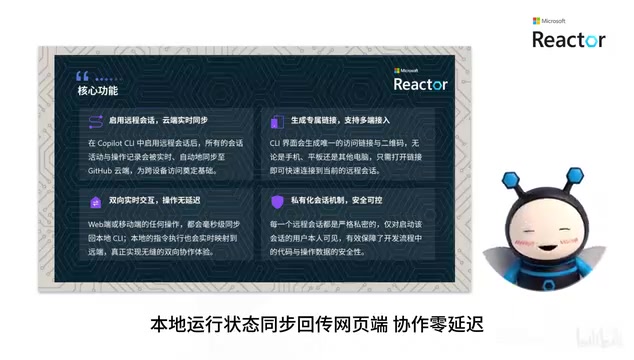
Deep Integration with Copilot Agent for Remote Development
The remote control feature is far more than just "viewing the terminal remotely." It deeply supports the full-scenario development needs of the Copilot agent, including:
- Remotely issue new instructions: Have the agent continue unfinished tasks without returning to the local device
- Review execution plans online: Before actual execution, review and modify AI-generated execution plans online, adjusting steps as needed
- Flexibly switch work modes: Freely switch between Plan, Interactive, and Auto modes
- Remote approval and termination: Terminate abnormal tasks at any time, remotely approve or reject permission requests with one click
- Real-time responses to AI questions: When AI needs human confirmation through interactive prompts, respond in real time from your mobile device
The three work modes represent different degrees of autonomy allocation in human-AI collaboration. Plan mode is the most conservative — AI only generates execution plans and step breakdowns, and all actual operations require manual step-by-step confirmation before execution. This is suitable for high-risk operations like database migrations or production deployments. Interactive mode is semi-automatic — AI pauses at critical decision points to ask the user questions, then continues after receiving confirmation, similar to the "navigator-driver" model in pair programming. Auto mode grants AI maximum autonomy — it independently plans, executes, and handles exceptions, only requesting human intervention when encountering unsolvable problems or needing permission escalation. The design philosophy behind these three modes draws from the tiered autonomy concept in self-driving vehicles, allowing developers to flexibly choose the depth of human-AI collaboration based on task risk level and personal trust.
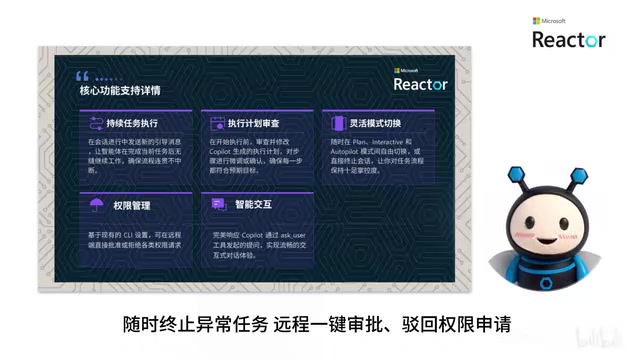
This means you can review AI-generated code plans on your phone during your commute, adjust task parameters on a tablet at a coffee shop, and truly achieve "portable" development work.
Copilot Remote Quick Start Guide
To try this feature, follow these steps:
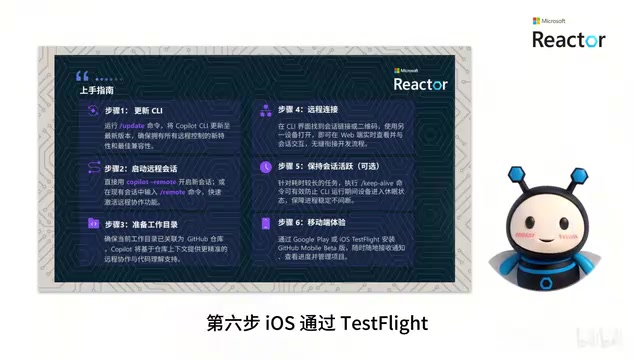
Step 1: Run the update command to update Copilot CLI to the latest version.
Step 2: Create a new remote session with copilot remote, or type remote in an existing session to enable remote access.
Step 3: Confirm that the current working directory is linked to a GitHub repository — leveraging repository context improves AI collaboration accuracy.
Step 4: Copy the link generated by CLI or scan the QR code to join the session via web browser.
Step 5: For long-running tasks, enter the keep alive command to prevent device sleep from interrupting the process.
Step 6: For mobile access, iOS users install via TestFlight, and Android users download the Beta version of GitHub Mobile from Google Play to enable mobile management.
Notes for Enterprise Users
If you're using Copilot Business or Enterprise, organization administrators need to enable remote control and CLI permissions in the backend policy panel beforehand for the feature to work. Enterprise administrators are advised to evaluate and enable the relevant permissions early so team members can experience this new feature.
The Profound Impact of Remote Control on Development Workflows
The significance of this feature goes far beyond "remote access" itself. It represents the trend of development tools evolving toward cross-platform, cloud-native paradigms:
- Breaking spatial constraints: Developers are no longer tied to their workstations — mobile work becomes a reality
- Improving AI collaboration efficiency: Long-running AI tasks no longer require someone sitting at the computer; asynchronous review and adjustment become possible
- Enhancing team collaboration potential: Although currently limited to creator access, future team sharing capabilities could dramatically boost collaboration efficiency
The launch of Copilot Remote is the latest milestone in the cloud-native wave of development tools. This trend began with the rise of cloud development environments like GitHub Codespaces and Gitpod — which host complete IDEs and development environments in the cloud, giving developers a consistent experience through the browser. VS Code's Remote Development extension further blurred the boundary between local and remote, enabling developers to seamlessly work with code on remote servers from their local editor. Copilot Remote extends this concept to AI-assisted development in command-line scenarios. From a broader perspective, this reflects the industry trend of "Development Environment as a Service" — developers' toolchains are evolving from locally installed software packages to continuously running cloud services, with devices themselves becoming lightweight access terminals. This aligns with the Chromebook design philosophy and suggests that in the future, developers may only need a browser to complete all their development work.
For developers who frequently handle long-running tasks or need to switch between multiple environments, this feature is worth trying immediately. We recommend updating to the latest version and experiencing the seamless transition from local to cloud firsthand.
Key Takeaways
Related articles

AI Comic Drama with WorkBuddy from Scratch: A Step-by-Step Skill Pack Installation Guide
Learn how to create AI comic dramas with WorkBuddy from scratch. This guide covers installation, Skill pack import and invocation, plus a script generation demo with manual revision tips to get you through the first step from script to storyboard.

WorkBuddy Agent Runs the Entire GEO Database Mining Pipeline with a Single Prompt
WorkBuddy agent automates GEO database mining: from data search and curation to batch correction, differential analysis, co-expression networks, feature gene screening, and immune infiltration—a single prompt generates a complete bioinformatics report, greatly lowering the barrier to bioinformatics analysis.

PC Memory Wasted? Hacker News Debates Centralized Data Centers
Hacker News users argue that personal computer memory is wasted and should be centralized in data centers, sparking debate on centralized vs. distributed computing resource allocation. This article analyzes the logic behind the claim, the costs of centralization, and new tensions in memory resource allocation in the AI era.