GitHub Copilot Desktop App Released: How Agent Programming Is Reshaping the Development Workflow

GitHub Copilot launches desktop app and upgrades JetBrains CLI Agent, penetrating the full development workflow.
GitHub Copilot is evolving from an IDE plugin to a standalone desktop application. The desktop app provides an Agentic Development environment with Sessions at its core, supporting task isolation and GitHub platform context awareness. The JetBrains ecosystem introduces CLI Agent, extending AI capabilities beyond code editing into terminal automation. GitHub adopts a layered strategy—desktop app for task orchestration, IDE plugins for code modification, CLI Agent for terminal automation—addressing the challenge from emerging competitors like Cursor through full workflow coverage.
GitHub Copilot is undergoing a significant form evolution—moving from an IDE plugin to a standalone desktop application. This isn't merely a change in product form; it signals that AI programming tools are breaking free from editor constraints and penetrating deeper into the operating system and terminal layers. Meanwhile, the JetBrains ecosystem has also received a major Agent capability upgrade.
Copilot Desktop App: More Than a Reskinned Web Version
The GitHub Copilot native desktop application has officially entered Technical Preview. It's important to emphasize that this is not simply the web version wrapped in a desktop shell—it provides a native desktop environment specifically designed for Agentic Development.
Agentic Development is one of the most important paradigm shifts in AI programming from 2024-2025. Traditional AI coding assistance (such as code completion and code suggestions) is fundamentally "passive and reactive"—a developer writes a line of code, and the AI predicts the next one. The Agentic model, however, empowers AI with the ability to proactively plan, decompose tasks, invoke tools, and iteratively execute. An Agent can receive high-level instructions (like "add pagination to this API and write tests"), then autonomously complete a series of steps including code modification, file creation, test execution, and bug fixing. This concept stems from Agent architecture research on Large Language Models (LLMs), with the core idea of using LLMs as reasoning engines, combined with Tool Use, Memory management, and Planning Loops to accomplish complex tasks.
Its core design philosophy revolves around Sessions. Developers can initiate independent sessions for complex tasks, with each session having isolated context and execution environments. This session isolation design draws from process isolation and containerization concepts in operating systems—in the AI programming context, each Session maintains an independent context window, working directory state, and tool invocation history. This solves a core pain point of traditional AI conversations: context pollution. When developers handle multiple unrelated tasks simultaneously (such as fixing a bug while developing a new feature), shared conversation context causes the AI to confuse code logic and intent across different tasks. Session isolation ensures each task has a clean execution environment, similar to how Git branches provide isolated spaces for code changes. This design makes the Copilot desktop version more like a dedicated "AI programmer terminal" that does work for you, rather than a supporting sidekick in your IDE.
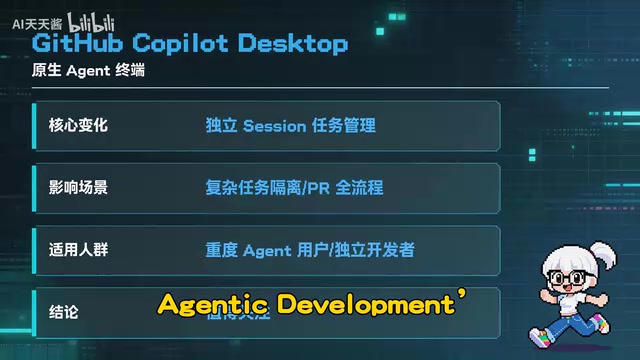
More critically, the desktop App can deeply perceive contextual information from the GitHub platform. From repository structure and Issue descriptions to Pull Request reviews and final delivery, all workflows can be completed in a unified interface. Developers no longer need to constantly switch between browser, IDE, and terminal—high-level task orchestration now has a dedicated operations center.
JetBrains Ecosystem Receives Major CLI Agent Update
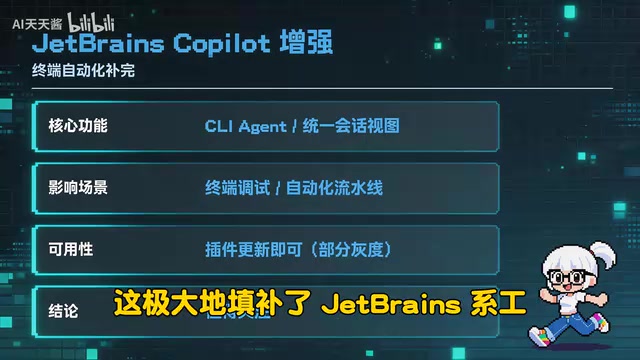
For users of JetBrains IDEs like IntelliJ IDEA and PyCharm, this update is equally noteworthy. Copilot for JetBrains IDEs has officially introduced CLI Agent capabilities—a qualitative leap forward.

The introduction of a CLI (Command Line Interface) Agent means AI capabilities have officially broken through the boundaries of code editing and entered the DevOps and automation operations domain. In modern software development, the terminal command line carries numerous critical operations: package management (npm install, pip install), build compilation (gradle build, cargo build), test execution (pytest, jest), container operations (docker build), infrastructure management (terraform apply), and more. Previously, these operations required developers to manually input commands or write Shell scripts. The CLI Agent enables AI to understand the developer's high-level intent and then autonomously generate and execute these commands, while also possessing error recognition and automatic retry capabilities. This essentially upgrades AI from a "code assistant" to a "full-stack development and operations assistant."
Specifically, developers can now invoke AI directly within JetBrains IDEs to execute terminal commands, run automated tests, and perform other operations. Previously, this depth of terminal automation capability had been an exclusive advantage of VS Code and Cursor, leaving JetBrains users envious. The introduction of CLI Agent significantly fills this gap.
Additionally, the new Unified Sessions View feature allows developers to monitor the status of all running and queued Agent tasks in real time. This is particularly practical for scenarios where multiple AI tasks are managed simultaneously—you can clearly see which tasks are executing and which are waiting, without worrying about "AI doing something in the background that I'm completely unaware of."
GitHub's Strategic Layout: Layer-by-Layer Penetration of the Development Workflow
From this update, GitHub's strategic thinking for the Copilot product line is clearly visible: layered architecture, each layer serving its purpose.
- Desktop App handles high-level task orchestration and project management—the "command center" for developer-AI collaboration
- IDE plugins handle deep code modifications, real-time completion, and refactoring—the core of the "execution layer"
- CLI Agent penetrates downward to the terminal and command-line level, covering automation scenarios like building, testing, and deployment

The elegance of this layered strategy lies in the fact that Copilot no longer depends on a single IDE entry point, but instead attempts to cover every touchpoint in a developer's workflow. Whether you're planning tasks, writing code, or debugging deployments in the terminal, there's a corresponding AI capability ready to assist.
From an industry competition perspective, this is also GitHub's powerful response to emerging AI editors like Cursor and Windsurf. Cursor, developed by Anysphere, is built on a deep modification of VS Code's open-source core, treating AI capabilities (such as multi-file editing, codebase-level context understanding, and Agent mode) as first-class citizens in the editor design, rather than as after-the-fact plugin integrations. Windsurf (formerly Codeium) adopts a similar strategy, emphasizing AI collaboration experiences in a "Flow" state. The common characteristic of these products is: redesigning the editor experience from scratch around AI interaction, rather than layering AI features on top of traditional IDEs. They rapidly gained large developer followings in 2024, posing a substantial threat to GitHub Copilot's market share, and driving Copilot's evolution from plugin to standalone application.
GitHub's strategy is to transcend the editor dimension and establish advantages at the broader development workflow level. GitHub hosts over 400 million code repositories and has more than 100 million developer users. What's accumulated on its platform is not just code itself, but also requirement descriptions and bug reports in Issue discussions, code review comments and design decisions in Pull Requests, CI/CD pipeline configurations in GitHub Actions, project management boards in Projects, and technical discussions in Discussions—both structured and unstructured data. This data constitutes a complete knowledge graph of software development. When the Copilot desktop App can perceive and leverage this context, its depth of understanding code intent far exceeds competitors that can only read local files. This data flywheel effect and platform-level contextual awareness is a moat that other competitors find difficult to replicate.
How Developers Should Take Action
For different types of developers, the recommended action paths differ:
- Developers pursuing ultimate task management: Apply early for the Copilot desktop version Technical Preview to experience Session-driven Agentic development
- Loyal JetBrains users: Immediately check for Copilot plugin updates to experience the efficiency gains from CLI Agent and Unified Sessions View
- VS Code / Cursor users: Pay attention to how the Copilot desktop App might complement existing workflows—the desktop App's task orchestration capabilities can pair well with the coding experience inside your IDE
The competition among AI programming tools is evolving from "whose code completion is more accurate" to "who can better take over the entire development workflow." GitHub Copilot's product form evolution is the perfect footnote to this trend.
Key Takeaways
- GitHub Copilot's native desktop App enters Technical Preview, providing an Agentic Development environment with Sessions at its core
- The Copilot plugin for JetBrains IDEs officially introduces CLI Agent, supporting terminal command execution and automated testing
- New Unified Sessions View enables real-time monitoring of all Agent task statuses
- GitHub adopts a layered strategy: Desktop App for task orchestration, IDE plugins for code modification, CLI Agent for terminal automation
- Copilot is breaking free from IDE constraints, penetrating into the OS and terminal layers, competing with emerging AI editors like Cursor through differentiation
Related articles
 Tech Frontiers
Sherlock: An Open-Source Tool for Tracking Usernames Across Social Networks
Sherlock is an open-source Python tool that tracks social accounts across networks by username. This article covers its core features, why developers love it, typical use cases, and privacy compliance considerations.
 Tech Frontiers
GitHub Daily·Nov 07: Agent-Ready and Context Compression
GitHub Trending Nov 07: meta's agent-ready design system astryx, billion-context's 5x context compression, sherlock nearing 100k stars, plus local-first localthings and bare-metal GPU orchestration nvke.
 Tech Frontiers
Buoyant Open-Sources Kinference: An Inference Control Plane for vLLM on K8s
Buoyant open-sources Kinference, an inference control plane for vLLM on Kubernetes, with declarative routing, KV-cache-aware load balancing, and per-tenant metrics—claiming 95% lower median TTFT in official benchmarks.