GitHub Copilot Integrates Claude Opus 4.8 Fast Mode: AI Coding Tools Are Now Competing on Response Speed

GitHub Copilot integrates Claude Opus 4.8 Fast Mode, prioritizing response speed for interactive coding and agentic workflows.
GitHub Copilot has added Claude Opus 4.8 Fast Mode to its preview channel, delivering significantly higher Token output speeds while maintaining the same intelligence level as standard Opus 4.8. The update covers all major subscription tiers and IDEs, though enterprise users must enable it manually. This move signals a broader industry shift: AI coding tools are increasingly competing on developer experience — latency, pricing, and manageability — not just raw model capability.
The Next Battleground for AI Coding: Not Smarter, But Faster
A recent GitHub Copilot update may signal an important shift in how AI coding tools compete. According to Bilibili creator "AI变化观察," GitHub Copilot has officially added Claude Opus 4.8 Fast Mode to its preview channel. The real significance here isn't a rebranding exercise — it's that the most frustrating part of AI-assisted coding, waiting, has been carved out as a standalone capability to optimize.
The official release notes are refreshingly direct: Fast Mode delivers noticeably higher Token output speeds compared to standard Opus 4.8, while maintaining the same level of intelligence — making it better suited for interactive coding and agentic workflow scenarios.
Understanding Token speed: Response latency in large language models breaks down into two components: Time to First Token (TTFT) and Tokens per Second (TPS). Fast Mode primarily targets the latter — using techniques like model distillation, quantization, or dedicated inference hardware scheduling to significantly increase Token output rate without meaningfully degrading reasoning quality. In interactive coding scenarios, TTFT determines "how long after I click before the first character appears," while TPS determines "whether the code block streams smoothly or stutters." Together, they define what developers experience as "responsiveness."
Put simply: when you ask Copilot to refactor code, explain an error, or run an agent task, what matters isn't just whether it answers correctly — it's whether every step feels like watching tea steep. In high-frequency interactive coding workflows, the psychological friction of response latency can hurt the actual experience more than raw model capability.
This problem is amplified even further in agentic workflows. In agent mode, the AI model executes multi-step tasks in an autonomous loop — continuously cycling through "perceive → plan → execute → reflect" rather than answering a single question. In this architecture, latency per LLM call compounds serially: if an agent task requires 10 model calls, a 2-second delay per call accumulates to 20 seconds of total waiting. Fast Mode is purpose-built for exactly this kind of high-frequency call pattern.
Wide Coverage, But Enterprise Users Are Off by Default
In terms of availability, Fast Mode has rolled out across a broad surface area. It covers Pro, Pro+, Business, and Enterprise subscription tiers, and is accessible from VS Code, Visual Studio, Copilot CLI, GitHub.com, JetBrains IDEs, Xcode, Eclipse, and virtually every other major development environment.
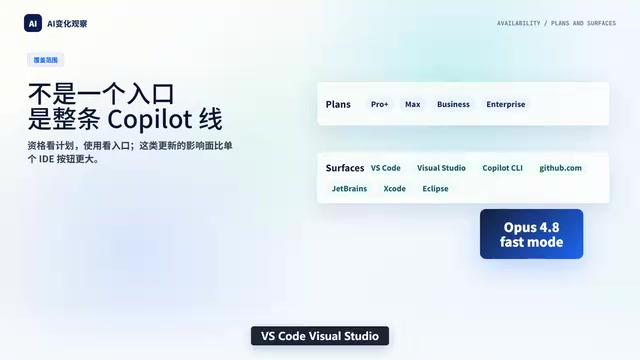
However, enterprise users should note a critical detail: Fast Mode is disabled by default for Business and Enterprise tiers, and must be manually enabled by an administrator in the Copilot settings under model policy management. This design reflects three distinct enterprise-level concerns: compliance risk (whether data passes through additional intermediate nodes), cost control (high-frequency Fast Mode usage could substantially increase API bills), and model consistency (output style differences between speed tiers may complicate code audit traceability). This mirrors the "principle of least privilege" in enterprise IT governance — new capabilities default to off and require deliberate administrator authorization after evaluation, rather than leaving the decision to individual developers. It speaks directly to an unavoidable challenge as AI tools enter the enterprise market: governability.
Gradual Rollout: Fast Mode Is Becoming a Long-Term Tiering Standard
GitHub has confirmed that Fast Mode is being deployed via a gradual rollout strategy — not pushed to everyone overnight. If you don't see the option yet, that's expected behavior.

Another notable signal: the previous generation Opus 4.6 Fast is being phased out, with GitHub recommending users migrate directly to Opus 4.8 Fast. This makes clear that "Fast Mode" is not a temporary toggle feature — it is evolving into a permanent tiering standard within Copilot's model architecture.
Going forward, Copilot's model selection is likely to settle into a clear two-dimensional structure:
- Standard Mode: Prioritizes capability ceiling, suited for complex tasks requiring deep reasoning;
- Fast Mode: Prioritizes response speed, suited for high-frequency interaction and agent loop call patterns.
The user decision framework upgrades accordingly: it's no longer just "which model do I pick," but "within the same model, do I prioritize capability or responsiveness?"
Pricing: Cheaper Than Before, But Still More Than Standard
On cost, GitHub hasn't published specific multipliers or price figures — only that Fast Mode is less expensive than the previous generation, but still priced above standard Opus 4.8.

This positioning is nuanced — it's not a "faster and cheaper" clean upgrade. It's an explicit tradeoff: you pay a premium for a faster response experience. This is a textbook example of AI tooling commoditizing "speed" as a standalone dimension — putting an explicit price tag on a specific experience quality, rather than bundling it into model capability tiers. For developers and teams with Copilot deeply embedded in their daily workflows, the math is personal: is the time saved waiting worth the extra cost?
Industry Insight: AI Coding Tools Are Now Competing on Developer Experience
What makes this update truly worth paying attention to isn't how capable Opus 4.8 is — it's what it reveals about an industry trend: the competitive center of gravity for AI coding tools is shifting from "who's smarter" to "who's more usable."
Over the past year or two, model vendors competed almost exclusively on capability metrics: code pass rates, reasoning depth, context window length. But as model capabilities across providers have begun to converge, the gaps users actually feel in real-world use increasingly come from non-capability factors: Is the response fast enough? Is there a noticeable wait? Is the pricing reasonable? Can enterprises actually manage it?
Developer Experience (DX) as a formal product metric gained serious traction in the mid-2010s with the rise of API-first companies like Stripe and Twilio. They demonstrated that great documentation, easy debugging, and fast response times are themselves product competitiveness. That logic is now playing out in AI tooling — as the "capability ceiling race" approaches saturation, experience-layer factors like latency, pricing transparency, and IDE integration depth are increasingly driving user retention.
As the creator "AI变化观察" put it at the end of their video: when evaluating future model updates, don't just ask who's smarter — also ask whether it keeps you waiting, whether it's expensive, and whether enterprises can actually govern it. No matter how capable a model is, if it consistently costs you a few seconds per interaction, the cumulative drag is more than enough to erode overall efficiency and willingness to use it.
GitHub's decision to make "speed" a standalone product tier is essentially a public acknowledgment that Developer Experience (DX) has become one of the core competitive advantages in AI coding tools. It sends a clear signal to the entire industry: AI tools are graduating from research products to engineering products, and the competition ahead will increasingly play out on a dimension that's invisible but unmistakably felt — the dimension of feel.
Related articles

Coinbase Engineer: How to Determine Whether an AI Agent Can Operate Unattended
Coinbase engineer Evan Kormos shares an engineering method for judging whether an AI agent can run unattended: model processes with DAG/DCG, replace output comparison with statistical evaluation, and hand over control in three phases—supervision, sampling, and exception handling.

WorkBuddy Beginner's Guide: How AI Agents Automate Office Tasks
WorkBuddy tutorial: learn how this desktop AI agent workbench automates files, organizes data, and generates documents, compared with LLMs and Codex, plus a beginner path and cost analysis.

Doubao Work in Practice: Three Modes That Let AI Actually Get Work Done
Doubao Work practical tutorial: from chat mode to Work Mode Lite and Pro, explaining the logic for choosing among three modes with real office task demonstrations. Even complete beginners can learn to use an AI agent to handle local files, organize materials, and generate documents.