GitHub Tag Signature Verification Mechanism Explained: A New Practice for PR Archiving

GitHub verifies tag authenticity via SSH signatures, showcasing supply chain security with archive/pr15095.
GitHub recently introduced tag SSH signature verification, exemplified by the archive/pr15095 tag, which points to the merge point of PR 15095 and carries a verified signature. The article analyzes how tag signing has moved from optional to trustworthy, using SSH key cryptography to confirm committer identity and raise the bar for forgery. Archive tags pin down PR merge points for long-term traceability. This reflects a micro-level practice in software supply chain security, and it is recommended to enable signing for release tags and verify signatures in CI. SSH signing is easier to use than GPG, but private key security requires attention. Developers should value tag signing and naming conventions to build a chain of trust.
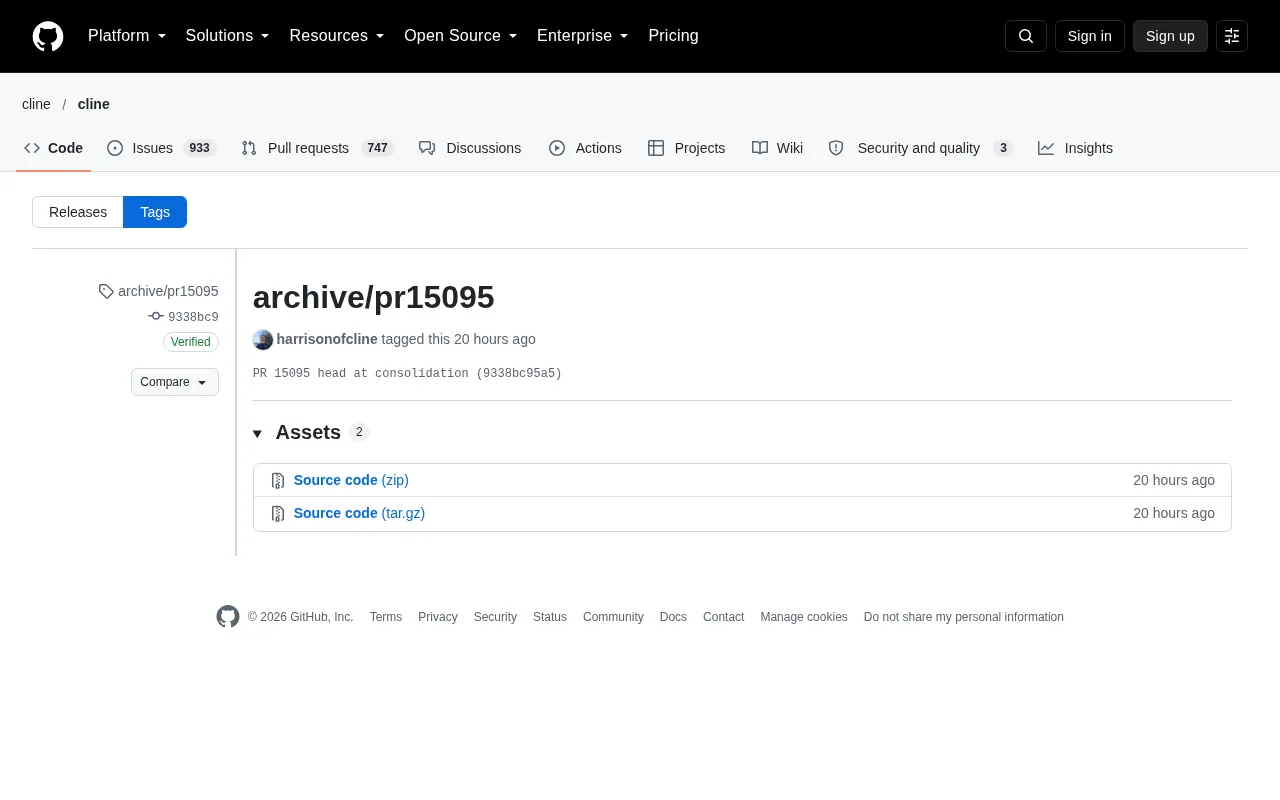
GitHub recently introduced a noteworthy practice in tag management: verifying tag authenticity via SSH key signatures. A tag named archive/pr15095 was marked on the 19th at 19:33, pointing to the merge point of PR 15095 (commit 9338bc95a5), and the tag carries the committer's verified signature. This seemingly simple operation involves deeper considerations around code archiving, supply chain security, and collaboration workflows.
Tag Signatures: From Optional to Trustworthy
GitHub's tag signing feature allows committers to sign tags using SSH keys, and the platform displays a "Verified" badge. In this case, the committer Harrison (username harrisonofcline) has an SSH key fingerprint of OwI5X3cTNDnQjcdExZwyln4ZMe2ieDeV3X1yG28AdWo, and the signature verification passed. This means the identity of the tag's creator is confirmed at the cryptographic level, rather than relying solely on account passwords.
For open source projects, tags are often used to mark release versions or important milestones. If tags could be arbitrarily forged, attackers could inject malicious code and disguise it as an official release. While signature verification cannot prevent all attacks, it significantly raises the bar for forgery. GitHub's "vigilant mode" further requires all commits and tags to be signed, suitable for projects with extremely high security requirements.
Vigilant mode is a mandatory signing policy provided by GitHub. Once enabled, GitHub requires all contributors to the repository to attach verified signatures to their commits and tags, otherwise they will be marked as "Unverified." This is suitable for projects with extremely high integrity requirements (such as security-sensitive open source libraries). It can be configured in repository settings, or similar effects can be achieved through branch protection rules. Note that this mode does not block unsigned code from being pushed, but it alerts maintainers for review through prominent indicators, forming a soft line of defense in the collaboration workflow.
Differences between SSH signing and GPG signing: Git traditionally uses GPG to sign commits and tags, but GPG key management is complex and configuration is cumbersome. Since 2021, GitHub has supported SSH signing, allowing developers to reuse existing SSH keys (such as those used for git push) for signing. The SSH signature format is more concise, verification is faster, and it integrates seamlessly with daily Git operations. However, SSH keys typically have no expiration mechanism, so once leaked the impact can be significant. It is therefore recommended to use a dedicated key for signing or combine it with hardware key storage (such as a YubiKey).
The Collaborative Significance of Archive Tags
The tag name archive/pr15095 reveals a workflow: archiving the merge point of a Pull Request for future traceability. PR 15095 may be a closed or merged request, and tagging it pins it down to avoid losing critical information due to branch deletion or history rewriting. This practice is not uncommon in large projects, especially when a PR involves complex discussions or requires long-term reference.
From the screenshot, the comparison view for this tag shows a loading error, which may be a temporary issue with the GitHub interface in certain network environments. However, the tag itself has been successfully created and signed, and the core metadata (commit hash, signer, timestamp) can be retrieved via API, so the archiving purpose is not affected.
The nature of Git tags: A tag is a fixed reference pointing to a commit, and is divided into lightweight tags and annotated tags. Only annotated tags can be signed, because signing requires an independent object containing tag metadata (such as creator, time, and message). Tags like archive/pr15095 typically use the annotated tag form to carry signature information. Once created, a tag will not move with branch changes unless forcibly deleted and re-pushed, making it suitable as a long-term archive point.
Retrieving tag metadata via API: The GitHub REST API endpoint GET /repos/{owner}/{repo}/git/tags/{tag_sha} returns tag object details, including the tagger, signature verification status, and the commit it points to. For signed tags, the API response includes a verification field, where verified being true indicates a valid signature. Developers can call this endpoint in automation scripts or CI to programmatically validate tag authenticity.
A Micro-Level Practice in Supply Chain Security
Software supply chain security is receiving increasing attention, from dependency auditing to build artifact signing, every link is being hardened. GitHub tag signing is one such link: it ensures the authenticity of "milestones" in code repositories. For teams using Git as their version control system, it is recommended to enable signing for release tags and verify signatures in CI workflows to prevent man-in-the-middle tampering.
In this case, the signature uses an SSH key rather than GPG, which aligns with GitHub's recent push toward SSH signing. SSH key management is relatively simple, and many developers already have SSH configured for Git operations, so reusing the same key for signing lowers the barrier to adoption. However, secure storage of keys remains critical—once the private key leaks, signatures become meaningless.
Takeaways for Developers
Ordinary developers can learn two things from this case: first, add signatures to important tags, especially publicly released versions; second, establish tag naming conventions within the team, such as archive/pr<number> for easy identification of purpose. GitHub's verification badge may be small, but it is a cornerstone of building a chain of trust.
As open source collaboration grows increasingly complex, similar micro-innovations will continue to emerge. Paying attention to these details helps us better understand the intersection of platform evolution and security practices.
One-line Summary
GitHub verifies tag authenticity through SSH signatures, demonstrating supply chain security practices with archive/pr15095 as an example.
Paragraph Summary
GitHub recently introduced a tag SSH signature verification practice, exemplified by the archive/pr15095 tag, which points to the merge point of PR 15095 and carries a verified signature. The article analyzes how tag signing has moved from optional to trustworthy, using SSH key cryptography to confirm committer identity and raise the bar for forgery. Archive tags pin down PR merge points for long-term traceability. This reflects a micro-level practice in software supply chain security, and it is recommended to enable signing for release tags and verify signatures in CI. SSH signing is easier to use than GPG, but private key security requires attention. Developers should value tag signing and naming conventions to build a chain of trust.
Related articles

Last Week Tonight Exposé: The Dangerous Ties Between Politicians and White Supremacy
Last Week Tonight investigates Georgia Senate candidate Mike Collins and Florida candidate Marshall Rawson, exposing their multiple ties to white supremacists and the Republican Party's silent response.
AI Buzz Weekly: GPT-6.5 Leak, New Claude Model, and MiniMax's Cost-Effectiveness
This week's AI buzz roundup: suspected GPT-6.5 leak, Microsoft configs showing GPT-6.1 Tera, Anthropic's new model that can identify entire classes of bugs, disappointing early Gemini 4 Carbon results, and MiniMax M3.1 Flash beating Claude Opus 5 and GPT-5.6 Sol in benchmarks at extremely low cost.

AI Briefing: Gemini 4 Carbon Released, Ant Open-Sources Ling-3.1
AI Briefing: Google releases Gemini 4 Carbon qubit model, claiming to surpass Opus 5.5 with half-price tokens; Ant open-sources Ling-3.1-1019 for real-task Personal Agents; domestic AI drug discovery succeeds in 18 of 19 projects, hitting all 6 GPCR targets; zero-revenue company valued at $20B raises another $1B; Sichuan convenience store robot sales fail.