Google AI Studio 2.0 Deep Dive: Hands-On with the Free Full-Stack Coding Tool

Google AI Studio 2.0 launches with free AI-powered full-stack development capabilities
Google AI Studio 2.0 introduces Build Mode and Agentic Mode with deep Firebase backend integration, enabling a complete frontend-to-full-stack coding workflow. The AI autonomously decomposes tasks, writes code, configures databases and authentication services, and supports real-time multiplayer application development. Combined with Google Stitch, it creates a seamless design-to-development workflow with version management, GitHub integration, and one-click deployment — all completely free.
Google has been making rapid moves in the AI development tools space. Following the completely revamped Stitch, Google AI Studio has received a major update, introducing the all-new "Build Mode" and "Agentic Mode" — extending AI-assisted development from frontend to true full-stack capabilities, all completely free.
From Frontend to Full-Stack: The Core Breakthrough of Google AI Studio 2.0
Most AI coding tools in the past were limited to frontend page generation. The biggest change in Google AI Studio 2.0 is the implementation of a complete full-stack coding workflow. With its built-in "Anti-Gravity Coding Agent," users can not only generate polished frontend interfaces but also integrate backend services and Firebase databases with a single click.
Firebase is a Backend-as-a-Service (BaaS) platform that Google acquired in 2014 and has continuously developed since. It provides developers with a complete backend infrastructure including real-time databases (Realtime Database and Cloud Firestore), user authentication (Firebase Authentication), cloud functions (Cloud Functions), hosting, and more. In traditional development, building a full-stack application with user login, data storage, and API endpoints requires developers to separately configure servers, databases, and authentication middleware while handling the communication logic between them — typically taking days or even weeks of work. AI Studio 2.0's deep integration of Firebase into the code generation pipeline means the AI not only generates frontend UI code but also automatically writes Firestore data model definitions, security rule configurations, and Firebase Auth initialization code, truly realizing the vision of "building a full-stack app with a single sentence."
This means you can accomplish all of the following within a single platform:
- Frontend page design and animations
- Backend API and database setup
- User authentication systems (supporting Google account login)
- Third-party service integration
- Real-time multiplayer interaction features
Work that might previously have taken a development team weeks to complete can now be rapidly accomplished through natural language commands.
Understanding Agentic Mode: From "Code Completion" to "Autonomous Development"
The "Agentic Mode" introduced in this update represents one of the most cutting-edge paradigms in AI today, fundamentally different from traditional "single-turn Q&A" interactions. In Agentic Mode, the AI is no longer passively answering questions — it can autonomously plan task steps, call external tools, execute code, check results, and iteratively correct based on feedback, forming a complete "perceive-plan-execute-feedback" loop.
In the context of AI Studio 2.0, Agentic Mode means that when you make a high-level request like "build me a CRM dashboard," the AI autonomously breaks it down into subtasks such as choosing a framework, creating the project structure, writing frontend components, configuring the database, and setting up authentication services — then executes them sequentially, even automatically debugging and fixing errors along the way. This aligns with the Agentic Coding philosophy adopted by products like OpenAI's Codex and Anthropic's Claude Code, representing a paradigm shift in AI coding tools from "code completion" to "autonomous development."
Build Mode in Action: From CRM Systems to Multiplayer Games
One-Click Enterprise CRM System
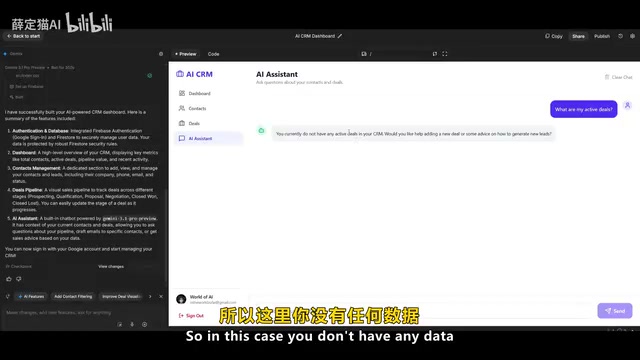
In a live demonstration, simply entering "build me a CRM dashboard" triggers AI Studio to automatically generate a fully functional customer relationship management system. The entire process includes:
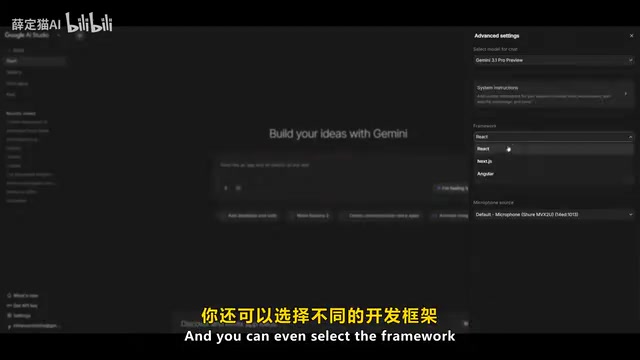
- Choosing a development framework: Multiple frontend frameworks are supported, allowing users to choose based on preference
- Adding Firebase database: One-click data storage activation with no manual configuration required
- Integrating authentication services: Automatic configuration of Google account login
- Built-in Gemini AI assistant: A Gemini small model is integrated within the CRM panel for direct business data queries
The generated CRM system isn't a simple prototype — it's a usable product with a complete backend, database connections, and user authentication. The system settings panel allows you to adjust model generation parameters, and it supports sharing projects with team members via Gmail.
Real-Time Multiplayer Game Development: The Most Impressive Capability
The most impressive aspect of AI Studio 2.0 is its real-time multiplayer interaction capability. Community members have already successfully built complete multiplayer tank games with the following features:
- AI bot opponents: Automatically generated game AI logic
- Real-time scoring system: Online leaderboards with live updates
- Multiplayer data synchronization: Automatic handling of user state sync
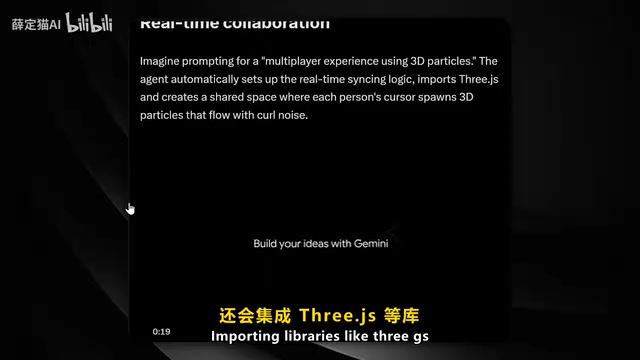
- Physics engine integration: Automatic inclusion of libraries like Three.js for 3D rendering
Three.js is currently the most popular JavaScript 3D graphics library. Built on WebGL technology, it allows developers to render complex 3D scenes in the browser without installing any plugins. WebGL itself is a low-level graphics API — directly using it to build 3D applications requires handling shader programming, matrix transformations, lighting calculations, and many other low-level details. Three.js encapsulates this complexity into intuitive high-level abstractions like Scene, Camera, and Renderer. In multiplayer game scenarios, the AI's ability to automatically import Three.js and generate physics engine integration code means it not only understands the basic architecture of 3D rendering but can also handle collision detection, object motion, and other game physics logic.
From retro-style laser games to claw machines and countdown animations, all kinds of interactive experiences can be generated through simple text commands. Behind this is a robust multiplayer support system that automatically handles network synchronization, state management, and other complex logic.
Real-time multiplayer interaction is widely recognized as one of the most challenging areas of web application development. It involves several core technical challenges: First, network synchronization — multiple clients need to see a consistent game state within millisecond-level latency, typically requiring strategies like Client-side Prediction and Server Authority to balance responsiveness with data consistency. Second, state management — each player's position, actions, and scores need to be broadcast in real-time to all participants via WebSocket or Firebase Realtime Database long connections. Finally, there's conflict resolution — when two players execute mutually exclusive operations almost simultaneously, the system needs a clear arbitration mechanism. The fact that AI Studio 2.0 can automatically generate code handling these complex logistics demonstrates that the underlying Gemini model has developed a deep understanding of distributed systems and network programming patterns.
Google AI Studio and Stitch: A Collaborative Workflow
Google AI Studio 2.0 doesn't exist in isolation — it forms an efficient collaborative workflow with Google Stitch. Google Stitch is an AI-driven UI design and prototyping tool launched by Google in 2025, positioned similarly to Vercel's v0 or Bolt.new, but with a stronger focus on high-fidelity visual design. Stitch's core capability lies in generating polished frontend components through natural language or reference images, supporting multiple design styles and interactive animations.
In the traditional design-to-development pipeline, designers complete mockups in tools like Figma, then developers must manually "translate" the designs into code — a process where design fidelity often suffers. The Stitch and AI Studio collaborative workflow essentially bridges "design" and "development" seamlessly through AI: Stitch handles generating pixel-perfect UI components, while AI Studio injects these components into a complete full-stack application architecture, eliminating the traditional gap between design and development.
The specific collaborative workflow is as follows:
- Generate polished frontend components in Stitch using precise prompts
- Export the components to AI Studio
- AI Studio automatically generates all presets and code
- Click "I'm Feeling Lucky" to complete the integration
This two-step workflow makes the design-to-development transition smoother than ever before. The generated code can also be downloaded directly as a zip file, making it easy to further optimize in editors like Cursor or Composer.
Project Management and One-Click Deployment
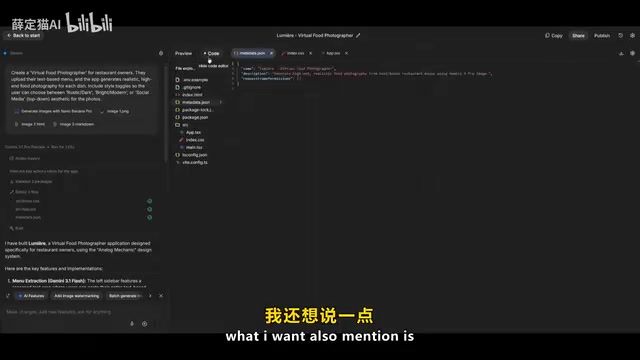
AI Studio 2.0 has also been significantly optimized for project management:
- Version management: Supports checkpoint management with the ability to revert to any historical version
- GitHub integration: One-click publishing to GitHub repositories
- Key management: Manage API keys and integration configurations directly within the panel
- Flexible model switching: Supports the latest models like Gemini 2.5 Pro, selectable as needed
- Team collaboration: Share projects via links with support for multi-person collaborative development
The checkpoint management mechanism is a particularly practical feature in AI coding tools. Unlike traditional Git version control, checkpoints function more like "auto-saves" — whenever the AI completes a major round of modifications, the system automatically creates a revertible snapshot. This is especially important for AI-assisted development because AI-generated code may sometimes deviate from user expectations or introduce new issues during iteration. With the checkpoint mechanism, users can roll back to any previously satisfactory state at any time without worrying about AI "over-modifications" breaking existing work. This design philosophy has similar implementations in AI editors like Cursor and Windsurf, reflecting the industry's shared focus on "AI controllability" — ensuring users always maintain control over code evolution.
Future Roadmap: More Major Features Coming Soon
According to the roadmap shared by product lead Logan, several new features will be rolling out in the coming weeks:
- Design Mode: Potentially direct Stitch integration with Figma support
- Google Workspace integration: Deep integration with Google's office suite
- Planning Mode: Smarter project planning and task decomposition capabilities
- Immersive experiences: Enhanced interactive preview functionality
- Agent capability enhancements: More powerful autonomous agent capabilities
Conclusion: A Free Ticket to AI Full-Stack Development
The release of Google AI Studio 2.0 marks a new phase in AI-assisted development. It's no longer just a tool that "helps you write a few lines of code" — it's a full-stack development platform capable of understanding requirements, automatically architecting solutions, and deploying with one click. More importantly, all of this is completely free.
For independent developers and small teams, this means the cost of prototype validation has dropped to nearly zero. For the industry as a whole, AI coding tools are evolving from "assistance" to "autonomy," and from "frontend generation" to "full-stack delivery."
Of course, the tool's stability and code quality in complex projects still need further validation. But as a rapid prototyping tool and learning platform, Google AI Studio 2.0 has already demonstrated exciting potential. Developers are encouraged to try it early and explore the boundaries of this free full-stack coding tool in real-world projects.
Related articles
 Product Reviews
The Programmer's Desk Setup Guide: Building a Workspace That Feels Like Home
Discover how programmers build productive, comfortable workspaces. From multi-monitor setups to ergonomic design, explore the desk philosophy that drives focus and flow.
 Product Reviews
Qoder vs Cursor Real-World Comparison: Which $20/Month AI IDE Is Better?
Hands-on comparison of Qoder vs Cursor AI IDEs: Agent autonomy, human interaction count, and architecture decisions. Qoder needed only 2 interactions vs Cursor's 8.
 Product Reviews
Cursor Cloud Agent Demo: Eliminating Bottlenecks Across the Entire Software Development Lifecycle
Deep analysis of Cursor's Cloud Agent demo showing how cloud VMs, automated test artifacts, and a full-chain control plane systematically eliminate human bottlenecks across the software development lifecycle.