Google AI Studio Annotate App Explained: The New Vibe Coding Approach Where You Draw to Modify Code

Google AI Studio launches Annotate App, enabling "draw to code" as the ultimate Vibe Coding experience.
Google AI Studio launched the exclusive Annotate App feature, letting developers draw and annotate directly on frontend interfaces to guide AI in modifying code — achieving true "what you draw is what you get" and pushing Vibe Coding from text-driven to visually-driven. While highly efficient for frontend prototyping, the platform still has clear limitations in environment variable management, external API integration, and Firebase configuration. A recommended phased approach: use AI Studio for rapid frontend prototyping, then export to tools like Cursor for backend integration and commercialization.
Google AI Studio recently launched an exclusive feature — Annotate App. This functionality doesn't exist in any mainstream AI coding tools like Cursor AI, ChatGPT Codex, or Claude Code. The core concept is so simple it'll make you slap your forehead: it turns your frontend interface into a whiteboard where you can draw and annotate directly, and the AI understands your intent and modifies the code accordingly.
No typing descriptions, no voice commands — truly "what you draw is what you get." This is probably the most extreme form of Vibe Coding to date.
The concept of Vibe Coding was coined by Andrej Karpathy in early 2025. Karpathy, former Tesla AI Director and one of OpenAI's co-founders, described a core philosophy: developers no longer write code line by line but instead guide AI to generate code through natural language, visual cues, or even vague descriptions of intent. The developer's role shifts from "code writer" to "intent communicator" and "result reviewer." This concept quickly sparked heated discussion in the developer community because it touches on a fundamental question — is the essence of programming precise syntax manipulation, or the communication and realization of intent? Annotate App pushes this philosophy from the textual level to the visual level.
Annotate App: Turning Your Frontend Interface into a Whiteboard
How It Works: Circle It to Change It
Let's look at a concrete scenario: you're building a thumbnail editor in Google AI Studio, and there's a generic image icon on the interface that you want to replace with a coffee bean icon.
With other AI coding tools, you'd need to open the chat window and type something like "please replace the second icon in the top left corner with a coffee bean style." But in Google AI Studio, the workflow looks like this:
- Click the Annotate App button
- Use the brush tool to circle that icon directly on the frontend interface
- Use the text tool to write "Make this icon coffee beans"
- Click Add to Chat, then hit Enter to send
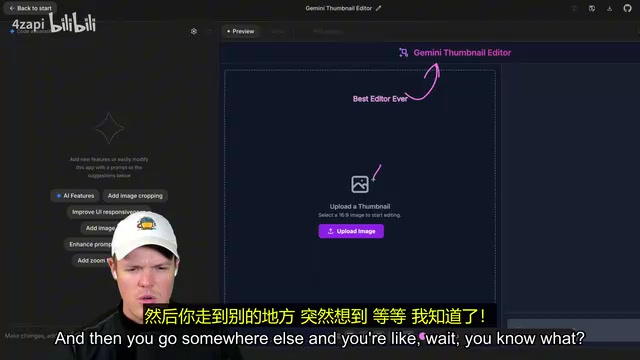
The AI understands your annotation location and text description, automatically locates the corresponding code, and modifies it. You can also draw an arrow pointing to a button and write "make this pink" next to it, and the button color changes to pink. The entire process is as intuitive as sketching on a whiteboard for a designer.
Why This Is the Ceiling of Vibe Coding
The core pursuit of Vibe Coding is reducing the expression cost of programming — you don't need to precisely describe technical details, just convey "feeling" and "intent." Annotate App pushes this to the current limit:
- Goodbye to ambiguity in text descriptions: No more struggling to organize language explaining where a UI element is located
- Goodbye to voice command misinterpretations: No more worrying about the AI confusing which "that button" you're referring to
- Visual problems solved visually: Circle where you want changes, arrows hit where you point them
Frontend development is inherently visually driven work, so expressing visual needs through visual means makes perfect logical sense.
From the perspective of interaction paradigm evolution in AI-assisted programming, this visual annotation mode represents a significant leap. The earliest stage was code completion (like GitHub Copilot), where developers write half the code and AI predicts the rest; the second stage was conversational programming (like ChatGPT), where developers describe needs in natural language and AI generates complete code blocks; the third stage was Agent mode (like Claude Code, Cursor Agent), where AI autonomously plans tasks, reads/writes files, and executes commands. The visual annotation mode represented by Annotate App can be seen as a prototype of the fourth stage — it introduces spatial information (annotation position) and visual semantics (circling, arrows, hand-drawing), enabling AI to understand not only "what to do" but precisely "where to do it." This shares conceptual similarities with Set-of-Mark (SoM) prompting techniques in the computer vision field, which help multimodal models precisely locate visual elements by overlaying markers on images.
The Real-World Limitations of Google AI Studio
Pain Points with Environment Variables and External API Integration
Annotate App is genuinely exciting, but using Google AI Studio as a complete development environment still has obvious shortcomings. Developer Corbin hit a snag in an actual project: the platform cannot effectively manage environment variables (.env files).
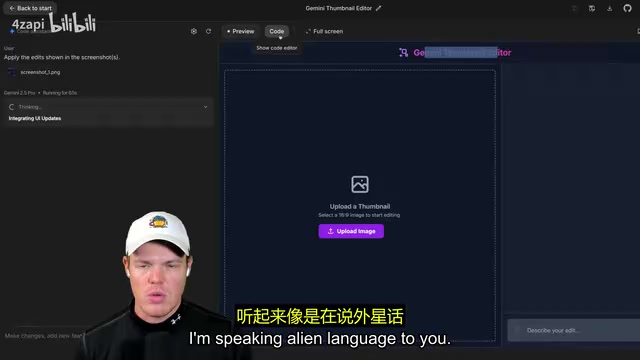
In standard development workflows, sensitive information like API keys is stored in .env files, and code reads them via process.env. This prevents keys from being leaked when pushed to public repositories like GitHub. This practice follows the third principle of the "Twelve-Factor App" methodology: strictly separating configuration from code. In the Node.js ecosystem, developers typically use the dotenv library to load variables from .env files into the process.env object, while the .env file is added to .gitignore to ensure it's never committed to version control. Once API keys leak to public platforms like GitHub, attackers can discover and abuse these keys within minutes using automated scanning tools, resulting in massive bills or data breaches. Google AI Studio handles its own API ecosystem (Gemini API, Google Maps, etc.) fine, but is essentially helpless when it comes to managing keys for external APIs.
Corbin's assessment was blunt: it's a "too siloed of a coding environment." Trying to make large-scale architectural changes within it, like directly integrating Firebase, would be extremely difficult.
Why Firebase Integration Isn't Smooth Either
Firebase is Google's own backend service, so logically it should be naturally compatible with Google AI Studio. But in reality, Firebase's Authentication, Firestore database, Hosting, and other services require numerous sensitive configuration variables that aren't convenient to handle in the current Google AI Studio environment.
To understand the root of this problem, you need to understand Firebase's service architecture. Firebase is a Backend-as-a-Service (BaaS) platform that Google acquired in 2014 and integrated into its cloud ecosystem, offering a complete suite of backend capabilities that run without self-managed servers: Authentication supports multiple login methods including email, phone number, Google/Apple; Firestore is a real-time syncing NoSQL document database that automatically pushes data changes to all connected clients; Cloud Functions allow developers to write serverless functions triggered by events. Firebase configuration involves multiple variables including Project ID, API Key, Auth Domain, Storage Bucket, and more. While some of these are public (needed by the frontend SDK), server-side Admin SDK keys and service account credentials are highly sensitive information that must be securely managed through environment variables. This is precisely Google AI Studio's current weakness.
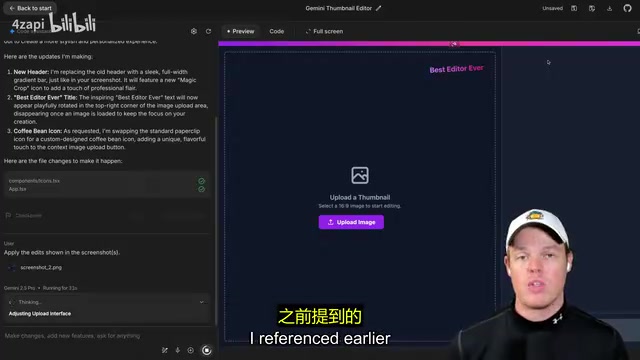
The good news is that Google AI Studio already provides one-click deployment — hit Deploy and you get a live link. The direction is right; there are just several aspects of the complete development pipeline that still need to be filled in.
Google AI Studio's Optimal Position in the Development Workflow
Platform Background and Strategic Intent
Google AI Studio was originally positioned as a debugging and prototyping tool for the Gemini series of large language models, where developers could test Prompts, adjust model parameters, and quickly generate API call code. In 2025, Google expanded it into a lightweight full-stack development environment with a built-in code editor, live preview, and one-click deployment capabilities. The Gemini API is Google's core product competing against OpenAI's GPT series, supporting text generation, multimodal understanding (images, video, audio), code generation, and more. Google's strategic intent is clear: lower the barrier to using the Gemini API through AI Studio, lock developers into Google's AI ecosystem, and create synergy with other Google Cloud Platform (GCP) services.
Recommended Three-Phase Development Strategy
Based on current capability boundaries, a pragmatic approach is to divide the development process into three phases:
Phase 1: Use Google AI Studio for frontend and core logic
Google AI Studio's strength is rapidly building frontend interfaces and leveraging the Google API ecosystem. In this phase, you can complete most of your app's frontend development, simulate login/logout functionality with mock data, and integrate the Gemini API for core business logic. Annotate App's efficiency advantage is most pronounced in this phase.
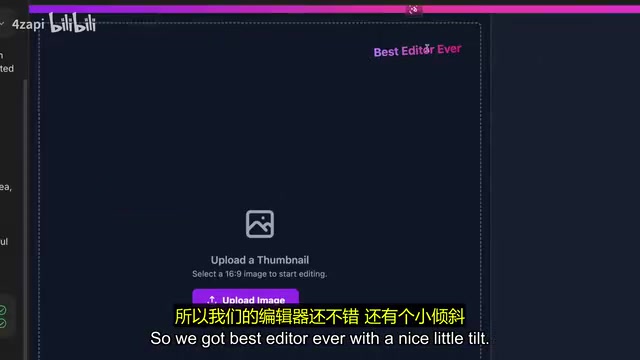
Phase 2: Export code and integrate backend services
Export the code from Google AI Studio and integrate Firebase Authentication, Firestore database, and other backend services in a more complete development environment like Cursor. This step requires some traditional development skills, or you can leverage other AI coding tools to get it done.
Phase 3: Commercialization and launch
Add payment systems, subscription management, and other monetization features to complete the final step from prototype to product.
Comparison with Cursor AI, Claude Code, and Other Tools
This phased strategy also illustrates the fundamental differences between Google AI Studio and other AI coding tools:
| Tool | Core Positioning | Biggest Advantage |
|---|---|---|
| Google AI Studio | Frontend prototyping + Vibe Coding | Visual annotation interaction, Google API ecosystem |
| Cursor AI | Full-stack development | Deep code editor integration |
| ChatGPT Codex | Code generation and understanding | Strong versatility, broad applicability |
| Claude Code | Complex reasoning and code refactoring | Outstanding long-context comprehension |
Cursor AI deserves special elaboration here. Cursor is an AI-native code editor deeply customized on VS Code's open-source codebase, developed by Anysphere. Its core advantage lies in embedding large language model capabilities directly into every operation within the editor: Tab auto-completion, inline editing (Cmd+K), multi-file context conversations (Cmd+L), and Agent mode (autonomously executing multi-step development tasks). Cursor supports connecting to multiple model backends, including Claude, GPT-4o, Gemini, and others. Unlike Google AI Studio's browser-based lightweight environment, Cursor is a full desktop IDE with direct access to the local file system, terminal, Git repositories, and environment variables, giving it a natural advantage in full-stack development scenarios. The difference between the two essentially reflects the divergence between "cloud-based lightweight" and "local heavyweight" approaches to AI coding tools.
Google AI Studio isn't trying to be an all-in-one development environment — instead, it's pushing Vibe Coding to the extreme. Annotate App is the most intuitive embodiment of this product strategy.
Summary and Outlook
Google AI Studio's Annotate App represents a new direction in AI-assisted programming: shifting from text-driven to visually-driven. While the platform still has obvious shortcomings in environment variable management and external service integration, its experience in rapid frontend prototyping already leads all competitors.
For developers, the key isn't finding the "best" AI coding tool, but understanding what each tool is best suited for. Google AI Studio excels at quickly turning ideas in your head into interactive frontend prototypes, while subsequent engineering work gets handed off to more specialized tools like Cursor.
When you can draw a circle and write a sentence directly on the interface to change your app's appearance, the barrier to programming has dropped another notch. This is probably the real reason Google is placing heavy bets on the Vibe Coding track.
Related articles
 Product Reviews
The Programmer's Desk Setup Guide: Building a Workspace That Feels Like Home
Discover how programmers build productive, comfortable workspaces. From multi-monitor setups to ergonomic design, explore the desk philosophy that drives focus and flow.
 Product Reviews
Qoder vs Cursor Real-World Comparison: Which $20/Month AI IDE Is Better?
Hands-on comparison of Qoder vs Cursor AI IDEs: Agent autonomy, human interaction count, and architecture decisions. Qoder needed only 2 interactions vs Cursor's 8.
 Product Reviews
Cursor Cloud Agent Demo: Eliminating Bottlenecks Across the Entire Software Development Lifecycle
Deep analysis of Cursor's Cloud Agent demo showing how cloud VMs, automated test artifacts, and a full-chain control plane systematically eliminate human bottlenecks across the software development lifecycle.