Google AI Studio: Generate a Native Android App from a Single Sentence

Google AI Studio generates a real native Android app from a one-sentence description in about five minutes.
Google AI Studio can now generate native Android apps from natural language descriptions — no coding required. In about five minutes, users get a genuine native app (not a web wrapper), with an in-browser virtual phone for instant preview, USB installation to real devices, and the ability to publish to Google Play Store's internal testing track for up to 100 users. The tool is free; only Google's standard one-time $25 developer fee applies. It's ideal for simple tools and prototype validation, though complex apps may still need manual refinement.
Building an Android app used to mean either learning to code yourself or hiring a developer. Google AI Studio has dramatically lowered that barrier — just describe what you want in plain language, and you can have a real, runnable native Android app in about five minutes. For creators and entrepreneurs without a technical background, the distance from idea to finished product has never been shorter.
From One Sentence to a Running Native App
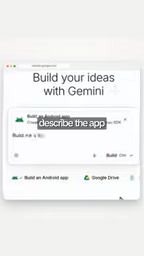
The process is surprisingly straightforward: open Google AI Studio, select Android, and describe your requirements in natural language. The example shown in the original video is "Build me a tip calculator that can split a bill among up to 6 people." The system generates a genuine native app — not a web wrapper — in roughly five minutes.

The word "native" matters here. Many low-code or AI website builders produce web apps, which compromise on experience and performance. AI Studio's selling point is that it outputs a real native Android app, meaning it can better leverage system capabilities and deliver a user experience close to what you'd get from a hand-coded app.
It's worth unpacking the difference between a native app and a web or hybrid app. Native Android apps are written in Kotlin or Java and run directly on the Android OS — they can access system-level APIs like the camera, sensors, background services, and push notifications, and they typically offer faster launch times and smoother interactions than web pages running inside a WebView. By contrast, many low-code tools and early AI app generators produce Progressive Web Apps (PWAs) or Cordova/Capacitor-based hybrid apps — essentially web pages wrapped in a shell, with limited system permissions and degraded performance. The fact that AI Studio generates native code means the output is on the same technical footing as hand-written code, rather than being a compromised workaround with restricted capabilities.
In-Browser Preview and Real Device Installation
Once generated, you don't have to immediately wrestle with deployment environments. AI Studio provides a virtual phone running right in the browser, where you can tap and interact with the app as if it were real, verifying that everything works as expected. This instant feedback dramatically shortens the debug-and-iterate cycle.

If you want to try it on your own device, simply connect your phone via USB and the app installs directly onto it. This collapses the gap between "demo" and "actually usable" — what you end up with is something you can slip into your pocket and open anytime.

Publishing to the Play Store for Testing
Going even further, AI Studio lets you publish your app to Google Play Store for testing, with support for up to 100 invited users. For individual developers or small teams looking to validate a product idea, this creates a complete loop: describe the requirement → generate the app → verify on a real device → run a small-scale public test.
On the cost side, the tool itself is free. The only fee is Google's one-time $25 developer registration — this is the standard fee required to publish any app on the Play Store, not an additional charge from AI Studio.
Google Play Store's testing tracks come in three tiers: internal testing, closed testing (Alpha), and open testing (Beta). Internal testing allows up to 100 testers and passes review almost instantly, making it the lowest-friction path for quickly validating a product idea — and the track AI Studio currently targets. Closed and open testing can reach more users, but require going through Google's app review process, which typically takes several days. The $25 one-time developer registration fee is the entry point for Google Play Console; once registered, you can publish an unlimited number of apps — it's not per-app or per-use. For entrepreneurs using AI Studio to rapidly test multiple product directions, this fixed cost is negligible when spread across individual experiments.
Who It's For — and Where It Has Limits
The greatest value of tools like this is enabling people without programming skills to quickly bring ideas to life. A tip calculator — with clear logic and a single focused function — is exactly the kind of app it excels at. For education, prototype validation, and internal utilities, generating from a single sentence is more than sufficient.
That said, it's worth being realistic. The original video primarily showcases simple examples. For genuinely complex apps — those involving backend services, payments, intricate state management, or demanding UI details — AI-generated results may still require manual refinement. Additionally, the video was presented in a social-media promotional style (with a link distributed via comments), and some capability descriptions carry a marketing tone. It's best to refer to official documentation and try it yourself before drawing conclusions.
Overall, Google AI Studio represents a concrete milestone in the "natural language as development" trend. It hasn't eliminated the value of developers — rather, it has handed the starting point of "building something that actually works" to a much broader group of ordinary people.
Related articles

Chain of Thought Isn't Just for AI: How Humans Can Use CoT to Improve Thinking Quality
Chain of Thought isn't just a prompt trick for large models. Starting from a Hacker News discussion, this article analyzes why CoT works for human thinking too, breaks down actionable ways to transfer it, and highlights the key differences between human CoT and machine CoT.
Cloudflare Teams Up with OpenAI: Closi…
Cloudflare Teams Up with OpenAI: Closing the Loop from Vulnerability Discovery to Defense with AI
Cloudflare uses OpenAI Daybreak to investigate security vulnerabilities and generate reviewable remediation plans, while developers use Codex to boost coding efficiency and quality.

Orca Multi-Agent Orchestration in Practice: A Guide to Parallel Collaboration with Claude and Codex
Orca is Stable AI's free open-source agent workbench supporting 34 agents like Claude Code and Codex in parallel. Learn its Git worktree isolation, multi-model orchestration, and mobile management.