Google Jules Hands-On Review: AI Coding Agent Automatically Analyzes Code and Commits to GitHub

Google launches AI coding agent Jules that autonomously completes the full development workflow from code analysis to commit.
Google has released Jules, an AI coding agent powered by Gemini 2.5 Pro that seamlessly integrates with GitHub and autonomously handles code analysis, feature development, test fixing, and PR submission in a complete closed loop. Hands-on testing demonstrates excellent performance in deep C# project code review and Python GUI development, with standout ability to autonomously troubleshoot and fix errors—distinguishing it from traditional code completion tools. Currently limited to 5 free uses per day, Jules represents the evolution of AI programming from assistance to autonomous development.
AI Programming Enters the Agent Era: What Exactly Is Jules
Google recently officially launched its next-generation AI coding agent Jules, an AI Agent capable of autonomously understanding, analyzing, and executing programming development tasks. The concept of an AI Agent represents one of the most significant paradigm shifts in artificial intelligence today—unlike traditional AI tools that passively respond to single instructions, AI Agents possess a complete closed-loop capability of perceiving their environment, autonomous planning, executing actions, and adjusting based on feedback. In the programming domain, this means AI is no longer just a "code autocompleter" but can understand project context, formulate development plans, write code, run tests, and self-adjust based on results—just like a human developer. Unlike traditional AI code completion tools, Jules doesn't just offer suggestions while you write code; it can independently complete the entire workflow from code analysis and feature development to code submission.
Jules' biggest highlight is its seamless integration with GitHub—you don't need to configure a local environment. It automatically clones the code repository to a secure virtual machine on Google Cloud, fully understands the project structure, and then executes tasks. Under the hood, it uses the Gemini 2.5 Pro model, Google DeepMind's flagship multimodal large language model launched in 2025, the latest iteration in the Gemini series. This model excels particularly in code generation, mathematical reasoning, and long-context understanding, supporting a context window of up to 1 million tokens, meaning it can "read" an entire large code repository at once. In multiple authoritative programming benchmarks (such as SWE-bench and HumanEval), Gemini 2.5 Pro ranks among the top performers. Its "thinking" mode allows the model to perform multi-step internal reasoning before generating answers, which is crucial for complex code logic analysis and architectural decisions. It is precisely this model that gives Jules its outstanding code comprehension and logical reasoning capabilities.
Next, I'll walk you through two in-depth real-world project tests to show you how Jules actually performs in code analysis, feature addition, and automated workflows.
Quick Start: Connecting Jules to GitHub in Just Three Steps
Jules' usage flow is extremely streamlined—three steps and you're up and running:
- Connect your GitHub account: Open Jules' official webpage, click the "Connect to GitHub" button, select your GitHub account, and complete authorization
- Select the target repository: Use the dropdown menu to select the project repository and corresponding branch you want to work with
- Describe your task requirements: Use natural language in the input box to describe what you want Jules to do
The entire process requires no local tool installation and no development environment configuration, making it highly efficient for quickly launching project analysis and code modifications.
Test One: Comprehensive Code Analysis of a C# Project
Deep Code Review Across Ten Dimensions
The first test project was a .NET MAUI application developed in C#, designed to send questions to multiple AIs simultaneously and receive answers. .NET MAUI (Multi-platform App UI) is Microsoft's cross-platform application development framework that allows developers to write a single codebase using C# and XAML, deploying simultaneously to Android, iOS, macOS, and Windows platforms—it's the evolution of Xamarin.Forms. I submitted an analysis task to Jules covering ten dimensions: project overview, code structure analysis, feature map, dependency analysis, code quality assessment, key algorithms and data structures, function call graph, security analysis, scalability and performance evaluation, and summary recommendations.

After receiving the task, Jules first cloned the repository, then automatically formulated a step-by-step execution plan. The entire analysis process was methodical and well-organized:
- Retrieving project details from README
- Analyzing the main project structure and file organization
- Identifying design patterns (correctly identifying the MVVM pattern)
- Analyzing core features and dependencies
- Evaluating code quality and providing improvement suggestions
- Identifying key algorithms and data structures
- Conducting security and scalability assessments
How Reliable Are Jules' Analysis Results
From hands-on testing, Jules' analysis results were quite professional. It accurately identified that the project employs a "view-centric MVVM pattern"—MVVM (Model-View-ViewModel) is an architectural design pattern widely used in UI development, originally popularized by Microsoft in the WPF framework. It divides an application into three layers: Model handles data and business logic, View handles interface presentation, and ViewModel serves as the intermediary layer handling view logic and data binding. Jules' ability to accurately identify this pattern variant demonstrates that it doesn't just understand code syntax but also grasps architectural-level design intent. In the feature map, it provided detailed breakdowns of core flows including user input and dynamic view management. Regarding code quality, Jules gave a rating of "good readability" while also pointing out specific areas for improvement.

Notably, Jules also identified the key algorithm where the project interacts with AI through JS injection, as well as the custom class structures used in the project. In its final summary, it concluded that the project "has high scalability." Overall, both the depth and accuracy of the analysis exceeded my expectations.
Automatically Adding Features and Committing to GitHub
After completing the analysis, I further tested Jules' feature development capabilities. The task was: add a feature to export AI responses from the WebView as Markdown format files.
Jules demonstrated excellent interaction capabilities—rather than immediately writing code, it first asked three clarifying questions: How should the export be triggered? What content should be exported? Should it be saved to clipboard or file? After I specified the requirements (toolbar button trigger, export all content, save to file), Jules broke the task into five subtasks and executed them step by step:
- Modifying project code to add HTML-to-Markdown functionality
- Adding file save logic
- Integrating into the existing UI
- Running test verification
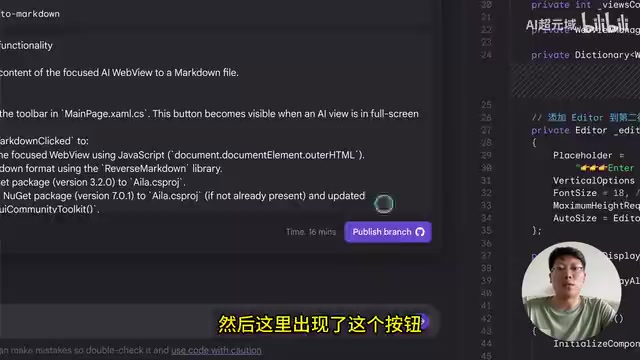
After completing the task, Jules generated a "Publish to GitHub" button. Upon clicking it, the modified code was submitted directly as a PR (Pull Request) to the project's corresponding branch. PR is the most core collaboration mechanism on the GitHub platform—when developers complete code modifications, they create a PR to submit a merge request to project maintainers. Other team members can perform code review, discuss, and suggest changes within the PR, merging to the main branch only after confirmation. Jules' ability to automatically generate PRs and submit them to GitHub means its code modifications can seamlessly integrate into a team's existing development collaboration workflow—other developers can review AI-generated code just as they would review a colleague's code. This significantly lowers the barrier for AI tools to integrate into actual development teams. This complete closed loop from requirements analysis to code submission is the core value of Jules as an AI coding agent.
Test Two: Automatically Adding a GUI to a Python Project
From Command Line to Graphical Interface
The second test project was a Python script that splits PDFs by chapters—a very common task when building RAG knowledge bases. RAG (Retrieval-Augmented Generation) is one of the most mainstream technical architectures in enterprise AI applications today. Its core approach is: first split enterprise documents (such as PDFs, Word files, etc.) into semantically complete small chunks, store them in a vector database via vector embeddings, and when a user asks a question, the system first retrieves the most relevant document fragments, then provides them as context to a large language model to generate answers. In this workflow, splitting PDFs by chapter is a critical data preprocessing step—the granularity of splitting directly impacts retrieval quality. If an entire book is one chunk, retrieval precision is too low; if split by sentence, context is lost. Splitting by chapter is a commonly used strategy that balances semantic completeness and retrieval precision.
The script originally only had a command-line interface, requiring manual command input each time, which wasn't user-friendly for non-technical users. The test task was: add an intuitive, user-friendly graphical interface (GUI) on top of the existing script, so users without programming knowledge can easily use it.
Automatic Development, Testing, and Bug Fixing
Jules' execution process demonstrated true AI agent capabilities:
- Creating UI code — Automatically generating graphical interface components
- Integrating business logic — Connecting the UI with the original script code
- Adding status messages and error handling — Improving user experience
- Automatically running tests — Discovering missing dependency modules
- Autonomous troubleshooting and fixing — Automatically installing missing modules and re-testing
- Optimizing interface layout — Further adjusting UI layout and interaction experience

One detail here deserves special attention: Jules encountered a missing module error during the testing phase, but instead of stopping and waiting for human intervention, it autonomously executed commands to investigate the error cause, installed the missing module, and then continued completing subsequent tasks. This ability to independently solve problems is the key characteristic that distinguishes it from ordinary AI code generation tools—and it's precisely the core embodiment of the AI Agent paradigm: perceiving problems, planning solutions, executing fixes, and verifying results, forming a complete autonomous decision-making closed loop.
How Does It Actually Run
After copying Jules' generated code to the local PyCharm environment and running it (with dependencies installed), it successfully presented a fully functional GUI interface, including file selection, chapter splitting, result saving, and other complete features. The transformation from a command-line tool to a visual desktop application was accomplished by Jules in one go.
Comparison with Competitors: Where Are Jules' Differentiating Advantages
The AI programming tools space is currently highly competitive, with products like OpenAI Codex, Manus, and Coze each having their strengths. OpenAI Codex is OpenAI's asynchronous AI coding agent, based on its code-optimized model codex-mini, which also supports GitHub integration and can autonomously complete code writing and testing in a cloud sandbox. Manus is a general-purpose AI Agent platform that excels at breaking complex tasks into multi-step automated execution. Coze is ByteDance's AI application development platform, focusing on building AI workflows and Bots through visual interfaces. Additionally, GitHub Copilot Workspace, Cursor, Windsurf, and other products each have their own positioning in the AI-assisted programming space. The entire sector is rapidly evolving from "code completion" toward "autonomous development."
Jules' differentiating advantages are mainly reflected in three areas:
| Comparison Dimension | Jules | Other AI Coding Tools |
|---|---|---|
| Code Repository Integration | Native GitHub integration, one-click PR submission | Most require manual copy-pasting of code |
| Task Autonomy | Complete end-to-end autonomous execution, automatic error fixing | Usually requires human intervention for troubleshooting |
| Underlying Model | Gemini 2.5 Pro, strong code reasoning capability | Model capabilities vary significantly across products |
In simple terms, Jules' core competitive advantage is: It doesn't just help you write code—it helps you write it, test it, and commit it to the repository.
Current Limitations and Future Outlook
Currently, Jules' main limitation is only 5 free uses per day, which is clearly insufficient for deep testing and daily development. However, based on hands-on testing results, Jules demonstrates solid performance in the depth of code analysis, completeness of feature development, and autonomous problem-solving capabilities.
As Google continues to optimize the Gemini model and the Jules platform, this AI coding agent is poised to become an indispensable productivity tool in developers' daily workflows. Especially for teams that frequently need to conduct code reviews, feature iterations, and project maintenance, Jules offers an entirely new collaboration approach—making AI truly a "developer" on the team, not merely a code completion tool. From a broader perspective, the AI Agent programming paradigm that Jules represents is redefining the boundaries of software development: future developers may no longer need to write every line of code manually, but instead take on the roles of requirements definers, architecture decision-makers, and code reviewers, delegating the actual implementation work to AI agents.
Related articles
 Product Reviews
The Programmer's Desk Setup Guide: Building a Workspace That Feels Like Home
Discover how programmers build productive, comfortable workspaces. From multi-monitor setups to ergonomic design, explore the desk philosophy that drives focus and flow.
 Product Reviews
Qoder vs Cursor Real-World Comparison: Which $20/Month AI IDE Is Better?
Hands-on comparison of Qoder vs Cursor AI IDEs: Agent autonomy, human interaction count, and architecture decisions. Qoder needed only 2 interactions vs Cursor's 8.
 Product Reviews
Cursor Cloud Agent Demo: Eliminating Bottlenecks Across the Entire Software Development Lifecycle
Deep analysis of Cursor's Cloud Agent demo showing how cloud VMs, automated test artifacts, and a full-chain control plane systematically eliminate human bottlenecks across the software development lifecycle.