Google's Free AI Coding Agent Tested: 1,380 Requests, Zero Files Generated

Google's free AI coding agent failed the test: 1,380 requests all errored, zero files generated.
A YouTube creator tested Google's free AI coding agent on a production-grade app, with disappointing results. The first request hit the Pro model limit, so the agent downgraded to Flash, followed by a 15-minute unresponsive "thinking" period; only after canceling was the daily quota exhaustion revealed. Most strikingly, Pro model requests reached 1,380, all errors, with zero files written. The article summarizes four predicaments of free AI coding tools—strict quota limits, opaque error handling, low efficiency, and poor UX—and advises developers to manage expectations, monitor usage, and prepare fallbacks. While an individual case, it reflects the general reliability shortcomings of current free AI coding tools.
A Disappointing Test of a Free AI Coding Agent
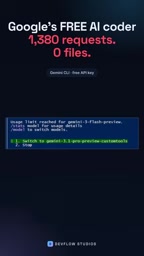
Recently, a YouTube creator put Google's free AI coding agent to the test, and the results were staggering. He asked the agent to build a real, production-ready application, but the entire process was plagued by errors and limitations. According to the creator, on the very first request, all Pro model usage limits had already been reached, and the agent automatically switched to the Flash model. The Flash model drew up a plan and asked some questions it shouldn't have asked.
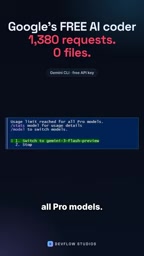
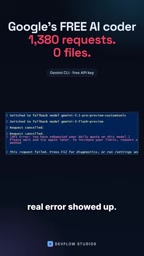
Ten minutes later, the limit was triggered again. Then came a 15-minute "thinking" period with no results returned. When the creator canceled the operation, the real error was finally revealed: the daily quota had been exhausted.
Striking Statistics: 1,380 Erroneous Requests
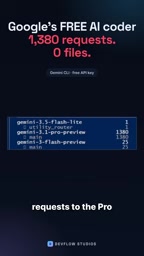
The most shocking part is the statistics: requests to the Pro model reached as many as 1,380, and every single one was an error. And the number of files written to the project was — zero.
The creator said he tested five free AI coding tools with the exact same application, and the full results can be found on his channel.
To understand the anomaly of "1,380 requests, zero files written," it's necessary to understand the basic operating mechanism of AI coding agents. These agents typically follow a "plan—execute—observe—correct" loop: the model first breaks down the task, then progressively implements it through tool calls (such as creating files, writing code, running commands), and decides the next step based on the return result of each call. Ideally, a task requires only dozens to hundreds of model calls. But when the agent encounters persistent errors, lost context, or abnormal tool returns, it easily falls into a "retry—fail—retry" loop, with the request count ballooning while producing no effective output. The 1,380 erroneous requests are a typical manifestation of this out-of-control loop, indicating that the agent's self-correction and termination mechanisms failed to take effect.
The Common Predicament of Free AI Coding Tools
This test exposed several common problems with free AI coding tools:
- Strict quota limits: Even the Pro model has strict daily usage limits, leading to frequent quota triggers.
- Opaque error handling: The agent automatically switches models when it hits the limit, but the final error message is hidden until the user cancels the operation.
- Low efficiency: A large number of requests (1,380) failed to produce any actual output (zero files), suggesting the agent may have fallen into a loop or ineffective attempts.
- Poor user experience: Long "thinking" periods with no response, as well as unnecessary questions, both reduce the tool's usability.
The Pro and Flash mentioned in the article are two versions with different positioning within the same model family. Pro typically has a larger parameter count and stronger reasoning ability, making it suitable for complex code generation and multi-step planning, but its per-call cost and quota consumption are also higher; Flash is a lightweight version with faster responses and lower cost, but it is more prone to errors or misunderstandings when handling complex tasks. Many free AI coding tools adopt a strategy of "Pro first, downgrade to Flash when quota is exhausted," which also explains why the agent in the test switched to Flash after the first request. Although downgrading can extend free usage time, it may sacrifice output quality and change the task execution path without the user's knowledge.
Implications for Developers
For developers who rely on free AI coding tools, this test sounds an alarm. Although free tools are attractive, they may not provide reliable performance for production-grade tasks. Developers need to:
- Manage expectations: Free tools are suitable for experiments and small tasks, not critical projects.
- Monitor usage: Pay close attention to quota consumption to avoid being limited at critical moments.
- Prepare fallback options: Have paid or alternative solutions available when free tools fail.
"Production environment" in software engineering means an application must meet requirements for stability, maintainability, security, and observability, not merely that it "runs." Building a production-grade application from scratch with an AI agent places extremely high demands on the model's planning ability, code correctness, and error recovery. Limited by quotas and model capabilities, free tools are better suited for prototype validation, learning experiments, or small script generation; using them directly for critical projects can easily leave hidden risks in dependency management, edge-case handling, and test coverage. Therefore, when evaluating AI coding tools, "whether it can reliably produce runnable code within a limited number of calls" should be taken as a core metric, rather than looking only at single-generation results.
Conclusion
Google's free AI coding agent performed poorly in this test. All 1,380 requests were errors, and the result of zero files generated highlights the limitations of free tools. Although this is only one case, it reflects the current shortcomings of free AI coding tools in terms of reliability. Developers should remain cautious when using them and choose appropriate tools based on actual needs.
(Note: This article is based on a YouTube creator's test sharing, with specific data cited from his description.)
Related articles

DeepSeek Harness in Detail: DIY Your Own Software Like Building with LEGO
What is DeepSeek Harness? Using the metaphor of a car assembly platform, this article explains this equipment system of freely combinable functional modules, analyzes its spatiotemporal composability technical foundation, and shows how ordinary users can DIY exclusive software that does not exist on the market at extremely low cost.

DeepSeek Harness Step-by-Step Tutorial: Master DSH and Its Plugin Ecosystem in 50 Minutes
DeepSeek Harness step-by-step install tutorial: from Node.js environment setup to client installation, covering three plugin install methods — chat, marketplace, and command line — plus practical uses of local file access and plugin extensions.

DeepSeek Open-Sources Super-agent Architecture: A Turning Point for Proactive AI
DeepSeek's open-source Super-agent architecture proposes a new proactive AI paradigm: a central Agent dispatches tasks, sub-Agents execute autonomously, and humans only decide and accept. This article analyzes the watershed between passive and proactive AI, and the implementation logic of proactive Agents in scenarios like short-video lead generation.