Google's Major Accessibility Update: Sign Language-to-Text, Rambler Voice-to-Text, and More

Google releases accessibility updates across multiple product lines, covering sign language translation, natural voice input, and AI visual assistance.
Google announced a series of accessibility updates across Pixel, Android, Chrome, Gboard, Gemini, Workspace, and Search. Key highlights include: Rambler on Pixel 11, which converts spoken language with self-corrections and filler words into usable text with voice editing; Sign-to-Text, which translates American Sign Language into written English in real time using the SL2T model; Guided Frame with Gemini, enabling blind users to photograph specific subjects via voice commands, plus Guided Vision for interactive audio guidance. Other updates include Motion Assist for motion sickness, Voice Access and Gboard refinements, Chrome's immersive Reading Mode, Workspace and Gemini executive function guides, Search AI Mode keyboard navigation improvements, and a new accessibility help community. Most new features debut on Pixel 11 and will expand to more devices and languages.
Google has recently announced its latest accessibility advancements, spanning multiple product lines including Pixel, Android, Chrome, Gboard, Gemini, Workspace, and Search. From real-time sign language translation to new voice-to-text tools, these updates aim to make technology more inclusive. Here are the core highlights of this release.
Rambler: More Natural Voice-to-Text
Google has introduced a new feature called Rambler on Pixel 11 devices that intelligently converts spoken language into written text. Unlike the existing Gboard voice input, Rambler allows users to speak naturally—even with self-corrections, repetitions, or filler words like "um" and "ah"—while still capturing the key content and generating usable text. Users can then easily edit the text using voice commands. For TalkBack users, the feature can be quickly started and stopped with a two-finger double-tap gesture.

Rambler is currently only available on Pixel 11, with plans to expand to more devices in the future. This marks a step forward from "accurate transcription" to "intent understanding" in voice input.
What is the difference between "intent understanding" and "accurate transcription" in voice-to-text?
Traditional automatic speech recognition (ASR) systems aim to transcribe audio verbatim into text, typically measured by word error rate (WER). These systems lack the ability to handle pauses, repetitions, self-corrections, and filler words (such as "um" and "ah"), requiring users to speak deliberately clearly and fluently. Voice input with "intent understanding," on the other hand, introduces a semantic layer: the model determines what the user ultimately wants to express while transcribing, proactively removing redundancies, merging self-corrections into the final statement, and preserving an editable structure. This typically relies on end-to-end speech large models or ASR followed by a large language model for rewriting. Rambler represents exactly this direction, upgrading voice input from a "dictation tool" to an "expression assistant," but it also brings new challenges—such as how to make deletion decisions without losing the user's original intent, and how to reliably distinguish voice editing commands from body text.
Sign-to-Text: Real-Time Sign Language Transcription
Most notably, the Sign-to-Text feature can translate American Sign Language (ASL) into written English in real time. Developed in collaboration with the deaf and hard-of-hearing community, it is based on the multilingual sign-to-text translation model SL2T, which can analyze features such as hand shapes and facial expressions, supporting both one-handed and two-handed signs.
Users can use sign language anywhere they need to type in Gboard—for example, searching the web, prompting Gemini, drafting messages or documents, or even conversing with others through Live Transcribe. Sign-to-Text is also currently limited to Pixel 11, with future support planned for more devices and sign languages.
Why is sign language translation harder than voice-to-text?
Sign language is not a word-for-word gestural version of spoken language; it is a complete language with its own grammar, spatial syntax, and non-manual markers (facial expressions, mouth morphemes, eyebrow movements, body tilts). In American Sign Language (ASL), the same hand sign combined with different facial expressions can convey questions, negation, or degree differences, so recognizing hand shapes alone is far from sufficient. Models like SL2T that perform "sign-to-text" translation need to simultaneously process hand keypoints, pose, and facial features in video and map them to the word order of the target language—essentially a cross-modal, cross-word-order machine translation problem. Additionally, sign languages have significant regional variants and individual style differences, annotated data is scarce, and model generalization is difficult. Real-time requirements also mean inference must be completed on-device with low latency, which is one reason the feature is initially limited to Pixel 11.
Guided Frame and Guided Vision: AI Empowering Users with Visual Impairments
The Guided Frame feature in the Pixel camera app is now integrated with Gemini. Blind or low-vision users can use voice prompts to photograph specific subjects—for example, saying "focus on the omelet in the top right corner" at the breakfast table—and Guided Frame will help capture that shot. The update is currently available for the Pixel 11 series and will soon support Pixel 6a and newer devices.

Additionally, Guided Vision with Gemini allows users not only to describe what is in front of them but also to interact with it. When enabled, users can share their camera feed in Gemini Live to receive audio guidance about their surroundings—such as reading the small print on food labels verbatim, distinguishing color differences, ordering in a dimly lit restaurant, or finding household items. Gemini can also adjust the camera framing through prompts to provide more accurate guidance.
Motion Assist: Alleviating Motion Sickness During Travel
For users who experience motion sickness when using Android devices in moving vehicles, Google has introduced Motion Assist. The feature adds a subtle bubble overlay on the screen that moves with the vehicle, bridging the gap between visual perception and physical sensation to make phone use more comfortable during travel. Motion Assist is available on Android 17 and higher.
The Sensory Conflict Theory of Motion Sickness
The prevailing explanation for motion sickness is the "sensory conflict" hypothesis: when the visual system perceives a stationary interior environment while the vestibular system senses the vehicle's acceleration, deceleration, and turning, the brain receives contradictory motion signals, triggering nausea, dizziness, and other reactions. Looking at a phone while riding exacerbates this conflict because the gaze is fixed on a screen that moves with the vehicle, leaving vision almost entirely without a reference for the vehicle's motion. Motion Assist's approach is to overlay bubbles on the screen that move slightly in the direction of the vehicle's motion, providing the visual system with motion cues consistent with physical sensation and thereby narrowing the gap between the two. Similar approaches appear in autonomous driving and VR—for example, displaying a moving dot pattern synchronized with acceleration at the edge of the field of view. Its effectiveness varies by individual and is typically used as a supplementary measure alongside behavioral interventions such as looking up at distant objects.
Detail Improvements to Voice Access and Gboard
Android's Voice Access has gained new features that make hands-free operation smoother. A redesigned feedback bar automatically adjusts its size based on voice content, floating below the top of the screen while keeping the clock, battery, and notifications visible. A blue glow appears while speaking, and the outline of response text can adjust to the user's preferred font size. Additionally, Voice Access can now recognize contacts by the pronunciation of their names rather than exact spelling, and a quick menu pops up for users to choose when names are similar.

In Gboard, emoji size now automatically aligns with the device's system font size, benefiting low-vision users or those who rely on large display text. The default scaling can also be overridden, and emoji size can be customized.
Accessibility Enhancements in Chrome and Workspace
Chrome's Reading Mode now offers a full-page, fully immersive experience designed to reduce visual distractions on busy web pages.
Workspace has partnered with Gemini to provide new guides for executive function challenges. Google collaborated with Understood.org to create effective work guides for people with learning and thinking differences, including strategies such as using Gemini to create document drafts, scheduling focus time in Google Calendar and muting notifications, taking notes during presentations, and summarizing long email threads.
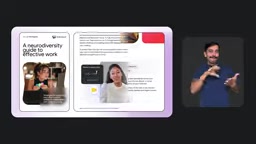
The Relationship Between Executive Function and Accessibility
Executive function refers to a set of cognitive abilities by which the brain manages planning, initiating tasks, sustaining attention, inhibiting impulses, and switching tasks. People with attention deficit hyperactivity disorder (ADHD), autism spectrum conditions, learning disabilities, and brain injuries often struggle with these. Although it does not fall under traditional sensory accessibility, it directly affects the usability of digital products: long email threads, multi-step document creation, and frequent notifications all cause cognitive overload. The guides Google provides in collaboration with Understood.org essentially bring "cognitive accessibility" into the scope of product support—lowering barriers to use by having Gemini handle cognitively demanding steps such as drafting, summarizing, and note-taking, and by reducing distractions through calendar focus time and notification muting. This reflects how accessibility design is expanding from visual, auditory, and motor dimensions to cognitive ones.
Search and a New Help Community
Search's AI Mode has introduced two keyboard navigation updates: desktop shortcuts allow users to quickly navigate between the input box, prompts, and replies in the conversation history; new jump links help users easily return to earlier points in a conversation.
Finally, Google has launched the official Google Accessibility Help Community, a hub designed specifically for users who rely on assistive technology or accessibility features. Users can solve problems, connect with people and accessibility advocates worldwide, and exchange practical tips. Visit the accessibility community at support.google.com to join the discussion.
For more information, visit the new website accessibility.google.
One-line Summary
Google releases accessibility updates across multiple product lines, covering sign language translation, natural voice input, and AI visual assistance.
Paragraph Summary
Google announced a series of accessibility updates across Pixel, Android, Chrome, Gboard, Gemini, Workspace, and Search. Key highlights include: Rambler on Pixel 11, which converts spoken language—including self-corrections and filler words—into usable text with voice editing support; Sign-to-Text, which uses the SL2T model to translate American Sign Language into written English in real time; Guided Frame integrated with Gemini, enabling blind users to photograph specific subjects via voice commands, while Guided Vision provides interactive audio guidance. Also included are Motion Assist for alleviating motion sickness, detail optimizations for Voice Access and Gboard, Chrome's immersive Reading Mode, Workspace and Gemini executive function guides, keyboard navigation improvements in Search AI Mode, and a new accessibility help community. Most new features debut on Pixel 11 and will expand to more devices and languages over time.
Related articles

Prompt Engineering for Beginners: From Writing Prompts to Engineering Thinking
Starting from the essence and four functions of prompts, this article systematically explains the six-step process, four success criteria, learning value, and practical limitations of prompt engineering to help you build a complete understanding.

Anthropic Launches Nasdaq IPO: AI Giant's Listing and Risk Disclosures
Anthropic officially launches its Nasdaq IPO under ticker ANT, with market valuation expected to potentially exceed SpaceX's record. The prospectus devotes nearly 100 pages to AI risks, while first-half revenue grew over 14x but net losses widened sharply, reigniting the AI bubble debate.

Rust cURL Clone Uses 4,832 unsafe Blocks—Is the Memory Safety Myth Broken?
A Rust cURL clone uses 4,832 unsafe keywords, challenging Rust's memory safety narrative. We analyze what unsafe really means, compare Fil-C, and examine rewrite motives.