GPT 5.5 Image 2.0 for Academic Illustrations: Technical Roadmaps & Defense PPTs Compared with Gemini

GPT 5.5 Image 2.0 vastly outperforms Gemini Pro for academic illustrations and defense PPTs
A Bilibili creator tested GPT 5.5 Image 2.0 against Gemini Pro for creating research technical roadmaps and thesis defense PPTs. Image 2.0 generates logically clear, discipline-adaptive roadmaps in three minutes and produces academic PPTs that look the least AI-generated ever seen. Gemini Pro, meanwhile, suffers from blurry outputs, frequent errors, and outright task failures—making the gap a fundamental difference between usable and unusable.
Introduction: What GPT 5.5 Image 2.0 Brings to Academic Illustration
Since the official release of GPT 5.5, its Image 2.0 generation capability has attracted widespread attention. GPT 5.5 is OpenAI's latest multimodal large language model released in 2025, and Image 2.0 represents a major upgrade to its native image generation abilities. Compared to GPT-4o's image generation capabilities, Image 2.0 achieves a qualitative leap in text rendering accuracy, logical structure visualization, and style consistency. The model employs an autoregressive image generation architecture rather than the traditional diffusion model approach, enabling it to better understand and execute complex visual instructions—particularly advantageous in academic scenarios requiring precise text annotations and logical relationship expression.
For graduate students, creating research technical roadmaps and thesis defense PPTs are two high-frequency essential tasks. A Bilibili content creator conducted hands-on testing to compare GPT 5.5 Image 2.0 and Gemini Pro's performance in these two scenarios, with impressive results.

Research Technical Roadmap Creation: Image 2.0 vs Gemini Pro
The Academic Significance of Technical Roadmaps
A Technical Roadmap is a core visualization element in research papers and project proposals, used to present the overall research framework, methodological steps, and logical relationships between components. In National Natural Science Foundation of China applications, doctoral dissertation proposals, and SCI paper submissions, a clear and professional technical roadmap can significantly improve reviewers' impressions. Traditional creation methods typically rely on Microsoft Visio, Adobe Illustrator, PowerPoint, or online tools like ProcessOn—producing a high-quality roadmap usually takes 3-8 hours and requires some design sensibility.
Testing Method and Prompt Design
The content creator used the simplest possible instruction—"Please generate a technical roadmap based on this content"—with input taken from a published high-impact paper abstract. This minimalist prompt design better reveals the model's depth of understanding of academic content and the professionalism of its image generation.
From a Prompt Engineering perspective, this testing approach validates the model's "zero-shot" comprehension ability—whether the model can autonomously complete high-quality academic visualization tasks with minimal human intervention. For daily use, graduate students can further improve generation quality by adding more specific constraints (such as specifying color schemes, number of nodes, arrow directions, etc.).
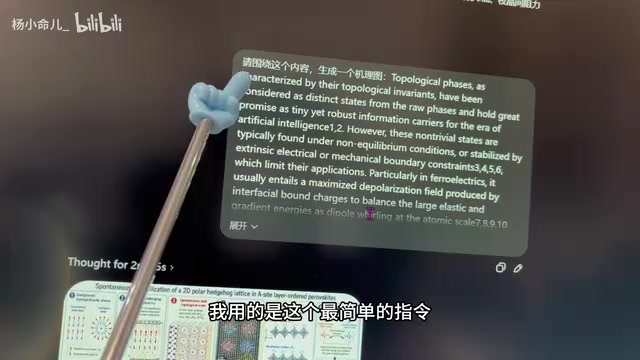
Image 2.0 Results: Three-Minute Generation with Clear Logic
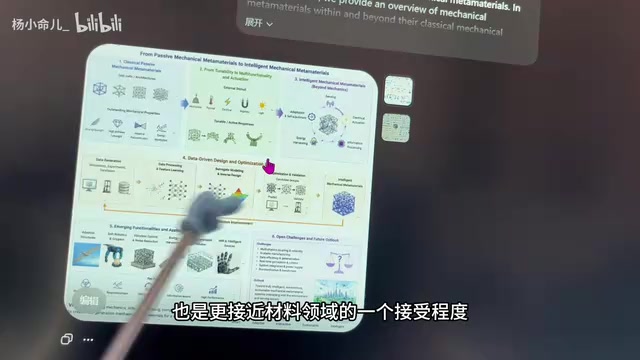
Using Image 2.0, a complete technical roadmap can be generated in approximately three minutes, with every step and logical framework clearly presented. A notable detail: when testing papers from different fields, Image 2.0 automatically adapts to different visual styles:
- Mechanical/Computer Science fields: Generated roadmaps lean toward engineering-style, process-oriented designs
- Materials Design field: The overall style better matches the academic aesthetics and conventions of materials science
This domain-adaptive capability fundamentally stems from the large language model's deep learning across different disciplinary literatures. During training, the model was exposed to massive volumes of academic papers, technical reports, and discipline-specific charts, enabling it to recognize visual paradigm differences across fields. For example, computer science prefers blue-toned engineering styles for flowcharts and system architecture diagrams, while materials science more commonly uses hierarchical experimental process displays with clean color schemes typical of academic journals. This application of implicit knowledge allows generated results to naturally integrate into the corresponding discipline's academic context, demonstrating that the model not only understands textual content but can also adjust visual presentation based on disciplinary characteristics.
Gemini Pro Performance: Blurry, Unstable, Frequent Errors
In contrast, Gemini Pro revealed significant shortcomings in the same tests. Gemini Pro is a multimodal AI model from Google DeepMind, positioned as the high-end version of the Gemini series competing at the GPT-4 level. Its image generation functionality builds on Google's prior technical work with the Imagen model series. However, based on actual user feedback, Gemini still has considerable room for improvement in image generation stability and instruction adherence.
Specific issues include:
- Low image quality: Generated images are relatively blurry with obvious AI artifacts—"anyone can tell at a glance"
- Poor stability: For some instructions, it directly responds that "it is a language model and cannot answer," frequently failing to generate images
- Insufficient comprehension: Noticeably inferior ability to understand academic content and convert it into visual form
Thesis Defense PPT Creation: Real Workflow Testing
Test Workflow Description
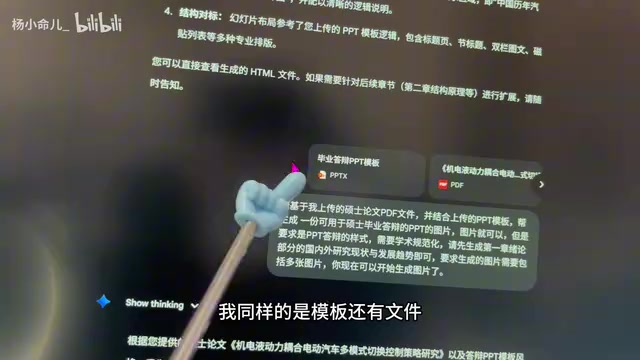
The content creator's workflow was: first upload a minimalist academic PPT template, then upload a PDF paper, and have the AI generate defense PPT page images matching the template style. This workflow simulates the real scenario graduate students face when preparing thesis defenses—typically needing to condense tens of thousands of words from a dissertation into 15-20 presentation slides while maintaining visual style consistency and academic standards.

Image 2.0: The Least AI-Looking Academic PPT Ever Generated
The PPT generated by Image 2.0 was praised by the content creator as "the least AI-looking academic PPT style I've ever seen made with AI." In academic contexts, "not looking like AI" is actually the highest compliment—it means the output conforms to academic standards and won't immediately signal to advisors or committee members that AI did the work. The deeper meaning of this evaluation is that academic PPTs have their own unique visual grammar—moderate information density, balanced text-to-image ratios, restrained professional color schemes, and clear typographic hierarchy—and Image 2.0 can accurately grasp these implicit conventions.
Gemini Pro: Failed to Recognize Requirements, Task Incomplete
Even with the paid Pro version, Gemini ultimately failed to recognize the user's requirements after receiving the same template file and PDF paper, and was unable to complete the task. In practical use scenarios, this means it's completely unusable. This result also reflects that when multimodal models handle complex multi-file inputs and cross-modal conversion tasks, the capability gap between different products may far exceed the differences seen in text conversation scenarios.
Core Advantages of Image 2.0 for Academic Illustration
Professional Adaptation for Academic Scenarios
The biggest difference between Image 2.0 and previous image generation tools is that it doesn't merely "draw pictures"—it truly understands the logical structure of academic content and transforms it into visual expressions that conform to disciplinary standards. Previous AI image generation tools (such as Midjourney, DALL-E 3, Stable Diffusion, etc.) primarily excelled at artistic creation and creative design, often falling short in academic scenarios requiring precise logical expression and text rendering. Image 2.0's breakthrough lies in deeply integrating language comprehension with image generation capabilities, enabling it to handle the transformation from "abstract logic to concrete diagrams."
The value of this capability for graduate students includes:
- Time savings: Technical roadmaps that previously required hours of manual work in Visio or PPT can now be completed in minutes
- Lower barriers: No need to master professional illustration software
- Style adaptation: Automatically matches the visual conventions of different disciplines
The Gap Between GPT 5.5 and Gemini Pro: Usable vs. Unusable
Based on this testing, the gap between GPT 5.5 Image 2.0 and Gemini Pro in academic illustration scenarios isn't a matter of "slightly better"—it's a fundamental difference between "usable vs. unusable." Gemini's shortcomings in stability and task completion rate make it difficult to rely on in actual research workflows. In academic work, tool reliability is often more important than peak performance—graduate students need an assistant that can consistently deliver results, not an experimental tool that works intermittently.
A Rational View of AI-Assisted Academic Illustration Boundaries
Despite Image 2.0's powerful academic illustration capabilities, the following points should be noted:
- Assistive tool, not a replacement: AI-generated roadmaps and PPTs still require human review and fine-tuning, especially to ensure accuracy of technical details and correctness of logical relationships
- Limitations of simple prompts: Complex multi-level technical roadmaps may require more refined prompt engineering, including explicitly specifying hierarchical relationships, timeline directions, key nodes, and other specific requirements
- Academic integrity: As AI assistive tools become more prevalent in academia, universities and academic journals are gradually establishing relevant usage guidelines. The current mainstream academic consensus is that AI can serve as an assistive tool for chart beautification, language polishing, and formatting adjustments, but core research content, data analysis, and academic viewpoints must be completed by the researchers themselves. Top journals like Nature and Science already explicitly require authors to declare AI tool usage upon submission. For dissertations, most universities allow AI-assisted illustration and typesetting but require disclosure of tools used in the acknowledgments or methods section. Graduate students using Image 2.0 and similar tools should confirm their institution's specific policy requirements.
Overall, GPT 5.5 with Image 2.0 genuinely brings significant efficiency improvements to graduate students' research work, particularly excelling in the two high-frequency scenarios of technical roadmap creation and defense PPT production. For graduate students, properly leveraging such tools can dramatically boost research output efficiency, freeing up more time and energy for the creative thinking that truly matters in research.
Related articles
 Product Reviews
The Programmer's Desk Setup Guide: Building a Workspace That Feels Like Home
Discover how programmers build productive, comfortable workspaces. From multi-monitor setups to ergonomic design, explore the desk philosophy that drives focus and flow.
 Product Reviews
Qoder vs Cursor Real-World Comparison: Which $20/Month AI IDE Is Better?
Hands-on comparison of Qoder vs Cursor AI IDEs: Agent autonomy, human interaction count, and architecture decisions. Qoder needed only 2 interactions vs Cursor's 8.
 Product Reviews
Cursor Cloud Agent Demo: Eliminating Bottlenecks Across the Entire Software Development Lifecycle
Deep analysis of Cursor's Cloud Agent demo showing how cloud VMs, automated test artifacts, and a full-chain control plane systematically eliminate human bottlenecks across the software development lifecycle.