GPT-5.6 + Codex Tested: 3 Prompts to Edit a 15-Minute Video, Efficiency Doubled

GPT-5.6 + Codex cuts a 15-min video edit to 20 minutes with just 3 prompts — here's what the real test revealed.
OpenAI's GPT-5.6 (Sonara), GPT Work, and Codex are now deeply integrated. Real-world testing shows the stack can edit a 15-minute video in ~20 minutes using 3 prompts, auto-correct English subtitles via web search, and automate office tasks like tax filing and email management — though Token consumption is far higher than advertised.
Last Friday, OpenAI officially launched GPT-5.6 and deeply integrated it with GPT Work — a workplace-focused suite — and the coding tool Codex, creating a powerful AI application matrix. Bilibili creator WebTalk spent an entire weekend stress-testing the new stack and delivered this verdict: for non-coding domains, this update is "a technological leap of a different dimension." This article breaks down the real-world experience — covering GPT-5.6's capability upgrades, the Token consumption controversy, and how it's reshaping a content creator's entire workflow.
What Makes GPT-5.6 So Powerful — And Its Double-Edged Nature
According to OpenAI's official documentation, GPT-5.6's flagship variant, "Sonara," ranks #1 globally across major AI benchmarks — making it the most powerful model currently accessible to everyday users.
A Note on AI Benchmarks: AI benchmarks are standardized evaluation frameworks for assessing large language models. Common ones include MMLU (Massive Multitask Language Understanding, covering 57 subjects), HumanEval (code generation), MATH (mathematical reasoning), and GPQA (graduate-level science QA). OpenAI's claim that GPT-5.6 Sonara "ranks #1 across all benchmarks" typically means its aggregate scores surpass competitors like Google Gemini Ultra and Anthropic Claude 4. That said, there's an inherent gap between benchmark performance and real-world usability — the nature and complexity of benchmark tasks differ fundamentally from actual work scenarios, which explains why official messaging and user experience often diverge.
OpenAI also stated that for equivalent programming tasks, GPT-5.6 Sonara consumes only one-third the Tokens that GPT-5.5 did while delivering comparable output quality.
However, real-world testing revealed a significant gap from these claims. In practice, Sonara's Token consumption was described as "growing exponentially" — generating two or three cover images or making minor edits could burn through 20–30% of a 5-hour quota; running a single editing task consumed the entire 5-hour allotment after just two requests.
"By the time I finished the first task, I had already used 87% of my Token quota. The second task barely squeaked through on the remaining 13% — thanks to a bug that let it slide."
Why Is Token Consumption So Extreme?: A Token is the basic unit a large language model uses to process text — think of it as a word fragment or character chunk. 1,000 English words equals roughly 750 Tokens; Chinese characters convert at a slightly different ratio due to higher information density. GPT-5.6 Sonara's inflated Token usage likely stems from its more complex Chain-of-Thought reasoning — the model generates extensive intermediate reasoning steps before producing a final answer, and all of those steps consume Tokens that users never see. This explains why the official claim of "more efficient for coding tasks" and users reporting "way more expensive for creative tasks" can both be true simultaneously.
The community has raised a pointed question: did GPT-5.6 adopt a fundamentally different reasoning mechanism compared to 5.5, resulting in this Token explosion? This points to a broader pattern worth watching — a leap in model capability often comes with a redistribution of compute costs. Whether a task is "cheaper" or "more expensive" likely depends heavily on the task type.
One silver lining: during the testing period, OpenAI announced the removal of the 5-hour usage cap across all paid plans, replacing it with a weekly quota — and reset all users' Token balances to mark 7 million active users. This effectively gave the high-consumption GPT-5.6 more room to breathe, enabling longer and more complex tasks.
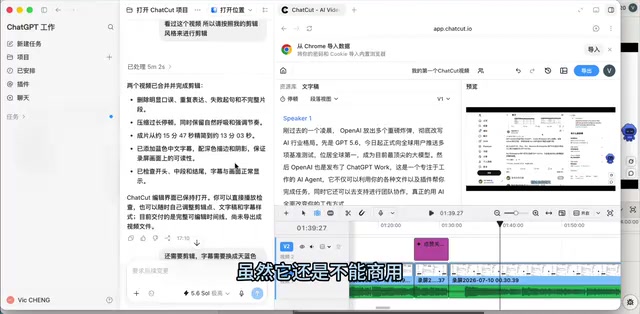
Chat Card + Codex: How Good Is AI Editing, Really?
For video creators, editing is the single biggest bottleneck. The test covered a new editing tool called Chat Card, which is now fully integrated with Codex.
Codex's Technical Evolution: Codex was originally launched by OpenAI in 2021 as the engine powering GitHub Copilot, fine-tuned specifically for code generation and understanding. After years of iteration, the new-generation Codex has evolved from a simple code-completion tool into an AI Agent framework capable of calling external APIs, controlling local software, and executing multi-step tasks. Its fusion with GPT-5.6 means Codex not only has stronger code comprehension but can also leverage GPT's general reasoning to handle judgments beyond code context — such as verifying proper nouns or understanding business logic. This is precisely the technical foundation that allowed the AI to "actively search the web" and correct the creator's mispronunciations during the editing test.
The setup process was remarkably simple: paste one line of code into Codex for automatic installation, after which video editing, animation creation, and asset generation features become available.
Three Rounds of Prompts, Progressively Closer to a Finished Cut
The editing test was completed in three iterative rounds — each revealing something instructive:
- Round 1 (~5 minutes): Merge two screen recordings, auto-add subtitles, remove verbal stumbles and discontinuous clips. First-pass completion rate was roughly 70% — subtitle color wasn't right, and some English recognition was off.
- Round 2 (~11–12 minutes): Change subtitles to sky blue and fix the English. This round took the longest because the AI actively searched the web, visiting the official sites of OpenAI, Anthropic, Grok 4.5, Meta, and other proper nouns mentioned in the voiceover to verify their correct spellings. All English subtitles came out correct — including spots where the creator had mispronounced them.
- Round 3: Trim remaining repeated clips and add optional-style animations at the "like and subscribe" segment.
The final cut came in at 12 minutes 40 seconds, compared to 12 minutes 01 seconds for a manual edit — a difference of about 30 seconds (due to additional human cuts).

Efficiency Comparison: From 30 Minutes Down to 20
Manually editing a 15-minute video in CapCut typically takes about 30 minutes. Using Chat Card + GPT-5.6 for the first time, the entire process took just over 20 minutes. With more refined prompting, it's expected to drop to around 15 minutes.
The core value of this workflow is that it plays both editor and researcher at the same time. A traditional editor understands cutting but not the content — processing a long-form knowledge video can take 2–3 hours and still require a second review pass from the creator. With Chat Card handling the editing and Codex verifying proper nouns, content accuracy is baked right in. This is precisely the asymmetric advantage AI holds over outsourced human labor.
GPT Work: Hand Off Non-Coding Work to AI
A major highlight of this update is that Codex now splits "writing code" from "everyday office work" — the latter is handled by GPT Work. For users with minimal programming needs, Work offers a more intuitive interface than Codex.

The test covered several real-world scenarios:
- Financial Form Processing: Handle accounting tax forms and financial ledgers — just connect the relevant apps and get intelligent responses.
- Tax Filing Automation: After connecting an email account, GPT Work automatically navigates to the municipal tax authority's website, calculates the amount owed, determines whether monthly or annual payment is more cost-effective, fills out the form, and sends the email to the local government.
- Smart Email Management: Building a custom Agent with GPT-5.5 to read emails often ran into authentication bugs or would "reply by creating a new thread instead." GPT-5.6 Sonara only needs one instruction — "I want to reply to emails, connect my Google/Microsoft inbox" — to automatically read, filter important messages from spam, and execute replies or draft new ones with a single click.
This leads to a sharp industry observation: innovations that AI application teams spent two to three years building often can't withstand a single minor version update from a foundation model provider.
AI Agents and the Third-Party Tool Landscape: An AI Agent is an AI system that can autonomously plan, break down tasks, and call external tools to accomplish complex goals — distinct from traditional chat models limited to single-turn Q&A. Third-party Agent tools like Manus, AutoGPT, and LangChain Agents emerged precisely because early large models lacked native tool-calling and multi-step execution capabilities, forcing developers to build complex orchestration frameworks on top. As OpenAI bakes Agent capabilities natively into GPT Work and Codex, these third-party tools face the fate of being absorbed — similar to how smartphones decimated the markets for standalone GPS devices, alarm clocks, and calculators. This phenomenon of foundation model providers "killing" upstream applications through native integration is called "getting platformized" in Silicon Valley, and it's one of the biggest existential risks for AI startups.
With this integration, the necessity of third-party Agent tools like Manus has dropped significantly — coding questions go to Codex, work tasks go to GPT Work, all under one roof with a smooth experience. This also partially explains why OpenAI surpassed 7 million daily active users so quickly after the GPT-5.6 and Codex launch.
GPT Live and the Jarvis Dream: How Far Away Is Voice AI?
Beyond the headline features, this update also shipped GPT Live, a voice interaction model. During testing, the creator spent over an hour in a late-night, slightly tipsy conversation with GPT Live — from Edinburgh's weather to random chitchat — and the AI kept up with every topic, even handling emotional swings.
On the voice side, it can freely switch between British, American, and "Valley Girl" accents, catch grammar mistakes in real time, and switch to standard Mandarin if you're not happy with how your Chinese sounds.
The Technical Architecture of Voice AI: GPT Live's real-time voice interaction involves the end-to-end fusion of three modules: Automatic Speech Recognition (ASR), large language model inference, and Text-to-Speech (TTS). Traditional approaches kept these modules separate, resulting in noticeable latency and semantic discontinuity. Next-generation voice AI models like GPT-4o and GPT Live take audio directly as modal input, bypassing the transcription step entirely — enabling more natural emotional perception and tonal variation. This is the underlying reason it can "ride emotional waves" in conversation.

A bolder vision: if GPT Live could integrate with the Apple ecosystem (iPhone, Apple Watch), automatically aggregate health data into reports, and then connect with Codex plugins — users could issue tasks entirely by voice while AI calls desktop software to execute them. Isn't that basically the early form of Iron Man's Jarvis?
The core challenge for this "personal AI assistant" roadmap is running voice AI on-device at low power consumption while securely accessing highly private local data like calendars, health records, and emails. Apple, Google, and OpenAI are all competing in this space — at its core, it's a battle for control over the user's "super-entry point."
Practical Advice: Map Your Workflow Before Introducing AI
How do you actually use this stack to boost efficiency? Here's a methodology worth considering:
- Break Down Your Workflow: Categorize your work step by step. For a content creator, this might look like: ① gather information → ② edit video → ③ write copy → ④ design cover.
- Test Each Step Against AI: Try handing each step to AI and run it for 2–3 days to a week. If you can do it better than AI, keep doing it yourself (e.g., information gathering — running a daily AI report costs $20–30 per day and still can't match human judgment in filtering high-value insights). If AI performs better, hand it over confidently (copy and cover design are now fully delegated to AI).
- Calculate Total Cost: Token pricing isn't cheap — initial setup and debugging burn through a lot of quota, and Chat Card itself requires a subscription. Factor in time cost, editing cost, Token usage, and tool fees before concluding it genuinely beats your existing workflow.
Conclusion
The integration of GPT-5.6, GPT Work, and Codex represents a deep fusion of foundation model capability and AI Agent functionality — far more significant than the typical "20–30% performance improvement" update. Tasks that previously required building custom Agents or connecting third-party tools have been consolidated into single-click execution.
That said, issues remain: high Token consumption, lingering subtitle bugs, and restrictions on commercial use. The most rational approach may be this: map out your own workflow first, then let AI gradually take over the most time-consuming and repetitive parts — rather than handing everything over all at once.
Key Takeaways
Related articles

Felix Rieseberg Personal Homepage
Felix Rieseberg's personal homepage sparks attention on Hacker News. This article covers the Slack engineer's technical background, the rise and fall of nativefier, and the value of a developer homepage as a tech calling card.

@ai-sdk/vue 3.0.306 Patch Release Syncs with [email protected] Update
@ai-sdk/vue 3.0.306 released, synced with [email protected]. A routine patch release for the Vercel AI SDK ecosystem with no public API changes; the Vue adapter layer stays version-aligned with the core package.

Gemini 4 Argon API Launches: The Era of Million-Token Output Begins
Google launches Gemini 4 Argon with sparse MoE architecture, up to 1M output tokens, and a 68.90% Vals Index score, available across API, AI Studio, and the Gemini app.