GPT-5.6 Hands-On Deep Dive: Three-Tier Models + Ultra Multi-Agent, Codex Fully Evolved

GPT-5.6 brings three tiered models, Ultra multi-agent mode, and Codex integrated into ChatGPT desktop.
OpenAI's GPT-5.6 introduces three tiered models (Sol, Terra, Luna) covering tasks by complexity, an Ultra multi-agent mode for parallel collaboration, Codex integrated into the ChatGPT desktop client, and a faster Computer Use. This deep dive covers pricing, use cases, and practical setup.
Deep Dive into OpenAI GPT-5.6: Faster, Stronger, and a Fully Connected Workflow
OpenAI is back with another major update — the GPT-5.6 model has officially arrived. To sum up this upgrade in one sentence: faster, stronger, same price. But what truly stands out is that alongside the model update, the desktop client has undergone a deep integration, gradually connecting chat, code development, computer operation, and multi-project collaboration into one complete workflow.
This article will help you fully understand the value and practical application of this update, covering several dimensions: desktop integration, the three-model system of GPT-5.6, the brand-new Ultra multi-agent mode, and practical features like Computer Use.
Codex Integrated into the ChatGPT Desktop Client: A Unified Entry for Three Modules
The most immediately noticeable change this time is that Codex has been integrated into the new version of the ChatGPT desktop app. After updating, users no longer need to open the Codex app separately — they can directly switch between the Chat, Work, and Codex modules within the ChatGPT desktop client.
The History of Codex and the Strategic Integration Background: Codex was originally released in 2021 as a standalone API, a specialized fine-tuned version of GPT-3 for the code domain. It once served as the underlying engine of GitHub Copilot, marking an important leap for large language models from "understanding natural language" to "generating executable code." In its early days, Codex was made available to developers as an API, and later evolved into the standalone Codex CLI tool. Understanding this history helps gauge the significance of this integration: Codex is not simply a feature migration, but a strategic signal that OpenAI is consolidating its scattered product lines into a unified entry point. This is exactly in line with how Google renamed Bard to Gemini and integrated it into GSuite, and how Microsoft embedded Copilot into Office 365. The core logic behind this "super app" strategy is to reduce users' cognitive switching costs, transforming AI capabilities from "standalone tools" into "environmental infrastructure." From the perspective of product evolution, this integration also means OpenAI is officially acknowledging that developers' real workflows have never been about jumping between isolated tools, but rather require seamless transitions between conversation, coding, and execution within the same interface.
Users who miss the native Codex icon needn't worry — this update supports setting Codex as the default view, though this feature is currently limited to the macOS platform.
The official positioning of the three modes differs as follows:
- Work: A general-purpose intelligent assistant that can combine files and plugins to complete comprehensive office tasks such as documents, spreadsheets, and presentations. It's suited for scenarios centered on office work, research, or content creation with only a small amount of code involved.
- Codex: Focused on software development. It can directly open local projects, read and modify code, execute terminal commands, run tests, and view code diffs in conjunction with Git.
- Chat: The standard ChatGPT chat capability that has been integrated in.
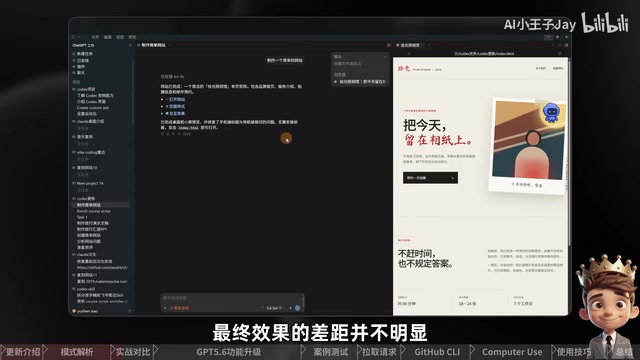
Hands-on testing with website creation as an example shows that both Work and Codex can complete the task smoothly, and the difference in the final result is not significant. The real difference lies in the workflow: Codex fully displays which files were created, how many lines of code were modified, and the specific diffs, making it convenient for developers to review and manage. Work, on the other hand, omits the code review step and focuses more on directly presenting the completed result.
In one sentence: Work focuses more on result delivery, while Codex is more convenient for process management. Currently, the boundary between the two remains somewhat blurred, and we look forward to further refinement in future versions.
Chat Capability Integrated into Codex
A very practical detail is that this update integrates ChatGPT's chat capability directly into Codex. Clicking the chat button in the left sidebar lets you send messages to ChatGPT in a pop-up dialog box.
In actual work scenarios, you can first let ChatGPT clarify requirements, explain concepts, or optimize prompts, and after confirming, add the reply to the current Codex task as context with a single click. This eliminates the hassle of repeatedly switching between the web and desktop clients and manually copying and pasting, making the workflow more coherent and efficient.
Detailed Breakdown of the Three GPT-5.6 Models: Sol, Terra, and Luna
GPT-5.6 adopts a tiered model strategy, using three models with distinct positioning to cover various task requirements ranging from high difficulty to high frequency. This strategy draws on the "compute tier" concept from the cloud computing industry — similar to the distinction between AWS Spot Instances and On-Demand Instances, AI models are beginning to be priced granularly by task complexity and latency sensitivity. Behind this trend is the direct correlation between the Transformer architecture's parameter scale and inference cost: larger models require more GPU memory and compute cycles, with a marginal cost significantly higher than smaller models. By launching three tiers, OpenAI is effectively making explicit the cost structure that was previously hidden under a single price, allowing enterprise users to make precise selections based on their SLA (Service Level Agreement) and budget.
Sol: The Flagship, Most Powerful Model
Sol is the flagship of the GPT-5.6 series, with the strongest capabilities, suited for high-difficulty tasks such as complex programming, Computer Use, deep research, and cybersecurity. Its advantage lies in deeper analysis and higher completion quality, at the cost of relatively slower response speed.
The standard API price is $5 per million input tokens and $30 per million output tokens, on par with the previous-generation GPT-5.5, with no price adjustment.
Analysis of the Token Pricing Mechanism and GPU Compute Structure: A token is the basic unit that large language models use to process text. Typically, one English word is roughly equal to 1–1.5 tokens, and a Chinese character is roughly 1.5–2 tokens. Taking the Sol model as an example, processing a long document of about 750,000 characters and generating a reply of about 33,000 characters costs approximately $5. The fundamental reason output tokens are priced higher than input tokens lies in the difference in the underlying compute structure: when processing input (the Prefill stage), the model can perform parallel matrix operations on the entire sequence, achieving extremely high GPU utilization. But when generating output (the Decode stage), because the generation of each token depends on the result of the previous token, the model must decode serially, step by step — the "autoregressive" characteristic. Additionally, each generation step requires loading the complete KV Cache (Key-Value Cache) into GPU memory, placing continuous pressure on memory bandwidth. The essence of the KV Cache is to cache the Key and Value matrices already computed in the attention mechanism to avoid redundant computation, but as the sequence length increases, its memory footprint grows linearly, further exacerbating the hardware bottleneck of the Decode stage. These underlying constraints determine that the GPU throughput of the Decode stage is about 1/6 to 1/10 that of the Prefill stage, which is directly reflected in the fact that Sol's output price ($30) is six times its input price ($5).
Terra: The Balanced Daily Workhorse
Terra is positioned as balanced, with overall capabilities close to GPT-5.5 but at a lower cost and faster speed. The API price is $2.5 per million input tokens and $15 per million output tokens, just half that of Sol and GPT-5.5.
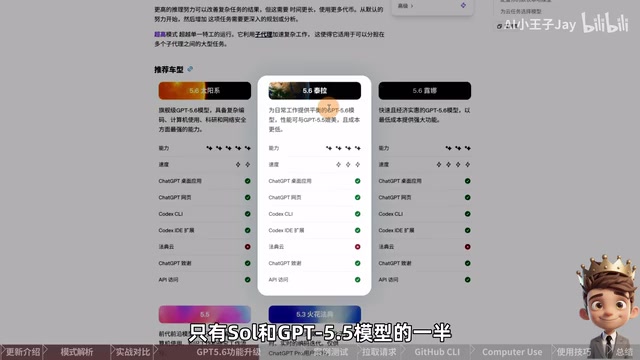
For daily coding, modifying web pages, organizing materials, or handling tasks of medium complexity, Terra is the most cost-effective choice.
Luna: The Ultra-Fast, Low-Cost Contender
Luna is the fastest and lowest-cost of the three models. The API price is $1 per million input tokens and $6 per million output tokens, about 80% cheaper than Sol and about 60% cheaper than Terra. Terra's cost is exactly 50% of Sol's, and Luna's is about 20% of Sol's. This proportional tiered pricing makes it easier for enterprises to build cost budgeting models, and is also a common pricing strategy among cloud AI service providers.
It is better suited for tasks with clear requirements and high repetitiveness, such as extracting information, format conversion, generating fixed-structure content, or batch-processing large numbers of files.
OpenAI's model strategy this time is clear: using price tiers to guide users toward reasonable selection based on task complexity, significantly reducing overall usage costs while ensuring effectiveness.
Ultra Mode: Multi-Agent Parallel Collaboration
In addition to the three base models, GPT-5.6 also adds a new Ultra mode. If you can't find this option in the model selector, go to settings and enable "Show Ultra in the model selector slider."
It's worth specifically noting that Ultra is fundamentally different from simply increasing reasoning intensity:
- High reasoning intensity: Lets a single agent spend more time thinking deeply.
- Ultra mode: Invokes multiple sub-agents, breaking down a complex task and processing it in parallel.
The Design Principle of the Multi-Agent Parallel Architecture: The multi-agent parallel architecture used in Ultra mode essentially breaks down the single "chain-of-thought reasoning" into "Directed Acyclic Graph (DAG) task scheduling." In the traditional single-agent mode, the model completes subtasks sequentially; whereas in the multi-agent framework, the Orchestrator is responsible for task decomposition and dependency analysis, Worker Agents concurrently execute subtasks that have no dependency relationships, and finally an Aggregator consolidates the results. This architecture aligns with the design philosophy of open-source frameworks such as AutoGen and LangGraph, and its core advantage is reducing the overall completion time from O(n) to close to O(max_subtask) — that is, it depends on the most time-consuming single subtask rather than the sum of all subtasks.
The Engineering Challenges of the Multi-Agent Architecture: While Ultra's parallel architecture brings efficiency gains, it also introduces the classic problems of distributed systems. First is "context consistency": when multiple Worker Agents execute concurrently, each maintains an independent context window, and ensuring that information between subtasks doesn't conflict or duplicate requires strict dependency-graph management by the Orchestrator. Second is the "idempotency" problem: if a subtask is retried after failing, it must be ensured that repeated execution does not produce side effects (such as duplicate file writes or duplicate external API calls) — this problem has mature solutions in the distributed database field (such as two-phase commit), but it is harder to guarantee in the LLM multi-agent scenario due to the randomness of outputs. Third is the "semantic alignment of result consolidation": outputs from different agents may have subtle differences in terminology, format, or stance, and the Aggregator requires additional normalization processing, which itself is a step requiring model reasoning. This also explains why Ultra mode consumes far more tokens than normal mode — much of the additional overhead comes from these coordination mechanisms themselves, rather than merely the repeated processing of task content.
For example, when having Codex analyze a complete website, Ultra can have different sub-agents separately check page design, code quality, runtime performance, and security issues, ultimately consolidating them into a complete report. Large tasks that can be clearly broken down into multiple subtasks are best suited for Ultra.
Note that Ultra runs multiple sub-agents simultaneously, and both context synchronization and result consistency verification bring additional token consumption, so the quota it consumes is usually much higher than normal mode. Currently, Work and Codex share the same quota, and you can view the quota consumed this week and the next reset time on the usage page.
Practical New Features: Pull Requests and Computer Use Upgrade
Pull Request
The newly added Pull Request (PR) feature in the left sidebar allows developers to request merging the changes of the current branch into the main project after completing part of the code. This integration embeds the Code Review process into the "last mile" of the AI programming workflow. In the traditional development process, AI-generated code → developer copies to IDE → manual commit → initiate PR in the web interface involves multiple context switches. After this integration, Codex can directly read PR comments and diffs from the remote repository, achieving a closed loop of "AI suggestion → human review → one-click commit." This is highly consistent with the product philosophy of GitHub Copilot Workspace, representing the industry trend of AI programming tools evolving toward a "full-process IDE."
If, when using it for the first time, you are prompted to configure the GitHub CLI, it means the local machine has not yet installed it or completed account authorization.
GitHub CLI and the Modern DevOps Workflow: GitHub CLI (gh) reached general availability (GA) in 2020, marking an important move by GitHub to bring the capabilities of its "social coding platform" down to the terminal. Before this, developers had to frequently switch between the terminal and browser: after executing git push in the terminal, they had to open a browser to access the GitHub interface to create a PR, view CI results, or handle review comments. GitHub CLI achieves secure authorization through the OAuth Device Flow, and supports commands such as gh pr create, gh pr review, and gh workflow run, encapsulating the complete PR lifecycle into CLI operations. For AI programming tools, being able to read PR metadata (title, description, diff, review comments) through gh commands means the AI can incorporate the "code review context" into its generation prompts, rather than just seeing isolated code snippets — this is analogous to the concept of RAG (Retrieval-Augmented Generation): dynamically injecting external structured information into the model's context, greatly raising the quality ceiling of AI-assisted review, and enabling the AI to truly evolve from a "code generator" into a "development process participant."
The configuration process is roughly as follows: install the GitHub CLI through Codex's built-in terminal, restart the terminal, then run the login command to start device verification, select GitHub.com as the server and HTTPS as the protocol, and complete authorization through the browser.
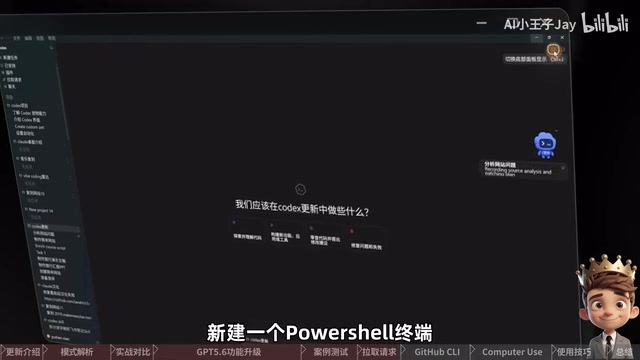
After successful configuration, return to the Pull Request page, and Codex can then read the PRs, review comments, and code changes corresponding to the current project, making team collaboration smoother.
Computer Use Upgraded for GPT-5.6
Computer Use was previously launched and has now been officially adapted for the GPT-5.6 model. Its underlying implementation relies on a "vision-action" loop: the model perceives the current screen state through screenshots, outputs structured mouse coordinates, keyboard sequences, or window operation commands, which are executed by a local agent and then fed back via screenshots, forming closed-loop control. Put simply, it lets ChatGPT view the computer interface like a human, completing tasks through mouse clicks, keyboard input, and window switching. It's suited for handling work that cannot be accomplished by code and command line alone, such as opening peripheral software, modifying application settings, reproducing interface bugs, or cross-software workflows.
A Paradigm Comparison Between RPA and Large-Model Computer Use: Traditional RPA (Robotic Process Automation) tools emerged in the 2000s, with representative products including UiPath, Blue Prism, and Automation Anywhere. Their core principle is "interface element location" — precisely identifying UI controls by recording operation trajectories or writing XPath/CSS selectors, then replaying them for execution. This approach is highly efficient in scenarios with stable interfaces, but has serious "fragility": once the interface layout or control attributes change, the automation scripts fail, resulting in extremely high maintenance costs — a phenomenon the industry calls "UI Drift." Computer Use based on vision large models adopts a completely different perception path: taking pixel-level screenshots as input and locating target areas through semantic understanding (e.g., "find the login button in the top-right corner of the page"), thus possessing an inherent tolerance for interface changes. The cost is that each operation step requires model reasoning, with latency and token consumption far higher than RPA's rule matching, and it is still less stable than traditional control-tree-based solutions in precise coordinate location. This paradigm was first commercialized by Anthropic's Claude Computer Use in 2024, followed by multiple vendors. The two paradigms are also gradually converging in enterprise deployments — using LLMs to handle exceptional scenarios and natural language instruction parsing, and RPA to handle high-frequency stable processes, forming a hybrid architecture of "AI decision layer + RPA execution layer."
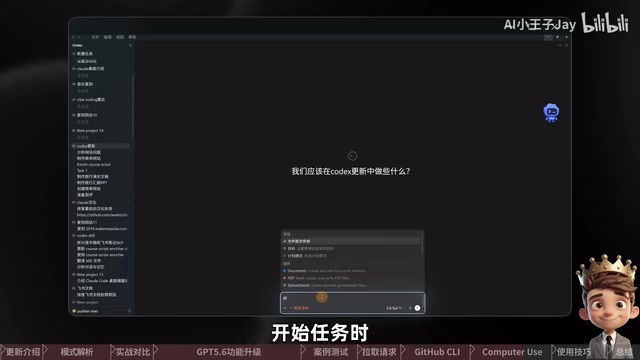
This time, the official focus was on improving operation speed, with smoother transitions between window switching, mouse clicks, and consecutive steps. Hands-on testing showed a task running for about 12 minutes, with no need to manually take over the mouse and keyboard throughout, and more complete handling of page details.
Windows users should pay special attention: Computer Use directly operates the current desktop, and while running, it may move the mouse, type text, and switch windows — it cannot fully retreat to the background. This limitation stems from Windows' exclusive control mechanism over desktop input focus, whereas macOS's Accessibility API allows more fine-grained background injection, which is why the experience currently differs between the two platforms. There is still a gap compared to solutions like Manus that support background control, and improvements are anticipated in the future. Therefore, when executing tasks, try not to occupy the mouse and keyboard, and keep the target application visible.
Additionally, since Computer Use is relatively token-intensive, it is recommended to prioritize Codex's built-in browser for local web testing, and only invoke Computer Use when you must operate desktop software or cross-application processes.
Conclusion: The Value of Integration Outweighs Feature Stacking
Overall, the core value of this GPT-5.6 update is not that it "adds a few more buttons," but that it gradually connects the complete workflow of chat, code development, computer operation, and multi-project collaboration.
The three-tier model system (Sol / Terra / Luna) provides flexible choices for cost and capability, Ultra mode brings the imaginative potential of multi-agent parallel collaboration, and the desktop integration significantly reduces the switching cost of the workflow. Of course, some features are still affected by plan quotas, system environment, and regional availability, so actual usage should be based on what your own interface displays.
For developers and high-frequency users, familiarizing yourself with the positioning of the three models in advance, mastering the applicable scenarios of Ultra, and configuring the GitHub CLI will let you quickly seize the efficiency advantage in this update.
Related articles

Vibe Coding Full-Stack in Practice: AI Programming from Beginner to Enterprise Deployment
From Cursor to Claude Code, this Bilibili AI programming course uses four progressive projects to cover full-stack development, open-source secondary development, and team collaboration. The article analyzes the shock to frontend roles, the efficiency shift from 50 people to 5, and the methodology required for enterprise-grade projects.

David Blaine's Global Quest for Real Magic: From South Africa to Japan and India
David Blaine travels to South Africa, Japan, and India in his Do Not Attempt special, documenting Spinning drivers, black mamba rescuers, iaijutsu masters, and ascetics—exploring the boundary between magic and real human极限 challenges.

Is a Touchscreen MacBook Coming? Vergecast Reveals Apple Executive's Response
Vergecast podcast reveals a conversation between a reporter and Apple executive John Ternus about a touchscreen MacBook and Apple Pencil support. Ternus says iPad is the best device for a stylus, while the reporter bets MacBook will eventually support Apple Pencil.