GPT-6.2 Sol/Astra Released: ChatGPT Plus Subscription Guide and Plan Comparison
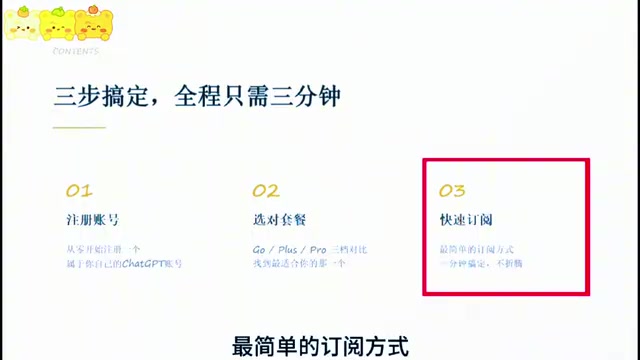
Bilibili creator's three-minute tutorial: how to choose among ChatGPT's three membership tiers, register, and subscribe.
Based on a step-by-step Bilibili tutorial, this article maps out the complete decision path for a ChatGPT membership subscription. It first identifies three common pitfalls for newcomers: unfamiliarity with registration, payment failures, and choosing the wrong tier. Registration supports Google accounts plus QQ, 163, and 126 email. On tiers, Go is the light-upgrade entry point, Plus at $20/month is the top choice for most individual users, and Pro comes in $100/$200/$500 tiers, with the $500 flagship exclusively offering Ocean mode. The subscription walkthrough involves obtaining a Token via a designated website, pasting it and verifying the email, paying via WeChat, and seeing the membership badge on your avatar once funds arrive. The core advice: when unsure, start with Plus for a month and then adjust, choosing your tier by usage frequency and task complexity.
GPT-6.2 Sol/Astra's release has once again made ChatGPT a hot topic, but with multiple tiers like Go, Plus, and Pro, many users don't know how to choose. A Bilibili creator released a step-by-step tutorial covering everything from account registration to plan comparison to subscription walkthroughs, aiming to help users "spend their money on the right tier." This article is based on that video's content, combined with screenshot information, to break down the key decision points for you.
Why do people always stumble when subscribing to ChatGPT?
According to the creator's summary, newcomers opening a membership often run into three types of problems: unfamiliarity with the account registration process (whether domestic email addresses work, how to register a Google account), subscription payment failures (fiddling with the web interface for ages without being able to pay), and wasting money on the wrong tier (unable to tell the difference between Go, Plus, and Pro). This video was designed specifically around these three pain points, split into three steps—registering an account, choosing the right plan, and subscribing quickly—taking about three minutes in total.
Step 1: Registering a ChatGPT account from scratch
For registration, the creator demonstrated logging in with a Google account, while also clarifying that domestic QQ Mail, 163 Mail, and 126 Mail can also be used to register. The steps are: open the Google account registration page and select personal use, fill in your name and date of birth, set your email and password, and complete phone verification. Then on the ChatGPT login page, select "Log in with Google account," choose the account you just registered, fill in your name and age, and you're done. For users who already have an account, this step can be skipped entirely.
The limits of registering with domestic email: The creator mentions that QQ, 163, and 126 email addresses can be used for registration, which solves the email verification issue during account creation. But it's important to distinguish between "can register" and "can use stably": some domestic email providers may experience delays or have international emails land in spam, so it's recommended to check for the verification email promptly after registering and to link a Google account as a backup login method. Additionally, email is only one part of the account system—actual access and payment are still affected by network environment and payment channels, so successful registration doesn't guarantee a smooth subscription process.
Step 2: How to choose between Go, Plus, and Pro?
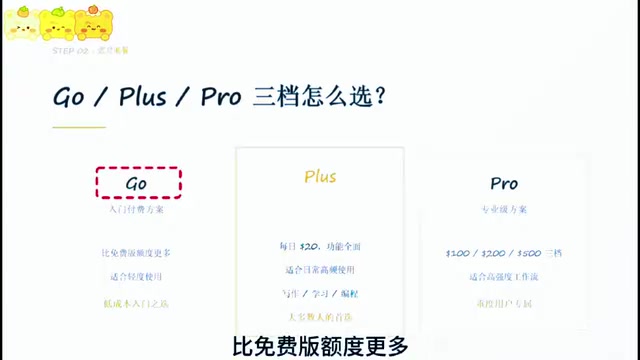
ChatGPT memberships are currently divided into three tiers—Go, Plus, and Pro—with usage quotas and available capabilities increasing progressively, and prices rising accordingly. The creator summed up the overall positioning in one sentence: Go is the entry-level paid plan, Plus is the most popular tier, and Pro is the professional-grade plan.
Go: A low-cost entry point for light users
Go sits between the free version and Plus, suitable for users who mainly use ChatGPT for chatting, looking things up, translating, or independent learning, and who occasionally find the free version's quota insufficient—wanting to add usage headroom at a lower cost without needing many advanced features for now. In one sentence: choose Go if you want a light upgrade.
Plus: The top choice for most individual users
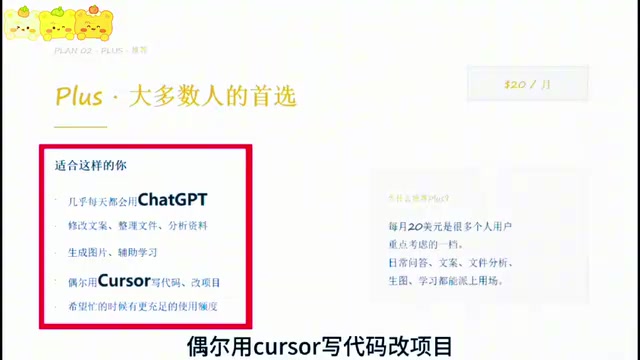
Plus costs $20 per month and suits people who use ChatGPT almost daily—for example, to revise copy, organize files, analyze materials, generate images to assist learning, or occasionally use AI to help write code or modify projects. The creator suggests that users subscribing for the first time who aren't sure which tier fits should start with Plus for a month, then decide whether to adjust based on actual usage. For users who "want more ample usage quotas when busy," Plus is a key consideration.
Pro: For high-intensity workflows only
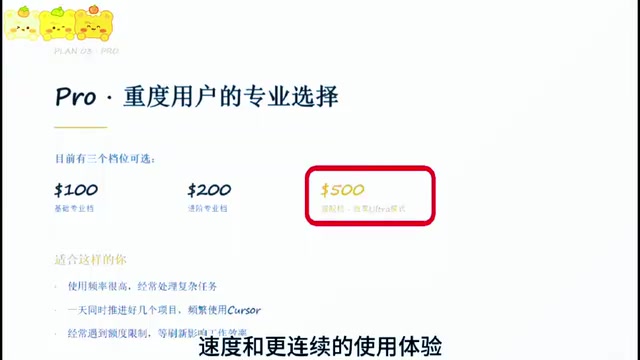
Pro offers three tiers at $100, $200, and $500, corresponding to the basic professional tier, advanced professional tier, and flagship tier respectively. It suits users with very high usage frequency, who regularly handle complex tasks, push several projects forward in a single day, or who hit quota limits and are forced to stop and wait for a refresh, impacting their efficiency. With the release of the GPT-6 model, the Pro $500 tier also exclusively offers Ocean mode, with stronger performance and lower latency. The creator notes that if you truly need higher processing speed and a more continuous experience, you can look further into this tier.
What "Token" means in the subscription process: The "obtaining a Token" mentioned in the article does not refer to the token unit used by large models when processing text, but rather a temporary credential string used for identity verification. On third-party top-up or payment agent pages, users first obtain a string containing parentheses from the ChatGPT official login state, then paste it into the top-up interface, and the system uses it to confirm account ownership and complete order binding. Note that such credentials are typically time-sensitive; when copying, make sure it's complete with no missing parentheses, and don't leak it to unrelated third parties, to avoid your account being bound by others or unauthorized charges being made.
The relationship between Ocean mode and model tiers: Ocean mode is an inference configuration introduced alongside the GPT-6 series release. The official claim is that it outperforms the default mode in response speed and latency, but it's only available to the Pro $500 flagship tier. This means that even if users subscribe to Plus or a lower-priced Pro tier, they cannot invoke this mode. For latency-sensitive scenarios—such as real-time conversation, continuous multi-turn tool calling, or long-chain automated workflows—the value of Ocean mode lies mainly in reducing wait times and maintaining context coherence; if you're only doing everyday Q&A and copywriting, the experience difference from the default mode isn't obvious, and there's no need to pay extra for it.
Step 3: Quick subscription walkthrough
After choosing a tier, the creator demonstrated the subscription process via a designated website: go to the top-up page for the corresponding tier, click official login and obtain the Token, copy the entire content including parentheses, return to the top-up interface, paste the Token and verify the email, then confirm to create the order. The payment step supports WeChat Pay, and the funds arrive within one to two minutes. After that, refresh the page and click your avatar—if the Plus membership badge appears, the subscription was successful.
Key decision recommendations
Based on the video content, the core logic for choosing a tier is usage frequency and task complexity: choose Go for occasional use, Plus for daily high-frequency use, and Pro for high-intensity continuous work. The creator particularly emphasizes that when unsure, start with Plus for a month to avoid wasting money by committing to too high a tier upfront. For users interested in the new capabilities of GPT-6.2 Sol/Astra, if you need Ocean mode's low-latency characteristics, you'll need to consider the Pro $500 tier.
Related articles

Google Play Age Signal API: A Privacy-Friendly Approach to Age-Appropriate Experiences
Google Play launches the Play Age Signal API, helping developers obtain age range information in a privacy-friendly, user-controlled way to build age-appropriate experiences without collecting sensitive data.
Material 3 1.5.0 Stable Release: Material 2 Officially Retired
Material 3 1.5.0 stable release: new Fab Menu, wavy progress indicators and other expressive components, experimental annotations cut by 52%, sliders move to state model, major accessibility and keyboard navigation improvements, Material 2 officially deprecated.

YouTube's $3 Billion Settlement Over Teen Addiction Lawsuits: A Turning Point for Platform Liability
YouTube is accused of addictive design harming children and plans a $3 billion settlement with thousands of school districts plus teen protections. This analysis covers settlement details, industry impact, and platform liability boundaries.