GPT-6 Astra + Images 2.5 Hands-On: One Prompt to Run an Entire Workflow

Images 2.5 + GPT-6 Astra combine to run a full generate-design-print workflow from a single prompt.
OpenAI's ChatGPT Images 2.5 reaches top-tier performance in facial consistency, multi-round editing stability, and reference image handling, while adding Sketch, annotation editing, text insertion, and background removal — all free for every user. Meanwhile, the paid GPT-6 Astra can autonomously chain Google Drive, ChatGPT, Canva, and a print shop website in one workflow. In testing, a single instruction set drove the AI to complete the entire process — from generating a personal promo poster to layout to placing a print order — in about 40 minutes. The deeper significance: AI can now act as a cross-application workflow orchestrator, not just a single-step tool.
OpenAI has recently launched two major products in quick succession: the image generation model ChatGPT Images 2.5, and GPT-6 Astra, an AI capable of controlling your computer. Bilibili creator 李厂长 (Li Changzhang) ran a systematic hands-on test of both tools — and combined them to complete a real-world business task: generating an image, designing a poster, and placing a print order, all driven by a single instruction. This article summarizes the key findings from that test and what it means for AI-powered workflows.
Images 2.5: A Major Leap in Image Consistency
The new Images 2.5 is now available to all users, including those on the free tier. You can access it through the "Images" entry on the left sidebar of the ChatGPT web interface, via the chat or work modes in the desktop app, or simply by typing your request directly into the chat box.
OpenAI claims the new model delivers improvements in detail clarity and lighting quality, with especially notable gains when working with reference images. In the hands-on test, the creator uploaded a photo of himself taken in Singapore and asked the model to swap his outfit for a tropical island look and replace the matcha drink in his hand with sugarcane. The result preserved the likeness and proportions naturally — the hand holding the sugarcane followed realistic physics, and the edit was nearly seamless.
The most significant improvement is the stability of facial features. Previous image models would produce noticeably different results with each generation, but Images 2.5 retains the history of edits across multiple rounds of revision — unlike 2.0, which would "forget" earlier changes after too many iterations. The creator also tested generating versions of himself wearing different colored outfits, and consistency remained high throughout.
New Sketch Feature and Expanded Editing Tools
The biggest new addition in this version is the Sketch feature. You can access it by clicking Sketch under the Images category, or by typing @ in the chat box to select the drawing tool. This opens a canvas where you can draw a rough sketch and have GPT render it into a finished image. The creator drew an exaggerated cartoon character on the spot, and the model quickly turned the rough sketch into a fully rendered illustration — with style adjustable via prompts.
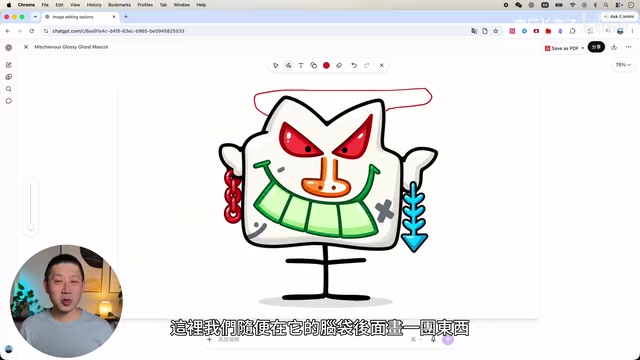
Editing capabilities have also expanded significantly:
- One-click aspect ratio adjustment: Quickly switch to widescreen formats like 16:9;
- Annotation-based editing: Use a brush to select a specific area and ask the model to modify just that region — though the creator warns you need to be precise with your instructions. When he simply said "make the fountain bigger," the model enlarged the fountain base along with it;
- Add text and elements: Drawing a rough shape and asking for "Happy Mid-Autumn Festival" text caused the model to not only recognize the intent, but also automatically add a thematically appropriate moon;
- Background removal to generate a PNG, and an erase tool to remove elements. However, the erase function tends to fill the removed area with other objects (like paint and brushes) rather than simply deleting them.
There are also template features for specific use cases like logos, posters, and interior design, which auto-fill preset prompts and produce more polished results than before. The creator tested this with a living room photo from an Australian real estate website using the interior design template — the first result wasn't ideal, but after sharing a screenshot and refining the prompt, the output improved noticeably.
GPT-6 Astra: Letting AI Take Over the Entire Workflow
The real value isn't in generating a single image — it's in whether that image can serve as the starting point for everything that comes next. That's where GPT-6 Astra comes in. After upgrading to the latest version (paid users only), select the Astra model on the Work page and authorize it to remotely control your computer. The creator personally recommends using "medium intensity" to balance performance and token consumption — higher intensity produces better results but burns through tokens at a staggering rate.
In the demo, the AI sequentially used four applications within a single workflow: it pulled a photo of the creator from Google Drive, used Images 2.5 to generate a promotional poster for an AI offline event featuring him as the subject, switched to Canva to handle layout automatically, then produced two print-ready PDFs and configured the settings on a print shop website — leaving only the address and payment for the user to fill in.
The entire process took about 40 minutes. The creator provided a detailed set of instructions and authorized app logins; everything else was handled autonomously by the AI. He admits he could have done it faster himself, but the significance lies in the fact that this is the first time AI has been able to autonomously chain together multiple applications, rather than just handling one step in the process. Users can still edit and undo steps during the session without disrupting the workflow.
GPT-6 Astra is essentially an implementation of "Computer Use" — the ability for AI to perceive screen state via screenshots and simulate mouse clicks and keyboard inputs to control real software interfaces, rather than calling preset APIs. This technical approach is similar to Anthropic's Claude Computer Use and Microsoft's UFO project. The core challenge lies in cross-application state awareness and error recovery. Since each step requires a complete reasoning loop of screenshot → comprehension → decision, token consumption is extremely high — which is why the creator recommends "medium intensity" over maximum. The key difference from RPA (Robotic Process Automation) tools is that RPA relies on pre-recorded fixed scripts and breaks when the UI changes; Astra uses visual understanding to adapt dynamically, and can theoretically control any software with a graphical interface without any prior integration.
Implications and Limitations: AI Is Starting to Feel Like a Coworker
The creator sees enormous potential in this approach: research, weekly reports, copywriting scripts, and even future audio editing, video rendering, and quality review could all be handed off to AI, with humans responsible only for the initial creative direction and final judgment calls. He gives the example of AI pulling information from multiple apps — financial data, meeting notes — and automatically consolidating them into an operations weekly report with priorities, owners, and bottlenecks identified. Tasks that used to require a project manager.
That said, Images 2.5 is still far from perfect. The creator identified several notable shortcomings:
- Consistency is good for standard portraits but complex images still have room for improvement;
- The erase tool adds other elements rather than simply removing them;
- Instructions must be written in significant detail to be executed accurately;
- Photos involving celebrities or copyrighted IP cannot currently be generated.
GPT-6 Astra is also not fully automatic — users must first log in and authorize applications step by step. But when image generation is combined with GPT-6 Astra, the generated image can serve directly as raw material for the next task, eliminating the tedious cycle of "download image → switch apps → reprocess."
"Multi-Agent Workflow" is the key concept for understanding the deeper value of this demo. In traditional AI applications, one model handles one task — image generation, copywriting, and layout are all separate — with the user acting as the "glue layer," manually passing files and instructions between tools. In the Astra demo, a single AI instance can cross application boundaries, autonomously deciding which tool to use, when to switch, and how to handle intermediate outputs. The user only needs to define the goal at the start and make judgments at the end. This points in the same direction as OpenAI's previously released Operator and Google's Project Mariner: the competitive battleground for AI is shifting from "single-point capability" to "workflow orchestration capability." Whoever can more reliably complete long-running cross-application tasks holds the greater productivity leverage.
Final Thoughts
Based on this hands-on test, Images 2.5 is genuinely in the top tier of current image models when it comes to facial consistency, multi-round editing stability, and reference image handling. And GPT-6 Astra's demonstration of "running an entire workflow from a single prompt" represents the direction of AI's evolution from tool to autonomous collaborator. Despite the cumbersome authorization process and longer completion times, once the workflow is properly set up, the AI can keep working for you continuously over time — and that may be the most important signal these two products send when combined.
Related articles

@ai-sdk/vue 3.0.306 Patch Release Syncs with [email protected] Update
@ai-sdk/vue 3.0.306 released, synced with [email protected]. A routine patch release for the Vercel AI SDK ecosystem with no public API changes; the Vue adapter layer stays version-aligned with the core package.

Gemini 4 Argon API Launches: The Era of Million-Token Output Begins
Google launches Gemini 4 Argon with sparse MoE architecture, up to 1M output tokens, and a 68.90% Vals Index score, available across API, AI Studio, and the Gemini app.

DukaanAI: Turning Product Photos into Inventory Lists with Open-Source AI
DukaanAI is an AI inventory tool for small retailers that turns product photos into inventory entries using the open-source Gemma 3 model, with local inference, editable fields, and CSV export.