GPT-6 Astra in Blender: Can AI Replace 3D Artists?

GPT-6 Astra took 27 minutes to generate a villa scene that impresses at a glance but fails under scrutiny — more assistant than replacement.
A Bilibili creator put GPT-6 Astra through a real Blender workflow test, revealing the honest state of AI modeling: the model positions itself as a "technical artist assistant" strong in procedural scenes and repetitive tasks, not full creative replacement. The key test — rebuilding a luxury villa from a reference image — took 27 minutes and produced a result convincing at first glance but visibly flawed on closer inspection. The creator also found that asking the AI to generate its own prompt before sending it alongside the reference image meaningfully improved output quality. Overall, AI has not yet achieved a speed or precision advantage that threatens skilled 3D artists, though its value in compressing repetitive work is real.
The "Existential Anxiety" Sweeping the 3D Art World
For many 3D artists, the constant stream of new AI modeling tools flooding social media every week has become a source of persistent psychological pressure. In a recent video, a Bilibili creator joked that every time he sees a post about "some incredible AI model built specifically for Blender," he spirals into another round of "should I even bother staying in this field?" This time, the subject is a model known as GPT-6 Astra. The creator decided to put it through its paces inside Blender and find out whether it could genuinely "steal his job."
One notable detail: you don't even need Blender running in the background to use tools like this. The entire test was conducted through the ChatGPT desktop client, with the model set to "medium" quality (the creator admitted he didn't want to burn through all his credits). This signals a broader shift in how AI-assisted 3D work is evolving — from "human operating software" to "human states intent, AI delivers results."
Asking the AI to Evaluate Itself: What Does It Think It Can Do?
Rather than jumping straight into complex requests, the creator first asked the model: "What do you think you can do in Blender, and whose job do you think you'll take?" This open-ended prompt turned out to be surprisingly revealing about the real limits of current AI modeling.
The model's response was measured and professional. It described itself as best suited to the role of "technical artist" — capable of quickly producing drafts, including building procedural scenes with Python, modeling props, setting up materials and lighting, positioning cameras, automating repetitive edits, and troubleshooting geometry or rendering issues. It offered an example: give it a direction like "a gloomy underwater research station," and it can generate a concrete scene and iterate with the user from there.
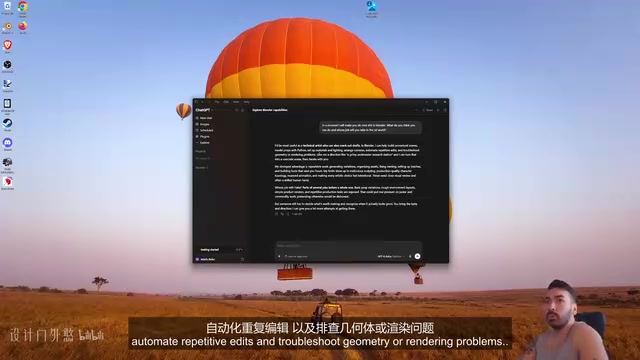
On the question of job displacement, the model's self-assessment is worth reading carefully. It acknowledged it would replace tasks like "repetitive work, generating variants, organizing assets, fixing naming conventions, and batch processing" — but explicitly stated it was "nowhere near fully replacing" human artists. In other words, AI currently behaves more like a highly efficient assistant than an independent creative.
The "procedural scenes" the model refers to means generating 3D content in bulk through parameters or scripts, rather than modeling each object by hand. Blender's built-in Geometry Nodes system is the classic implementation: the artist defines rules, and the software automatically generates large numbers of objects that follow those rules — such as a randomly distributed forest or a neatly arranged city street. When AI uses Python scripts to call the Blender API, it is essentially "writing and executing" this kind of procedural logic. This makes it relatively efficient for highly repetitive, rule-based scene construction, but its output quality drops noticeably for irregular, organic forms that require subjective aesthetic judgment — things like characters or detailed natural terrain.
First Test: A Few Seconds of Animation and the "Psychological Suggestion" Effect
The creator asked the AI to "make something cool," then added: "I'm making a YouTube video, so you'd better make it look good." Interestingly, he compared this to a previous test where he hadn't included that line — and said this result was "a million times better." That's obviously an exaggeration, but it does highlight how prompt wording can meaningfully affect the output.

The generation process took two to three minutes, and the AI eventually rendered an object along with a 6-second animation. The creator's assessment was honest: "It looks pretty cool," but as for being impressive, "not really." He even floated the idea of doing a "3D artist vs. AI" head-to-head video to see whether he could recreate the same scene faster — because the AI took six or seven minutes.
The Real Test: Rebuilding a Luxury Villa from a Reference Image
The truly meaningful test was architectural visualization. The creator pulled a "luxury villa" reference image from a Google Images search — a house he had previously done visualization work on himself — and made one clever move before diving in: he first asked the AI to suggest how to write an effective prompt for this task, reasoning that "it should know itself better than I do."

This approach is genuinely useful for everyday users. Rather than agonizing over how to phrase a prompt, ask the model to generate a structured prompt for you, then send that alongside the reference image and request that the 3D scene match it as closely as possible.
Architectural Visualization (ArchViz) is one of the higher-value niches within 3D art, commonly used for real estate sales, interior design proposals, and architectural presentations. Practitioners must stay faithful to the reference image while managing realistic lighting, material textures (concrete, glass, water reflections), and landscape details. These projects demand an extremely high degree of accuracy — clients can often immediately spot a perspective issue or a material that feels "off." This makes ArchViz an ideal stress test for AI modeling capabilities, far more demanding than generating an abstract, stylized sci-fi object.
27 Minutes of Waiting and the "Two-Second Impression" Trap
From hitting enter to receiving the result: 27 minutes passed. Before revealing the output, the creator offered a sharp observation: our first impression of something is typically formed in the first two or three seconds of looking at it, and that initial read almost always differs dramatically from a more careful assessment. He encouraged viewers to note both reactions — what they felt in the first two seconds, and what they noticed after staring at it for a minute or two.

The result was convincing enough to fool at first glance — the creator initially thought he was looking at the reference image itself. The swimming pool section was rendered quite well, and several details in the scene looked decent at a quick glance. But on closer inspection, problems emerged. The trees, for instance, the creator described as looking like the unsettling creatures from the old video game Silent Hill. The overall verdict: a classic AI-generated result — stunning from a distance, full of cracks up close.
27 Minutes for One Image — Is That a Real Threat?
The creator left the central question to his audience: is a service that takes 27 minutes to produce this kind of result actually advanced enough to threaten professionals in architectural visualization, game design, environment art, or product visualization?
From this real-world test, a few reasonably grounded conclusions emerge:
- Speed is not yet an advantage: A 27-minute wait for a single static image that still has obvious flaws offers no overwhelming efficiency advantage over a skilled 3D artist.
- First impressions are deceptive: AI results are best at engineering a "stunning two-second moment," but they don't hold up under a professional's scrutiny — trees, structural details, and similar elements remain clear weak points.
- The role is assistant, not replacement: Even the model itself acknowledged that its strengths lie in repetitive, variant-based, and asset-management tasks — not end-to-end creative work from scratch.
For 3D professionals, rather than anxious hand-wringing over whether to change careers, a more productive framing is to treat these tools as accelerators that compress repetitive labor and speed up early drafts. Genuine creative judgment, aesthetic control, and the fine-tuning of details remain firmly in human hands — at least for now.
Note: This article is based on a single-person test conducted by a Bilibili creator, run on the ChatGPT desktop client at medium quality. Results carry a degree of subjectivity and should be treated as a reference point rather than a definitive benchmark.
It's also worth noting that this test used the "medium" quality tier and ran on the ChatGPT desktop client rather than a locally deployed model. Cloud inference times depend not only on model capability but also on server load, network bandwidth, and task queuing — the 27-minute wait does not fully represent the model's "intelligence ceiling." As compute costs continue to fall and inference acceleration technologies (such as model quantization and speculative decoding) become more widespread, generation speeds for comparable quality outputs are likely to compress significantly over the next year or two. The conclusion that "speed is not yet an advantage" is therefore time-sensitive — practitioners should keep watching rather than treating any single test as the final word.
Related articles

Chain of Thought Isn't Just for AI: How Humans Can Use CoT to Improve Thinking Quality
Chain of Thought isn't just a prompt trick for large models. Starting from a Hacker News discussion, this article analyzes why CoT works for human thinking too, breaks down actionable ways to transfer it, and highlights the key differences between human CoT and machine CoT.
Cloudflare Teams Up with OpenAI: Closi…
Cloudflare Teams Up with OpenAI: Closing the Loop from Vulnerability Discovery to Defense with AI
Cloudflare uses OpenAI Daybreak to investigate security vulnerabilities and generate reviewable remediation plans, while developers use Codex to boost coding efficiency and quality.

Orca Multi-Agent Orchestration in Practice: A Guide to Parallel Collaboration with Claude and Codex
Orca is Stable AI's free open-source agent workbench supporting 34 agents like Claude Code and Codex in parallel. Learn its Git worktree isolation, multi-model orchestration, and mobile management.