GPT Tool Chain in Action: Free Batch Image Generation for E-Commerce Product Pages

GPT autonomously generates batch e-commerce product pages from images — no workflow setup required.
This article walks through a hands-on test of GPT's AI Agent capabilities, covering automated image parsing, reverse prompt engineering, and batch generation of 9:16 e-commerce detail pages. Notably, the model proactively adapted design styles for Amazon's Western markets without being prompted. The piece also raises important caveats about third-party platform safety and version naming accuracy.
From Conversational Tool to Autonomous Executor
For a long time, using GPT meant staying in the realm of back-and-forth dialogue: you ask, it answers, and you handle the rest yourself. But as model capabilities continue to evolve, a clear trend is emerging — AI is shifting from being a "responder" to becoming an "executor."
The technical foundation of this shift is the gradual maturation of the "AI Agent" architecture. Traditional conversational models can only generate text, but Agent mode equips models with "Function Calling" capabilities, enabling them to proactively call external APIs, search engines, code interpreters, image generation interfaces, and other tools — breaking complex tasks into multiple steps and executing them autonomously. Starting with GPT-4, OpenAI introduced a structured Function Calling mechanism that allows models to dynamically decide during a conversation when to call a tool, what parameters to pass, and how to integrate the results back into the response. This architectural evolution means models are no longer passive "Q&A machines" — they now possess the beginnings of autonomous planning, execution, and feedback loops. This is precisely the technical foundation behind the "no workflow setup required" experience.
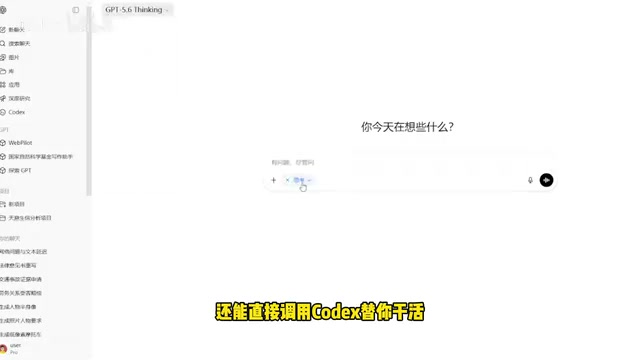
According to hands-on demonstrations by content creators on Bilibili, the latest generation of models can already autonomously invoke tools and complete an entire complex task from start to finish — no need for users to manually build cumbersome workflows. This means the barrier to entry is dropping rapidly: you don't need to understand node connections or configure APIs. Just clearly describe your requirements in natural language, and AI will handle the execution end to end.
Note: The "GPT 5.6" mentioned in the video is the creator's own terminology. OpenAI has not officially released a version with that name. This should be understood as a description of the tool-calling capabilities of a newer-generation model. Refer to official OpenAI announcements for accurate version information.
Hands-On Test: From Image Parsing to Batch Image Generation
Step 1: Extracting Information from Images
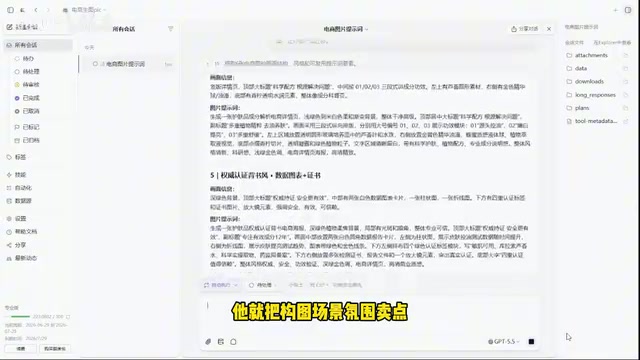
The experience begins with a typical e-commerce scenario. The creator grabbed a few product detail page images and handed them directly to the AI with a straightforward instruction: "Extract the visual information from these images and give me the corresponding image prompts."
Within about ten seconds, the AI broke down each image's composition, scene, atmosphere, and selling points. This step relies on the large language model's multimodal capabilities — GPT-4V and subsequent models use a visual encoder to convert images into vector representations the model can understand, then leverage the language model to output structured descriptions. This process is known in the industry as "Reverse Prompt Engineering": deriving the text prompt that could regenerate a given image from the image itself. For content creators and e-commerce practitioners, this is essentially an automated reverse-engineering analysis assistant — designers don't need to start from scratch. Instead, they can extract the style DNA from competitor products or reference cases and transplant it onto their own products, completing the full loop from "generation" to "understanding and analysis."
Step 2: Batch-Generating Product Detail Pages from Prompts
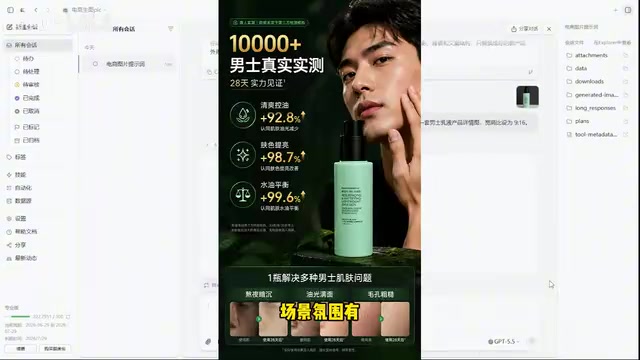
With the prompts in hand, the next step was mass production. The creator sent the AI their own product photos and asked it to generate a set of 9:16-ratio product detail pages based on the extracted prompts.
After about three minutes of waiting, the finished images were ready. Based on the results shown, the generated detail pages performed well across several key dimensions: product specs were clearly presented, scene atmosphere was on point, and selling points were communicated effectively. This was no longer just "generating an image" — it completed a design task with genuine commercial logic.
Intelligent Adaptation for Cross-Border Scenarios
The most impressive moment came during testing for cross-border e-commerce scenarios.
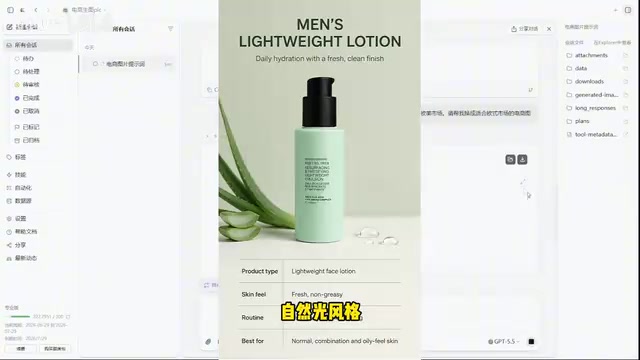
The creator added just one more instruction: "I sell to the US and European markets — generate product detail pages suitable for Amazon." The AI not only automatically switched the copy to English, but also proactively adjusted the design style to align with the "clean minimalist, natural lighting" aesthetic preferred in Western markets.
The key point: the style adjustment was something the creator never mentioned in the instruction. This reflects the model's accumulated "platform–audience–visual preference" associative knowledge from pretraining. Western e-commerce platforms like Amazon have long established clear visual norms — white or light backgrounds, high-resolution product close-ups, natural lighting, clean layouts. These preferences appear extensively in platform seller guides, design blogs, and vast numbers of product pages, all of which became part of the model's training data. This ability to proactively infer "design standards" from "platform context" is technically known as "Contextual Reasoning" — and it's one of the core advantages that distinguishes modern large language models from rule-based engines. Rather than relying on hard-coded rules, the model has internalized industry conventions from massive amounts of data. This is precisely the capability upgrade that sets the new generation of AI apart from the "by-the-book" tools of the past.
Efficiency Highlights Beyond the Workflow
Beyond output quality, there were several noteworthy efficiency features throughout the experience.
The most notable was automatic saving: after generation was complete, users didn't need to manually download each image one by one — the AI saved the finished files directly to a designated asset folder, ready to use immediately. This "output-and-archive" design eliminates a significant amount of repetitive work, making it especially valuable for batch image generation scenarios.
In terms of scope, these capabilities are not limited to e-commerce images. The creator noted that similar workflows can handle everything from e-commerce visuals, research illustrations, and product design mockups to lesson plans and PowerPoint presentations. In essence, it brings the barrier to "design execution" down to nearly zero.
A Measured Assessment: Opportunities and Things Worth Verifying
As a technology observation piece, a few points also warrant a note of caution for readers:
Regarding "free and unlimited usage": The video claims the featured site offers free, unlimited access to the latest models. Third-party aggregator platforms like this typically relay requests to the original model provider via API forwarding — some purchase official API quotas and distribute access at low or no cost, while others access model services through unauthorized means. There are real uncertainties around user data security, service reliability, and regulatory compliance. Images and business data you upload may be stored by third parties or used for model training, and the platform could go offline at any time for violating terms of service. For commercially valuable assets, it's advisable to use the official OpenAI API or AI services provided by enterprise-grade, compliance-certified cloud vendors to ensure data sovereignty and service continuity.
Regarding version naming: The term "GPT 5.6" currently lacks any official backing. Readers should rely on information from official OpenAI channels and avoid being misled by inflated version numbers.
Regarding capability boundaries: Batch image generation may look impressive in demos, but AI-generated commercial assets still require human review — especially when brand guidelines, copyright, and platform compliance requirements are involved. Human judgment remains essential for final sign-off.
Overall, the core trend reflected in this experience is real: AI is evolving from a conversational assistant into an executor capable of calling tools and autonomously completing complex tasks. For content creators and e-commerce practitioners, investing time in getting familiar with these "just say what you need" AI tool chains is unquestionably a worthwhile direction.
Key Takeaways
Related articles

Anthropic IPO Explained: Fuel for the AI Boom or the Spark for a Bubble?
Anthropic files for an IPO under ticker ANT. Breaking down the prospectus: 80% of revenue from usage-based pricing, $72B of an $80.7B net loss being non-cash charges, 900% net revenue retention, and how past IPOs like SpaceX performed on day one and over three years — answering the AI bubble question.

Will AI Kill the Research Paper? Mathematicians Offer a New Answer
Mathematicians on the Lex Fridman podcast discuss whether AI will kill research papers—from journal review pressure to Lean formal verification, GitHub open source fatigue to Mathlib's crowdsourcing model, exploring the evolution of academic contributions and the future of mathematical knowledge verification.

Enterprise LLM Development: From RAG to Multi-Agent in Practice
A course breakdown of enterprise LLM application development: from prompt engineering and RAG to multi-agent engineering practice and FDE project delivery, helping developers understand why Agent technology is a key focus for enterprise deployment and learn systematically to avoid detours.