Gradio Workflow: Build Hugging Face AI Pipelines by Connecting Visual Nodes

Gradio Workflow lets developers visually build and publish AI pipelines using Hugging Face nodes.
Gradio Workflow is a visual AI pipeline orchestration tool from the Hugging Face/Gradio team that replaces traditional glue code with a node-based canvas. It unifies Hugging Face Spaces, open-source models, datasets, and custom Python functions as draggable nodes — all runnable in the cloud without local setup. Beyond manual canvas building, it supports AI agent-generated workflows, intermediate node inspection, model hot-swapping, and REST API output for production integration. The product launched on Product Hunt at #14 with 79 upvotes; community feedback is still early.
Building AI applications often means writing mountains of glue code and wrestling with environment configs just to chain together models, datasets, and custom logic into a working pipeline. Gradio Workflow, a new tool from the Hugging Face ecosystem, takes a more intuitive approach — letting developers construct AI pipelines visually by connecting nodes on a canvas, like assembling building blocks.
The product debuted on Product Hunt at #14 for the day, earning 79 upvotes across the Productivity, Developer Tools, and Artificial Intelligence categories. One of its core developers is Yuvraj Sharma from the Gradio team.
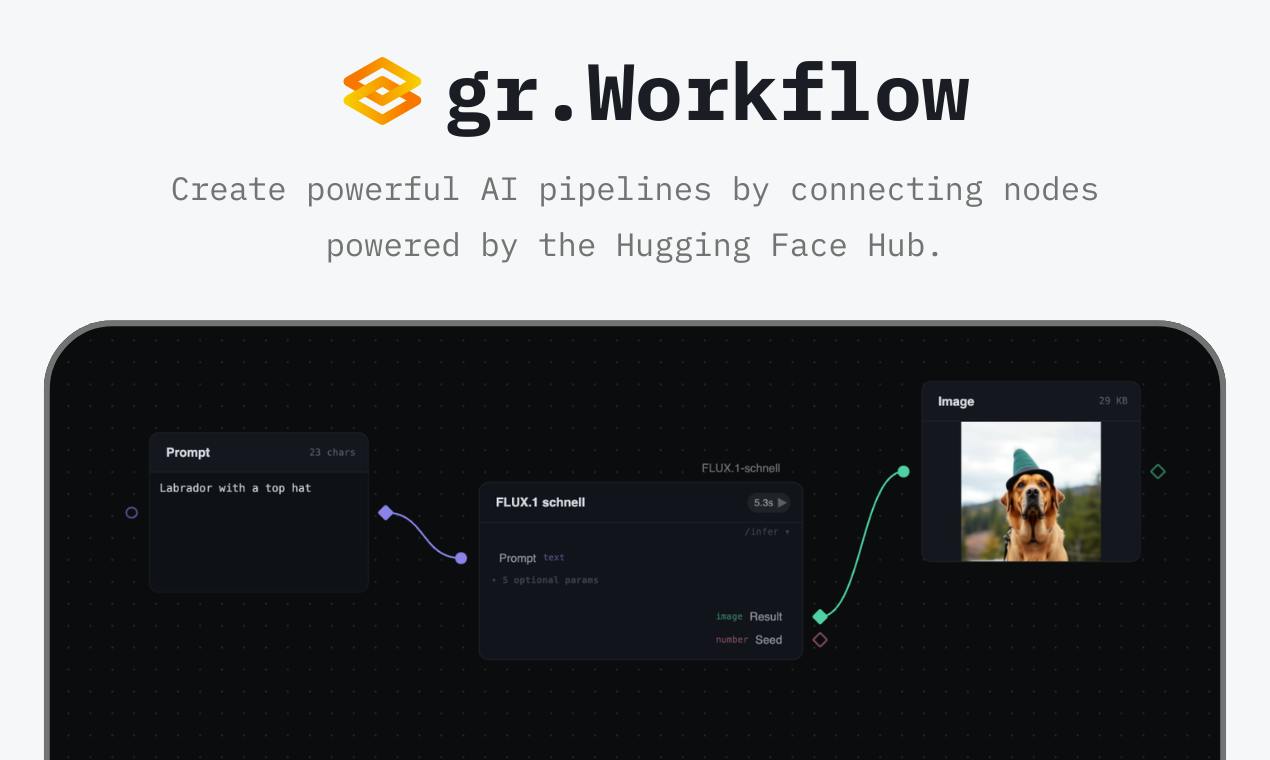
What Is Gradio Workflow
The core idea behind Gradio Workflow is "connect nodes to build AI pipelines." It presents Hugging Face Spaces, models, datasets, and your own Python functions as draggable nodes on a shared visual canvas.
Node-based orchestration isn't a new concept — tools like ComfyUI and n8n have already proven the value of visual workflow design. What sets Gradio Workflow apart is its deep integration with the Hugging Face ecosystem: you can directly invoke the platform's vast library of open-source models and Space applications without downloading or deploying anything yourself. The product page prominently highlights "No downloads needed," meaning most of the heavy lifting happens in the cloud.
Hugging Face Spaces is a managed hosting service that lets developers deploy Gradio or Streamlit apps directly in the cloud, accessible via browser without any local setup. Hundreds of thousands of open-source applications are already hosted on Spaces, covering virtually every mainstream AI task — image generation, speech recognition, text processing, and more. By treating these Space apps as reusable nodes on the canvas, Gradio Workflow lets developers tap into community-built inference endpoints directly, without spinning up their own model-serving infrastructure. This is the technical foundation behind its "No downloads needed" promise.
Two Ways to Build: Manual Canvas or AI Agents
Gradio Workflow offers two paths for constructing pipelines. The first is the manual canvas approach: drag, drop, and connect nodes step by step until your workflow is complete. The second is letting AI agents programmatically generate the workflow for you.
The second option is particularly noteworthy. When an AI agent can interpret task intent and automatically assemble a pipeline, the barrier to building one drops dramatically. This aligns with the broader trend in AI tooling of "using AI to build AI" — agents are taking on an increasingly larger share of automation responsibilities, from writing code to orchestrating entire workflows.
This pattern is often described in engineering as Agentic Workflow or Meta-Orchestration. The core idea is that a language model or planning agent parses a user's natural language intent, automatically selects the appropriate tool nodes, determines their connection order, and generates an executable flow graph. This differs fundamentally from traditional RPA (Robotic Process Automation), which relies on manually predefined rules — here, the agent dynamically generates solutions using its reasoning capabilities. Frameworks like LangGraph and AutoGen have explored similar logic at the code level; Gradio Workflow extends this to the visual orchestration layer, making generated results visible and editable even for non-programmers.
Debuggable, Swappable Workflow Design
For developers, debugging capability often determines whether an orchestration tool is actually usable. Gradio Workflow lets you inspect the intermediate inputs and outputs at every node in the pipeline, making it straightforward to trace issues and verify data flow.
Even more practical is the model hot-swap capability: if you identify a better model for a particular step, you can swap it in without rebuilding the entire workflow. This loosely coupled design reduces iteration overhead and is especially well-suited for experimental settings where you're constantly testing different model combinations. Given today's rapid pace of model releases, avoiding the "change one thing, rebuild everything" problem has clear engineering value.
Sharing and Integration
Once built, a workflow can be shared directly via a URL or run as a REST API. The former makes team collaboration and demo sharing easy; the latter allows a finished pipeline to be embedded into other applications or automation systems.
This combination of visual construction and API output effectively positions Gradio Workflow as a bridge from prototype to production. Developers can quickly experiment with ideas and, once a workflow matures, plug it into real business systems — significantly closing the gap between demo and deployment.
Exposing a workflow as a REST API essentially converts the output of visual orchestration into a standardized HTTP interface. Callers simply send a POST request with their input data and receive the pipeline's output — no knowledge of internal node implementation required. This model aligns with the Backend-as-a-Service (BaaS) philosophy and enables non-technical roles (product managers, business systems) to consume AI capabilities without understanding the underlying model calls. For teams looking to embed AI inference into existing systems, this mechanism can meaningfully shorten integration timelines and eliminate the need to build a dedicated service layer from scratch.
Who Is It For
Based on its feature set, Gradio Workflow is best suited for three types of users: AI researchers and engineers looking to quickly validate multi-model combinations; teams that prefer cloud-based collaboration over local environment management; and developers already deeply embedded in the Hugging Face ecosystem who need to chain together various Spaces and models.
That said, as a newly launched product, its real-world stability, performance under complex workflows, and flexibility compared to custom-built solutions still need to be validated by broader user feedback. At the time of writing, there is only one comment on Product Hunt, so community sentiment has yet to fully form.
Closing Thoughts
Gradio Workflow brings together Hugging Face's extensive open-source resources with visual node-based orchestration, complemented by AI agent-driven pipeline generation, intermediate result inspection, model hot-swapping, and REST API output. Together, these features offer a low-barrier path to building AI pipelines. For developers looking to rapidly experiment and ship on top of open-source models, it's worth a try.
Related articles

JobRunner MCP Server: AI Agents Can Now Fix Failed Java Jobs
JobRunner launches an open-source MCP server enabling AI agents to view cluster status, diagnose failures, and recover Java jobs—incident response from any cloud coding environment or existing agent.

MLAI Digital Launches 9 Security Agents: MCP Server Safeguards the Full Lifecycle of Agentic AI
MLAI Digital launches Security MCP Server with nine built-in specialized security agents covering vulnerability discovery, attack simulation, prompt injection detection, API and infrastructure assessment, and accelerated remediation—embedding security validation across the full Agentic AI lifecycle from development to production.

Running Isaac Lab on H100 GPUs: Exploring Better Approaches
Exploring optimization methods for running Isaac Lab on NVIDIA H100 GPUs, including MIG configuration, mixed precision, TensorRT acceleration, and community experience to improve robotics simulation and reinforcement learning efficiency.