Grok Bot Long-Run Error Troubleshooting Guide: What to Check First Before Resetting

When a long-running Bot fails, check state and inputs item by item first rather than resetting the computer; reset should be the last resort.
Based on Bilibili creator "马上花生"'s Grok Bot graduation course, this article systematically sorts out troubleshooting priorities for long-running automation. The core principle: don't start guessing from "it's stuck"—first confirm whether it's waiting for input, whether the computer is initialized, whether the task is alive, then check usage and scheduling. The development track emphasizes minimal reproduction and a single owner, forbidding old logs from masquerading as fixes; the office track emphasizes source verification and keeping items pending confirmation, with no sending or other actions without authorization. The usage section clarifies boundaries around weekly quotas, first-party vs. third-party models, and team seats. The stop and reset section points out that closing the local app doesn't stop cloud work, that actions already taken are irreversible, and that reset should be a last resort. The final delivery standard is leaving traceable artifacts, exception records, and a maintenance owner so the next person doesn't have to troubleshoot from scratch.
Grok Bot Long-Run Error Troubleshooting Guide: What to Check First Before Resetting
When a Bot is put into long-term automated work—whether development tasks or office workflows—failures are almost inevitable. What really determines efficiency is not the failure itself, but what you check first and in what order after something goes wrong. In the graduation episode of the Grok Bot series course, Bilibili creator "马上花生" (Mashang Huasheng) strings together roles, tools, methods, triggers, and acceptance criteria into a complete work task chain, and provides a systematic troubleshooting path for three high-frequency failure types in long-running operations—missing input, duplicate events, and expired permissions.
This article, based on that course content, sorts out the troubleshooting priorities when Bots go wrong, common misconceptions, and why "resetting the computer" should be the very last step.
The Core Principle of Troubleshooting: Check State First, Guess Causes Later
The creator repeatedly emphasizes one principle: Don't start guessing from a vague "it's stuck." When a long-running Bot behaves abnormally, the first step is not to restart, not to reset, but to confirm the actual current state item by item.
The troubleshooting order can be summarized as:
- Is it waiting for input—questions, approvals, login verification codes, or secret requests
- Is the computer initialized—whether the environment is ready
- Is the task still running—whether the process is alive
- Usage, activation history, pause timezone, and current source—whether there's a quota or scheduling-level blockage
The value of this order lies in the fact that most "stuck" situations are actually the Bot normally waiting for some input, not a system crash. Resetting the computer directly without confirming the state not only fails to solve the problem but also loses current progress and unsaved changes.
Bring back the actual state and errors, eliminate unknown conditions one by one—don't replace problem localization with repeatedly clicking "Allow" or re-running.
Failure Card Design for Development and Office Tracks
The course provides troubleshooting frameworks for two graduation tracks, with the same core idea: Every segment of work has a single owner, and every step has handoff-ready documentation.
Development Track: Minimal Reproduction First
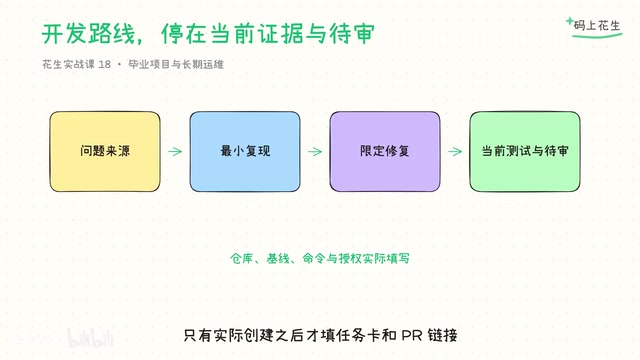
Starting from the current problem materials, do a minimal reproduction, delegate modifications with a limited file scope, then use regression and continuous integration evidence from the current version to decide whether to halt pending review. The key constraint is: You cannot pass off old passing logs as the current fix. When you don't have real access permissions, delivering a task brief and a description of what wasn't completed is sufficient; only fill in the task card and PR link after actual creation.
Office Track: Source Verification and Keeping Items Pending Confirmation
First read the current requirements, progress, and communication materials, check for contradictions, and produce a source-attributed table and weekly report draft. Sending, inviting, and changing sharing permissions are subsequent specific actions—you cannot assume authorization has been granted just because the weekly report has been generated. When the owner or date is missing, keep it pending confirmation rather than making commitments on behalf of the contact.
Graduation acceptance requires running at least three scenarios: normal delivery, missing input, and duplicate with the same identifier. The point that "duplicates must not cause extra shipments or extra creations" is especially critical—deduplication is a capability that must be actually implemented and validated; writing an identifier does not equal obtaining an official "exactly-once" guarantee.
"Exactly-once" is a semantic guarantee in distributed systems: even if a message is sent multiple times, the receiver processes it only once, avoiding duplicate creation, duplicate shipments, and similar issues. The counterparts are "at-least-once" (which causes duplicates) and "at-most-once" (which may lose messages). In Bot automation workflows, duplicate events are a common failure—for example, the same form submission being consumed by two workflows simultaneously, or a callback being triggered multiple times by a retry mechanism. Simply tagging an event with a unique identifier does not constitute an "exactly-once" guarantee, because the receiver still needs to implement deduplication logic (such as an idempotency table, a database unique constraint, or a distributed lock) to truly prevent duplicate side effects. The course specifically emphasizes that "deduplication is a capability that must be actually implemented and validated"—precisely this point: the identifier is only a necessary condition, not a sufficient one.
Usage and Subscription: Don't Describe Weekly Quota as a Fixed Number of Tasks
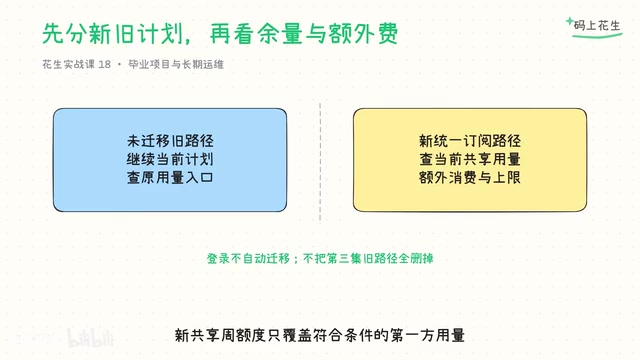
Quota issues are one of the most easily misjudged types of failures in long-running operations. The course points out that you must first confirm whether the account belongs to an unmigrated legacy plan or the new unified subscription path, then check the corresponding backend for remaining balance, reset time, additional spending, and activation history.
Several common misconceptions need clarification:
- Login only performs authentication and does not automatically merge accounts or change plans
- The new shared weekly quota only covers eligible first-party usage and does not include all third-party models
- Team seats each have their own weekly quota
- Different activities consume quota at different rates; you cannot describe it as a fixed number of tasks or "unlimited team balance"
Only after clarifying these boundary conditions can you determine whether "the task didn't finish" is due to quota exhaustion, scheduling conflicts, or the task itself failing.
First-party usage refers to quota consumed by models or services provided by the platform itself, while third-party models refer to external AI models integrated through APIs (such as OpenAI, Anthropic, etc.). The new shared weekly quota typically only covers the former, because the platform has direct control over billing and resource scheduling for first-party models, whereas third-party models often have independent pricing and rate-limiting policies. Additionally, team seats refer to the independent quota allocated to each member in an enterprise or team subscription; quotas between members are generally not shared or only partially shared. Different activities (such as text generation, image generation, code execution) consume quota at very different rates because their computational costs differ—a single image generation may consume as much quota as dozens of text conversations. Therefore, interpreting the weekly quota as a "fixed number of tasks" or "unlimited team balance" is seriously misleading and will lead to systematic deviations in task planning.
Stop and Reset: What Can't Be Stopped, What Gets Lost on Reset
This is the most easily overlooked but highest-cost part of the entire course.
Closing the local application does not automatically stop cloud work. Stopping the current task and pausing future runs are two different functions; first clarify which part you want to stop. More critically: actions that have already been sent or modified are not automatically undone by stopping and must be handled according to actual authorization and current state.
Logging out of the interface also does not mean all tasks have been canceled.
As for resetting the computer, the course's position is very clear: Reset goes last. Recovery and reset both rebuild the environment and interrupt work, and reset also removes manually installed packages. When there is progress, wait first; do not start a reset simultaneously during recovery or update. When the computer cannot save, recent unsaved changes may be lost, and you cannot promise that "recovery will never lose files."
A cloud computer failure itself does not equal a deleted chat. When you can't find a conversation, first check the account, hidden Bots, and other devices, keep the version and problem details, then contact support. Resetting the computer is not a way to "recover conversations."
Cloud work and local applications differ fundamentally in execution location and state management. Local applications run on the user's device, and closing the process terminates the operations it initiated. Cloud work executes on remote servers, and the local application is merely a control interface. Closing the interface or logging out does not send a "stop" command to the cloud; cloud tasks continue running and consuming resources as scheduled. Furthermore, stopping the current task (aborting a single execution in progress) and pausing future runs (preventing subsequent scheduled triggers) are two different control semantics—the former affects ongoing actions, the latter affects actions that haven't started yet. Messages already sent, permissions already modified, and resources already created are irreversible side effects; stop operations do not automatically undo them, and they must be manually rolled back or corrected based on the actual authorization state. Only by understanding this distinction can you avoid the common misconception that "closing the app means all work has stopped."
The Real Capability Needed for Long-Running Operations
The course finally returns to a simple judgment standard: Only what is actually accomplished is worth handing over to long-running operations.
What needs to be left behind: current inputs, validated methods, traceable artifacts, exception records, and a maintenance owner. Don't fabricate fixed cost-saving or efficiency percentages; instead, speak with verifiable results and actual usage. Start from one computer and one role, then move through tools, memory, skills, runs, collaboration, and acceptance—every step needs a source, a result, and someone who can take over when problems arise.
The value of a failure card is not in eliminating failures, but in ensuring the next person who takes over doesn't have to start guessing from "it's stuck" all over again. This may be the underlying capability that Bots truly need for long-term work.
One-line Summary
When a long-running Bot fails, check state and inputs item by item first rather than resetting the computer; reset should be the last resort.
Paragraph Summary
Based on Bilibili creator "马上花生"'s Grok Bot graduation course, this article systematically sorts out troubleshooting priorities in long-running automation. The core principle: don't start guessing from "it's stuck"—first confirm whether it's waiting for input, whether the computer is initialized, whether the task is alive, then check usage and scheduling. The development track emphasizes minimal reproduction and a single owner, forbidding old logs from masquerading as fixes; the office track emphasizes source verification and keeping items pending confirmation, with no sending or other actions without authorization. The usage section clarifies boundaries around weekly quotas, first-party vs. third-party models, and team seats. The stop and reset section points out that closing the local app doesn't stop cloud work, that actions already taken are irreversible, and that reset should be a last resort. The final delivery standard is leaving traceable artifacts, exception records, and a maintenance owner so the next person doesn't have to troubleshoot from scratch.
Related articles

Felix Rieseberg Personal Homepage
Felix Rieseberg's personal homepage sparks attention on Hacker News. This article covers the Slack engineer's technical background, the rise and fall of nativefier, and the value of a developer homepage as a tech calling card.

@ai-sdk/vue 3.0.306 Patch Release Syncs with [email protected] Update
@ai-sdk/vue 3.0.306 released, synced with [email protected]. A routine patch release for the Vercel AI SDK ecosystem with no public API changes; the Vue adapter layer stays version-aligned with the core package.

Gemini 4 Argon API Launches: The Era of Million-Token Output Begins
Google launches Gemini 4 Argon with sparse MoE architecture, up to 1M output tokens, and a 68.90% Vals Index score, available across API, AI Studio, and the Gemini app.