Grok Build Has 26K Stars: How Does It Compare to Codex and Claude Code?

Grok Build, Codex, and Claude Code overlap heavily in features — the real differences lie in focus and ecosystem fit.
This article compares three terminal-based coding agents: xAI's open-source Grok Build, OpenAI's Codex, and Anthropic's Claude Code. All three support reading project files, editing code, running commands, invoking child agents, and connecting to MCP — their feature lists are nearly identical. The real differences lie in emphasis: Grok Build leads with a full-screen terminal UI and ACP-based orchestration; Codex shines through its multi-entry-point ecosystem for ChatGPT users; Claude Code offers the most mature configuration system via Hooks, CLAUDE.md, and agent teams. Project rule filenames, sandbox platform coverage (Claude Code lacks native Windows Bash sandboxing), and account systems also meaningfully affect migration and daily usage costs.
A terminal-based coding agent called Grok Build has been quietly racking up attention on GitHub, sitting at over 26,000 stars. Open-sourced by xAI, it lets you point it at a codebase and have it read files, modify code, run commands, browse the web, and even delegate subtasks to multiple child agents. The question is — Codex and Claude Code can do all of that too. So what actually sets Grok Build apart?
This article puts all three tools side by side, not to benchmark model outputs, but to examine the differences in how they work, how they extend, and where they draw permission boundaries.
Grok Build's Core: A Full-Screen Terminal UI
Grok Build's most distinctive feature is its full-screen terminal interface. Conversation, commands, file edits, task progress, and child agent status all live in the same window. It supports both keyboard and mouse input, lets you expand long outputs, and lets you inspect plans and code diffs directly.
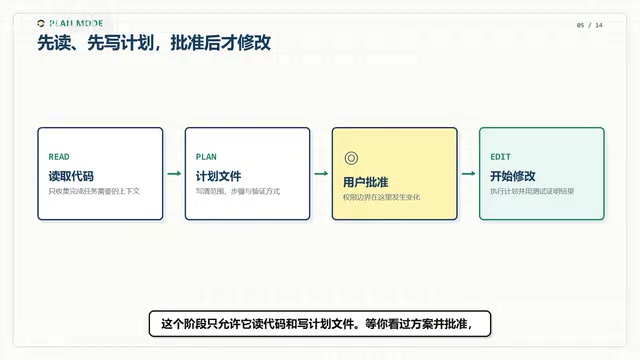
Take a typical workflow: read project rules, locate relevant files, propose changes, apply them, run tests, and review diffs. Grok Build handles this by first entering a plan mode — during which it can only read code and write plan files. Only after you review and approve the plan does it start making actual changes.
If a task can be parallelized, it can spin up multiple child agents. Each child agent can share the current directory or operate in its own Git worktree to minimize merge conflicts. This sounds like a complete workflow — but to be fair, Codex and Claude Code have comparable capabilities here too.
ACP (Agent Communication Protocol) is a protocol proposed by xAI that allows external scripts, CI/CD pipelines, or editors to send instructions to Grok Build and receive results through a standardized interface — no interactive terminal required. The counterpart is MCP (Model Context Protocol), a broader standard led by Anthropic and adopted by multiple tools, primarily focused on how models access external tools and data sources. The two serve different purposes: MCP is more about "how a model calls tools," while ACP is more about "how an agent is orchestrated by external systems." Understanding this distinction helps you evaluate whether Grok Build fits into your existing automation workflows.
Similar Feature Lists — Different Priorities
All three tools can read projects, edit files, execute commands, run tests, connect to MCP, load skills, and invoke child agents. On paper, the feature lists look nearly identical. What actually shapes the experience is where each tool places its emphasis.
Grok Build centers on the full-screen terminal UI, making it easy to keep an eye on task progress while offloading commands to run in the background. It also offers a headless mode and ACP protocol access for integration with scripts, CI pipelines, or editors that support the protocol.
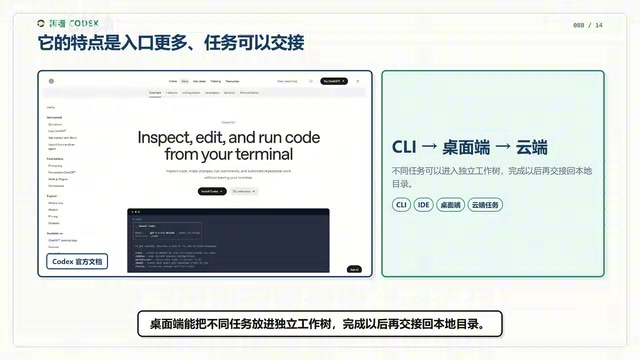
Codex offers more entry points: you can work from the command line, a desktop client, an IDE, or cloud-based tasks. The desktop client can place different tasks into isolated worktrees and hand them back to the local directory when complete. If you're already living in the ChatGPT and Codex ecosystem, the switching cost is low.
Claude Code still emphasizes terminal-first workflows. Its CLAUDE.md auto-memory, Hooks, child agents, and agent teams have matured into a comprehensive configuration system. Hooks are particularly useful when you need automated checks inserted before or after file edits, command runs, or commits.
Project Rules and Migration Compatibility
The filename for project rules is worth noting. Both Grok Build and Codex read AGENTS.md, while Claude Code primarily reads CLAUDE.md. All three support layered rule loading — from user-level config down through repo subdirectories. When switching tools, your existing project specs won't necessarily transfer as-is; you'll need to check filenames and compatibility scope.
Grok Build has done some work on migration compatibility: its skills loader doesn't just scan its own directory — it also picks up from Claude Code, Cursor, and generic agents directories. If you've built up a collection of skills, you'll have less to manually migrate.
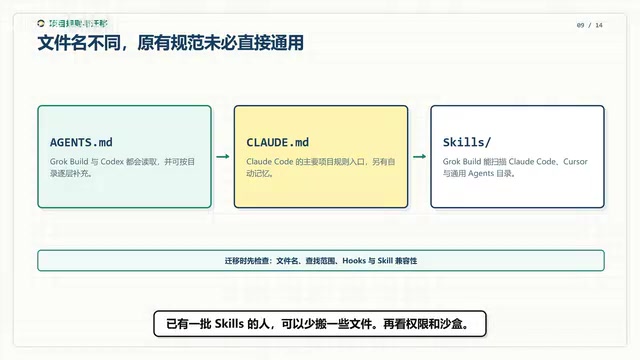
Both AGENTS.md and CLAUDE.md are essentially plain-text "system prompt supplement files" stored in the project repository, used to tell the agent about the project's coding conventions, off-limits operations, common commands, and other context. "Layered" loading means you can put global rules in your home directory and module-specific rules in subdirectories; the agent merges them by path hierarchy. The value of this mechanism: a single set of rules governs how all collaborators use the agent, codifying team consensus into version-tracked files rather than scattering it across everyone's local configs.
Permissions and Sandboxing: Windows Users Take Note
All three tools share the same general philosophy on permissions and sandboxing — separating "approval" from "isolation" — but they differ in platform coverage.
Grok Build asks for confirmation before executing commands or editing files by default. You can configure allow, ask, and deny rules, and add Hooks for interception. It also offers an optional system-level sandbox, though the official documentation currently focuses the implementation on Linux and macOS, and the sandbox is disabled by default.
Codex also separates approval from sandboxing. The common workspace mode allows it to edit and run commands within the project, requesting approval only when it needs to cross boundaries. Official isolation solutions are provided for native Windows, WSL2, Linux, and macOS.
Claude Code also sandboxes across the board. One important caveat: its Bash sandbox supports macOS, Linux, and WSL2, but native Windows is not supported for this isolation layer. Windows users who care about full sandboxing should run it inside WSL2.
WSL2 (Windows Subsystem for Linux 2) is a Linux kernel compatibility layer provided by Microsoft on Windows 10/11 that can run full Linux binaries. For tools like Claude Code that rely on Linux sandboxing mechanisms (e.g., namespaces, seccomp), WSL2 is the most direct path to equivalent isolation on Windows. Note that path mappings and permission rules between the WSL2 environment and the host Windows filesystem differ from native Linux — when configuring project roots and agent workspaces, confirm paths are correctly mapped to avoid the agent accidentally accessing or modifying host system files.
Accounts and Pricing
Open-source client does not mean free model calls. Grok Build opens a browser for login on first launch by default; in headless environments, you can use an xAI API Key. Codex supports ChatGPT login as well as API-based authentication for automation. Claude Code works with a Claude subscription, the Anthropic API, or cloud platform accounts.
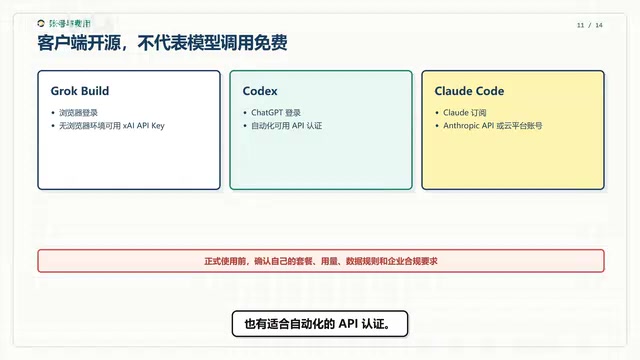
Before committing to any of these tools, confirm your plan's usage limits and data handling requirements.
How to Choose
- If you're already working heavily with ChatGPT, the Codex desktop client, and cloud tasks, Codex's multi-entry-point ecosystem will feel more natural.
- If your project has already built up a lot of Hooks, CLAUDE.md files, and child agents around Claude Code, staying with it usually costs the least in migration effort.
- If you want to use Grok models, prefer a full-screen terminal interface, or need background task loops and ACP integration, Grok Build is worth installing and trying out.
A few final facts: as of September 9, 2026, Grok Build has 26,592 stars and is licensed under Apache 2.0. The official changelog shows the latest version is 1.0.13, with recent fixes addressing Windows, MCP, child agent, and rendering stability issues.
The differences between these three tools aren't about what they can do — they're about where each puts its capabilities and who it's most comfortable for. When making your choice, weigh your existing ecosystem and platform requirements. That'll get you further than benchmark scores alone.
Related articles

Chain of Thought Isn't Just for AI: How Humans Can Use CoT to Improve Thinking Quality
Chain of Thought isn't just a prompt trick for large models. Starting from a Hacker News discussion, this article analyzes why CoT works for human thinking too, breaks down actionable ways to transfer it, and highlights the key differences between human CoT and machine CoT.
Cloudflare Teams Up with OpenAI: Closi…
Cloudflare Teams Up with OpenAI: Closing the Loop from Vulnerability Discovery to Defense with AI
Cloudflare uses OpenAI Daybreak to investigate security vulnerabilities and generate reviewable remediation plans, while developers use Codex to boost coding efficiency and quality.

Orca Multi-Agent Orchestration in Practice: A Guide to Parallel Collaboration with Claude and Codex
Orca is Stable AI's free open-source agent workbench supporting 34 agents like Claude Code and Codex in parallel. Learn its Git worktree isolation, multi-model orchestration, and mobile management.