Hamdori: How a 3D Hamster on Your Desktop Redefines Focus Tools

Hamdori combines a 3D hamster desktop pet with a focus timer and file drawer, emphasizing privacy and one-time purchase.
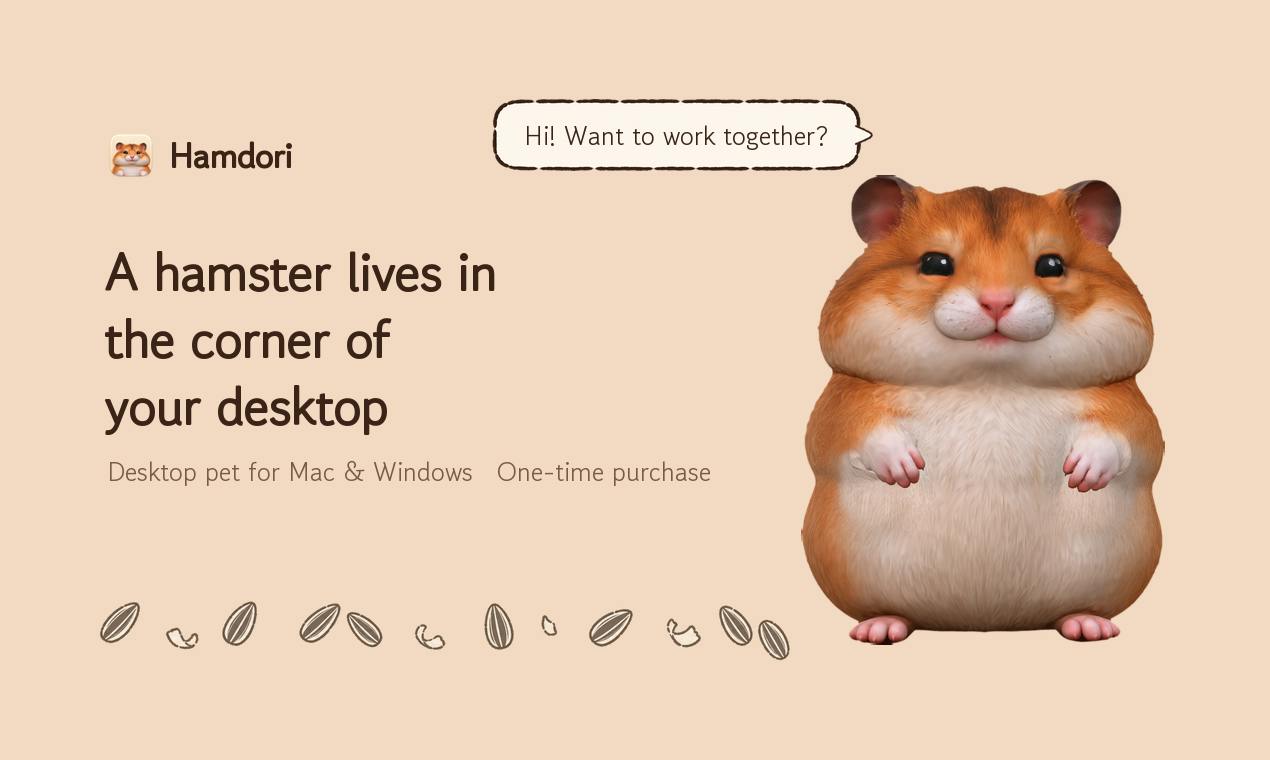
Hamdori is a Mac/Windows desktop app that places a 3D canary hamster in the corner of your screen, reacting to petting, typing, and your absence with eye-closing, seed-nibbling, and sleeping. Beyond decoration, it includes a Pomodoro focus timer, interactive toys, and a quick file drawer. It declares no monitoring permissions and uses a one-time purchase model. On Product Hunt it earned 64 upvotes and ranked 17th for the day.
In an era where productivity tools keep multiplying, most products chase faster processing speeds and more comprehensive feature sets. Yet an app called Hamdori does the opposite: it places a 3D canary hamster in the corner of your Mac or Windows desktop. The hamster closes its eyes when you pet it, nibbles seeds while you type, and dozes off when you step away. It also comes with a built-in focus timer, toys, and a file drawer. No monitoring permissions, one-time purchase. On Product Hunt, it received 64 upvotes and ranked 17th for the day.
From Desktop Pet to Focus Companion
Desktop pets are nothing new, but what makes Hamdori special is its lightweight blend of emotional companionship and practical functionality. According to its Product Hunt page, the hamster reacts to a range of user behaviors: closing its eyes when petted, nibbling seeds while you type, and sleeping when you leave. These details give the digital pet a sense of being alive rather than a static sticker.
More importantly, Hamdori doesn't stop at "cute." It includes a focus timer to help users practice the Pomodoro Technique, toys for interacting with the hamster during breaks, and an integrated file drawer for quick access to frequently used files. All of these features are built around the desktop scenario without being intrusive.
Desktop Pet refers to a category of interactive virtual characters that run on the operating system's desktop, typically floating above other applications in a transparent window and responding to user actions (such as mouse clicks, drags, and keyboard input) with animated feedback. Such applications date back to the 1990s with Tamagotchi and Windows' Clippy assistant, and have since evolved into standalone software with greater decorative and emotional-companionship value. Unlike static wallpapers or stickers, desktop pets emphasize real-time interaction and anthropomorphic feedback, with technical implementations relying mostly on 2D/3D rendering engines and system-level window management APIs. In recent years, as GPU performance has improved and cross-platform frameworks have matured, 3D desktop pets have become increasingly common—Hamdori being one of them.
Privacy First and One-Time Payment
At a time when privacy concerns are increasingly sensitive, Hamdori explicitly states "no monitoring permissions." This means it does not record your keystrokes or screen content, nor does it upload data to the cloud. For an app that resides on your desktop, this is worth commending.
In terms of payment model, Hamdori uses a one-time purchase rather than a subscription. For users tired of monthly fees, this lowers the long-term cost of use and avoids the awkwardness of a pet "disappearing" when a subscription expires.
Monitoring permissions in the context of desktop applications typically refer to sensitive system permissions that an app requests, such as keystroke logging, screen capture, clipboard reading, or webcam access. Some productivity tools request such permissions to track typing frequency or screen time, but this also raises user concerns about privacy leakage. Hamdori's declaration of "no monitoring permissions" means it does not request or use these system-level interfaces, thereby eliminating the possibility of recording user behavioral data at the architectural level. For desktop software that runs persistently in the background, the principle of least privilege is the first line of privacy defense—and an indicator users increasingly value when choosing products.
The Design Philosophy of a Lightweight Productivity Tool
Hamdori's emergence reflects a new set of expectations some users have for productivity tools: they don't have to be feature-bloated productivity suites—they can be a small object that brings a smile to your face. The addition of a focus timer and file drawer helps it find a balance between entertainment and utility.
Of course, such products also face challenges. The novelty of a desktop pet may fade over time, and whether the focus timer and file drawer can build enough stickiness remains to be tested by the market. But at the very least, Hamdori offers a gentler, more humanized approach to the desktop experience.
The Pomodoro Technique is a time management method proposed by Francesco Cirillo in the late 1980s. At its core, it divides work into 25-minute focus periods (called a "pomodoro"), followed by a 5-minute break after each period, with a longer break (15–30 minutes) after every four periods. This method reduces procrastination and improves concentration through a fixed rhythm, and has been built into numerous productivity apps (such as Forest and Focus To-Do) as a timer feature. Hamdori's focus timer is a lightweight implementation of this method—users can use it directly alongside the desktop pet without installing a dedicated Pomodoro app.
Who Is It For?
If you enjoy having a small animal on your desktop and need a simple focus tool, Hamdori is worth a try. It's suitable for Mac and Windows users, especially those who are privacy-conscious and prefer one-time purchases. Currently, the product has 64 upvotes on Product Hunt, ranking 17th. Discussion isn't particularly high, but reviews are positive.
In an age where AI and automation sweep through everything, Hamdori reminds us: sometimes, a hamster nibbling seeds is the best stress reliever there is.
One-line Summary
Hamdori combines a 3D hamster desktop pet with a focus timer and file drawer, emphasizing privacy and a one-time purchase.
Paragraph Summary
Hamdori is a Mac/Windows desktop app that places a 3D canary hamster in the corner of your desktop, capable of interactive feedback such as closing its eyes when petted, nibbling seeds when you type, and sleeping when you leave. It goes beyond decoration by including a Pomodoro focus timer, interactive toys, and a quick file drawer, striking a balance between emotional companionship and lightweight productivity. The app explicitly states no monitoring permissions—it doesn't record keystrokes or screen content—and uses a one-time purchase rather than a subscription, reducing long-term costs and privacy concerns. The product received 64 upvotes on Product Hunt, ranking 17th for the day, with moderate discussion but positive reviews. Its design philosophy reflects some users' new expectations for productivity tools: they don't need to be feature-heavy—they just need to blend gently and humanely into the desktop.
Related articles

AI Tools Quietly Altering Settings: Postman Silently Installs Plugin, Codex Sharing Option Auto-Resets
AI Daily reports: Postman silently installs a Mac plugin and self-approves startup hooks, logged as auto-existing upgrade; Hacker News developers say Codex data-sharing opt-out flips back. Plus Simon Willison's raw float weight experiment with QEN 3.8-27B.

AI Learns to Rewrite AI: MIT's "Weightspace Programming" Redraws the Path to Recursive Self-Improvement
MIT team proposes weightspace programming: GPT-6 Astra reads and edits AI model weights directly. Math scores jump several-fold, hand-written networks beat trained models. Eight experiments analyzed, plus Anthropic's same-day warning and the real boundaries of recursive self-improvement.

Running Qwen 3.8 on a Laptop to Read Raw Weights: 46 Minutes Per Answer
Simon Willison reproduced weight space programming with Qwen 3.8 27B on a laptop: a 17GB model file, 46 minutes per answer, 43,506 reasoning tokens, Pong over an hour, Freeway failed. Suited for interpretability researchers.