Hands-On Review of Miaoda AI Website Builder: Zero Code, Three Minutes to a Personal Website — Is It Really That Easy?
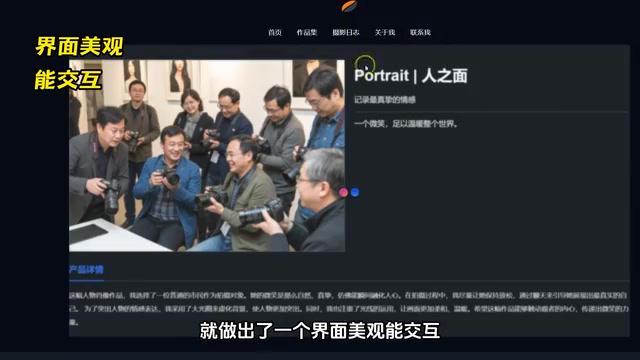
AI tool Miaoda lets zero-experience users build a personal website in three minutes via conversation
This article reviews Miaoda, a free Chinese AI website builder powered by LLM-based Text-to-Code technology that lets users generate complete personal websites in three minutes through natural language conversation. Compared to overseas competitors like Bolt and v0, Miaoda's core advantage is its "concierge-style" incremental update maintenance, supporting continuous conversational modifications without regenerating from scratch. The article argues AI website builders are shifting competitiveness back to content itself, with personal websites becoming more powerful professional calling cards than traditional resumes.
Your Resume Keeps Getting Ignored? You Need a Personal Website
The job market is getting more competitive by the day, and a PDF resume alone no longer cuts it. One of the core advantages top professionals have is the ability to transform their expertise into transmittable value symbols. Compared to cookie-cutter resume templates, a visually appealing, interactive personal website that showcases your philosophy and portfolio is undoubtedly a more powerful professional calling card.
In fact, the concept of "Personal Branding" was first introduced by management guru Tom Peters back in 1997, but it has taken on entirely new meaning in the Creator Economy era. LinkedIn data shows that job seekers with personal portfolio websites are approximately 2.7 times more likely to receive interview invitations compared to those who submit resumes alone. Personal websites are becoming the standard "digital identity anchor" for freelancers, creative professionals, and knowledge workers.
But here's the problem — what if you can't code or design? Recently, an AI website builder called "Miaoda" (秒搭, literally "instant build") has been gaining attention. Some users claim they built a complete personal blog site in just three minutes, without writing a single line of code, simply by having a conversation with AI. Is this just hype or real capability? Let's break it down in detail.
What Is Miaoda? A Conversational AI Website Building Experience
Miaoda's core concept is simple: build a website like you're chatting. Its interface looks almost identical to the conversational AI tools we're familiar with — you just describe your needs in natural language, and the AI automatically generates the corresponding web pages.
This is powered by the rapidly evolving "Text-to-Code" technology path — typically driven by large language models (LLMs) like GPT-4 and Claude at the base layer, converting users' natural language descriptions into HTML, CSS, JavaScript, and other frontend code in real time. This "Prompt-to-UI" capability has been one of the fastest-landing AI application directions since 2023, giving non-technical users the genuine ability to "describe and create" for the first time.
Here's the specific workflow:
- Write your requirement prompt: Describe the website structure you want, including layout, fonts, and style for pages like the homepage, portfolio, and project details
- Upload assets: You can upload images of your representative works
- Wait for generation: In about three minutes, a complete website is ready
- Iterate and adjust: If anything isn't right, continue the conversation to modify or directly drag-and-drop to adjust
It's worth noting that Miaoda is directly accessible within China and free to use, which significantly lowers the barrier to entry for domestic users.
Miaoda's Core Advantage: Not Just Generation, But "Concierge-Style" Maintenance
There's no shortage of tools on the market that can generate web pages with AI — overseas options like Bolt and v0, for example. Bolt.new is launched by StackBlitz, while v0 is a Vercel product. Both deeply integrate modern frontend frameworks like React and Next.js along with cloud deployment capabilities, primarily targeting developers with some technical background. Chinese users often face network restrictions and payment barriers when accessing these tools — this is precisely the core market entry point for local tools like Miaoda.
But Miaoda's biggest differentiator from these competitors lies in the convenience of ongoing maintenance.

To use a vivid analogy:
Other AI website builders are like renting an unfurnished apartment — if you want to add something, you need to renovate all over again. Miaoda is like a fully furnished apartment with a concierge — when you want to upload new work, just ask the concierge.
This "concierge-style" experience technically corresponds to incremental update capability — the system needs to maintain a complete "website state context" during each conversation, enabling the AI to understand the overall structure of the current website and make precise modifications only to the changed parts, rather than regenerating everything from scratch each time. This places considerable demands on the underlying context management and code diff & merge capabilities, and is one of the core technical indicators that distinguishes the maturity of AI website building tools.
For designers and freelancers who need to continuously maintain their portfolios, adding a new piece of work, changing a color scheme, or adjusting layout can all be accomplished through continued conversation, keeping maintenance costs extremely low.

How Can Beginners Get Started Quickly with Miaoda?
No Ideas? See What Others Have Done
If your mind is blank and you don't know where to start, Miaoda's homepage showcases creative examples from other users. You can reference their prompts and final results to find inspiration before getting started yourself.
Make Good Use of the Official Cloud Documentation
Miaoda provides a very detailed cloud document that includes:
- Prompt templates: Reference prompts for different website-building scenarios
- Mode recommendations for different skill levels: Suitable approaches for both beginners and advanced users
- Pros and cons analysis of each mode: Helping you choose the website-building path that best suits your needs
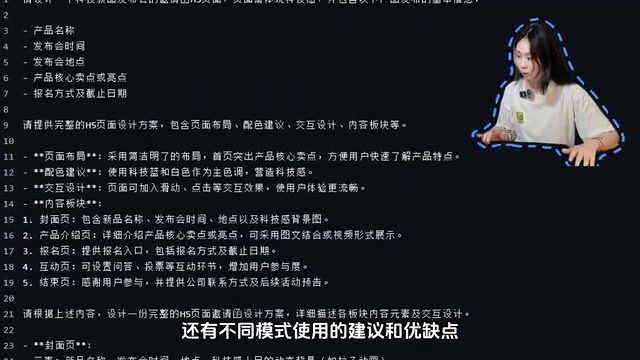
How to Write Prompts for the Best Results?
Prompt Engineering refers to the technical method of carefully designing input text to guide AI models toward producing results that better match expectations. Research shows that structured prompts containing specific constraints can improve satisfaction with AI-generated results by over 40% compared to vague descriptions — this principle applies equally in the website building context.
Based on hands-on experience, it's recommended to clearly specify the following elements in your prompts:
- Page structure: What pages are needed (homepage, about me, portfolio, contact info, etc.)
- Visual style: Minimalist, tech-forward, artistic, dark theme, etc.
- Layout preferences: Card-based layout, masonry/waterfall flow, timeline, etc.
- Interaction requirements: Hover effects, animation transitions, navigation style, etc.
When you clearly define these elements, the AI-generated results will be much closer to your expectations, and the subsequent adjustment workload will be significantly reduced.
Current Limitations of Miaoda
To be fair, Miaoda currently has some shortcomings. For example, compatibility with third-party textures/images is still being improved, and the rendering of complex interactive effects like floating bubbles is not yet ideal. Additionally, AI-generated websites still show a gap in detail refinement compared to code hand-crafted by professional frontend developers — this is a common limitation of all current "Text-to-Code" tools, fundamentally stemming from the fact that large models' understanding of complex visual details and pixel-level precision still falls short of human experts.
However, for users without a technical background, these limitations are entirely acceptable. After all, being able to go from zero to a personal website that "looks good, works well, and is shareable" in three minutes is already a massive efficiency leap.
Final Thoughts
AI website building tools are making "everyone can have their own website" a reality. The emergence of Miaoda means you don't need to squeeze time into learning to code, you don't need to spend money hiring outsourced help — just spend a bit of time in the evening chatting with AI, and you can accumulate your abilities and experience into visible confidence.
For freelancers, designers, content creators, and job seekers, a well-maintained personal website is far more persuasive than a Word document resume. And when AI has reduced the barrier to building a website to nearly zero, true competitiveness returns to the content itself — what works and experiences you have that are worth showcasing is the most fundamental question.
Key Takeaways
- Miaoda is a free, domestically accessible AI conversational website builder in China. Based on LLM-powered "Text-to-Code" technology, it requires no programming skills and can generate a complete personal website in three minutes through natural language descriptions
- Compared to overseas competitors like Bolt and v0, Miaoda's core advantage lies in "concierge-style" maintenance — through an incremental content update mechanism, it supports continuous conversational modifications without regenerating from scratch each time
- Official detailed cloud documentation is provided, including prompt templates, mode recommendations for users at different skill levels, and pros/cons analysis, lowering the barrier to entry
- Current limitations include imperfect third-party image adaptation and constrained complex interaction effects — common challenges across current AI website building tools — but already practical enough for non-technical users
- AI website building tools are shifting competitiveness back to content itself. Personal websites are becoming more powerful professional value symbols than traditional resumes, with portfolio website owners being approximately 2.7 times more likely to receive interview invitations
Related articles
 Product Reviews
The Programmer's Desk Setup Guide: Building a Workspace That Feels Like Home
Discover how programmers build productive, comfortable workspaces. From multi-monitor setups to ergonomic design, explore the desk philosophy that drives focus and flow.
 Product Reviews
Qoder vs Cursor Real-World Comparison: Which $20/Month AI IDE Is Better?
Hands-on comparison of Qoder vs Cursor AI IDEs: Agent autonomy, human interaction count, and architecture decisions. Qoder needed only 2 interactions vs Cursor's 8.
 Product Reviews
Cursor Cloud Agent Demo: Eliminating Bottlenecks Across the Entire Software Development Lifecycle
Deep analysis of Cursor's Cloud Agent demo showing how cloud VMs, automated test artifacts, and a full-chain control plane systematically eliminate human bottlenecks across the software development lifecycle.