Hands-On Tutorial: Build an Image-to-Prompt Feature in 3 Minutes with Cursor

Build an image-to-prompt tool in minutes using Cursor AI — no coding skills required.
This hands-on tutorial demonstrates how to use Cursor, an AI-native code editor, to build an image-to-prompt (reverse prompt engineering) feature in just a few minutes. By leveraging multimodal API services, the tool analyzes images and generates detailed text prompts for AI art generation — all without writing a single line of code. The guide covers API setup, natural language development in Cursor, testing, debugging, and tips for adding image upload functionality.
What Is Image-to-Prompt (Reverse Prompt Engineering)?
In the world of AI art, there's a common pain point: you see a stunning AI-generated image and want to create something similar, but you have no idea how to write the prompt. The character poses, lighting effects, composition, background details — your eyes can see all these visual elements, but describing them precisely in words is nearly impossible for most people.
Image-to-Prompt (also known as reverse prompt engineering) is the tool that solves this problem — it gives AI "eyes" to automatically analyze an image's content and generate a corresponding text description (prompt). Once you have these prompts, you can feed them into an AI art tool to generate images with highly similar style and content.
The underlying capability depends on one of the most important breakthroughs in the large model space in recent years — multimodal understanding. Traditional language models (like the early GPT-3) could only process text input, while the new generation of multimodal models (such as GPT-4V, Gemini, Claude 3, etc.) can simultaneously understand images, text, and even audio. The core principle involves using a Vision Encoder to convert images into vector representations the model can understand, then fusing them with the language model's text comprehension capabilities to achieve "look and describe" functionality. It's the maturity of this technology that has transformed image-to-prompt from a technical challenge into an easily callable API service.
This article follows a hands-on tutorial from a Bilibili content creator, demonstrating how to use Cursor (an AI coding tool) to build your own image-to-prompt feature in just a few minutes.
Demo of the Image-to-Prompt Feature
Before diving into development, let's look at the final result. The creator grabbed a random AI-generated artwork, uploaded it, clicked the "Reverse Prompt" button, and the system returned results almost instantly — character features, hair details, background environment, and more were described with remarkable clarity.
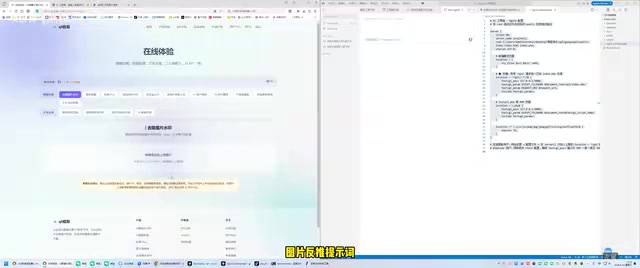
These reverse-engineered prompts, whether in Chinese or English, can be directly used in AI art tools and will most likely generate works highly consistent with the original image's style.
The key takeaway: this feature isn't some insurmountable technical barrier. There are already plenty of websites offering similar services, but if you can build it yourself, it means you have full control over pricing and service delivery and can integrate it into your own products for commercialization.
Full Workflow: Building Image-to-Prompt with Cursor
Step 1: Prepare the Multimodal API Documentation
The core capability of image-to-prompt comes from a large model's multimodal understanding. You don't need to train your own model — just call an existing API endpoint.
Here's what to do:
- Find the API documentation for a service that provides image-to-prompt capabilities
- Copy the full content of the API documentation
- You don't need to understand every detail of the docs — Cursor will help you make sense of it
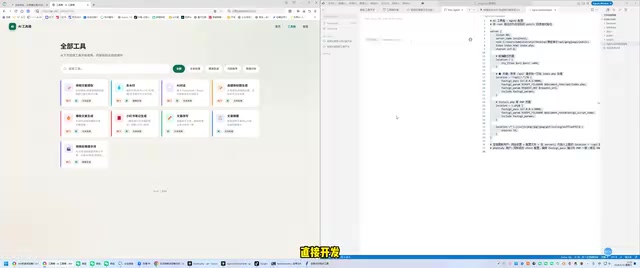
Step 2: Submit Your Requirements in Natural Language via Cursor
Open Cursor and describe your requirements in plain language: "Help me build a feature called image-to-prompt", then paste the API documentation alongside it.
It's worth introducing Cursor here. Cursor is an AI-native code editor deeply rebuilt on top of VS Code, developed by Anysphere. It has deep built-in integration with large models like GPT-4 and Claude, supporting natural language conversations to generate code, fix bugs, and refactor projects. Unlike code completion tools like GitHub Copilot, Cursor emphasizes "conversational development" — developers can describe requirements as if talking to a colleague, and Cursor will understand the context and generate complete code solutions, even directly modifying multiple files in the project. This is why throughout the entire development process, the creator never wrote a single line of code by hand.
You'll also need to do two things:
- Configure the API Key: An API key serves as the identity credential and billing reference when developers call cloud-based AI services. Each time the multimodal API is called to analyze an image, the service provider charges based on the number of input tokens (images are converted to equivalent tokens) and output text tokens. With mainstream providers, the cost of analyzing a single image and generating a detailed description typically ranges from a fraction of a cent to a few cents, meaning that even at scale, the per-call cost remains extremely low — providing a viable cost structure for individual developers looking to commercialize.
- Add tool dependencies: Install the necessary packages as prompted by Cursor
Once configured, you'll see the new feature automatically added to the project's toolbox.
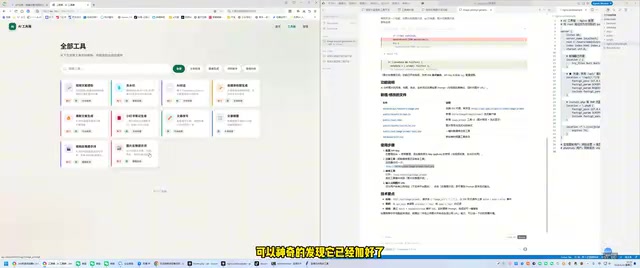
Step 3: Test and Debug the Results
For the first test, the creator used an image URL to pass in the image (since the project was still running locally and hadn't been deployed yet, direct image upload wasn't supported — after deployment, integrating object storage for uploads would only take a few minutes).
Find an AI-generated artwork, copy its URL, paste it into the input field, and click "Reverse Prompt."
The first run threw an error, which is completely normal in development.
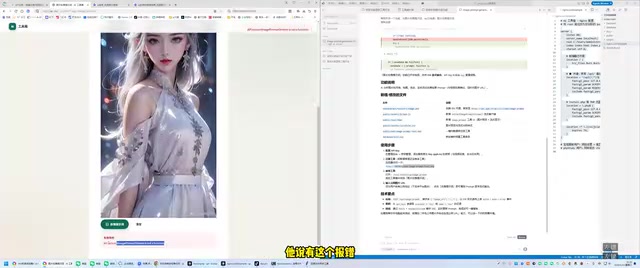
Feed the error message back to Cursor, and it will automatically analyze the issue and fix the code. After the fix, retest — the feature runs successfully, outputting detailed AI art prompts that users can directly copy and use.
Bonus: How to Add Image Upload Functionality
The current demo version uses image URL input. Once the website is officially deployed, you can ask Cursor to add an image upload feature, storing images on a server or cloud object storage (such as Alibaba Cloud OSS, Tencent Cloud COS, etc.) — again, this only takes a few minutes.
Object storage mentioned here is a cloud infrastructure service specifically designed for storing unstructured data (such as images, videos, and files). Compared to traditional local server storage, object storage offers unlimited capacity scaling, automatic multi-copy backup, and global CDN-accelerated distribution. In the image-to-prompt scenario, user-uploaded images are first stored in object storage to generate an accessible URL, which is then passed to the multimodal API for analysis — this is the standard architecture pattern for handling image uploads in web applications, and it's both cost-effective and reliable.
Core Advantages of AI-Powered Development with Cursor
What's most noteworthy about this case isn't the feature itself, but the paradigm shift in AI-powered development it represents:
A Quantum Leap in Development Efficiency
Under the traditional development model, implementing an image-to-prompt feature would require at minimum:
- Reading and understanding API documentation
- Writing frontend and backend code by hand
- Handling various exceptions and edge cases
- Debugging and optimization
A conservative estimate would be one week of work, or at least several thousand yuan in outsourcing costs. With Cursor, the entire process was compressed to just a few minutes, with zero code written manually.
Full Ownership and Control of Your Product
Building it yourself means:
- Set your own prices: Charge whatever you want
- Full customization: Feature names, UI style, and interaction patterns are entirely up to you
- Data security: User data doesn't pass through third-party platforms
- Rapid iteration: Add new features whenever you want
Zero Coding Background, Production-Ready Products
In this tutorial, the developer never wrote code by hand and didn't need to fully understand the API documentation. Cursor, as an AI coding assistant, handled all the technical work — code writing, error fixing, and feature integration. This means even people without any programming background can build commercially viable features.
This phenomenon is reshaping the production dynamics of the entire software industry. According to GitHub's 2024 survey data, developers using AI coding tools see an average productivity increase of over 55%. The deeper shift is that the barrier to software development is dropping from "must master a programming language" to "can clearly describe requirements." This has given rise to a new group — "AI Product Builders" — who aren't necessarily traditional programmers but can leverage AI tools to rapidly turn business ideas into usable products. The development approach demonstrated by the creator in this article is a vivid illustration of this trend.
Conclusion
Image-to-prompt is just an entry point; the real value lies in the replicability of this AI-assisted development model. The creator's toolbox contained several similar features, and reportedly all of them combined took only a few dozen minutes to develop.
In the AI era, the cost of technical implementation is approaching zero, and true competitive advantage will shift to creativity, operations, and business models. If you have a great product idea, now is the best time to act — AI coding tools like Cursor have shortened the distance from idea to product to an unprecedented degree.
Related articles

AI Comic Drama with WorkBuddy from Scratch: A Step-by-Step Skill Pack Installation Guide
Learn how to create AI comic dramas with WorkBuddy from scratch. This guide covers installation, Skill pack import and invocation, plus a script generation demo with manual revision tips to get you through the first step from script to storyboard.

WorkBuddy Agent Runs the Entire GEO Database Mining Pipeline with a Single Prompt
WorkBuddy agent automates GEO database mining: from data search and curation to batch correction, differential analysis, co-expression networks, feature gene screening, and immune infiltration—a single prompt generates a complete bioinformatics report, greatly lowering the barrier to bioinformatics analysis.

PC Memory Wasted? Hacker News Debates Centralized Data Centers
Hacker News users argue that personal computer memory is wasted and should be centralized in data centers, sparking debate on centralized vs. distributed computing resource allocation. This article analyzes the logic behind the claim, the costs of centralization, and new tensions in memory resource allocation in the AI era.