Hands-On Tutorial: Building an AI Agent on TongAgent Platform with MCP Server

Build an outdoor itinerary AI agent on TongAgent with AMAP MCP Server — no heavy coding required.
This article walks through building an outdoor itinerary AI agent on TongAgent using the AMAP MCP Server. MCP standardizes tool-calling so agents can plug into external services without touching underlying APIs, splitting responsibility cleanly between model reasoning and tool execution. The four-step process covers connecting an LLM (Mistral), writing a system prompt, adding AMAP's route and weather tools via MCP, and assembling everything into a template in AI Plaza. A Hong Kong Island itinerary test reveals the full ReAct reasoning chain in action. After validation, an API Key is assigned and the app is published — completing the full loop from model to user with minimal traditional coding.
MCP (Model Context Protocol) is rapidly becoming the universal bridge between large language models and external tools. With MCP Server, AI agents can invoke various tools through an LLM to directly interact with databases, applications, services, and other resources — transforming conversational ability into genuine execution capability. This article, based on a TongAgent platform demo, walks through how to build an AI agent capable of planning outdoor itineraries from scratch.
The Core Value of MCP Server
MCP's significance lies in standardization. In the past, enabling a model to call external capabilities required custom adapter logic for each individual interface. MCP provides a unified protocol: an AI agent simply connects to the corresponding MCP Server and gains instant, plug-and-play access to the tool set that service exposes.
In this demo, the AMAP (AutoNavi/Gaode Maps) MCP Server is used. It exposes a suite of tools including route queries and weather checks. The agent doesn't need to understand the underlying map service API — the LLM automatically decides which tool to call based on the user's request, then synthesizes the returned results into a natural language response. This division of labor — "model handles decisions, MCP handles execution" — represents a key direction in the evolving architecture of modern AI agents.
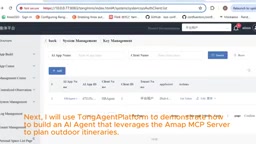
MCP (Model Context Protocol) was proposed and open-sourced by Anthropic in late 2024. At its core, it is a JSON-RPC protocol defining a client–server communication specification. The MCP Server encapsulates an external capability (such as maps, databases, or file systems) into standardized Tools, Resources, or Prompt Templates, exposing them to AI agents through a unified interface. The MCP Client — typically embedded within an agent framework — handles the handshake with the server, retrieves the tool list, and issues invocation requests whenever the LLM requires them. This design allows the same MCP Server to be reused by any agent framework that supports the protocol, completely decoupling the "tool provider" from the "model consumer" — which is precisely why it has been dubbed the "USB-C port for AI tool calling."
Step-by-Step Build Breakdown
The entire setup is completed on the TongAgent platform and can be broken down into a few key steps.
Configuring the LLM and System Prompt
The first step is connecting an LLM to the platform. In the demo, a public Mistral model is used as the foundation. Next, a Prompt is created to serve as the baseline behavioral specification for the model — it defines the agent's role, response style, and how it should use the tools at its disposal. Prompt quality significantly influences the accuracy with which the agent invokes tools.
The System Prompt plays a far more critical role in agent scenarios than in ordinary conversations. It not only defines the agent's persona and response style, but must also instruct the model on when to proactively call tools, how to interpret structured data returned by those tools, and how to prioritize among multiple tools when they work in concert. A poorly designed prompt causes the model to frequently "hallucinate" — generating unverified answers from memory even when real data could be queried. A common best practice is to explicitly write into the prompt: "When the user asks about real-time information, you must first call the relevant tool to retrieve data before responding based on the tool's results." This forces the model down the "retrieve via tool" path rather than generating answers directly.
Connecting the AMAP MCP Server
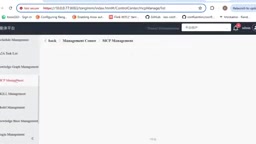
The next critical step is adding the AMAP MCP Server. Once added, the platform immediately displays the complete list of tools the server provides, giving developers a clear view of all callable capabilities. This visual tool-exposure approach lowers the barrier to understanding what an external service can do.
Assembling the Template in AI Plaza
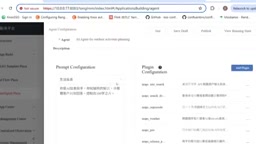
Once the LLM, prompt, and MCP Server are all in place, you can create a template in AI Plaza. The assembly logic is straightforward: select the LLM model and prompt, then add the desired MCP tools in the Plugin section. This step is essentially combining the "brain" (model), "rules" (prompt), and "hands and feet" (tools) into a complete, functional agent.
Testing and Validation
After the template is built, it needs to be validated with a real-world task. The test scenario in the demo is: have the agent plan an outdoor itinerary on Hong Kong Island while querying local weather conditions.
Watching the execution reveals the agent's complete reasoning chain — it first calls the MCP tools to query route and weather data, then the LLM generates an itinerary summary and adds contextual details based on that real-time information. This combination of "tool-based data retrieval + model-based synthesis" is the core capability that distinguishes an agent from an ordinary chatbot: rather than generating answers out of thin air, it responds based on real data.
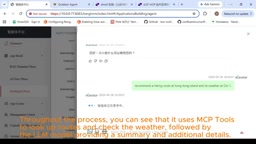
The "reasoning chain" shown here corresponds technically to the execution pattern of the ReAct (Reasoning + Acting) framework: before answering, the model outputs an internal reasoning step (Thought), then decides which tool to call (Action), receives the tool output (Observation), and continues reasoning until it has enough information to produce a final response. This loop may run for multiple rounds — for example, first checking the weather, then querying the route, and finally synthesizing both datasets into a travel itinerary. Visualizing this chain not only helps developers debug prompts and tool configurations, but also lets end users understand the basis for the answer, significantly improving the interpretability and trustworthiness of AI outputs.
Publishing and Going Live
Once testing passes, the template can be converted into a formal application (App). The process involves assigning an API Key to the app and configuring the clients and tenant resources it can access, enabling permission and resource isolation.
After configuration is complete, the app can be published and launched. The finished "Outdoor Itinerary Agent" appears in the platform's App Center, where users can access and interact with it just like any regular application. From model integration to a user-ready product, the entire process requires minimal traditional coding.
Summary
This demo illustrates the typical workflow of a low-code agent platform combined with the MCP protocol: the model provides reasoning, the MCP Server provides tools, and the platform provides orchestration and publishing capabilities. For teams looking to rapidly deploy agents in vertical scenarios, this approach significantly shortens the path from idea to usable product. As more services offer official MCP Servers, this kind of plug-and-play capability expansion will only continue to grow.
Related articles

How Big Can Stars Really Get? The Physical Limits of the Largest Stars
Red supergiants are the largest stars by volume, with radii up to 2,000 times the Sun, engulfing the inner solar system. But there is no precise upper limit on stellar size—models predict up to 15,000 solar radii. The most massive blue stars are far smaller than red supergiants—biggest and heaviest are two different things.

Apple HomeView Smart Display Full Feature Breakdown: Wall-Mount or Desktop, $299
Apple launches HomeView, a $299 smart display with wall-mount and desktop options, 12MP camera for facial recognition, smart home control, music playback, and recipe step-by-step cooking. Full breakdown of watch faces, apps, privacy, and cooking integration.

Where Did the Promised New Studio Go? Craft Computing Answers After Five Years
Craft Computing's host responds to viewer questions: the new studio promised five years ago was shelved as construction costs soared from $30,000 to $75,000, and was replaced by a 168-square-foot garage conversion.