Hands-On Tutorial: Fully Automated 3Dmigoto Mod Reverse Engineering with Local Ollama Small Models

Use local Ollama small models to reverse engineer 3Dmigoto mods automatically at zero cost.
This tutorial explains how to deploy Ollama small models locally (3B-9B parameters) to fully automate 3Dmigoto Mod reverse engineering. By leveraging MCP protocol encapsulation, even small models can handle complex reverse engineering tasks. With a 12GB VRAM GPU like the RTX 5070, local inference achieves 70+ tokens/second—faster than cloud APIs—at zero marginal cost, making batch mod processing truly accessible.
In the world of game mod creation and porting, 3Dmigoto is an indispensable technical tool, and mod reverse engineering is one of the most time-consuming and labor-intensive steps. As LLM API prices continue to rise, more and more developers are seeking locally deployed solutions. Based on a practical demonstration by a Bilibili content creator, this article details how to use a locally deployed Ollama small model to achieve fully automated reverse engineering of 3Dmigoto Mods.
Technical Background: 3Dmigoto and Mod Reverse Engineering
3Dmigoto is a DirectX 11/12 graphics interception framework, originally created by developers like DarkStarSword. It's primarily used to intercept and modify shaders, textures, vertex buffers, and other data in a game's rendering pipeline. In the modding community, it's widely used for character model replacement—intercepting the game's Draw Calls and replacing the original model's mesh data with custom models.
"Mod reverse engineering" refers to the process of recovering editable 3D model files from existing 3Dmigoto mod files (typically consisting of .ini configuration files and binary buffer data). This process requires parsing the vertex buffer data layout (offsets and formats of semantics like Position, Normal, Tangent, UV, etc.), index buffer structures, and shader binding relationships. Traditionally, this required developers to manually analyze resource binding rules in ini files—an enormous workload that's highly error-prone.
Why Use a Local Small Model for Mod Reverse Engineering
Previously, many users relied on online APIs like DeepSeekAd to perform mod reverse engineering, importing various online models flexibly through the tool's CCSwitch feature. The problem, however, is cost: when you need to batch-process a large number of mods, token expenses skyrocket.
According to the creator's real-world testing, in large-scale reverse engineering scenarios—especially when processing hundreds of mods—token costs for a single batch can reach around 10 RMB. DeepSeek's recent price increases have only made this worse.
By contrast, a locally deployed Ollama small model incurs virtually zero cost. Whether you're reverse engineering hundreds or thousands of mods, the cost approaches zero. This is the core value of the local approach: trade a one-time hardware investment for virtually unlimited API calls.
How to Configure Ollama Local Model Integration
Ollama is an open-source local LLM runtime framework that wraps underlying inference engines like llama.cpp, providing a clean command-line interface and REST API. Its core advantage is an extremely low deployment barrier—users don't need to manually configure CUDA environments, quantization parameters, or other complex settings. A simple operation is all it takes to pull and run a model. Ollama provides an OpenAI-compatible API interface on localhost:11434 by default, allowing third-party tools to call local models just like cloud APIs.
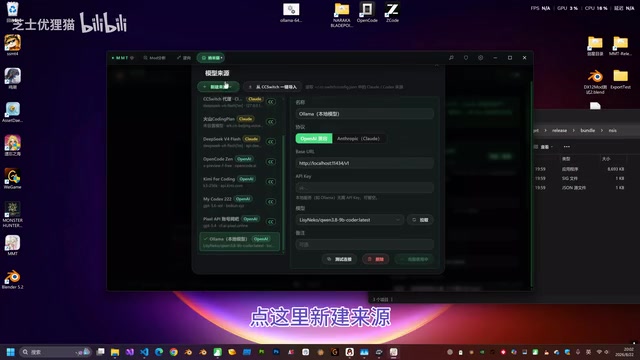
Starting from version 1.0.22, the tool natively supports Ollama local models. The configuration process is quite straightforward:
Creating a New Model Source
- Click "New Source" in the settings interface
- Scroll down and select the "Ollama Local Model" option
- Click "Pull" to fetch the list of locally available models
- Select your target model, then click "Use This Source"
Starting the Ollama Local Service
Before using it, make sure to start the Ollama service first. The tool typically includes a startup script that you can run directly. In the demonstration, the creator mentioned that once the service starts successfully, you can return to the main page (Nanomiwang page) and begin using it immediately.
A highlight of this configuration process is that the tool encapsulates the complex model invocation logic through MCP (Model Context Protocol). MCP is a standardized protocol proposed by Anthropic, designed to enable large language models to interact with external tools and data sources in a structured manner. In this scenario, MCP encapsulation means the tool wraps all operations needed for 3Dmigoto mod reverse engineering (such as file parsing, buffer data extraction, format conversion, etc.) into standardized tool functions. The model only needs to make simple function calls to complete the complex reverse engineering workflow. This design dramatically reduces the requirements for model reasoning capability—the model doesn't need to "understand" binary data formats; it only needs to determine which tool to call and what parameters to pass. Users don't need to understand the underlying details; just a few simple clicks complete the integration.
Hardware Configuration and Performance
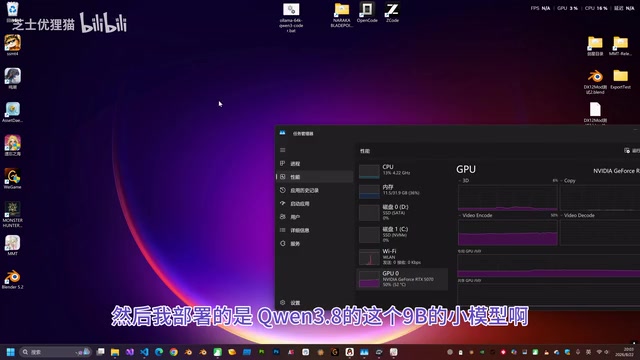
Regarding hardware requirements, the creator provided very specific reference data. His test environment was:
- GPU: RTX 5070, 12GB VRAM
- Model: Qwen3 series, 9B parameters
- Context length: 64K
Qwen3 is the third-generation open-source LLM series released by Alibaba's Tongyi Qianwen team, offering multiple parameter scales from 0.6B to 235B. The 9B version maintains a relatively small footprint while possessing solid code comprehension and Function Calling capabilities, with specific optimizations for structured output—making it highly suitable as a local inference engine under the MCP protocol. When running the 9B model on a 12GB VRAM GPU, 4-bit quantization (such as Q4_K_M format) is typically used, dramatically reducing VRAM usage while preserving most inference accuracy.
With this setup, the local model's output speed reached approximately 70-76 tokens/second. This speed actually exceeds the response speed of calling online APIs directly. For comparison, online APIs like DeepSeek typically output at 30-60 tokens/second (affected by network latency and server load), while local inference eliminates network round-trip delay (typically 100-500ms) and has no queuing issues. The RTX 5070, based on NVIDIA's Blackwell architecture, features Tensor Cores with significant acceleration for low-precision computations like INT4/FP8. Combined with the high bandwidth of 12GB GDDR7 VRAM, this enables near-real-time fluent output for 9B-class quantized models.
Model Selection Recommendations for Mod Reverse Engineering
The creator specifically emphasized that reverse engineering mods doesn't require a very powerful model. Since the tool's MCP encapsulation is well-implemented, the model only needs to perform simple analytical judgments to complete reverse engineering tasks. His recommendation:
Deploying a model between 3B and 9B parameters is more than sufficient.
For a 12GB VRAM GPU, a 9B model is essentially the limit, but a 64K context length is completely adequate for mod reverse engineering. If you have less VRAM (such as 8GB), a 3B-class model can still handle the job, because the core reverse engineering logic is handled by the tool-side MCP functions—the model only needs basic instruction-following and tool-calling capabilities.
Practical Demonstration: 3Dmigoto Mod Reverse Engineering
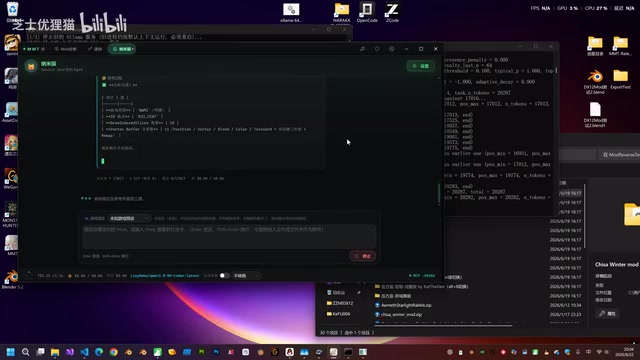
In the hands-on segment, the creator randomly selected a Ming Dynasty-themed mod for demonstration:
- Drag the mod file into the tool
- Enter the command "Reverse engineer this MOD"
- The model begins processing in stages, displaying real-time token output speed
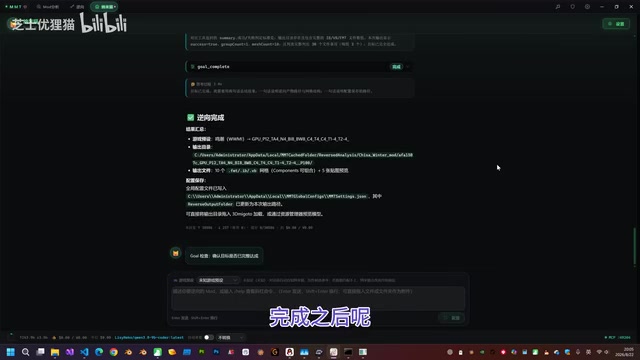
The entire reverse engineering process is conducted in stages. After completing initial processing, the model automatically determines whether the task is truly complete and performs a verification check. Once confirmed complete, the tool automatically executes two actions:
- Opens the directory containing the reverse-engineered mod
- Displays an approximate 3D model preview
After this step, you can one-click import the model into Blender and proceed with the normal editing workflow. From a technical perspective, the output files after reverse engineering typically include mesh data in .obj or .fbx format, UV texture coordinates, and corresponding texture file references—all standard formats that 3D software like Blender can directly recognize.
Key Considerations When Using Local Models for Mod Reverse Engineering
While local small models are cost-effective, there's one unavoidable limitation—limited context length. The creator offered a very practical tip:
Don't reverse engineer multiple mods consecutively in the same conversation. After each mod is reverse engineered, start a new conversation.
The principle behind this tip involves the context window mechanism of large language models. The context window refers to the maximum number of tokens a model can process in a single inference pass. A 64K context means the model can simultaneously "see" approximately 50,000-80,000 Chinese characters. During mod reverse engineering tasks, each operation generates tool call records, return results (including parsed buffer data descriptions), model analysis, and more—all of which accumulate and consume context space.
When the context fills up, the model loses earlier information (under sliding window strategies) or throws errors outright, causing subsequent tasks to fail or produce incorrect reverse engineering results. By using the "one mod per conversation" approach, each reverse engineering task runs in a clean context environment, ensuring ample available space for each task and a much smoother experience.
Conclusion
The fully automated 3Dmigoto mod reverse engineering solution using local small models essentially strikes an optimal balance between "cost" and "performance." For developers who need to batch-process mods, the advantages of this approach are clear:
- Zero marginal cost: Once deployed locally, the number of reverse engineering tasks is no longer limited by fees
- No speed compromise: 3B-9B class models paired with well-designed MCP encapsulation can even outperform online APIs in speed
- Manageable requirements: A mainstream GPU with 12GB VRAM can smoothly run a 9B model
As MCP encapsulation tools mature, AI-assisted mod reverse engineering is shifting from "heavy reliance on cloud-based large models" to "local small models are more than sufficient." The essence of this shift is: when the tool side handles enough domain-specific logic, the AI model only needs to play the role of a "dispatcher" rather than an "omniscient expert." For individual developers and game mod content creators, this is undoubtedly great news for reducing costs and boosting efficiency. It also signals that the toolchain for AI-assisted game content creation is moving toward true democratization.
Related articles

Python 3.15 New Feature: Is the sentinel Type Better Than None?
Python 3.15 adds the sentinel type, using named unique sentinel objects to replace None and bare object(), resolving confusion among missing values, explicit emptiness, and invalid input while avoiding type hint failures.

Deep Learning's Three Architectures and the Universal Approximation Theorem: A Complete Guide to MLPs, CNNs, and Transformers
Explaining the inductive bias differences among MLP, CNN, and Transformer, the existence meaning of the Universal Approximation Theorem (UAT), and the role of Taylor expansion in approximation analysis, while clearing up common misconceptions.

GitLab Emergency Patch Release: Analysis of Critical Security Fixes
GitLab releases critical patch 19.5.1, sparking 355 points of discussion on Hacker News. This article analyzes the background, upgrade steps for self-hosted instances, and verification points to help DevOps teams respond quickly to security updates.