Hands-On with Gemini 3.8 Live: Testing Google's Speech-to-Speech Model
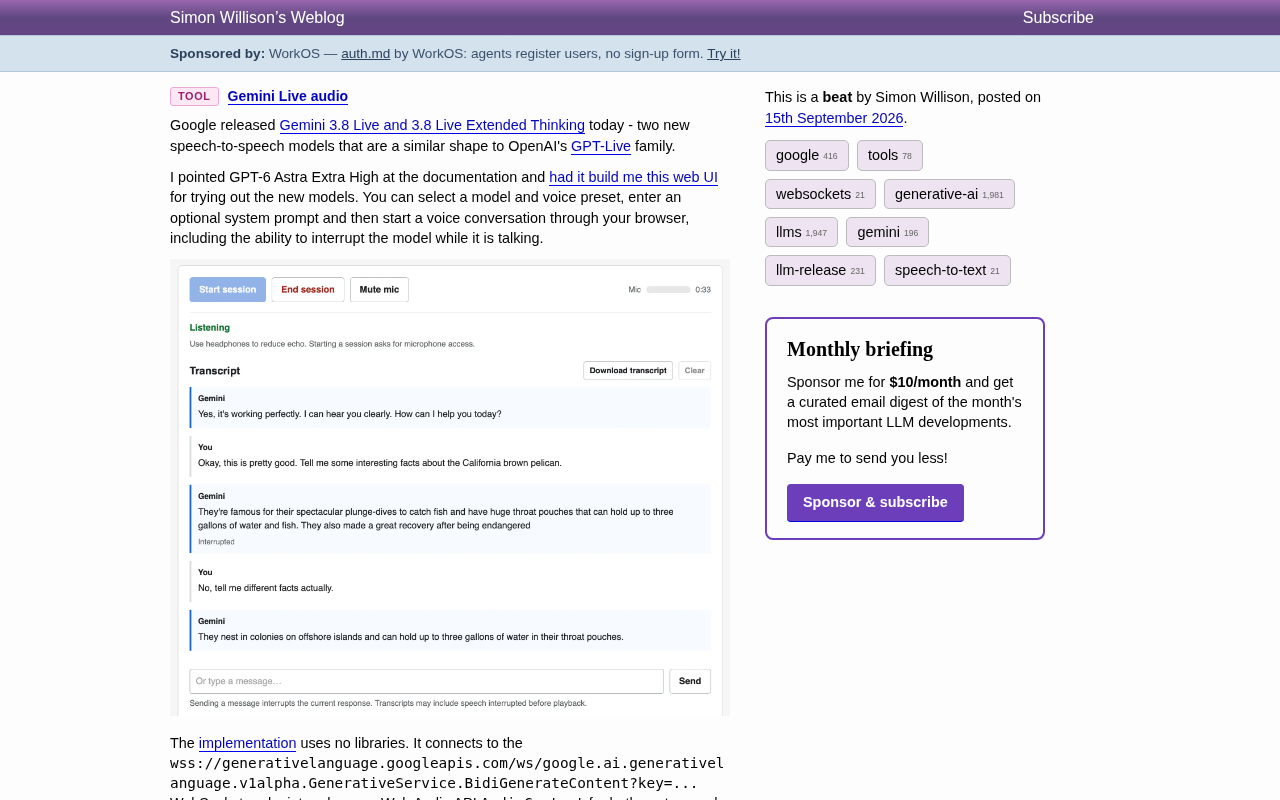
Google's Gemini 3.8 Live brings real-time speech-to-speech AI to the browser with zero-dependency WebSocket integration.
Google has launched Gemini 3.8 Live and Gemini 3.8 Live Extended Thinking, two end-to-end speech-to-speech models competing directly with OpenAI's GPT-Live series. Developer Simon Willison used AI-assisted coding to build a zero-dependency browser interface that connects via WebSocket to Gemini's BidiGenerateContent endpoint and uses the native Web Audio API for audio capture and playback — supporting model selection, voice presets, system prompts, and mid-conversation interruption. The test confirms that a single HTML file is sufficient to run a complete real-time voice conversation pipeline, with Extended Thinking suited for deep reasoning and the standard version optimized for speed.
Google today announced two new speech-to-speech models: Gemini 3.8 Live and Gemini 3.8 Live Extended Thinking. In terms of positioning, they closely mirror OpenAI's GPT-Live series — both targeting real-time, low-latency bidirectional voice conversation. This marks a further escalation in competition on the real-time voice interaction front.
Developer Simon Willison quickly put both models through their paces and, with the help of AI-assisted coding, built a browser-based web interface for testing them directly. This article draws on his work to walk through Gemini 3.8 Live's capabilities and the technical details behind the implementation.
What Is Gemini 3.8 Live
Gemini 3.8 Live is a classic speech-to-speech model: you speak, and the model responds directly in audio — no traditional cascaded pipeline of "speech-to-text → text reasoning → text-to-speech" required. This end-to-end design significantly reduces conversational latency, making interactions feel much closer to talking with a real person.
The Extended Thinking variant, as the name suggests, incorporates a more thorough "thinking" phase before generating a voice response, making it better suited for scenarios requiring deeper reasoning. The standard version, by contrast, prioritizes response speed. This two-tier product structure closely mirrors OpenAI's GPT-Live family, reflecting how both companies are converging on similar technical approaches in the real-time voice space.
The fundamental difference between speech-to-speech models and traditional voice assistants lies in the signal processing path. Traditional systems follow a three-stage serial pipeline — ASR (Automatic Speech Recognition) → text LLM → TTS (Text-to-Speech) — where each stage introduces latency and can compound errors. A misrecognized word from the ASR stage, for instance, can directly degrade the quality of downstream reasoning. End-to-end speech models, by contrast, feed audio features directly into a unified neural network and output audio streams directly, eliminating the intermediate text conversion steps. This not only reduces round-trip latency (typically compressible to within a few hundred milliseconds), but also lets the model capture paralinguistic cues — tone, pauses, speaking rate — that are invisible at the text level, enabling more natural responses. OpenAI's GPT-4o voice mode, released in 2024, was an early landmark example of this model class. Gemini 3.8 Live's arrival signals that this technical approach is now rapidly going mainstream.
A Zero-Dependency Browser Interface
Simon Willison fed the model documentation to GPT-4o and had it generate a Web UI. The resulting interface is remarkably full-featured: you can select a model, switch voice presets, enter an optional system prompt, and then start a voice conversation directly in the browser — including the ability to interrupt the model mid-speech.
The screenshots show actual conversation transcripts: a user asks for "fun facts about California brown pelicans," and Gemini responds that they're known for their spectacular plunge-diving to catch fish, with throat pouches that can hold up to three gallons of water and fish. When the user interrupts mid-response and asks for "some different facts," the model is flagged as Interrupted and reorganizes its answer. The interface also includes a microphone level meter, a timer, transcript download functionality, and a helpful suggestion to "use headphones to reduce echo."
This "interrupt and respond" interaction pattern is precisely what sets speech-to-speech models apart from traditional voice assistants — it feels more like natural conversation than the mechanical back-and-forth of a question-and-answer system.
Technical Implementation: WebSocket + Web Audio API
Worth noting is how this interface is built: with zero third-party dependencies. The entire application connects directly to Gemini's WebSocket endpoint:
wss://generativelanguage.googleapis.com/ws/google.ai.generativelanguage.v1alpha.GenerativeService.BidiGenerateContent?key=...
Audio capture and playback are handled entirely by the browser's native Web Audio API AudioContext. In other words, a single plain HTML file plus native browser APIs is all you need to build a working real-time voice conversation client.
The BidiGenerateContent (Bidirectional Generate Content) in the endpoint path makes the nature of this connection explicit: a persistent bidirectional stream is established between client and model, with audio data flowing in real time in both directions. For developers looking to integrate this capability, Google also provides an official Gemini Live WebSocket tutorial as a starting reference.
WebSocket is an upgrade variant of the HTTP protocol that establishes a persistent, full-duplex TCP connection through a single handshake, after which both client and server can push data to each other at any time over the same connection — no need to repeatedly open new requests. This stands in sharp contrast to traditional HTTP's "request-response" model, where each interaction requires a new connection, making it ill-suited for continuously streaming audio frames. BidiGenerateContent — Bidirectional Generate Content — names its own behavior directly: microphone audio frames stream continuously upstream while the model's generated voice frames stream back downstream, two flows running in parallel. The browser-side Web Audio API AudioContext handles capturing microphone input in raw PCM format and playing back received audio buffers in real time — all with no Flash or native plugins required, using only standard modern browser capabilities. Together, these two technologies allow a purely static HTML file to accomplish real-time bidirectional voice communication that previously would have required a desktop application.
What This Means for Developers
This hands-on test sends two clear signals. First, real-time voice is becoming a standard capability for mainstream large language models — the convergence in product form between Google and OpenAI shows that demand for low-latency voice interaction is now well-established. Second, the barrier to entry is dropping. No complex SDKs or bloated dependencies are needed; WebSocket and the browser's native audio APIs are enough to run a complete end-to-end pipeline.
For teams looking to integrate voice conversation into their products, Gemini 3.8 Live offers a new option worth evaluating. The two-tier split between Extended Thinking and the standard version also gives developers a clear trade-off axis — response speed versus reasoning depth — for choosing the right model for their use case.
Related articles

AI Coding Enters the Team Collaboration Era: Interpreting Three Major Moves from Meta, GitHub, and Mistral
Meta acquires Conductor, GitHub Copilot Fusion becomes available, Mistral opens Large 4 weights—three moves show AI coding shifting from code generation to organizing development workflows. This article explains task orchestration, model collaboration, and cost control for developers.

Building a RAG Assistant with Dify: A Practical Guide to Knowledge Bases, Workflows, and Agent Nodes
How should knowledge bases, workflows, and Agent nodes connect in a Dify RAG assistant? We break down the division of labor and wiring logic for a shippable app.
 Tech Frontiers
The AI Industry Doesn't Lack Marketing—It Lacks Good Products
AI faces market selloffs and public skepticism—is marketing really the problem? This analysis of market signals and product experience argues the core困境 is incomplete products and a gap between promises and experience; the only way to change perceptions is to ship better products.