Hands-On with Grok Bot: Turning AI Agents into Your Personal Employee Team

Grok Bot reimagines AI agents as a personal employee team — powerful, but gated behind a $300/month price tag.
xAI's Grok Bot tackles the core problem that AI agents are too complex for most people by shifting the paradigm from "task-based conversation" to "role-based teams." Users create specialized bots in a messaging-style interface, each with a dedicated always-on cloud computer that keeps working even when your device is off. Everything is configured through natural language, bots proactively ask clarifying questions, and multi-bot collaboration is supported. The mobile and desktop experiences are identical. The main barrier: access currently requires the $300/month SuperGrok Heavy plan, and the tool lacks manual model selection and real-time voice chat. Despite these limitations, Grok Bot points clearly toward making AI agents understandable and usable for everyday consumers.
xAI's latest product, Grok Bot, is taking aim at one of the industry's hardest problems: how to make AI agents genuinely usable by everyday people. A Bilibili creator who got early beta access shared glowing impressions after several days of testing — calling it one of the most intuitive and practically useful AI agent tools available right now. This article breaks down Grok Bot's core logic, standout features, and shortcomings based on that hands-on experience.
From "Thinking in Tasks" to "Thinking in Roles"
Grok Bot's most fundamental design shift is how it changes the way users think about AI. If you're used to tools like Claude Code or GPT, you typically start conversations around a specific task. In Grok Bot, you're encouraged to think in roles instead.
Once you open the desktop app, the interface feels a lot like WeChat or iMessage. On the left side sits a list of bots you've created — each representing a dedicated role. One handles email, another summarizes YouTube videos, one specializes in deal-making, and a general-purpose bot catches everything else.
This design makes the experience feel a lot like building a small team of employees: need sales support, ping the sales bot; need someone managing your inbox, that's the inbox bot's job. Compared to other agent tools that require complex setup, Grok Bot is "ready to run the moment you open it" — and that's its biggest differentiator.
Configure Everything Through Conversation
One of Grok Bot's cleverest features is that almost all configuration happens through natural language — no forms to fill out.
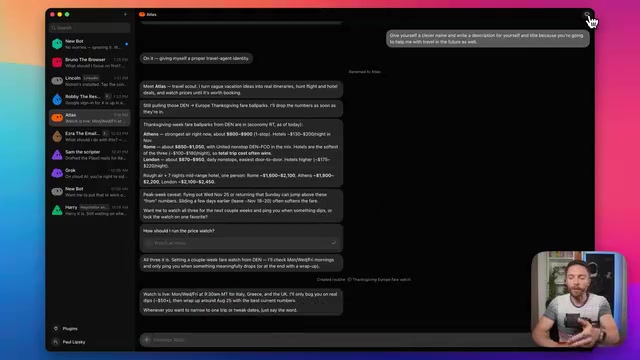
To create a bot, you click "New Chat," select "Create New Bot," and the AI immediately asks what you want it to do. The creator demonstrated a vacation planning scenario: he vaguely said "help me plan a trip, with two itinerary options for different destinations, find the best deals, and monitor prices for two weeks" — no specific destinations, no list of websites to check.
Grok Bot then proactively asked clarifying questions: "Do you prefer a specific location or more of a vibe, like Europe?" The user simply answered, and the bot took it from there — researching flights and hotel prices on its own. It even named itself: "Atlas."
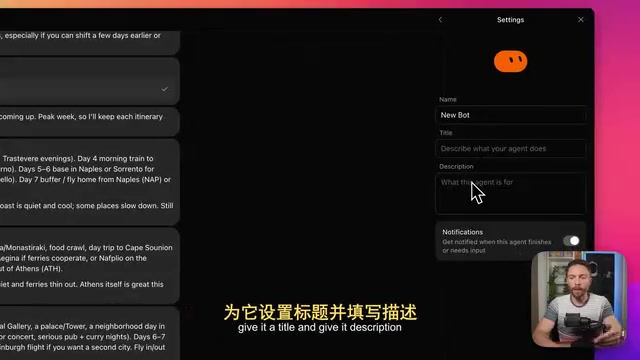
This ability to "figure things out on its own" was something the creator emphasized repeatedly. He described Grok Bot as "not lazy at all" — unlike other models that "just sit there and eventually give up, saying they can't complete the task." Grok Bot, he said, sticks with it until the job is done.
Every Bot Has Its Own Always-On Cloud Computer
Another major highlight is Grok Bot's cloud execution capability: each bot comes with a dedicated virtual computer that runs 24/7, complete with its own browser, file system, and saved credentials.
This means even when your laptop is closed and powered off, the bot keeps working. In the vacation example, Atlas continues monitoring flight and hotel prices in the background. In another example, a bot named "Lincoln" was used to research companies on LinkedIn and find relevant contacts.
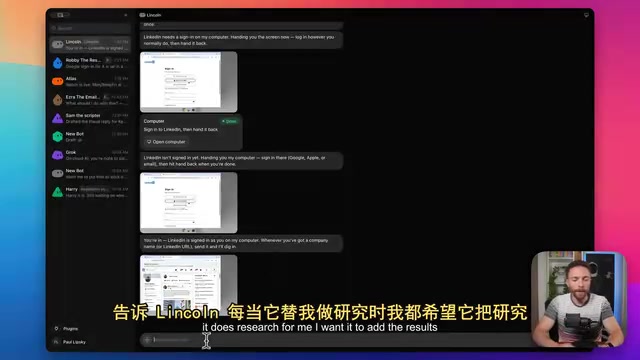
For sensitive logins, the bot prompts users to "take over" and enter credentials manually — for services like LinkedIn or Notion, for instance. You click "Take Over," log in yourself, then hand control back to the bot. This design strikes a balance between automation and privacy: the bot never touches credentials you don't want to share.
At any time, you can click the computer icon in the top-right corner to watch the bot's activity in real time — it might have Chrome open, a file manager, or a terminal running. The whole process is fully transparent.
Multi-Bot Collaboration and the "Chief of Staff" Setup
Grok Bot supports pulling multiple bots into a single conversation — just type @ and select which bots to bring in. The creator also suggested a more advanced setup: designating one bot as a "Chief of Staff" that receives all incoming tasks and delegates them to other bots. You only ever talk to that one bot.
Bots can also be "taught" skills: click "Teach it a task," start a screen recording, walk through a workflow step by step, and the bot will memorize and repeat it automatically going forward. These automations can run on a set schedule or be created directly through a natural language description in the chat.
This "cloud execution" architecture maps closely to the concept of a Persistent Sandbox. Traditional AI assistants are stateless — once a conversation ends, there's no retained context and no background execution. Grok Bot's per-bot virtual computers are essentially persistent, cloud-hosted runtime environments with their own browser sessions, file systems, and network access. This is conceptually similar to Anthropic's Claude Computer Use and Google's Project Mariner, but with a key distinction: those solutions typically run on the user's local machine and stop when the device shuts down. Grok Bot's cloud-native approach makes task scheduling feel more like a SaaS service — bots can start on a schedule, run silently in the background, and report results back via notifications. That's closer to a true "automated employee" than a "conversational assistant."
Mobile May Become the Primary Interface
Interestingly, the creator admitted he doesn't expect to use the desktop app very often — because the iPhone app offers a completely identical experience.
The mobile app shows all chats and even lets you view and take over a bot's virtual computer directly from your phone. Since both platforms work the same way, he expects mobile to become his go-to: open the app anywhere, dictate tasks by voice, and assign different jobs to different bots.
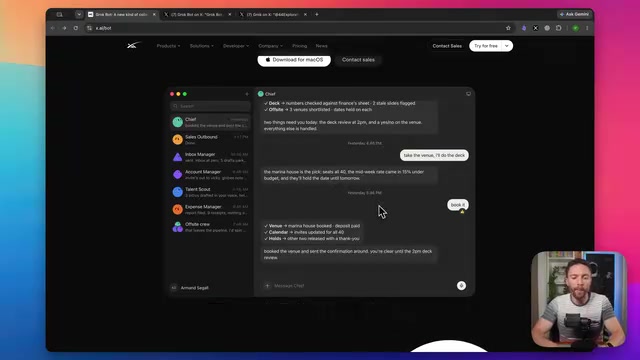
"As long as your phone is with you, you can manage your new employees from anywhere" — that line captures Grok Bot's product positioning perfectly: AI agents as an always-accessible team in your pocket.
Drawbacks and the Price Barrier
Grok Bot isn't without flaws. The creator noted a few disappointments:
- No model selection: The system automatically picks the best model for each task, which is friendly for casual users but frustrating for power users who want manual control and advanced modes.
- No real-time voice interaction: The voice button currently only does speech-to-text transcription — you can't have a live back-and-forth conversation with the bot, a feature many competing tools already offer.
But the biggest issue is the entry barrier: Grok Bot is still in beta, and access currently requires a subscription to the SuperGrok Heavy plan at $300/month. That price point puts it well out of reach for most everyday users.
The creator noted this reflects the state of things at the time of recording, and expects Grok Bot to open up to cheaper tiers eventually — though no timeline has been announced.
At $300/month, SuperGrok Heavy sits at the very top of the current AI subscription market. For context: OpenAI's ChatGPT Pro runs $200/month, Anthropic's highest-tier Claude Max is also $200/month, and the most common Plus/Pro plans most users subscribe to are around $20/month. The $300 threshold means Grok Bot's early adopters will largely be enterprise buyers or heavy professional users with clear automation needs — not individual consumers. This kind of pricing is fairly standard practice in the AI agent space: in early stages, premium pricing helps cover the compute and storage costs of cloud-hosted virtual machines, while also acting as a demand filter — ensuring only high-intent users participate in beta to generate meaningful feedback. Historically, similar products roll out tiered plans after the beta period, bringing core features down to more accessible price points.
Closing Thoughts: A Genuine Attempt to Bring Agents to the Masses
Setting aside the price, Grok Bot makes a compelling case for a new direction: AI agents that don't require complex configuration to work, but function more like a group of colleagues, each with their own specialty. You're not assembling a collection of scripts — you're building an AI team.
As the creator put it, once the pricing becomes more accessible, Grok Bot "might finally become the product that helps everyday consumers understand what agents are and why they represent the future of AI." That may be its real value — not how technically advanced it is, but how far it lowers the barrier to understanding and using AI agents in the first place.
Related articles

How Big Can Stars Really Get? The Physical Limits of the Largest Stars
Red supergiants are the largest stars by volume, with radii up to 2,000 times the Sun, engulfing the inner solar system. But there is no precise upper limit on stellar size—models predict up to 15,000 solar radii. The most massive blue stars are far smaller than red supergiants—biggest and heaviest are two different things.

Apple HomeView Smart Display Full Feature Breakdown: Wall-Mount or Desktop, $299
Apple launches HomeView, a $299 smart display with wall-mount and desktop options, 12MP camera for facial recognition, smart home control, music playback, and recipe step-by-step cooking. Full breakdown of watch faces, apps, privacy, and cooking integration.

Where Did the Promised New Studio Go? Craft Computing Answers After Five Years
Craft Computing's host responds to viewer questions: the new studio promised five years ago was shelved as construction costs soared from $30,000 to $75,000, and was replaced by a 168-square-foot garage conversion.