Hands-On with Seedance 2.5 Depth Video: AI Replication of Multi-Person Long-Take Action Tutorials

Three-step Seedance 2.5 workflow: extract depth video, generate assets, and auto-synthesize with Agent on a local GPU.
This article walks through an AI video re-rendering workflow built on Seedance 2.5, breaking the complex task into three modular steps: extracting a depth video from source footage via Codex to capture spatial structure and motion; generating character turnarounds and background images as visual assets; and uploading everything to Agent mode for automated synthesis. The result is a customizable video with high motion fidelity. The workflow supports local GPU rendering, making it ideal for dance recreation, multi-person scenes, and other motion-precise use cases — though hardware and asset quality requirements apply.
When AI Starts Reconstructing Real Movement
Generating a long-take video with smooth, highly faithful motion once required extensive post-production work and dedicated motion capture equipment. Now, with Seedance 2.5's Depth Video feature, everyday creators can convert real footage into controllable AI animation assets right on their home computers.
The core idea behind this workflow is straightforward: extract depth information and character movement from the original video, then use AI to replace the subjects and background — producing a fully re-rendered video that faithfully preserves the original motion. This is exactly what makes it capable of replicating multi-person long-take sequences: the motion stays intact while the visual presentation is entirely renewed.
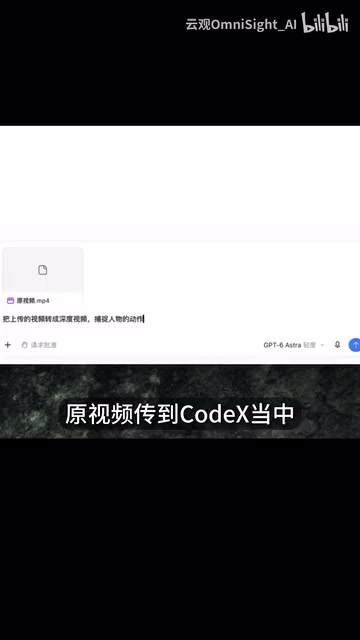
Step 1: Extract the Depth Video Using Codex
The workflow begins by uploading your source video to Codex with a clear instruction: convert the uploaded video into a depth video that captures the characters' movements.
A "depth video," in essence, is a data representation that records the spatial relationships and motion poses of objects within the frame. It strips away surface-level visual information like color and texture, retaining only the skeletal structure of space and movement. The advantage is that subsequent AI generation can strictly follow the original motion without being constrained by the source footage's visual style.
During execution, Codex will prompt you to install a Depth Estimation tool. Once installed, the system can leverage your local GPU for rendering. Local rendering means you don't have to rely on cloud computing — a cost-effective and privacy-conscious option for users with a dedicated graphics card. The generated depth video should be saved for use as a key input in the next step.
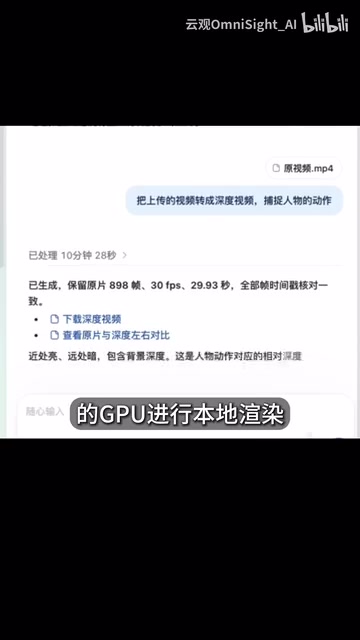
Depth Estimation is a classic computer vision task: inferring the relative distance of each pixel from the camera in a 2D image or video frame, producing what's known as a "depth map." Depth maps are typically displayed in grayscale — closer objects appear brighter (white), while farther objects appear darker (black). When applied to video, each frame generates its own depth map, and playing them in sequence creates a depth video. There are two main approaches: hardware-based methods using stereo cameras or LiDAR sensors for direct measurement, and software-based monocular depth estimation, which uses neural networks to learn depth cues — such as perspective, occlusion, and texture gradients — from a single image. Codex uses the latter approach; representative models include open-source solutions like MiDaS and Depth Anything, both capable of running locally on consumer-grade GPUs. This is why a depth video is essentially a form of "semantic compression" of the original footage: visual details like color and texture are discarded, while spatial structure and motion trajectories are preserved, providing precise geometric constraints for the AI to work with when re-rendering the appearance.
Step 2: Generate Character and Background Assets
With the depth video serving as the "motion skeleton," the next step is preparing the "skin" — the characters and background that will populate the video.
The image generation tool (referred to in the video as the "small circle" feature) is used to generate a character turnaround (three-view reference) and a background image separately. The three-view reference — typically front, side, and back — gives the AI a thorough understanding of the character's three-dimensional form, helping maintain visual consistency across dynamic shots and preventing the character from looking like a completely different person when the camera angle changes.
The background image defines the overall atmosphere of the scene. By separating motion, character, and environment into distinct components, this workflow gains significant flexibility: the same depth video can be paired with different characters and backgrounds to rapidly produce multiple stylistically distinct versions.
The three-view reference (typically front view, side view, and back view — sometimes including a 45-degree angle view) originates from industrial design and animation, where it serves as a standard character sheet ensuring all team members draw the same character consistently across different scenes. In the context of AI video generation, a character turnaround provides the model with a "full-body 3D reference," allowing it to reason about occluded areas and camera rotations without guessing. If only a single front-facing image is provided, AI models often produce hallucination errors in side or rear shots — such as misaligned clothing patterns or distorted facial features. When combined with a depth video, the model can align the skeletal information in the depth map with the character's three-dimensional form, maintaining more stable character consistency throughout the entire video. This is the core reason why this workflow outperforms "single-image driven" approaches for long takes.
Step 3: Switch to Agent Mode for One-Click Synthesis
With all assets ready, switch to the Agent mode within the "small circle" tool. Upload the depth video, character turnaround, and background image together, then enter your crafted prompt.

Two key operational tips are worth highlighting: first, you can reference the prompt template provided to reduce trial-and-error costs; second, make sure each asset is correctly associated — the Agent needs to accurately identify the depth video as the motion source, the turnaround as the character reference, and the background image as the scene. Getting these associations right is critical; incorrect mapping will directly result in a chaotic output.
Once everything is configured, hand the generation task over to the Agent and let it run automatically. The Agent synthesizes the motion data, character appearance, and scene information to produce a new AI video with high motion fidelity and a fully customizable visual style.

The Value and Limitations of This Workflow
Looking at the overall design, Seedance 2.5's Depth Video workflow reflects an important trend in AI video creation: breaking complex tasks into a modular pipeline of "motion extraction → asset generation → intelligent synthesis," then chaining the steps together with an Agent. Compared to the black-box approach of generating an entire video from a single prompt, this more controllable, step-by-step method is better suited to professional use cases that demand precise motion replication — such as dance recreation, multi-person ensemble shots, and continuous long takes.
Local GPU rendering is another highlight, reducing dependence on cloud subscriptions. That said, this step does have hardware requirements — users without a high-performance graphics card may find the experience significantly less smooth.
It's worth noting that this tutorial is based on a single creator's hands-on demonstration. Specific parameters, tool versions, and final output quality will vary noticeably depending on source material quality, prompt design, and hardware specs. Creators looking to try this out are advised to run a short test clip first to confirm the pipeline works end-to-end before tackling complex multi-person long-take footage.
Related articles

Chain of Thought Isn't Just for AI: How Humans Can Use CoT to Improve Thinking Quality
Chain of Thought isn't just a prompt trick for large models. Starting from a Hacker News discussion, this article analyzes why CoT works for human thinking too, breaks down actionable ways to transfer it, and highlights the key differences between human CoT and machine CoT.
Cloudflare Teams Up with OpenAI: Closi…
Cloudflare Teams Up with OpenAI: Closing the Loop from Vulnerability Discovery to Defense with AI
Cloudflare uses OpenAI Daybreak to investigate security vulnerabilities and generate reviewable remediation plans, while developers use Codex to boost coding efficiency and quality.

Orca Multi-Agent Orchestration in Practice: A Guide to Parallel Collaboration with Claude and Codex
Orca is Stable AI's free open-source agent workbench supporting 34 agents like Claude Code and Codex in parallel. Learn its Git worktree isolation, multi-model orchestration, and mobile management.