Hardware-Level Phone AI Agent Control: Bypassing Software Restrictions with HDMI + USB HID

Control phones with AI agents via HDMI capture and USB HID simulation — no root, no app needed.
The aiden-hardware-demo project takes a hardware-first approach to phone AI Agent control: it captures the phone screen via HDMI and simulates touch/keyboard input using USB HID, bypassing ADB, root access, and installed apps entirely. This makes it highly universal and hard to detect, but faces real challenges around cost, inference latency, scalability, and device compatibility.
A Phone AI Agent Approach That Steps Outside the Software Framework
Phone AI Agents have attracted significant attention in recent years, but the vast majority of implementations remain at the software level: relying on ADB debugging interfaces, running inside Android emulators, or requiring a custom app or root access on the target device.
ADB (Android Debug Bridge) is a command-line debugging tool Google provides for Android developers. It connects a PC to a phone via USB or Wi-Fi, allowing shell commands, app installation, screenshots, and more. It's one of the most commonly used underlying interfaces for phone automation and AI Agents today — mainstream automation frameworks like Appium and UIAutomator2 all depend on it. However, ADB requires manual authorization in developer options, some vendor ROMs (like MIUI) impose additional restrictions on ADB permissions, and many financial and payment apps actively detect ADB debugging state and refuse to run, creating a clear reliability bottleneck. While these software approaches are viable, each comes with its own limitations — requiring developer mode, hitting system permission walls, struggling with cross-app operations, and potentially triggering anti-automation mechanisms.
Recently, a Reddit user in r/aiagents shared an open-source project called aiden-hardware-demo, which offers a fundamentally different technical path: rather than relying on software hooks, it controls the phone "like a human" at the hardware level. Though still at the dev-board prototype stage, it sparked considerable discussion about whether external hardware control is a viable direction for mobile Agents.
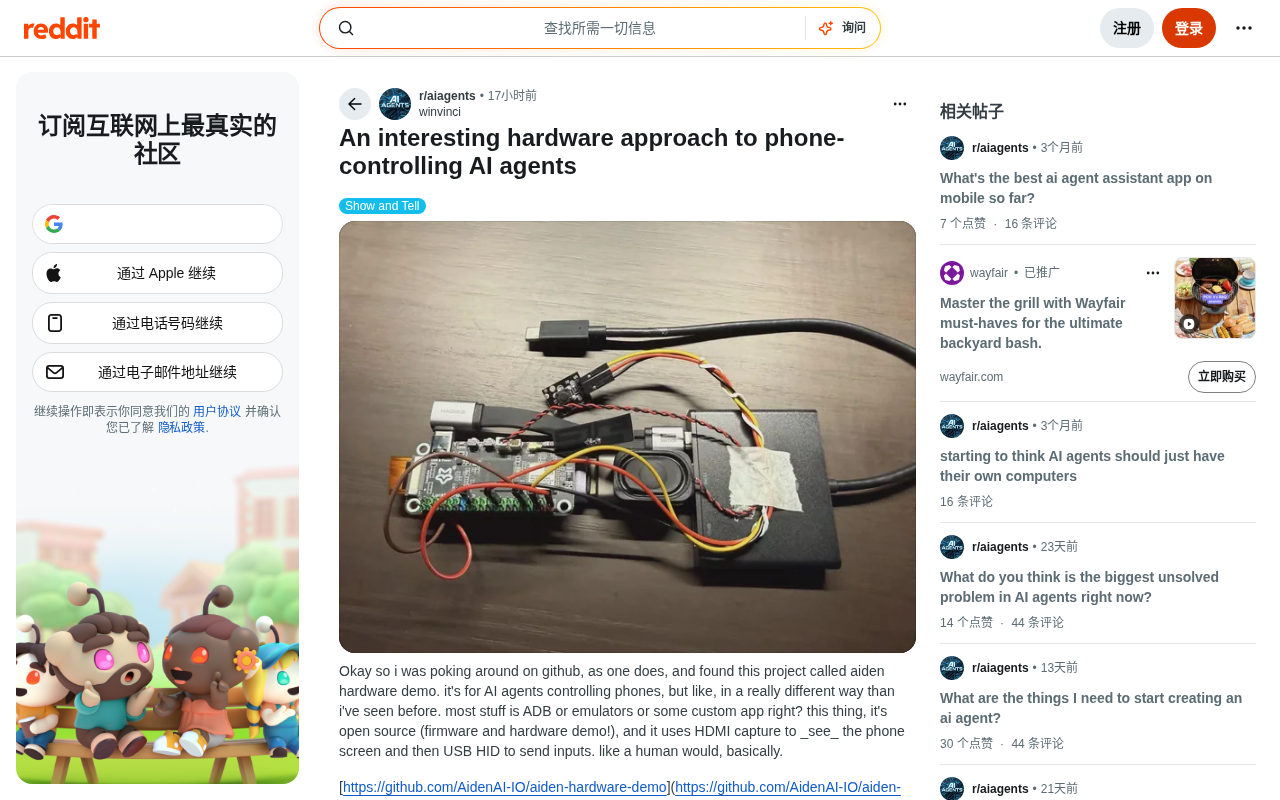
Core Principle: HDMI Capture for Vision, USB HID for Action
The most interesting aspect of this project is its control pipeline. It breaks down the AI Agent's interaction with the phone into two purely hardware-level steps:
Visual Input: Capturing the Screen via HDMI
Traditional phone AI automation solutions that need to read the phone's display typically require screenshot APIs or screen recording permissions. Aiden instead uses HDMI capture to "see" the phone screen as a video signal.
An HDMI capture card (Video Capture Card) is a hardware device that converts an HDMI video signal into a data stream readable by a computer, widely used in live streaming, video recording, and industrial vision inspection. In the phone context, modern Android phones can output screen content as a standard HDMI signal via USB-C's DisplayPort Alt Mode or a Type-C-to-HDMI adapter, typically at resolutions up to 1080p or even 4K. The capture card decodes this signal in real time into YUV or RGB pixel frames and sends them to the host via the UVC (USB Video Class) protocol — no extra drivers needed on the host side, which can read frames just like reading from a webcam. This means the Agent receives raw pixel data identical to what a human eye sees, with no dependency on any system interface.
It's worth noting that the video output capability relies on the phone's hardware support for DisplayPort Alt Mode (DP Alt Mode). This is a mechanism in the USB-C spec that allows non-USB protocols to reuse physical pins. The underlying principle: the USB-C connector has 24 pins; standard USB 3.x data transfer only uses a portion of them, and the remaining pins can be reassigned via "Alt Mode" negotiation. Once the phone and adapter complete the Alt Mode handshake, the frame buffer content rendered by the phone's GPU bypasses the USB data stack and is output directly as a DisplayPort electrical signal from those pins, then converted to a standard HDMI signal by an active adapter (containing a DisplayPort-to-HDMI chip) and fed into the capture card. The entire process is nearly transparent to the Android OS — at the system level, it simply sees "an external display connected." However, not all Android phones support this mechanism. Qualcomm Snapdragon flagship series (855 and above), Samsung Galaxy S/Z series, Sony Xperia, and others typically offer full support, while many mid-range models have had the DP Alt Mode controller cut for cost reasons. Some Huawei devices use proprietary protocols requiring specific adapters, and MediaTek Dimensity support for Alt Mode varies. This represents the clearest hardware compatibility boundary for this approach, and target device models need to be verified against a tested compatibility list before use.
Action Output: Simulating Touch and Keyboard Input via USB HID
On the output side, it uses the USB HID (Human Interface Device) protocol to simulate touch and keyboard input.
HID is a device protocol class defined in the USB specification, covering keyboards, mice, gamepads, touchscreens, and virtually all human input devices. Its core design: operating systems have built-in generic HID drivers, so any device conforming to HID descriptor standards is recognized without installing additional drivers. Using microcontrollers (such as a Raspberry Pi Pico, Arduino Leonardo, or other chips that support USB Device mode), you can spoof HID descriptors to make the host "recognize" the device as a keyboard or absolute-coordinate touchpad, then inject precise-coordinate touch events into the connected phone.
This approach's anti-detection capability stems from its position in the OS architecture: when an HID device sends a touch event, the Linux kernel's input subsystem (Android is built on the Linux kernel) merges it into the same input event queue (/dev/input/eventX) as events from the touchscreen driver. By the time the application layer receives the event through Android Framework's InputDispatcher, the source is indistinguishable. In contrast, events injected via ADB's uiautomator or Accessibility Services can carry special flags in some system versions (such as FLAG_IS_ACCESSIBILITY_EVENT), and financial app risk-control SDKs detect automation precisely by checking for these flags. HID events enter from the kernel layer, completely bypassing any application-layer-visible identifiers — that's the fundamental basis of their anti-detection capability. From the phone's perspective, these operations are indistinguishable from a real finger tap or an external keyboard. No Accessibility Services or ADB authorization required.
This "see the screen → perform actions" closed loop essentially turns the AI Agent into a "robotic hand + camera" combination, completely bypassing the operating system's software stack. As far as the phone is concerned, it's simply facing an ordinary external display and external input device.
No Jailbreak, No App, No Backend Required
The project author repeatedly emphasizes several "no-need-fors," which are the core differentiators from mainstream phone automation approaches:
- No jailbreak or root: The phone system is untouched, and no permission boundaries are crossed;
- No App API or custom app: Nothing needs to be installed on the target phone — it stays in its native state;
- No official backend: Particularly appealing for self-hosting enthusiasts.
Architecturally, the project open-sources its firmware and hardware demo, and provides an agent runtime that can connect to multimodal models.
Multimodal Large Language Models are AI models capable of processing text, images, and even audio input simultaneously. Representative examples include GPT-4o, Gemini 1.5, and open-source models like LLaVA and Qwen-VL. In aiden's architecture, screen frames output from the capture card are fed into a multimodal model for "screen understanding" — identifying current UI elements, text content, and interactive controls — then the agent runtime plans the next action based on the task goal and converts it into HID command output.
It's worth noting that feeding raw pixel frames into a multimodal LLM for screen understanding faces non-trivial latency challenges: mainstream cloud models (GPT-4o Vision, Gemini 1.5 Flash, etc.) typically have single visual inference latencies between 500ms and 3 seconds. Add to that the frame buffer delay from video capture (typically 50–200ms) and HID command execution time, and the complete perception–decision–execution cycle can exceed 5 seconds. This creates a significant bottleneck for task scenarios requiring rapid sequential operations (such as scrolling a news feed or responding to real-time chats). In response, the field has seen lightweight models specifically optimized for GUI understanding: Microsoft's UFO reduces per-step inference overhead through a dual-agent architecture (host agent + operator agent); ByteDance's UI-TARS was trained on a large-scale mobile GUI dataset with specialized optimization for UI element localization accuracy; SeeClick and similar models focus on screen coordinate prediction tasks, compressing model size to the 7B parameter range to support local deployment with single-inference latency below 200ms. These specialized models are an important complementary direction for inference efficiency in this type of hardware solution, and a key variable in whether the "visual perception + physical input" paradigm can land in scenarios with high real-time requirements.
STT (Speech-to-Text) and TTS (Text-to-Speech) endpoints enable voice interaction — users can speak commands to the device, and the Agent executes them and provides voice feedback, forming a complete conversational control loop. Users can configure their own model, STT, and TTS endpoints without being locked into any vendor's cloud service. For developers concerned about data privacy or wanting to avoid vendor lock-in, this customizable, self-hostable design is quite attractive.
The Value and Limitations of This Approach
Potential Advantages: Strong Universality and Hard to Detect
The greatest value of hardware-level phone AI Agent control lies in providing a universal and robust automation channel. Because it simulates physical human operations, it can theoretically work across any application, unconstrained by whether an app has opened its API or allows automation. For complex tasks requiring coherent cross-app operations (like copying information from one app to another), this "screen as input, simulation as output" approach feels especially natural.
Furthermore, since the target device is not modified, the phone is almost "unaware" of what's happening, making it much harder for the system or apps to identify it as automated behavior.
Practical Limitations: Cost, Latency, and Scalability
Of course, as the author acknowledges, this is currently a "dev-board prototype," not a mature consumer product. Hardware-based approaches face several inherent challenges:
- Cost and deployment barrier: Requires additional capture card and HID controller hardware — can't be deployed at zero cost like pure software;
- Performance and latency: The video capture plus multimodal model inference pipeline may have slower real-time response than directly reading system events;
- Difficulty scaling: In contrast to hardware approaches, cloud-based Android emulator farms (Device Farms) can run hundreds of Android VM instances in parallel on services like AWS Device Farm, BrowserStack, and Firebase Test Lab, controlled remotely via ADB or Appium, with very low marginal cost per instance (typically billed by the minute, a few dollars per hour), supporting horizontal scaling with one click. Hardware approaches face the hard constraint of "one physical setup per real device": capture cards (
$50–200), HID controllers ($10–50), and the phones themselves are all physical assets. Batch deployment means linearly growing hardware procurement costs, rack space, thermal management design, and manual maintenance overhead. When device counts exceed a few dozen, operational complexity rises sharply — nothing like cloud emulators that can complete large-scale parallel deployment within minutes. - Device compatibility boundaries: As noted above, the approach depends on the phone's support for DisplayPort Alt Mode. Mid-to-low-end devices and some domestic flagship phones carry compatibility risks, requiring device-by-device verification before large-scale deployment — adding upfront validation costs to device selection and procurement.
Is External Hardware Control a Trend or Just a Clever Hack?
The core question this project raises is: Is external hardware control a practical direction for mobile AI Agents, or just a clever prototype?
From a technical philosophy standpoint, it represents a "back to basics" approach to Agent design — if the goal is for AI to use a phone like a human, then operate it "like a human" at the physical level, rather than using the backdoors the OS provides to developers. This method sidesteps the many restrictions of the software ecosystem and has strong universality and resistance to being blocked.
Aiden is not an isolated case. In the commercial exploration of hardware-level phone control, Anthropic's Computer Use API launched in 2024 also adopts the "screenshot + coordinate click" paradigm (targeting the desktop side), opening up AI computer control as a standard API and signaling that this paradigm has received backing from a top AI lab. Rabbit's R1 device uses a Large Action Model to drive phone operations, attempting to push Agent deployment in an independent hardware product form factor. Companies focused on mobile testing (such as Headspin and Perfecto) have also launched large-scale automated testing equipment using physical robotic arms + cameras — essentially the same idea as aiden but at a higher engineering maturity, already deployed at scale in hardware compatibility testing at some automakers and financial institutions. These explorations all point toward the same trend: as multimodal model inference costs continue to fall (GPT-4V-level visual inference costs reportedly dropped over 90% between 2023 and 2024), the universal control paradigm of "visual perception + physical input" is becoming an important branch of Agent hardware form factors. Its core value lies in completely decoupling Agent capability from the degree of software openness of the target system — regardless of whether the target app provides an API or welcomes automation, hardware-level control can handle it in a unified way.
Whether it can become practical depends largely on whether the cost, latency, and scalability challenges can be solved. At the current stage, it's more likely to become a powerful tool for specific scenarios (such as hardware testing, automation requiring complete isolation, or tasks with high anti-detection requirements) rather than a general consumer solution.
Regardless of where it ultimately goes, this open-source demo at least offers a valuable reference point: in an era where everyone reaches for ADB and emulators, someone was willing to rethink the question of "how AI operates a phone" from the hardware layer up — and that alone is worth paying attention to.
Related articles

Anthropic IPO Explained: Fuel for the AI Boom or the Spark for a Bubble?
Anthropic files for an IPO under ticker ANT. Breaking down the prospectus: 80% of revenue from usage-based pricing, $72B of an $80.7B net loss being non-cash charges, 900% net revenue retention, and how past IPOs like SpaceX performed on day one and over three years — answering the AI bubble question.

Will AI Kill the Research Paper? Mathematicians Offer a New Answer
Mathematicians on the Lex Fridman podcast discuss whether AI will kill research papers—from journal review pressure to Lean formal verification, GitHub open source fatigue to Mathlib's crowdsourcing model, exploring the evolution of academic contributions and the future of mathematical knowledge verification.

Enterprise LLM Development: From RAG to Multi-Agent in Practice
A course breakdown of enterprise LLM application development: from prompt engineering and RAG to multi-agent engineering practice and FDE project delivery, helping developers understand why Agent technology is a key focus for enterprise deployment and learn systematically to avoid detours.