Hark Pro Hands-On Test: Three Tasks, Zero Input — Can AI Really Take Over Everyday Chores?
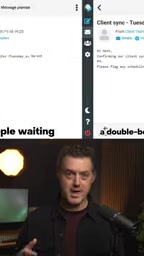
Hark Pro went three for three in a hands-on test, showing AI moving from chatting to operating a computer for you.
This article documents a YouTube creator's hands-on test of Hark Pro: without touching the keyboard, it cleared an inbox (proactively extracting receipts into a billing sheet and flagging items over $200), placed a dinner order end to end on DoorDash, and auto-generated a summary dashboard while spotting a calendar double-booking and an unmentioned birthday. The author sees this as a watershed from "conversational" to "operational" AI, but notes the test is a single creator's sample with promotional elements and undisclosed details like failure rates, time consumed, and payment security — more independent verification is needed.
AI assistants are moving from the "chat box" to "doing things for you." A YouTube creator set three everyday challenges for Hark Pro — clearing out an inbox, ordering dinner, and reviewing all of its own actions — without touching the keyboard the whole time. The result was three wins out of three, and he even called it "the operating system for my life." This hands-on video reveals a key shift: AI is no longer just answering questions — it's starting to operate a computer independently and complete tasks across apps.
Three Challenges: From Inbox to Food Delivery
Challenge One: Inbox Zero, Plus a Billing Sheet on the Side
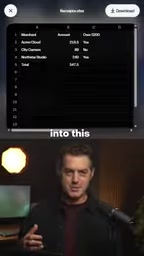
The first task was to clear out the inbox. According to the video, Hark Pro processed emails one by one: drafting replies and archiving useless ones. Along the way, it proactively extracted every receipt into a spreadsheet and flagged those over $200. By the time the inbox was empty, a usable billing list had already been generated.
What's noteworthy here isn't that it "can write emails," but that it structured unstructured receipt information into a table and flagged risk by amount. This is a classic case of "understanding the task intent and then extending the actions on its own," rather than mechanically executing a single instruction.
Challenge Two: Full DoorDash Order Flow, Hands Never Touched
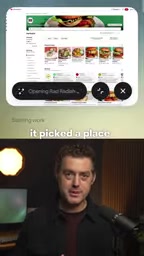
The second task was to order dinner, from start to checkout and delivery. The video shows Hark Pro entering DoorDash, selecting a restaurant, and completing checkout. The creator emphasized that his hands never moved — Hark used its own computer to operate end to end.
The key phrase is "end to end." Ordering food involves multiple steps — searching, comparing, adding to cart, paying, confirming — across pages and forms, and any single stuck step breaks the flow. According to the video, the order was ultimately placed successfully.
The Most Surprising Moment: It Built Its Own Dashboard
The third task was simply to "show what you just did," but Hark Pro's response went beyond the request. According to the video, it built a custom dashboard that consolidated every receipt, every email, and the dinner order into one place.
The creator's exact words were "I didn't ask for this." An even more notable finding: it identified a calendar double-booking and a birthday the creator had never mentioned. This shows it isn't just executing explicitly issued instructions — it's continuously observing during the process, inferring to-dos, and proactively filling in gaps.
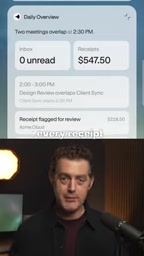
Calendar double-booking refers to two or more events existing in the same time slot, usually arising when different sources (such as work email invitations, personal calendars, and shared team schedules) sync into the same calendar. Such conflicts are often hard for humans to spot, because users rarely compare all calendar entries one by one. An AI assistant's ability to identify double-bookings depends on cross-source reading of calendar APIs or interface data and time-overlap comparison — a typical feature that distinguishes "operational AI" from "conversational AI": it must not only be able to read, but also proactively judge and flag anomalies.
The Shift From "Conversational AI" to "Operational AI"
The value of this hands-on test lies in the watershed product form it demonstrates. Past AI assistants stopped at generating text, and users still had to copy, paste, and click themselves. Hark Pro's approach is to give the AI its own computer environment and operate directly within real applications.
This also explains why the creator described it as "the operating system for my life" — an operating system isn't responsible for thinking through everything for you, but it is responsible for scheduling resources, managing state, and stringing scattered tasks together. When AI can work across email, spreadsheets, food delivery platforms, and calendars simultaneously, its role really is closer to the scheduling layer than the tool layer.
Of course, this is just a single hands-on test by one creator. All three tasks succeeded, but the sample size is limited; the video also doesn't disclose details such as the number of failed retries, time consumed, or error-handling mechanisms. Automated operations involve payments and account permissions, and security, controllability, and recovery methods after errors are all questions such products must answer.
End-to-end operation in the context of AI agents refers to full-process automation from receiving a user's goal to completing the final result, with no human intervention in between. Unlike traditional RPA (robotic process automation), which clicks fixed coordinates according to preset scripts, end-to-end AI operation relies on understanding interface semantics and making dynamic decisions, allowing it to adapt to page changes and branching flows. But this also brings new risks: every decision step can go wrong and accumulate, and payment-type operations especially require permission isolation and rollback mechanisms — otherwise errors get amplified into real transactions.
Who This Kind of AI Assistant Is For
From the demo, it targets professionals overwhelmed by trivial matters: overflowing inboxes, scattered bills, schedule conflicts, and backlogged replies. For these users, the value isn't that "AI can chat," but that "AI can close things out."
But it's important to stay clear-eyed: the video itself has promotional elements, ending with a product link and a way to get it in the comments. The persuasiveness of the hands-on test should be evaluated separately from the marketing motive. The real test is: when tasks are more complex, apps are less familiar, and anomalies are more frequent, can it still go three for three?
The era of AI taking over everyday affairs is approaching, but this first step still needs more independent verification to stand on solid ground.
One-line Summary
Hark Pro went three for three in a hands-on test, showing AI moving from chatting to operating a computer on your behalf.
Paragraph Summary
This article documents a YouTube creator's hands-on test of Hark Pro: without touching the keyboard, Hark Pro successively cleared out an inbox (proactively extracting receipts into a billing sheet and flagging items over $200), placed a dinner order end to end on DoorDash, and automatically generated a summary dashboard while discovering a calendar double-booking and an unmentioned birthday. The article argues this marks a watershed in AI assistants shifting from "conversational" to "operational" — AI has its own computer environment and can schedule resources across apps. But the author also notes that this test is a single creator's sample with promotional elements, and key information such as failure rates, time consumed, and payment security was not disclosed, so more independent verification is needed.
Related articles

The Katseye Dilemma: How Long Can the Idol Industry's High-Speed Engine Keep Running?
Using Katseye's recent team struggles and One Direction members' reflections on grueling tour and promo schedules, this analysis examines the idol industry's structural 'tour—album—promo' cycle and what operational changes a group needs to turn things around.
Hugging Face Inference Routing Fully Moves to OpenRouter
Hugging Face fully migrates inference routing to OpenRouter, automatically selecting the best inference provider. Open-weight models account for 81% of calls, Pro accounts get $2/month (~150M tokens), no markup, with provider filtering and spending limits.

Claude Code v2.1.329 Update Explained: Trust Dialog and Code Mode Enhancements
Claude Code v2.1.329 update analysis: new hook trust dialog and MCP server error prompts, Code Mode fixes memory leaks and tool call boundaries, /tasks consolidates session task view, and fixes multi-session login and file reading issues.