Helping AI Understand Unity Scenes: Real-Time JSON Export to Bridge the Information Gap

Export Unity scene hierarchy and components to JSON in real time so AI IDEs can fully understand your project.
AI coding assistants can only read Unity script files but lack visibility into scene hierarchies, component attachments, and parameter configurations. This article presents a practical solution: a Unity Editor script that exports the complete scene structure to a real-time JSON file. With this approach, AI can understand GameObject relationships, component parameters, and actual configurations, dramatically improving architecture design, bug diagnosis, and parameter tuning workflows.
The Pain Point: AI IDEs Can Only See Code, Not Scenes
Unity game developers have probably all encountered an awkward situation: we use various AI programming tools (AI IDEs) to help write code, and AI can analyze our scripts to identify issues and help design architecture. But the problem is that AI can only access script assets in the Assets directory — it has no idea which GameObjects those scripts are attached to or what the scene's hierarchy structure looks like.
Current mainstream AI coding assistants (such as Cursor, Windsurf, GitHub Copilot, etc.) primarily build context by reading code files from the project's file system. They work by indexing the code repository, then retrieving relevant code snippets based on the currently edited file and the user's questions to fill the LLM's context window. This mechanism is naturally suited for pure code projects, but for projects like Unity that rely heavily on visual editor configuration, the .cs script files in the file system represent only a small portion of the project's information — a massive amount of critical information is locked away in binary assets and editor state.
This is an information gap that many people overlook. In Unity, a script doesn't take effect automatically after being written — it must be attached to a specific GameObject to run. Unity uses a Component-Based Architecture, where game objects themselves are just containers, and all functionality is implemented by attaching different components. This design means the same script code can be attached to completely different objects, producing entirely different behaviors. The hierarchy structure, component attachment relationships, and parameter configurations are all work that game creators do manually in the Unity Editor — and AI knows nothing about any of it.
Unity serializes scene data in .unity or .prefab files. Although these files are in YAML-based text format, their structure is extremely complex and filled with GUID references, making them virtually unreadable for AI. This is the root of the problem.
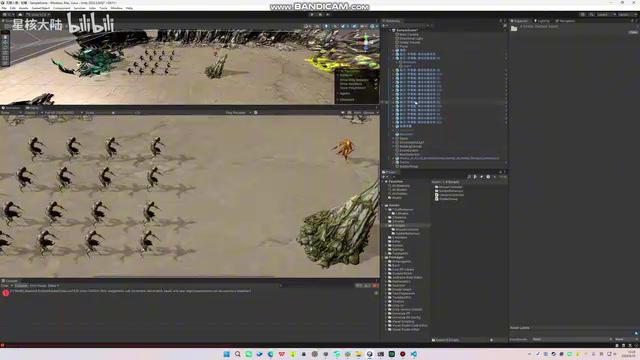
Hierarchy Structure: The Critical Information AI Can't See
Take an ordinary soldier unit as an example — its hierarchy structure is actually quite complex. The outermost layer isn't the model itself, but rather an empty object responsible for collision, navigation, state machine management, movement, and shooting logic. Below that are the various bone hierarchy levels, with melee weapons attached at the endpoints (left hand, right hand), and at the very bottom are the nodes responsible for the entire body's visual representation.

This entire hierarchy is designed entirely by the game creator — what each layer is responsible for and which scripts or built-in Unity components are attached are all the result of human decisions. In other words, a large amount of core work is actually done inside the Unity Editor, not at the pure code level.
When AI can only see script files, the information it receives is extremely incomplete. Here's a real example: character movement uses NavMesh Agent (Navigation Mesh Agent), but the controls always feel unresponsive. NavMesh Agent is Unity's built-in AI navigation system component that relies on pre-baked navigation meshes to enable automatic pathfinding for characters. Developers need to set the Agent's radius, height, speed, acceleration, angular speed, stopping distance, and other parameters in the editor. These parameters directly affect how character movement feels. The "unresponsive" issue is typically related to the numerical configuration of Acceleration, Angular Speed, and Stopping Distance — values that are stored entirely in the component's Inspector panel and never appear in any C# script file.
To get AI to help with tuning, developers have to take screenshots repeatedly — screenshots of the hierarchy for the AI, screenshots of the scripts attached at each level, screenshots of the parameter values being used. The back-and-forth communication is extremely inefficient.
The Solution: Real-Time Scene Export to JSON via Script
The idea is straightforward: since AI can't access information from the editor, write a script that exports this information in real time to a format AI can read.

The specific approach is to write a Unity Editor script that retrieves the complete model tree from the Hierarchy panel in real time, along with the component names attached at each level, component parameters, and their current values. It's worth explaining the special nature of Editor scripts: these are special scripts that only run in the editor environment, typically placed in a folder named Editor, and are not included in the final game build. These scripts can access APIs under the UnityEditor namespace, including getting the currently open scene, traversing all GameObjects in the Hierarchy panel, and reading serialized properties of components. The real-time export tool described here leverages exactly this capability — it can continuously listen for scene changes in edit mode and automatically re-serialize the entire scene structure when modifications are detected.
This information is exported to a Scene Live.json file in the project directory. Opening this JSON file reveals a complete scene snapshot: starting from the Sample Scene scene root node, it includes each object's path (e.g., Main Camera), attached components (e.g., Transform, Camera and their values), terrain (Global Volume), various scripts attached to buildings, and more. The entire model tree, component attachment relationships, and parameter values are all clearly visible.
The key is the phrase "real-time retrieval" — the JSON file updates in sync with changes made in the editor, rather than being a one-time static snapshot.
The Result: Giving AI a Wider "Field of View"
With this JSON file, the workflow becomes simple: just give AI the JSON file path, and it can access the game's complete information — not just script assets, but also how the scene is actually used, hierarchy structures, and component configurations.

Real-world testing shows that after receiving the JSON, AI can accurately read and understand the complete hierarchy tree and component attachment relationships. This means:
- More accurate architecture design: AI understands the real scene organization, so its suggestions better align with the actual project;
- More efficient bug locating: No more tedious back-and-forth with screenshots — AI can directly see parameter configurations and quickly identify where the problem lies;
- Easier tuning: For issues involving specific values like NavMesh Agent responsiveness tuning, AI can directly suggest modifications based on current values.
The essence is "giving AI more access" — the more complete the information, the more valuable the help AI can provide.
Some Extended Thoughts
Although this little tool is simple, it highlights a universal limitation of current AI-assisted development: AI's capability ceiling is often determined by how much context information it can access. In game development, where "code + editor" run on parallel tracks, information from the pure code dimension is just the tip of the iceberg.
With the rise of context protocols like MCP (Model Context Protocol), the future may bring more standardized solutions for AI to directly tap into the runtime state of tools like the Unity Editor and Unreal Engine. MCP is an open protocol proposed by Anthropic in late 2024, aimed at providing standardized context access for AI large language models. Its core idea is to enable AI models to connect to various external tools and data sources through a unified protocol, rather than having each tool implement its own integration solution. In game development, MCP's potential lies in letting AI directly read the engine's runtime state, asset databases, build configurations, and more — even enabling reverse operations on the editor. Community developers are already experimenting with building MCP Servers for Unity and Unreal, though a mature ecosystem has yet to form.
But until then, this straightforward approach of "serializing editor state to JSON and feeding it to AI" is precisely the most practical and accessible transitional solution.
The takeaway it gives us: if you want AI to help you more effectively, first find a way to "translate" your complete working context into a form AI can understand.
Key Takeaways
Related articles

How Big Can Stars Really Get? The Physical Limits of the Largest Stars
Red supergiants are the largest stars by volume, with radii up to 2,000 times the Sun, engulfing the inner solar system. But there is no precise upper limit on stellar size—models predict up to 15,000 solar radii. The most massive blue stars are far smaller than red supergiants—biggest and heaviest are two different things.

Apple HomeView Smart Display Full Feature Breakdown: Wall-Mount or Desktop, $299
Apple launches HomeView, a $299 smart display with wall-mount and desktop options, 12MP camera for facial recognition, smart home control, music playback, and recipe step-by-step cooking. Full breakdown of watch faces, apps, privacy, and cooking integration.

Where Did the Promised New Studio Go? Craft Computing Answers After Five Years
Craft Computing's host responds to viewer questions: the new studio promised five years ago was shelved as construction costs soared from $30,000 to $75,000, and was replaced by a 168-square-foot garage conversion.